Webex Meetings
- 72.30K
- 4.5
- Installs
- 100.00M
- Price
- Free

Screenshots





Analysis by Reviewed
For me, the point of a meeting app is simple: it should save more time than it takes to get everyone connected. That sounds obvious, but a late joiner, a confusing invite, or a phone that is not ready for a call can turn a short conversation into a small project. Webex Meetings is aimed at making those work conversations possible when I am away from a desk, and its mobile-first usefulness matters most when I need to join promptly rather than manage a complicated setup.
I see it as a practical business communication tool, not a replacement for every kind of conversation. It is useful when people are spread across locations, when a quick discussion needs face-to-face context, or when someone has sent a meeting invite and I need to join from my phone. For a simple message or a decision that can be handled in a few lines, opening a video meeting is still more effort than necessary. The time saved comes from having a dependable way to take part when a call is genuinely the easiest option.
Making mobile meetings less of a chore
The familiar alternative is to wait until I reach a laptop, then find the meeting details and join there. That can be sensible for a long presentation, but it is needless friction for a brief check-in while travelling between appointments or working from another room. A meeting app on a phone gives me a way to respond to the invite where I am, with the important caveat that a small screen and a busy environment are not ideal for every call.
The Latest on Webex Meetings
Webex is made by Cisco Systems, Inc., and it sits in the business-app category rather than being only a casual video chat tool. It is free to install, has an Everyone age rating, and has been available since Feb 9, 2011. Its average rating is 4.5 from around 2.2 million ratings, while its reach extends to over 100 million installs. Those figures suggest that it is a well-established option, though popularity alone cannot tell me whether it suits a particular team’s meeting habits.
Set it up around the way you join
My practical advice is to install the app before the first important call, not while someone is waiting in the meeting. Check that you can sign in, allow the device settings you need for audio and video, and learn where the join controls are while there is no pressure. If you usually receive invitations through a work calendar, start from the invite you already use rather than creating a separate routine that you may forget.
That small bit of preparation has a bigger payoff than exploring every setting. A phone call can arrive while I am outdoors, in a shared workspace, or between errands. Knowing how to switch to audio-only when video is unsuitable, mute myself when I am not speaking, and leave cleanly prevents the most common awkward pauses. I would also check the room before joining: a phone microphone can pick up nearby conversation, and a quiet location is often more useful than trying to fix noise after the meeting has begun.
Where it earns a place in the workday
The best fit is for people who already have recurring meetings and sometimes need to attend away from a computer: consultants visiting clients, colleagues moving between offices, or small teams coordinating across different schedules. It can also help when a discussion depends on seeing a person’s reaction or talking through a document together. In those cases, the convenience is not that every meeting becomes better on a phone; it is that an unexpected change of location does not automatically mean missing the conversation.
More From Our News Desk

Clash of Clans Is Won Between the Battles

Android Auto Makes the Case for Quieter Car Software

MobiOffice: Transforming Mobile Productivity with Seamless Integration

EA SPORTS FC™ Mobile Soccer: Redefining Mobile Sports Gaming

How Microsoft OneDrive Became a Mobile Productivity Giant

How Google Translate Breaks Language Barriers Effortlessly
For example, imagine I have a short project check-in just after leaving an appointment. Rather than asking the group to postpone, I can join from a quiet spot, listen to the update, and speak when my input is needed. If I am walking down a noisy street, though, I would not force the call: joining late from a calmer place or asking for the key points afterward may be more considerate. This is the kind of judgment that makes mobile access genuinely useful rather than merely available.
What to expect from the experience
Mobile video calls involve trade-offs that no app can remove. Battery use, a weak connection, glare, and the limits of a small display can all make a long meeting tiring. I treat the phone as a good way to attend a focused conversation, not as my first choice for hours of screen sharing or detailed work. When the meeting matters, a stable connection and headphones can make participation easier; when those are not available, audio participation may be more practical than struggling to keep video on.
Webex is also not the only reasonable choice. Many people already use another meeting service through their employer, school, or clients, and staying with that service can avoid asking everyone to install or learn something new. I would choose Webex when the people I need to meet already use it or the invitation points me there. For casual one-to-one calls, a familiar personal messenger may be quicker; for a team that needs extensive document collaboration, a dedicated work suite may be a better center of gravity than a meeting app alone.
Small habits that reduce call friction
One useful habit is to distinguish between joining and hosting. If I am simply attending, I can prepare by checking the invite and my surroundings; if I am responsible for bringing people together, I should send the details early and give participants a clear reason to join. That reduces the time spent at the beginning of a call figuring out who is missing or what the conversation is meant to accomplish. It is a people habit more than a technical trick, but it directly affects whether the app saves time.
Another trade-off is screen sharing from a phone. It can be handy for showing something already on the device, but it is not automatically the best way to present a complex file or compare several pieces of information. I would use mobile sharing for a quick visual reference, then move to a larger screen when the group needs to inspect fine details. Before sharing, I would close or hide anything unrelated that could appear; the convenience of presenting from a phone should not come at the cost of exposing personal notifications or other content.
For people who often join from changing locations, it helps to decide in advance what a “good enough” meeting setup means: a place where I can hear, a way to avoid broadcasting background conversation, and enough battery for the call. That simple checklist is more reliable than assuming the app will compensate for a noisy room or a poor signal. If a meeting is optional and conditions are bad, asking for notes or a brief follow-up can be a better use of everyone’s time.
Who should choose it—and who might not
I would recommend trying it if your work already revolves around scheduled video meetings and you want the option to take part from Android, iOS, or a supported Chrome OS setup. The Android and Chrome OS PWA availability make the mobile-and-browser angle relevant for people who move between devices. The broad user base also makes it a familiar name in business communication, while Cisco’s long-standing role in networking gives the product a clear professional context.
I would skip it as a default choice if you rarely join video calls, dislike taking meetings on a small screen, or your organization has already standardized on another platform. Installing another app does not solve the bigger problem of meetings that should have been an email or a short message. It is also a poor fit when the call requires careful review of detailed visuals and I only have a phone available. In those situations, waiting for a larger display is often the more productive decision.
Getting Started with Webex Meetings
First off, downloading and setting up Webex Meetings is a breeze. You can find it on both Android and iOS, so you're covered no matter what device you're using. Once you've got it installed, signing up is just a matter of a few clicks. They even have a free plan, which is super handy if you're just getting started or if you're a small team.
Features That Stand Out
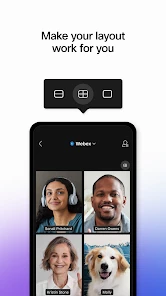
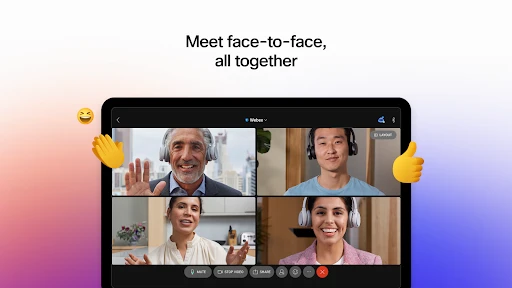
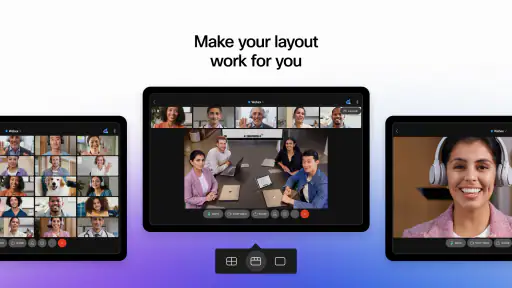
One thing that really impressed me is how feature-rich this app is. You can host HD video meetings with up to 100 participants on their basic plan. Not too shabby, right? Also, the app's interface is clean and intuitive, making it easy to join meetings, share your screen, or send messages in the chat.
What’s more, if you're someone who loves multitasking, the app supports background noise cancellation, so you won't have to worry about your dog barking or the neighbors mowing the lawn. And for the privacy-concerned folks, Webex Meetings offers end-to-end encryption, ensuring your conversations stay confidential.
Performance and User Experience
Now, let's talk about performance. During my tests, the video and audio quality were consistently top-notch. I rarely experienced any lag, which is crucial when you're trying to have a productive meeting. Plus, the app is pretty lightweight, so it doesn't hog all your phone's resources.
Another thing I love is the flexibility it offers. You can schedule meetings directly from the app, and it integrates seamlessly with your calendar, so you never miss an appointment. It's like having a personal assistant in your pocket!
Final Thoughts
In conclusion, Webex Meetings is a solid choice for anyone needing a reliable and feature-packed video conferencing app. Whether you're a professional looking to connect with colleagues or just someone who wants to stay in touch with loved ones, this app has got your back. Its ease of use, combined with its robust features, makes it stand out in a crowded market.
So, if you haven't tried it yet, I'd highly recommend giving it a shot. You might just find it becomes an indispensable part of your daily routine!
Webex Meetings Frequently Asked Questions
Can I join a Webex meeting from my phone while I’m away from my desk?
Yes. Webex Meetings is intended for connecting with others remotely, and its store summary highlights working from anywhere on Android as well as through a PWA for Chrome OS. That makes it a practical option when you need to join away from your usual work setup. The app is listed for a general audience, even though its focus is business meetings.
Do I need a Webex account or work subscription before I download the app?
Webex Meetings is free to download, so you can install it before deciding whether it suits your meeting needs. Whether a particular meeting requires an account or an organization’s subscription can depend on how that meeting is arranged. If you have been invited to a meeting, check the invitation for its joining instructions and use those to determine what access is expected.
Can Webex Meetings help me organize meetings as well as join them?
Webex Meetings is described as a video conferencing application for connecting remotely, with tools such as scheduling and meeting reminders to help organize sessions. It also supports calendar integration, which can make it easier to keep meetings alongside other appointments. These options may be useful if you expect to arrange calls regularly rather than only join meetings hosted by someone else.
Is Webex Meetings suitable for joining a meeting without creating a full work setup?
Webex Meetings is intended for connecting with others remotely, so it can be useful when you need to join a meeting from wherever you are. Its store summary highlights working from anywhere on Android and through a PWA for Chrome OS. Webex Meetings is a business app, but its Everyone content rating makes its listed age category suitable for a general audience.
What is Webex Meetings and how does it work?
Webex Meetings is a video conferencing application that allows users to virtually meet with others through high-quality video, audio, and screen sharing. It is designed for businesses and individuals who need to connect remotely. The app provides features like scheduling, meeting reminders, and integration with calendar systems, making it easy to organize and join meetings from anywhere.
Pros
- High-quality video conferencing
- Cross-platform compatibility
- End-to-end encryption
- Easy to schedule meetings
- Rich collaboration tools
Cons
- Limited free plan features
- Occasional connectivity issues
- Complex interface for beginners
- Resource-intensive on devices
- Requires strong internet connection
- Category
- Business
- Version
- Varies with device













