Webex Intune
- 17.00
- 3.9
- Installs
- 100.00K
- Price
- Free

Screenshots



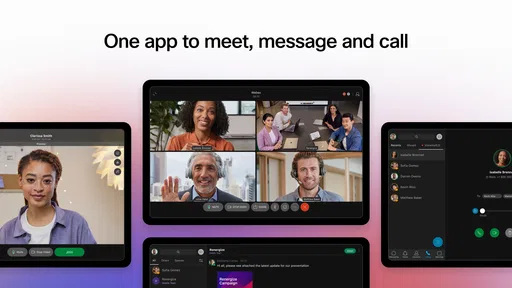
Analysis by Reviewed
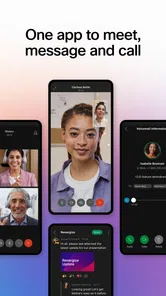
Webex Intune is a business-focused collaboration app from Cisco Systems, Inc., built for organizations that use Microsoft Intune to manage mobile access. I approached it less like a casual chat download and more like a work tool that has to fit into an existing company routine. That distinction matters: its value depends on how well your workplace has configured Webex and Intune, not simply on whether you can install the app and start tapping.
In everyday use, I found the most sensible role for it is as a controlled doorway to team communication on a phone or tablet. It is aimed at people who need to stay connected while away from a desk, but who also work within company rules around managed devices, accounts, and access. The app is free, aimed at Everyone, and belongs in the business collaboration category rather than the general-purpose messaging space.
The current release is version 46.7.0.104, and the app requires at least iOS 11. It has passed the 100K-install mark and holds a 3.9 average from roughly 582 ratings, with 17 written reviews shown in its store presence. Those figures suggest a useful but specialized product: it is visible enough to have an established audience, yet it is not trying to be the universal social messenger on every phone.
How Webex Intune fits into a normal workday
My baseline workflow would begin before the first meeting. I would open the app, confirm that the correct work account is active, check the day’s conversations, and use the mobile view to identify anything that genuinely needs a response. That sounds ordinary, but the managed nature of this edition changes the mindset. I would not treat it as a second personal inbox; I would treat it as a company-approved work surface.
A realistic example is a colleague traveling between customer visits. They might use a phone to read a project message, answer a short question, join a scheduled discussion, and then return to the conversation later from a managed computer. The benefit is continuity: the phone keeps work moving without requiring the employee to use an unmanaged consumer messaging app for business communication.
I especially like this approach for teams that already rely on Cisco’s collaboration environment. People are less likely to split a conversation across text messages, email, and an unofficial chat group when the approved mobile route is available. That can make handoffs easier, particularly when a question involves several coworkers and should remain visible to the wider project group.
Still, the app is not a magic replacement for every business tool. A long document review, detailed scheduling task, or complicated project discussion may remain more comfortable on a desktop. The phone experience is best for checking context, responding promptly, and joining conversations when mobility matters. I would not choose it as the main workspace for work that depends on large screens and extensive file handling.
More From Our News Desk

Weather by Xiaomi Review: Clear at a Glance, Less Clear Up Close

X Under Pressure: Can It Recover When Posting Goes Wrong?

Clash of Clans Is Won Between the Battles

Android Auto Makes the Case for Quieter Car Software

MobiOffice: Transforming Mobile Productivity with Seamless Integration

EA SPORTS FC™ Mobile Soccer: Redefining Mobile Sports Gaming
One practical habit makes the experience calmer: I would separate “read now” from “act later.” A quick reply can be handled on the phone, while a message that requires careful wording or a document open beside it can be marked mentally for desktop follow-up. That prevents the common mistake of forcing a small-screen app to perform a full office workstation’s job.
Who benefits most from the managed approach
Webex Intune makes the most sense for employees whose organization already uses Microsoft Intune to control mobile work access and Cisco Webex for collaboration. In that setting, the app is part of a larger administrative plan. The employee gets a familiar collaboration channel, while the organization can keep mobile work inside its chosen management framework.
It is also a reasonable fit for distributed teams, field staff, consultants, and managers who need work conversations available while moving between locations. The strongest use case is not constant messaging for its own sake. It is dependable access to the right work conversations without asking employees to improvise their own communication system.
I would be more cautious recommending it to a freelancer, a family group, or a small club that simply wants an easy chat app. The Intune connection is a clue that this product is designed around organizational control. If nobody in your group manages devices or accounts through that system, the app may feel unnecessarily specialized compared with a conventional consumer messenger.
Settings I would check before relying on it
The first setting-related question is not cosmetic. I would confirm that the account, organization, and device are all aligned before judging the app. A managed collaboration app can appear confusing when the real issue is an account mismatch or an organization policy. Checking the signed-in work identity early saves time and prevents messages being handled from the wrong profile.
I would also review notification behavior carefully. On a work phone, every alert competes with personal calls, travel updates, and other apps. If everything is allowed to interrupt, the tool becomes tiring; if alerts are too quiet, urgent team messages can be missed. My preference would be to keep notifications useful for direct work requests while reducing noise from conversations that do not require immediate attention.
Another worthwhile check is how the app behaves when moving between mobile data and Wi-Fi. I would not wait until an important call to discover that the phone is using a weak connection or that the device is switching networks. A short test conversation and a low-pressure meeting are better places to learn the workflow than a customer-facing appointment.
Device management can also affect what feels possible. Company policies may influence sign-in, access, copying content, or the way work information interacts with other apps. I would not assume that a feature available in an unmanaged Webex setup behaves identically in this managed context. If something is blocked, the right next step is usually to ask the organization’s administrator rather than repeatedly reinstalling the app.
That is one of the less obvious trade-offs here: the same controls that can make business communication safer can also make the experience less flexible. For a personal app, friction is usually a design flaw. In a managed business app, some friction may be intentional. The important question is whether the restriction protects a real work requirement or simply creates confusion for employees.
Small habits that make mobile collaboration faster
Experienced users do not usually become faster by tapping through every screen more quickly. They build a repeatable routine. I would start each work period by scanning the most relevant conversations, answering short questions in batches, and leaving complex items for a larger screen. That reduces context switching and keeps the phone from becoming an endless stream of half-finished tasks.
I would also write mobile messages with the next action included. Instead of sending a vague “Can you check this?”, I would identify what needs checking and when I need an answer. This is not a special feature, but it is particularly valuable in a collaboration app used across phones and desktops. Clear messages reduce the number of follow-up exchanges and make the conversation easier for someone joining later.
For meetings, my habit would be to prepare the conversation before joining. I would read the latest relevant messages, check whether I need headphones, and move to a stable connection. On a small screen, preparation matters more because there is less room to recover from a missing document, a muted microphone, or a misunderstood thread.
Another useful pattern is to avoid treating every notification as an immediate task. I would open a message, decide whether it needs a reply, and then close the app if the answer is no. This keeps Webex Intune in its proper role instead of allowing it to dominate the entire day. The app helps most when it supports deliberate communication rather than constant checking.
Teams can benefit from a shared habit too. If a conversation belongs in the group workspace, keeping it there is better than moving the important part into private texts. That gives absent colleagues a chance to catch up and reduces the risk that a decision disappears inside one person’s phone. The app’s value grows when everyone follows the same communication boundary.
For people switching between devices, I would use the phone for awareness and quick action, then continue substantial work on the managed desktop environment. That division plays to the strengths of each screen. It also avoids the frustration of trying to compose a detailed response while walking, traveling, or balancing several notifications.
Where the app can feel limited
The biggest limitation is dependency on the surrounding workplace setup. Webex Intune is not something I would evaluate in isolation. If an organization has inconsistent account instructions, unclear mobile policies, or limited support for employees, the app can feel difficult even when the underlying collaboration service is suitable.
There is also a learning curve for people who expect consumer messaging to work immediately. A personal chat app usually assumes that the user controls the account and the device. A managed business app may involve organizational enrollment and rules that are outside the employee’s control. That can be reassuring for security-conscious teams, but frustrating for anyone who wants a quick, independent sign-up.
I would also avoid assuming that mobile availability equals full desktop parity. A phone is excellent for short replies and joining discussions, but it is not automatically the best place for every collaboration task. If your work depends on extensive editing, large collections of files, or detailed project planning, a desktop Webex workflow or another specialized business tool may be more comfortable.
The 3.9 average rating reflects a mixed but respectable reception rather than universal enthusiasm. I would read that as a reminder to judge the app against your workplace needs. A managed communication tool can be highly useful in one company and awkward in another because administration, account setup, and team habits shape the experience as much as the interface does.
Compared with ordinary messaging apps, Webex Intune offers a more business-oriented path, but it gives up some of the simplicity and informality people expect from consumer chat. Compared with email, it is better suited to quick back-and-forth collaboration, while email may remain preferable for formal records or carefully structured announcements. Compared with a standalone meeting app, its appeal is having communication gathered within a broader team workflow rather than treating meetings as isolated events.
That comparison leads to a clear decision rule. Choose it when your organization already values Webex and manages mobile access through Intune. Choose a simpler alternative when your group has no need for managed work access, or when your main requirement is private casual messaging. Choose a more specialized project tool when conversations alone cannot provide the planning, tracking, or document structure your work demands.
My verdict after building a repeatable workflow
I see Webex Intune as a practical bridge between mobile convenience and organizational control. It is not trying to be the most relaxed chat app on a personal phone, and I would not recommend it on that basis. Its purpose is more specific: give eligible employees a managed way to stay connected to work conversations while respecting the company’s chosen mobile environment.
The app is free to download, carries an Everyone age classification, and comes from an established enterprise software developer. Those details make it approachable, but they should not obscure the real requirement: your organization needs to support the Webex and Intune setup. Without that foundation, the experience may not match what a user expects from a normal standalone app.
My strongest recommendation is to establish three habits from the beginning: verify the correct work account, tune notifications before they become distracting, and divide tasks between mobile quick actions and desktop deep work. Those habits do more for the experience than repeatedly exploring settings. They also make the app easier to use during travel, busy handoffs, and short gaps between meetings.
Webex Intune is a good choice when controlled business collaboration matters more than casual simplicity. I would recommend it to employees whose companies have already chosen this managed route, especially those who need dependable mobile access to team communication. I would skip it for personal groups and for teams seeking an independent messenger with no administrative layer.
In the right environment, the app becomes a quiet part of the workday: check the relevant conversation, respond with purpose, join when needed, and continue complex work elsewhere. That is not a flashy promise, but it is the kind of focused usefulness I want from a business app. Its success depends less on novelty than on whether your team uses the same workflow consistently.
Webex Intune Frequently Asked Questions
Is Webex Intune free to download?
Webex Intune is free to download, but using it for work may depend on your organization’s Webex account, subscription, and access policies. Your employer or school may need to provide an account and authorize the app before you can sign in. In practice, downloading the app alone does not guarantee access to collaboration features, so check with your organization’s IT team if you are unsure whether your account is ready.
Which devices and operating systems can run Webex Intune?
Webex Intune is available for mobile devices, and its minimum operating-system requirement is version 11. Before installing, check that your device meets this requirement and has enough available storage for the app and its updates. A compatible operating system is only one part of the setup: your organization may also require device enrollment or compliance checks before allowing you to sign in and access work information.
What is Webex Intune, and who is it designed for?
Webex Intune is the Microsoft Intune-managed version of the Webex mobile app, intended primarily for organizations that use Microsoft Endpoint Manager to control access to business applications and data. It provides Webex calling, messaging, meetings, and collaboration features while allowing an employer or administrator to apply security policies. It is generally more suitable for work or school accounts than for casual personal use.
Do I need a company account or administrator approval to use Webex Intune?
In most cases, yes. Webex Intune is normally distributed and configured by an organization, so you may need valid company credentials, a Webex account connected to your organization, and enrollment in Microsoft Intune or another approved management system. Depending on the company policy, you might also need to install Microsoft Company Portal, complete device compliance checks, or use multi-factor authentication before the application allows access.
What features are available in Webex Intune?
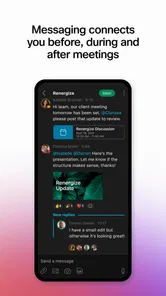
The available features typically include Webex messaging, one-to-one and group conversations, file sharing, team spaces, audio and video meetings, screen sharing, calling, and notifications. However, the exact experience depends on your organization’s Webex subscription, administrator settings, device capabilities, and licensing. Some functions may be restricted, disabled, or configured differently from the standard consumer-facing Webex application.
Pros
- Strong security controls for organizations using Microsoft Intune.
- Reliable video and audio quality on stable internet connections.
- Supports meetings
- webinars
- messaging
- and team collaboration.
- Useful calendar integration for joining scheduled work meetings.
- Clear interface with accessible captions and meeting controls.
Cons
- Requires an organizational Webex account or administrator setup.
- Some features may be restricted by company policies or device settings.
- Can consume significant battery during long video meetings.
- Advanced collaboration tools may feel excessive for casual users.
- Performance can suffer on older devices or weak mobile networks.













