Uber - Driver: Drive & Deliver
- 139.82K
- 4.6
- Installs
- 100.00M
- Price
- Free

Screenshots


Analysis by Reviewed
I approached Uber - Driver: Drive & Deliver as a work tool rather than something to browse for fun. Its value depends on whether it helps you fit driving or delivery into the time you actually have, and whether the routine remains worthwhile after the first few shifts. The main appeal is choice; the main challenge is judging that choice realistically.
What the first week can tell you
The first few shifts are useful for more than learning where the buttons are. I’d treat them as a trial of the routine: note how long you are willing to stay out, which parts of town feel manageable, and whether passenger trips or food deliveries suit your day better. A busy first evening can be encouraging, but I wouldn’t use one good session as a promise of steady income. Demand and the feel of the work can change with location and timing.
A practical test is to choose a familiar area and a time when you already expect to be out, rather than rearranging your whole week around the app. That makes it easier to judge the real trade-off: time on the road, waiting between requests, and the effort of staying alert. If you’re considering driving full-time, a short trial can help you decide whether the work itself fits before you build a routine around it.
Getting Started with Uber - Driver: Drive & Deliver
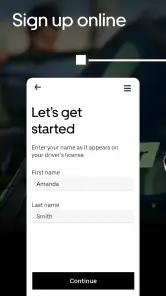
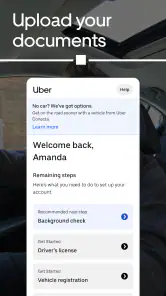
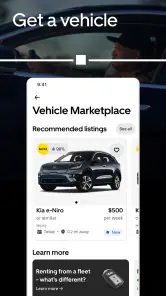
First things first, setting up the app. When you download the Uber - Driver: Drive & Deliver app, the registration process is pretty straightforward. You’ll need to provide some personal details, a valid driver’s license, and insurance info. Oh, and don’t forget your vehicle details if you’re planning to drive your own car. The app guides you through each step with ease.
Uber Technologies, Inc. makes this free business app, which is intended for everyone. It has been available since November 14, 2014, and its 4.6 average comes from around 5.4 million ratings; it has also passed 100 million installs. Those figures suggest it is widely used, but they don’t tell you whether taking requests will be worthwhile in your particular area. The key question is less whether the app is popular and more whether local demand fits the hours you can work.
Driving and Delivering: The Core Features
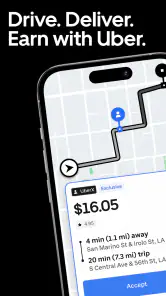
Once you’re all set up, it’s time to hit the road. One of the coolest things about this app is its flexibility. You can toggle between driving people around and delivering food. If you’re not feeling up to dealing with passengers, just switch to delivery mode. The app’s interface is intuitive, with a clean design that makes navigation a breeze. You get notified about nearby requests, and it’s up to you to accept them.
That choice is useful when your day changes unexpectedly. Imagine finishing your regular job and having a couple of hours free: you can see whether requests fit the time you have, instead of committing to a fixed shift. Passenger trips and deliveries are not interchangeable in how they feel, though. A delivery can avoid conversation with riders, while carrying passengers means sharing your vehicle and attention with people. I’d choose the mode that suits my energy and circumstances, not simply switch because one sounds easier in theory.
More From Our News Desk

Weather by Xiaomi Review: Clear at a Glance, Less Clear Up Close

X Under Pressure: Can It Recover When Posting Goes Wrong?

Clash of Clans Is Won Between the Battles

Android Auto Makes the Case for Quieter Car Software

MobiOffice: Transforming Mobile Productivity with Seamless Integration

EA SPORTS FC™ Mobile Soccer: Redefining Mobile Sports Gaming
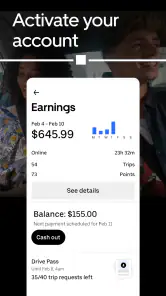
The earnings tracker is a nifty feature that lets you keep tabs on how much you’re making in real time. After each trip, you’ll see your earnings and get a summary at the end of the day. It’s a real motivation booster to see those dollars adding up.
For a clearer picture, I’d use the trip summaries as a record to review after a shift, rather than treating the running total as the whole story. The number on screen is easy to notice; the time and effort behind earning it are easier to overlook while you’re busy. If you are comparing this with a conventional hourly job, keep your own notes about the hours you actually spend working, including waiting. That small habit can help you decide whether the flexibility is paying off for you without assuming every session will look the same.
Safety and Support
Safety is a big deal when you’re out on the road, and Uber takes it seriously. The app includes features like the ability to share your location with friends or family, and an emergency button that connects you directly to local authorities. Plus, there’s a 24/7 support team ready to help out if you run into any issues.
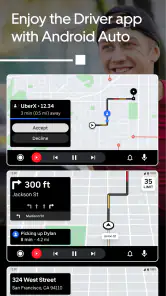
Another handy feature is the in-app navigation system, which is pretty reliable. However, you can also opt to use other navigation apps if that’s more your style. The choice is yours, which is something I appreciate a lot.
Navigation preference matters most when the route is unfamiliar or you have a particular way of orienting yourself. Before accepting a request, I’d make sure I’m comfortable with the trip details and the route, then avoid fiddling with the phone once moving. The app can help organize the work, but it doesn’t remove the need to make safe driving decisions or to take breaks when concentration drops.
Making the routine sustainable
The app is most useful when it supports a routine you can maintain, rather than becoming a reason to stay on the road longer than planned. Set a stopping point before you start, and check your results afterward when you are parked. That simple boundary can help keep a side gig from quietly taking over evenings you meant to keep free.
Compared with a regular job, this kind of work offers more control over when to log on, but also less certainty about how a particular stretch of time will go. Compared with other driving or delivery platforms, the practical choice depends on which options operate where you live and what kind of work you prefer; I wouldn’t assume one app is automatically better everywhere. If dependable scheduled hours matter more to you than flexibility, a conventional role may be a better fit.
When the routine starts to feel repetitive
Repeatedly checking for requests can make a flexible shift feel less free than it sounds. I’d decide in advance what counts as a worthwhile session for me: perhaps a limited window after work, or a particular route that keeps me close to home. That boundary also makes it easier to stop when requests are sparse instead of waiting indefinitely for the app to turn a slow period around.
A useful habit is to review a few shifts together rather than judging the work from one unusually good or frustrating evening. Look at how much of the time went into driving with a request, waiting, and returning to an area where you want to work. This is a personal comparison, not a guarantee of future results, but it can reveal whether the app fits your actual schedule better than occasional extra hours elsewhere.
Choosing between app-based work and alternatives
For someone who wants to decide their own working windows, this app is more appealing than a job with fixed shifts. The trade-off is that flexibility puts more of the planning on you: you have to choose when to go online, assess whether a session is worth continuing, and keep track of time that may not show up in a simple earnings total. If you prefer a manager-set schedule and predictable hours, a conventional part-time job may be easier to plan around.
Other driving and delivery apps can be worth comparing if they are available in your area. I would compare the kind of tasks they offer and how comfortably their workflow fits your day, rather than assuming that the biggest platform is always the best match. Switching between passenger and delivery work is a notable option here, but it does not eliminate the ordinary costs of being on the road or make demand uniform from one place and time to another.
Small choices that make shifts easier to judge
Before going online, I’d set a destination or a general area in mind and decide when I’ll reassess. This reduces aimless driving between requests and gives the shift a clear purpose. If I’m already out for errands, I’d also consider whether taking work could pull me away from the route I meant to follow; a request is not automatically convenient just because it appears nearby.
Afterward, I’d check the trip record while parked and jot down the total time I set aside, including the waiting. Keeping a simple personal log makes it easier to compare different days without relying on memory or the most exciting session. It also helps answer a practical question: is this a small, occasional supplement that fits my week, or is it consuming more attention than I intended?
Keeping expectations grounded
A common practical question is whether the app can work as a side gig without taking over a whole evening. I’d start with a short, clearly bounded window and treat it as an experiment, not a commitment. If requests fit the time you have and you can finish near home or another useful destination, that session may feel worthwhile even when it is modest. If you spend the window waiting or driving farther than you planned, the same flexibility can become frustrating.
For a realistic weekday example, imagine you finish work with a couple of hours before dinner and are already near a familiar part of town. You could go online, decide beforehand when to stop, and choose only work that still leaves enough time to get home and unwind. Once parked, compare the whole block of time with what you had hoped to do that evening. That helps prevent the visible trip total from disguising how much of your personal time the shift used.
It is also worth deciding what you need from a work app before comparing alternatives. If you want to choose between passenger and delivery tasks, that flexibility may be useful. If you mainly want guaranteed hours or a dependable schedule, a regular part-time position is a more sensible place to look. Another platform may suit your area or preferred task better, so I’d compare actual local options rather than choosing on name recognition alone.
Wrapping It Up
All in all, the Uber - Driver: Drive & Deliver app offers a great platform for those looking to earn on their own schedule. It’s user-friendly, packed with essential features, and prioritizes your safety on the road. Whether you’re a seasoned driver or new to the gig economy, this app is definitely worth a try. Just remember, your experience may vary based on your location and the demand in your area, but that’s all part of the adventure!
So, if you’re ready to take the wheel and explore your city while making some money, give this app a shot. Who knows, it might just be your next favorite side hustle!
Who will get lasting value from it?
I’d recommend trying it if you already have access to a suitable vehicle, want control over when you work, and are comfortable with the everyday demands of driving. It may also suit someone who wants to alternate between carrying passengers and making deliveries, depending on mood or circumstance. I’d be more cautious if you need predictable pay, dislike traffic, or find constant attention to navigation and requests tiring. In those cases, the freedom to choose when to work may not balance out the uncertainty and fatigue.
After the novelty wears off, the best reason to keep the app is that it still fits a useful slot in your week. Check whether you are using it because the schedule genuinely works for you, not just because the app makes it easy to keep accepting requests. For me, that’s the difference between a handy source of flexible work and an exhausting habit: it should serve a plan you chose, with clear limits, rather than quietly setting the pace of your evenings.
Uber - Driver: Drive & Deliver Frequently Asked Questions
What does the Uber Driver app cost to download?
Uber Driver is free to download. It is designed for people who drive or deliver with Uber services, so the download itself does not provide access to work or guarantee earnings. You’ll need an eligible driver or delivery partner account to use work features. Before installing, consider whether you are looking for a partner app rather than the passenger app used to request rides.
Is Uber Driver designed for drivers, delivery partners, or both?
Uber Driver is intended for people who drive passengers and those who deliver. Its store summary describes it as a driver and delivery partner app for Uber, Uber Eats, and Postmates. The work options you can access depend on the services operating where you are and the type of partner account you have. Check the options shown for your location during setup.
Can passengers use Uber Driver to book a ride?
No. Uber Driver is for people who partner with Uber to drive or deliver, rather than for passengers who want to request a trip. If you are looking to book a ride, you’ll want Uber’s passenger app instead. The driver app focuses on partner account access and work-related features, and an eligible partner account is needed to use those features.
Who develops Uber Driver?
Uber Technologies, Inc. develops and publishes Uber Driver. When looking for the app, check the publisher name to distinguish the driver and delivery partner app from unrelated apps with similar titles. It is a business app intended for people working with Uber services, not a passenger app for requesting rides. Once installed, sign in or follow the account setup process to access partner features.
Can I use Uber Driver if I don’t plan to work right away?
You can install Uber Driver and explore its account setup, but its main purpose is to support people who drive or deliver with Uber services. Work-related features require an eligible driver or delivery partner account. If you are only curious about the app, keep in mind that downloading it does not by itself make you eligible for work or create an earnings opportunity.
Pros
- User-friendly interface
- Flexible working hours
- In-app navigation
- Instant payment options
- Access to 24/7 support
Cons
- High commission fees
- Rating system pressure
- Traffic congestion issues
- Limited insurance coverage
- App glitches occasionally
- Category
- Business
- Version
- Varies with device













