Microsoft Authenticator
- 104.68K
- 4.6
- Installs
- 100.00M
- Price
- Free

Screenshots
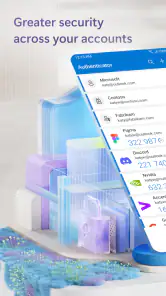

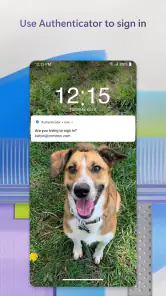
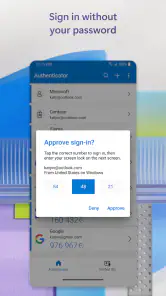
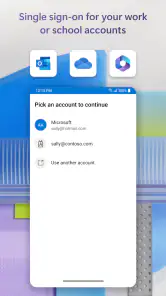

Analysis by Reviewed
I see Microsoft Authenticator as most useful when signing in is a daily chore and I want an extra check without reaching for a separate security device. It can approve account access and handle verification codes in one place, which makes it a practical companion for work and personal logins. The trade-off is that an authenticator app becomes part of my access routine: if my phone is unavailable, I need another way into important accounts. I’d recommend it to people who want a convenient second step, but I wouldn’t treat it as a substitute for recovery planning.
Where it fits among sign-in options
Compared with receiving one-time codes by text, an authenticator app keeps the approval step on the phone rather than relying on a text arriving at the right moment. Compared with a dedicated hardware security key, it is easier to carry because it is already on a device I use, though a key may suit someone who wants a separate physical sign-in tool. These methods solve similar problems in different ways; the best choice depends on how often I sign in, what the account supports, and what backup route I can use.
For Microsoft accounts, passwordless sign-in is the feature that can change the feel of the routine most. Instead of typing a password, I can use the phone to approve access. That is convenient when I’m signing in on a computer, but it also means I should keep the phone protected and make sure I understand the account’s recovery options before relying on this workflow. For services that use verification codes, the app is still useful even when passwordless sign-in is not part of the process.
The Latest on Microsoft Authenticator
A practical routine, not just a setup screen
Imagine starting work on a laptop at a café and being asked to confirm a sign-in. With the phone beside me, I can respond in the authenticator rather than waiting for a text message or searching for a code written down somewhere. If I manage separate work and personal accounts, keeping their verification methods together can also make it easier to choose the right entry when a prompt appears. I’d still pause to check that the request matches the sign-in I just started; approving an unexpected prompt is exactly the kind of shortcut that can undermine the extra protection.
A useful habit is to add accounts gradually and test the sign-in flow while I still have access to the account’s settings and recovery method. I wouldn’t move every account at once and then assume the phone alone is enough. If I replace or lose my device, the impact depends on the recovery arrangements for each account, so keeping those options current is part of using an authenticator responsibly—not an optional chore to leave for later.
Who will get the most from it
I think it suits people who sign into several services, use Microsoft accounts regularly, or want a simpler alternative to keeping separate code apps and text messages in mind. It is also a sensible choice for someone who prefers phone-based confirmation to carrying another gadget. Microsoft Corporation develops this free business app, and its broad adoption—over 100 million installs and an average rating of 4.6 from around 2.4 million ratings—suggests that it has become a familiar option for many users.
On the other hand, someone who rarely signs in, dislikes using a phone for account access, or needs a method that remains separate from their everyday device may prefer a hardware key or another supported verification route. The app’s usefulness also depends on the services I need to protect: an authenticator cannot add a sign-in method that a particular account does not support. I’d check the account’s own security settings before making it my default approach.
More From Our News Desk

Weather by Xiaomi Review: Clear at a Glance, Less Clear Up Close

X Under Pressure: Can It Recover When Posting Goes Wrong?

Clash of Clans Is Won Between the Battles

Android Auto Makes the Case for Quieter Car Software

EA SPORTS FC™ Mobile Soccer: Redefining Mobile Sports Gaming

How Microsoft OneDrive Became a Mobile Productivity Giant
There are a couple of practical questions worth settling before relying on it. Can I still get into an account if my phone is unavailable? That depends on the account’s recovery options, so I’d set those up and keep them accessible. Do I have to use it only for Microsoft services? No: it can manage multiple accounts, which is useful when different services offer compatible verification. And does using it remove every password? No; passwordless sign-in applies where the account supports that method, while other logins may still ask for a password and an additional check.
Its scale is impressive—around 105,000 reviews accompany its 4.6 average—but I wouldn’t let popularity replace a quick look at whether its sign-in flow fits my needs. The app is rated for Everyone, supports Android from version 8.0, and its current release is 6.2511.7533. Those details make it easier to judge whether it fits a device, while the more important decision is whether I’m ready to keep recovery methods in order.
There is some friction in the basic idea: approving a login on the same phone I rely on for everyday access is convenient, but it makes device access and account recovery especially important. A prompt can also interrupt a task at an awkward moment. I see those as manageable costs rather than reasons to avoid the app, provided I protect the phone and don’t approve requests automatically.
Ever found yourself in a situation where remembering passwords feels like a full-time job? Well, you're not alone. Enter the Microsoft Authenticator, a nifty app that's here to make your digital life a whole lot easier. With cyber threats on the rise, having a robust security system isn’t just an option anymore—it's a necessity. Let's dive into what makes this app a standout choice.
What is Microsoft Authenticator All About?
So, what's the deal with Microsoft Authenticator? In simple terms, it's your digital bodyguard, offering two-step verification to protect your online accounts. Whether you're using it for work or personal accounts, this app ensures that you, and only you, have access to your sensitive information.
Setup: Quick and Hassle-Free
One of the things I absolutely love about this app is how easy it is to set up. You don't need to be a tech guru to get started. Simply download the app, log in with your Microsoft account, and follow the straightforward prompts. In a matter of minutes, you're all set!
User Interface: Clean and Intuitive
Now, let’s talk about the user interface. The app’s design is sleek and intuitive, making navigation a breeze. Whether you're adding new accounts or verifying logins, everything feels effortless. Plus, the app is ad-free, so you won't be bombarded with annoying pop-ups while trying to secure your accounts.
Features: More Than Just Two-Factor Authentication
While its primary function is two-factor authentication, the app goes above and beyond with additional features. Need to sign into an account without typing your password? The app’s passwordless feature allows you to use your phone to log in securely. Plus, it supports multi-account management, which is perfect for those juggling multiple email addresses.
Security: Top-Notch Protection
Security is where it truly shines. The app uses advanced encryption to safeguard your data, ensuring peace of mind. Plus, it’s compatible across multiple platforms, including iOS and Android, making it a versatile addition to your security arsenal.
The app also offers biometric verification options, meaning you can use your fingerprint or face recognition for an extra layer of security. This is super handy for those who want quick access without compromising safety.
A sensible choice for work and personal accounts
One practical strength is that the app can sit between different parts of my digital life without asking me to use a separate tool for every account. I might keep a work login and a personal email account in the same place, then respond to whichever verification request I initiated. That convenience is most valuable when I sign in often; if I only use an account occasionally, the setup and upkeep may feel like more effort than the occasional text code.
For a small team or a person who handles several work identities, I’d treat the app as one piece of a broader sign-in routine, not as an automatic fix for every access problem. Before changing a work account’s method, I would check what my organization expects and make sure the recovery route is one I’m allowed to use. The app can make routine confirmation easier, but it cannot decide which sign-in policies apply to an account.
Small habits that make verification safer
My most useful tip is to treat an approval prompt like a request that needs context, rather than a button to clear as quickly as possible. If I have just initiated a sign-in, a prompt is expected; if I have not, I would deny it and review the account instead of assuming it is harmless. This simple pause preserves the value of phone approval and avoids turning convenience into a reflex.
I’d also test the process from a second device before depending on it for a time-sensitive account. That lets me learn what the sign-in looks like and confirm that I can reach the account’s recovery settings while I still have access. When adding a new service, I’d keep its backup codes or alternate recovery method wherever that service recommends, rather than storing the only route back inside the same phone that holds the authenticator.
That last point matters when moving to a replacement phone. A familiar app icon does not by itself guarantee that every account will be ready on a new device; the account’s own transfer and recovery process matters. I would check each important login after changing devices, one at a time, and avoid wiping the old phone until I know the new arrangement works. It is a modest bit of preparation that can prevent a stressful lockout.
What it does not replace
An authenticator helps with the sign-in check, but it does not remove the need for sensible account hygiene. I still need a strong, unique password where one is required, a protected phone, and a recovery method that I can actually reach. Passwordless access can reduce password typing for compatible Microsoft sign-ins, yet that convenience should not be mistaken for a universal password manager or a guarantee that every account will use the same flow.
There is also a trade-off between convenience and separation. Keeping verification on my everyday phone means I can approve a request quickly, but the phone becomes important to both ordinary communication and account access. Someone who wants a physically independent second factor may reasonably choose a security key where their services support one. Someone who prefers not to carry a key may accept the phone-based approach, provided they plan for loss, damage, or a dead battery.
What to expect before making it your default
The app is free, which makes it easy to try without adding a purchase decision, and its business focus is clear in how naturally it fits work sign-ins as well as personal accounts. Microsoft Corporation is the developer. It was released on January 13, 2015, and its current version is 6.2511.7533. Those details are useful context, but I would put more weight on whether the accounts I use support the verification method I want and whether I can keep a backup route current.
For someone choosing between this and SMS verification, I’d generally favor an authenticator workflow when the account supports it and the phone is reliably available. Text messages may be simpler for a person who does not want another app, while a hardware key is a better fit for someone prioritizing separation from the phone. The right choice is not the one with the most impressive-sounding label; it is the method I can use consistently without neglecting recovery.
Final Thoughts: A Must-Have for the Security Conscious
In a world where digital threats are ever-present, having a robust security solution like it is a no-brainer. Its ease of use, combined with top-tier security features, makes it an essential tool for anyone looking to protect their online presence. So, if you’re tired of juggling dozens of passwords and want to keep your accounts secure, this app might just be your new best friend.
All in all, whether you're tech-savvy or a complete newbie, you'll find Microsoft Authenticator to be an invaluable addition to your digital toolkit. With its robust features and seamless user experience, it's time to say goodbye to password headaches and hello to a safer digital life.
Microsoft Authenticator Frequently Asked Questions
Is Microsoft Authenticator free, and what should I know before installing it?
Microsoft Authenticator is free to download and use. It is a business security app from Microsoft Corporation, with an Everyone content rating, so it is intended for a broad range of users. Its purpose is to make sign-in easier and add protection to accounts. Installing it is only one part of the process: you will also need to set it up with the accounts and services you want to use it with.
What happens when I change phones or need to restore my accounts?
Changing phones can mean setting up Microsoft Authenticator on the new device and restoring or re-adding the accounts you use with it. The experience depends on the account and on the backup or recovery options you arranged beforehand. Before replacing or resetting a phone, check the recovery choices for your accounts and keep any alternative sign-in methods available, so you are not relying solely on the old device.
Can I use Microsoft Authenticator with accounts that are not Microsoft accounts?
Microsoft Authenticator is designed to work with accounts and services that support its verification methods, which may include services beyond Microsoft. The available setup and sign-in options depend on each service. When adding an account, follow that service’s security instructions and use the method it supports, such as scanning a setup QR code or entering a code manually.
Will Microsoft Authenticator work without an internet connection?
Some Authenticator features may work differently depending on the sign-in method and account. For example, a verification code generated in the app can be used when a service requests one, while approving a sign-in notification depends on the relevant service and connection being available. If you expect to be offline, make sure you understand the verification method your account requires and retain another way to sign in.
Is Microsoft Authenticator compatible with my phone?
Microsoft Authenticator is available for Android and iOS, so it can be a practical option if you use either platform. Before downloading, check that your device meets the app’s operating-system requirement: Android 8.0 or later. The app is free, and its content rating is Everyone, making it suitable for a broad range of users.
Pros
- Seamless integration with Microsoft services
- Easy setup with QR code scanning
- Supports multi-factor authentication
- Works offline for added security
- Regular updates enhance features
Cons
- Limited support for non-Microsoft accounts
- Can drain battery with frequent use
- No desktop application available
- Lacks customization in notifications
- May require frequent reauthentication
- Category
- Business
- Version
- 6.2511.7533













