Webex
- 1.26K
- 4.3
- Installs
- 10.00M
- Price
- Free

Screenshots



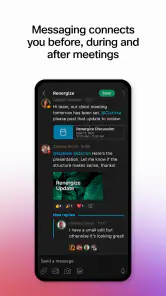



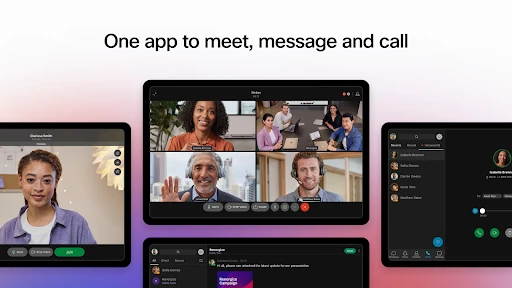
Analysis by Reviewed
When I’m trying to move a piece of work from an initial conversation to a clear decision, the hard part is rarely just getting people into a call. It’s keeping the discussion, questions, and next steps connected when teammates are in different places. That’s the kind of everyday business problem I look at when judging Webex: does it make collaboration easier without adding more busywork?
Start with the work, not the call
A useful test is to follow one task from the moment a question comes up to the point where someone can act on the answer. Imagine a customer reports a problem while the person who can resolve it is away from their desk. I’d first clarify what is known, then bring the right colleagues into a conversation, and finish by making the owner and next step unmistakable. A meeting is only one part of that chain; if the outcome is still unclear when everyone leaves, the call has not done enough.
This is where I’d look for a practical reason to use a business collaboration app rather than simply adding another meeting to the calendar. The goal is to keep communication close enough that a colleague can understand the issue and contribute without having to reconstruct the whole story from scattered messages. It helps to enter a call with a short question and a desired decision, then close by saying who will do what. That is a small habit, but it makes any handoff more dependable.
From a quick check-in to a useful meeting
A practical way to use Webex is to start with the outcome you need, not with a meeting for its own sake. For example, if a customer issue needs input from a colleague, I’d use a short conversation to clarify the problem, bring the relevant people together, and leave with an agreed owner for the next action. That flow is more useful than treating video calls as the whole job. The app is free to get started, while in-app purchases range from about $14 to $144 per item, so I’d check what a particular plan or purchase includes before relying on it for a team-wide setup.
Webex is a business communication app from Cisco Systems, Inc. It has a 4.3 average from around 28,000 ratings, and it has been installed over 10 million times. Those figures suggest it has a broad audience, but the more important question for me is whether its way of working suits yours. Its Everyone age rating makes it approachable for a general audience, though workplace use still depends on your organization’s own requirements.
Where it fits in a team’s toolkit
I’d consider Webex when meetings and ongoing coordination need to sit close together, especially for teams already using Cisco tools or working in a business environment. Compared with a basic video-call app, a collaboration platform can reduce the need to switch between separate meeting and messaging tools. Compared with a lightweight chat service, though, Webex may feel like more than you need if your team mainly shares quick updates and rarely schedules calls. The best fit is a group that will actually use its broader workflow, rather than install it and keep doing everything elsewhere.
For a small team, a useful habit is to agree on where decisions belong before the first busy week: use a meeting for discussion, then put the owner and next step somewhere teammates can find later. That simple handoff matters more than adding another call. If your group has no shared habit for following up, no communication app can prevent decisions from disappearing into a stream of conversations.
More From Our News Desk

Weather by Xiaomi Review: Clear at a Glance, Less Clear Up Close

X Under Pressure: Can It Recover When Posting Goes Wrong?

Clash of Clans Is Won Between the Battles

Android Auto Makes the Case for Quieter Car Software

MobiOffice: Transforming Mobile Productivity with Seamless Integration

EA SPORTS FC™ Mobile Soccer: Redefining Mobile Sports Gaming
How the workflow holds up
Once the team has agreed that a call is the right tool, I’d keep the agenda narrow. Start with the question that needs a decision, give participants enough context to respond, and reserve the last moments for confirming the next action. This is especially helpful when a meeting includes people from different roles: the person who spotted a problem may not be the person who can fix it, and a clear verbal handoff prevents the task from being left with “everyone.”
Moving from discussion to a handoff
In a realistic workday, I might join a short call between other tasks, explain what a customer is experiencing, and ask a colleague to assess the likely cause. The useful outcome is not simply that we spoke; it is that I know whether I should reply to the customer, whether the colleague is investigating, and when we should reconnect if the issue remains open. Webex can provide the meeting setting for that exchange, while the team still needs to choose a dependable place for the resulting task and decision.
One non-obvious improvement is to end with a spoken recap that is specific enough to survive a change of context: “I’ll send the customer the current status; you’ll check the issue; we’ll compare notes tomorrow.” That kind of summary is more valuable than stretching a call to cover every related topic. If another person needs to take over, the recap gives them a simple starting point instead of asking them to infer ownership from a long conversation.
Why Webex Stands Out
First things first, let's talk about user experience. One of the first things I noticed when I started using Webex was its intuitive interface. It's sleek, modern, and doesn't overwhelm you with too many options right off the bat. Whether you're a newbie or a tech-savvy professional, you'll find it pretty straightforward to navigate. The dashboard is clean, and everything you need is just a click away.
Features Worth Mentioning
Now, what's a review without delving into the cool features, right? Webex offers a plethora of tools that make virtual meetings not just possible, but seamless. One of my favorites is the noise cancellation feature. Imagine you're in a noisy coffee shop, but your colleagues hear only your voice – pretty neat, huh? Plus, the video quality is top-notch, even with a so-so internet connection.
Another feature that deserves a shout-out is the real-time translation. This is a game-changer if you're working in a global team. Language barriers? Not anymore! With Webex, you can have subtitles in multiple languages, making international collaboration a breeze.
Making calls work for different people
Those meeting tools are most useful when participants have different working conditions. A colleague joining from a noisy shared space may benefit from noise cancellation, while someone following a discussion in another language may find translation subtitles helpful. I would still speak clearly, avoid talking over others, and pause when a decision needs confirming. These habits matter because helpful audio and subtitle tools can support a conversation, but they cannot make an unclear explanation precise on their own.
For a mixed-location team, I’d also set expectations before the call: share the question in advance, tell people what kind of input is needed, and make room for a final recap. That reduces the chance that a remote participant listens passively while the people in the room make the real decision. If the topic is complex, a call is better for working through ambiguity than for serving as the only record of what was agreed.
Security and Reliability
We can't talk about a communication app without touching on security. Webex takes this seriously. With end-to-end encryption, you can breathe easy knowing your conversations are private and secure. They've got a strong track record, and I personally haven't encountered any major glitches or outages while using the app.
It's also worth mentioning the integration capabilities. Webex plays well with a host of other applications, which means you can streamline your workflow without jumping between different platforms. Whether it's syncing with your calendar or integrating with your project management tools, Webex has got you covered.
What to check before a team relies on it
Even when a communication platform offers security features, I would treat workplace guidance as part of the setup, not an afterthought. Teams should know which conversations are suitable for the service and how sensitive information should be handled. The practical point is not to assume that choosing a secure app automatically settles every question about company policy, access, or the way a conversation is shared.
I’d also test the handoff between a meeting and the tools the team already uses. If a calendar or project workflow is part of daily work, try one real meeting and confirm that the relevant people can find it and continue the task afterward. An integration is useful only when it removes a repeat step; if it creates another place to check or requires everyone to change established habits, the supposed shortcut may not save much time.
My Final Thoughts
So, is Webex worth your time? Absolutely! It's a robust platform that's constantly evolving to meet the demands of the modern workplace. Whether you're hosting a small team meeting or a large webinar, Webex provides the tools and features to make it happen smoothly. Plus, with its focus on security and user experience, it's no wonder it's a favorite among businesses and professionals alike.
In the ever-expanding universe of virtual communication tools, Webex is a reliable companion. So, if you haven't already, give it a spin and elevate your remote working game!
Who will get the most from it
I’d recommend it to people who regularly coordinate with colleagues, clients, or distributed teams and need meetings to fit into a wider work routine. It can also suit someone who joins calls from changing locations: noise cancellation can help in a busy setting, though it can’t fix a poor connection or make every noisy environment disappear. If you mostly need a simple way to message a few friends or hold occasional informal calls, a lighter chat app may be easier to live with.
It is also a more natural fit for groups that need to bring several contributors into the same discussion and then pass work between them. A project lead can use a call to resolve a question quickly; a customer-facing colleague can take the agreed response back to the customer; and the specialist who owns the follow-up can continue the investigation. If your routine rarely involves that kind of coordination, the extra structure may not repay the effort of adopting another platform.
One useful trade-off is that an all-in-one workspace only saves time when the team agrees to use it consistently. Before inviting everyone, I’d decide how meetings are announced, where follow-up tasks are recorded, and which existing tools Webex is meant to replace rather than duplicate. That small bit of planning can prevent parallel conversations from splitting attention across several apps.
Small workflow choices that help
For an international call, I’d check that participants know how to use the translation subtitles before an important discussion, rather than assuming everyone will discover the option mid-meeting. Subtitles can make a conversation easier to follow, but they don’t replace careful speaking, shared notes, or a pause to confirm a decision. Likewise, when joining from a phone, I’d keep the meeting goal and the action I need to report in mind; a small screen is convenient for attending, but less comfortable for reviewing several work items at once.
A second practical tip is to distinguish between a call that needs live back-and-forth and an update that can be read when convenient. Webex is easier to justify when the team needs to clarify an uncertain issue together, compare perspectives, or resolve a disagreement. If everyone only needs the same brief status note, a written message in the team’s established channel may be faster and less disruptive. Choosing the format deliberately keeps meetings from becoming the default for every small exchange.
Security claims should be considered alongside the way a company configures and uses any communication service. I’d follow workplace guidance for sensitive conversations instead of assuming that an app’s security features remove the need for sensible handling. Webex has a minimum OS requirement of 11, so it is worth checking device compatibility before planning a team rollout.
Choosing it with clear expectations
My practical test would be to use Webex for one recurring workflow, such as a weekly project check-in, and see whether the group can move from discussion to an assigned next step without duplicating notes elsewhere. If that works, the app earns a place in the routine. If people keep switching back to their established chat or meeting service, the extra platform may create friction rather than solve it.
For someone choosing between Webex and a lightweight chat app, I’d ask whether scheduled or focused meetings are a regular part of the work. Chat-first tools are often simpler for quick informal exchanges, while a meeting-centered collaboration setup makes more sense when people need to discuss an issue together and coordinate the follow-through. A standalone video-call option can be enough for occasional calls, too; the broader workflow is valuable only if the team actually uses it.
Webex is free to start, but purchases within the app range from about $14 to $144 per item. I’d treat that as a reason to check the intended plan and what it covers before a company builds a process around it, rather than assuming every team will have the same needs or access. For individual use, the key question is whether the available setup covers the way you expect to meet; for a workplace, it is worth agreeing on requirements before asking colleagues to switch.
Webex was released on September 12, 2014, and its long presence in business communication is part of its appeal, but age alone is not a reason to choose it. I’d pick it for a team that values structured collaboration and will make use of its meeting-focused tools; I’d skip it when a simpler, already-adopted option handles the job. For the right group, it can make a handoff from conversation to action feel more organized, provided the team supplies the habits that keep that handoff clear.
Webex Frequently Asked Questions
Is Webex free to download, and are there any optional purchases?
Webex is free to download, so you can install it without paying upfront. The app also offers in-app purchases, with prices ranging from around $14 to $144 per item. Consider whether the features you need are included in the free experience or may require a purchase, especially if you plan to use Webex regularly for work or team collaboration.
What kind of app is Webex, and who develops it?
Webex is a business app developed by Cisco Systems, Inc. Its short description is simply “Webex,” while its summary presents it as a secure, all-in-one team collaboration app. That makes it a potential fit if you want a single place for communication and collaboration with colleagues or other groups, whether you are exploring it for work or personal meetings.
Can I use Webex without creating an account?
Webex is designed to let people join virtual meetings and collaborate with others, so it can be useful when you need to connect with a team or attend a meeting. Before downloading, consider whether you want to use it regularly or only join sessions occasionally; signing in can make it easier to access the app’s collaboration features and keep your work organized.
What is Webex and what are its primary features?
Webex is a versatile communication platform designed to facilitate virtual meetings, webinars, and team collaboration. It offers features like high-definition video conferencing, screen sharing, and integrated messaging. Webex is suitable for businesses of all sizes, providing tools to enhance remote work productivity, including calendar integrations and recording capabilities for meetings.
Is Webex suitable for both personal and professional use?
Yes, Webex caters to both personal and professional use. While businesses benefit from its robust conferencing and collaboration tools, individuals can use it for personal meetings and social interactions. Its user-friendly interface and diverse functionalities make it a versatile choice for various communication needs, from casual catch-ups to formal business meetings.
Pros
- High-quality video conferencing
- Multiple device compatibility
- Robust security features
- Integration with other tools
- Customizable meeting layouts
Cons
- Occasional connectivity issues
- Complex interface for new users
- High data usage during calls
- Limited free plan features
- Inconsistent mobile app performance
- Category
- Business
- Version
- Varies with device













