

Mercado Libre: Compras online
- 76.79K
- 4.8
- Installs
- 500.00M
- Price
- Free

Screenshots



Analysis by Reviewed
Have you ever found yourself browsing through endless online shopping platforms, only to find out that the item you’ve been dreaming of is either too pricey or out of stock? Well, let me introduce you to Mercado Libre: Compras online, a veritable treasure trove for shoppers like us!
Discovering the Mercado Libre Experience
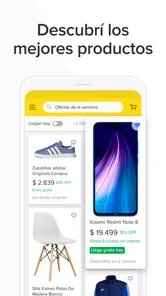
Embarking on my shopping journey with Mercado Libre was like diving into a vast ocean of possibilities. With a myriad of categories ranging from electronics to fashion, home appliances to collectibles, this app has something for everyone. The user interface is intuitive and easy to navigate, making it a breeze even for those who aren’t tech-savvy.
A practical first search
When I’m shopping for a specific item, I start with a plain-language search, then use the filters to make the results manageable. Comparing several listings side by side is more useful than choosing the first attractive price: I check the item description, seller details, delivery estimate, and any conditions shown on the listing. This habit matters especially for electronics, where a model name can cover different versions or accessories. The app is free, and Mercado Libre is developed by Mercado Libre; it has a 4.8 average from around 22 million ratings and over 100 million installs. Those figures suggest a widely used marketplace, but they don’t replace checking the individual seller and product.
Wide Range of Products
Mercado Libre boasts a prodigious selection of products. Whether you’re on the hunt for the latest smartphone, a quirky vintage item, or simply your daily essentials, you’ll find it here. It’s like having a shopping mall right in your pocket! The filtering options are quite robust, allowing you to narrow down your search based on price, brand, and even seller ratings.
That variety is most valuable when I’m open to comparing options rather than committed to one exact shop. I can search for a particular appliance, then broaden the query to see alternatives with different specifications or conditions. For something where compatibility matters, I do the opposite: keep the search narrow and verify the model details carefully. A large catalog saves time only when the results are relevant, so I treat filters as a way to reduce noise, not as proof that a listing is right for me.
Settings and repeatable habits
I get better results by deciding what matters before I search: the exact model, acceptable condition, and a sensible spending limit. If the app offers location or delivery choices for a product, I review them before committing, since availability and timing can affect which listing is practical. I also keep searches focused rather than piling unrelated terms into one query. For a household purchase, for example, I compare the dimensions and compatibility details in each listing instead of relying on a product photo. Mercado Libre’s current version is 10.484.0 and it runs on Android 6.0 or later; the app is rated for teens. That makes it accessible to many Android users, while parents should still consider whether a shopping marketplace is appropriate for a teen’s account and purchasing habits.
One useful routine is to decide in advance which details would make me reject an offer. For a phone, that might be storage capacity and exact model; for a household item, dimensions and included parts. This keeps me from being swayed by a low-looking price before I’ve checked what is actually being sold. I also look at the final amount and delivery information shown before placing an order, rather than judging the purchase by the listing price alone.
More From Our News Desk

 Clash of Clans
Clash of Clans Is Won Between the Battles
Its raids are quick; its community is a long-term project of coordination, teaching, rivalry, and shared responsibility—with all the friction that entails.

 Android Auto
Android Auto Makes the Case for Quieter Car Software
The car interface is no longer judged by how much it can do, but by how quietly it helps. Android Auto shows what drivers now expect—and what still gets in the way.

 MobiOffice: Word, Sheets, PDF
MobiOffice: Transforming Mobile Productivity with Seamless Integration
MobiOffice: Word, Sheets, PDF is redefining mobile productivity with a surprising blend of functionality and innovation.

 EA SPORTS FC Soccer Mobile 26
EA SPORTS FC™ Mobile Soccer: Redefining Mobile Sports Gaming
Dive into EA SPORTS FC™ Mobile Soccer, where immersive gameplay and strategic depth transform mobile sports gaming.

 Microsoft OneDrive
How Microsoft OneDrive Became a Mobile Productivity Giant
Discover how Microsoft OneDrive defies expectations, reshaping mobile productivity with its surprising features and unmatched integration.

 Google Translate
How Google Translate Breaks Language Barriers Effortlessly
Google Translate is not just a tool; it's a cultural force breaking language barriers with unprecedented ease and accuracy.
Latest News



Seamless Shopping Experience
One thing I absolutely love about this app is how seamless the shopping experience is. The checkout process is straightforward, and the multiple payment options, including credit cards, bank transfers, and even cash on delivery, make it super convenient. Plus, the app’s performance is smooth, with quick load times and minimal glitches.
For me, a straightforward checkout is most useful after the comparison is already done. I avoid treating a saved or revisited listing as a decision in itself: before paying, I return to the specific offer and confirm its condition, delivery details, and total. That final pause is especially worthwhile when several sellers offer what looks like the same product, since small differences in the listing can change whether the purchase suits my needs.
When speed helps—and when it doesn’t
A useful everyday pattern is to browse during a spare moment, save a short list of plausible options, then make the final comparison when I can read the details carefully. If I need a replacement appliance part, I check the model number against the listing before ordering; if I’m buying a routine item, I weigh delivery convenience against the total shown at checkout. The app’s promise of fast delivery can be appealing, but I treat the estimate shown for a particular listing as more important than a broad expectation. For urgent purchases, a nearby physical shop may be the safer choice because I can take the item home without waiting.
Imagine I notice a kitchen appliance has stopped working before a busy week. I can use the app to compare possible replacements and check which offers show a suitable delivery estimate, but I would not order a part based only on a familiar-looking photo. I’d first find the appliance’s model information, compare it with the listing, and then decide whether waiting makes sense. If I need the item that day, a local store may win even if online browsing reveals more choice. That is the practical trade-off: the marketplace is helpful for comparison, but it cannot make every purchase immediate.
Safety and Trust
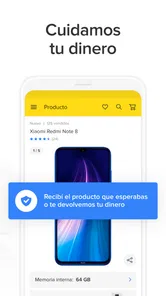
In today’s digital world, online safety is paramount. Mercado Libre ensures that with its strong security measures. The app offers buyer protection, ensuring that transactions are safe and secure. You can shop with peace of mind, knowing that your personal information is safeguarded.
Even when a marketplace provides protections, I still make a point of keeping the order details and communication within the app’s normal purchase flow and reading the conditions attached to the specific transaction. That gives me a clearer record of what I selected and what the seller offered. I also avoid assuming that a general sense of platform security removes the need to inspect the product description or seller information; those checks answer different questions.
Marketplace trade-offs
The breadth of a marketplace is its strength, but it also means that listings can differ in detail, condition, and seller reliability. I wouldn’t assume two similar-looking offers are equivalent: read the full description, inspect the seller information, and check the delivery and return conditions presented before paying. When I’m uncertain about a product’s fit or feel, a specialist retailer with in-person advice can be a better option. For a straightforward comparison across many sellers, though, Mercado Libre is more convenient than visiting several separate shops. The app is free to download, but the item and delivery costs still deserve a careful look before checkout.
Compared with a single retailer’s app, Mercado Libre is better when I want to scan a wider mix of sellers and product choices in one place. A specialist store can be easier when I need knowledgeable help, a consistent product range, or the chance to handle an item first. A physical shop is also the more sensible choice for an urgent replacement. I see this app as a strong comparison and ordering tool, not a reason to stop using other ways to shop.
A practical way to reduce decision fatigue is to compare a small number of credible listings rather than endlessly scrolling. I focus on the details that affect the purchase—condition, included accessories, seller information, delivery, and the terms displayed—then stop when one option meets my needs. More browsing is not automatically better if the alternatives differ in ways that do not matter to me.
Customer Service
Another feather in the cap for Mercado Libre is its excellent customer service. They offer a comprehensive help center and a responsive support team ready to assist with any queries or issues you might encounter. This adds an extra layer of trust and reliability to the overall shopping experience.
If an order raises a question, I would first look at the order information and the help options connected with the purchase, since the relevant details are easier to identify there than from memory. For an issue about whether an item will fit, though, it is better to resolve that uncertainty before buying by checking the listing and product specifications. Support can help with a problem; it cannot make a vague product description precise after the fact.
Who will get the most from it?
I’d recommend it to people who regularly compare prices, want a broad mix of everyday goods and harder-to-find items, or prefer to handle shopping from a phone. It is less suited to anyone who wants to inspect products in person, dislikes sorting through marketplace listings, or needs guaranteed immediate access to a purchase. A good rule is to use the app for research and comparison, then buy only once the listing details and delivery terms make sense for your situation.
The teen content rating is worth keeping in mind for families: access to a shopping marketplace can involve browsing products and making purchase decisions, so parents may want to agree on how an account is used. The app itself is free, but that does not mean the products are; I would set a personal spending limit and review the full checkout total before confirming an order. iPhone users should check the requirements shown for their device in the relevant store before installing, while Android users can use it on devices running Android 6.0 or later.
With a 4.8 average from around 22 million ratings and more than 100 million installs, Mercado Libre is clearly a familiar choice for many shoppers. It has been available since September 7, 2011, and the current Android version is 10.484.0. I take that popularity as context rather than a guarantee: the quality of an individual purchase still depends on the item, seller, and terms attached to that listing.
Making the habit work
My preferred approach is simple: search with a clear target, narrow the results, compare a few listings, and check the details again before paying. I use that routine for both everyday purchases and less familiar products because it balances convenience with a little healthy caution. The app is at its best when I know what I need and can evaluate the options; it is less helpful when I expect it to decide for me or replace seeing an item in person.
Overall, Mercado Libre: Compras online is a must-have app for anyone who loves shopping from the comfort of their home. With its vast array of products, user-friendly interface, and top-notch security, it ticks all the right boxes. So, why not give it a whirl and embark on your own shopping adventure?
I’d put it on my shortlist if I value choice and phone-based comparison, especially for purchases that are not urgent and have details I can verify from a listing. I would skip it for something I need immediately or when advice and hands-on inspection matter more than selection. Used with a repeatable checking habit, it can make shopping more manageable; used on impulse, the sheer range of offers can make it easier to overlook the distinctions that matter.
Mercado Libre: Compras online Frequently Asked Questions
Can I save products or keep track of items I’m interested in?
An account can make it easier to keep your shopping activity organized while you consider products. Once signed in, look for options on product pages to save or revisit items, where available. This is useful if you want to compare choices over time rather than make a decision during your first browse. Check the controls shown in the app for the item you are viewing.
Can I contact a seller before placing an order?
Mercado Libre provides a way for shoppers and sellers to communicate through the platform. If you have a question about an item, its details, or the purchase, check the product page for the available contact or question feature before ordering. Keeping communication within the app can also make it easier to review the exchange alongside the listing and your order information.
Can I track an order after buying something?
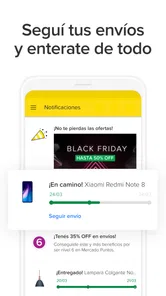
After making a purchase, use your account’s order area to review the information available for that order and follow its progress. Delivery updates and details can vary by item and order, so check the order screen and any messages shown in the app. Keeping order information together in your account can make it easier to return to updates if you need them.
Can I cancel an order or request a return?
If you need to change your mind about a purchase, open the order in your account and review the options shown for that specific transaction. Cancellation and return steps may depend on the item and its order status, so follow the instructions displayed in the app rather than assuming every purchase follows the same process. Keep the order details handy while reviewing the available next steps.
Can I browse Mercado Libre without creating an account?
You can explore Mercado Libre’s shopping categories and look through product listings to get a feel for what is available. To complete a purchase or manage an order, you will need to use an account and provide the information requested during checkout. Having an account also helps keep your purchases, messages, and order updates together in one place.
Pros
- User-friendly interface and navigation.
- Wide range of products available.
- Secure payment options supported.
- Fast delivery and tracking system.
- Regular promotions and discounts.
Cons
- Limited customer support availability.
- Occasional app crashes reported.
- High shipping costs for some items.
- Limited international shipping options.
- In-app ads can be intrusive.











