Domino's Pizza USA
- 881.66K
- 4.6
- Installs
- 10.00M
- Price
- Free
Screenshots


Analysis by Reviewed
I find this app most useful when the order needs to be coordinated around a real-life moment: dinner after a long day, food for a movie night, or a group order where people have strong opinions about toppings. Because it connects the menu, ordering flow, and order tracking in one place, I can make choices without having to juggle a phone call and guess what is happening next. The important trade-off is that the experience depends on a working connection, especially when browsing, submitting an order, or checking its progress.
When the connection matters
Ordering is the part where connectivity matters most. I would build the order and confirm the details while I have a reliable connection, rather than waiting until I am in a weak-signal spot. That is particularly helpful if I am arranging food for several people: settle the toppings and delivery details first, then submit the order once everything looks right. A brief interruption at the wrong moment can make it harder to tell whether a step has completed, so I would check the order status before trying to place it again.
The tracker is useful as a guide, not a reason to plan every minute around an exact arrival. It gives a view of the order’s progress, which is reassuring when I am waiting at home, but I still leave some flexibility in my plans. If timing is critical, I would avoid making the meal hinge on a precise status change; the app helps me stay informed, but it cannot make a busy evening predictable.
A better fit for some meals than others
For a relaxed night in, the app makes sense: I can browse, customize, and keep an eye on the order without interrupting what I am doing. It can also help when friends are sharing a meal, since choosing toppings in the app is clearer than trying to relay a complicated order over a noisy call. For a picnic or another outing, Hotspots may be useful, but I would confirm that the chosen location is practical to describe and reach before relying on it. A familiar address is still the simpler choice when the group needs a straightforward handoff.
Compared with ordering by phone, the app gives me a visual way to review a customized pizza and follow its progress. Compared with a general food-delivery service, it is centered on Domino’s menu rather than a range of restaurants. That focus is an advantage when I already want Domino’s, but not when I am still deciding between different cuisines or want to compare several nearby places. In that situation, a broader delivery service or a direct call may suit me better.
Small checks that prevent a messy order
My practical habit is to review the whole basket before placing it: check each pizza’s toppings, make sure the selected deal matches the meal, and confirm the delivery or pickup plan. This matters more when several people are ordering together, because a small customization mistake can be easy to miss while moving quickly. I also treat deals as options to compare rather than assuming the first one shown is automatically the best fit for the group.
If the app seems slow or the tracker has not changed, I would first check my connection and give the order status a moment to refresh before attempting anything again. Repeating a submission without checking can create uncertainty about whether an order went through. When I need to resolve a time-sensitive problem, I would use the available order details to contact the restaurant rather than relying only on a screen that may not have refreshed.
More From Our News Desk

Weather by Xiaomi Review: Clear at a Glance, Less Clear Up Close

X Under Pressure: Can It Recover When Posting Goes Wrong?

Clash of Clans Is Won Between the Battles

Android Auto Makes the Case for Quieter Car Software

MobiOffice: Transforming Mobile Productivity with Seamless Integration

EA SPORTS FC™ Mobile Soccer: Redefining Mobile Sports Gaming
For data-conscious use, I would browse and customize while connected to Wi-Fi if that is convenient, then use mobile data when I need to place or monitor an order away from home. I would avoid leaving the tracker open simply out of habit; checking it when I actually need an update is enough. This is a small way to keep phone use purposeful without making the ordering process harder.
Who will get the most from it
I would recommend this app most readily to people who already know they want Domino’s and value seeing their choices on screen before placing an order. It is especially handy for households with different topping preferences, because each person’s request can be considered while building the basket instead of being remembered from a rushed conversation. It also suits anyone who orders from the same restaurant regularly and appreciates having the menu and progress information together.
It is less compelling if you are browsing for dinner without a particular restaurant in mind. A multi-restaurant delivery app can be better for comparing cuisines, while a phone call may feel simpler if you have an unusual request that is difficult to express through menu choices. I would also think twice about starting a detailed group order while walking through an area with unreliable reception: it is easier to review customization calmly when the screen can load consistently.
A practical group-order routine
For a family movie night, I would ask everyone for their preferred toppings first, then enter the pizzas one at a time and inspect each before moving on. That sounds basic, but it reduces the common mix-up where one person’s customization gets attached to the wrong item. Before submitting, I would read the basket from top to bottom and confirm whether the group expects delivery or pickup. Those few checks are more useful than rushing to the final button just because everyone is hungry.
For a less predictable outing, such as meeting friends at a park, I would settle the meeting point before opening the ordering flow. Hotspots can make a nonstandard handoff possible, but the group still needs to know exactly where to meet and who will be waiting. If the location is confusing or plans are likely to change, choosing a familiar address is the safer, lower-stress option. The app can help organize the food; it cannot solve a vague meeting plan.
What to expect from the app itself
The Domino’s Pizza USA app is a free Food & Drink app from Domino’s Pizza LLC. It has a 4.6 average from around 2.4 million ratings, and it has been installed over 10 million times. Those figures suggest that it is a well-established way to order from the chain, though they do not guarantee that every local ordering experience will feel equally smooth. The app is rated for Everyone, and its current version is 12.11.2, with Android 9 as the minimum operating system requirement.
Domino’s has kept the app available since February 21, 2012, and its central appeal remains practical rather than complicated: browse the chain’s menu, place an order, and follow its progress. I would treat the tracker as a useful status view, not a promise of exact timing, and I would keep the order details handy if an unexpected delay needs attention. That combination of convenience and reasonable caution is a better way to use it than expecting the phone to manage the entire meal for me.
Ever had one of those days when you're craving something hot, cheesy, and utterly satisfying? Well, let me introduce you to the Domino's Pizza USA app, your ultimate companion for those pizza cravings. It's like having a pizzeria in your pocket, ready to serve you at a moment's notice.
Ordering Made Easy
With the Domino's Pizza USA app, ordering your favorite pizza is a breeze. The interface is super intuitive, making it easy even for the least tech-savvy among us. You just open the app, choose your pizza, customize it to your heart's content, and boom - your order is on its way. No more waiting in line or struggling with phone calls!
Customization at its Best
One of the standout features of this app is the customization options. Whether you're a pepperoni purist or a veggie enthusiast, the app lets you tailor your pizza just the way you like it. You can choose from a variety of crusts, sauces, and toppings. And the best part? You get to see your creation in real-time, which is oddly satisfying!
Track Your Order
Ever wondered what's happening to your pizza once you've placed the order? The app has a fantastic order tracker that keeps you updated every step of the way. You can see when your pizza is being prepared, baked, and even when it's out for delivery. It's like having a personal pizza assistant keeping you in the loop!
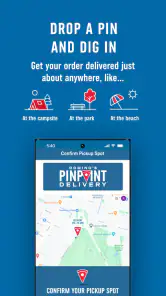
And for those who are always on the go, the app offers a neat feature called Domino's Hotspots. This allows you to get your pizza delivered to over 150,000 non-traditional locations, like parks, beaches, and more. Perfect for those impromptu picnics or beach days!
Deals and Offers
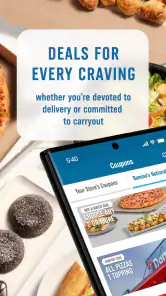
If you're anything like me, you love a good deal, and the app doesn’t disappoint. It’s packed with exclusive offers and discounts that you won’t find anywhere else. You can easily browse through the deals section and pick the one that suits your appetite and budget.
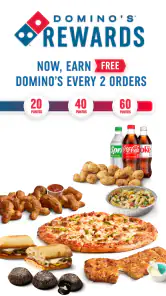
Plus, the app has a reward program called Piece of the Pie Rewards. Every order gets you points, and once you've accumulated enough, you get a free pizza. It's a win-win!
Final Thoughts
In a nutshell, the Domino's Pizza USA app is a must-have for any pizza lover. It's user-friendly, packed with features, and offers a seamless experience from start to finish. Whether you're ordering for a cozy night in or a large gathering, this app makes the process easy and enjoyable. So next time you're in the mood for a slice, give the app a try, and thank me later!
Domino's Pizza USA Frequently Asked Questions
Who develops the Domino's Pizza USA app, and what is it for?
Domino's Pizza USA is a Food & Drink app developed by Domino's Pizza LLC. It gives customers a way to order Domino's favorites and follow the progress of an order with Domino's Tracker®. The app is intended for people who want to browse and place orders from Domino's on a mobile device, whether they are planning ahead or ordering when hunger strikes.
What age group is the Domino's Pizza USA app suitable for?
The app has an Everyone content rating, so it is classified as suitable for users of all ages. As with any ordering app, placing an order involves choosing food and arranging payment, so younger users may need help from a parent or guardian with those steps. The app is focused on Domino's ordering and order progress rather than age-restricted content.
Is the Domino's Pizza USA app available for my device?
Domino's Pizza USA is a Food & Drink app from Domino's Pizza LLC for ordering from the restaurant. It is free to download and is rated for Everyone. Before installing, check that your device runs Android 9 or later, the stated minimum operating system requirement. The app is also available for iOS, though compatibility depends on your device and its software.
What features does the Domino's Pizza USA app offer?
The Domino's Pizza USA app provides a range of features designed to enhance convenience for users. These features include easy online ordering for delivery or carryout, real-time order tracking, access to exclusive deals and coupons, and the ability to save your favorite orders for quick reordering. It also offers a store locator and voice ordering capabilities, making it easy to place an order without even typing.
Is the Domino's Pizza USA app free to download and use?
Yes, the Domino's Pizza USA app is completely free to download and use. Users can order pizza, access deals, and more without any additional charges. However, keep in mind that the cost of the food and any applicable delivery fees will still apply when placing an order through the app.
Pros
- User-friendly interface for easy ordering.
- Fast delivery options available.
- Customizable pizza options.
- Exclusive deals and discounts.
- Track order in real-time.
Cons
- Limited customization for dietary restrictions.
- Occasional app crashes reported.
- Delivery charges may apply.
- Limited payment options.
- Requires stable internet connection.
- Category
- Food & Drink
- Version
- 12.11.2











