LinkedIn: Jobs & Business News
- 101.52K
- 4.2
- Installs
- 1.00B
- Price
- Free

Screenshots


Analysis by Reviewed
I wouldn’t treat LinkedIn: Jobs & Business News as a household social app, even if a family shares a tablet or phone. It is a business and career service from LinkedIn, built around personal profiles, work contacts, job searches, and professional updates. The useful question for shared-device use is not how several relatives can share one network, but how each person can keep their own account and activity distinct.
Keep shared-device use personal
If I were helping someone in my household use it on a common device, I’d make account ownership the first decision. A job seeker should build and maintain a profile in their own name, rather than borrowing another person’s account or mixing career histories. That keeps applications, messages, connections, and profile details tied to the right person. I’d also sign out when finished if another household member might use the device, and avoid leaving private job-search material open on a shared screen.
This matters most when a person is quietly exploring a move while still employed. They may want to research roles, polish their profile, and keep track of openings without turning a family member into an accidental intermediary. The app can support an individual’s career routine, but it is not a shared household workspace; coordination should happen through ordinary conversation, with each person responsible for their own account.
The Latest on LinkedIn: Jobs & Business News
Set expectations before coordinating
A practical routine is for one person to save or note interesting opportunities and then discuss them with a trusted relative, rather than handing over account access. A parent, partner, or friend can help review a résumé or talk through whether a role fits, while the applicant remains the one who decides what to apply for and how to present their experience. That boundary is especially useful when someone else is helping with a first job search: guidance can be supportive without taking over the applicant’s professional identity.
For everyday use, I’d check alerts at a planned time instead of letting every new opening interrupt family routines. Then I’d compare a posting with the person’s actual experience, location needs, and career goals before applying. Alerts can help surface possibilities, but they are prompts to assess, not a substitute for reading a listing carefully or deciding whether the role makes sense.
Age, privacy, and trust
The app is rated Everyone, but that label does not make every career feature relevant to every person in a household. I’d judge use by whether someone has a real reason to build a professional presence or look for work, and I’d make sure they understand what they are choosing to share on a profile. The service is most useful when the person using it is comfortable managing a public-facing work identity and communicating with professional contacts.
Trust also means treating profiles and job posts thoughtfully. I would not assume that every message or opportunity deserves a response just because it appears in a professional setting. Take time to inspect the role and the person or organization behind an approach, and keep sensitive personal details out of casual conversations. For a family member who only needs local vacancies or a simple way to coordinate shifts, a focused job board or shared calendar may be a better fit.
More From Our News Desk

X Under Pressure: Can It Recover When Posting Goes Wrong?

Clash of Clans Is Won Between the Battles

Android Auto Makes the Case for Quieter Car Software

EA SPORTS FC™ Mobile Soccer: Redefining Mobile Sports Gaming

How Microsoft OneDrive Became a Mobile Productivity Giant

How Google Translate Breaks Language Barriers Effortlessly
The Ultimate Networking Hub
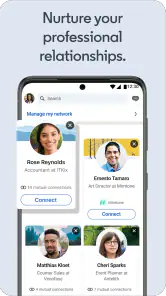
When I first downloaded the app, I was instantly impressed by its sleek and user-friendly interface. Navigating through it feels intuitive, and that’s crucial when you’re juggling between job applications and networking. With just a few taps, you can connect with industry leaders, colleagues, and even potential employers. It’s like having the world’s largest professional network in your pocket!
Jobs Tailored Just for You
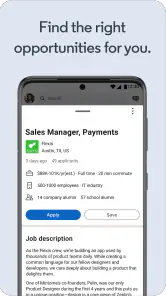
One of the standout features of the app is its personalized job recommendations. Based on your profile and activity, LinkedIn curates a list of job openings that align with your skills and career aspirations. I found this particularly helpful because it saves time sifting through irrelevant job postings. Plus, applying for jobs directly through the app is a breeze! You can even set alerts for new job postings, so you never miss out on opportunities.
My best practical tip is to treat recommendations as a starting point, then tighten the search yourself. A profile that clearly names the work you want, the skills you actually use, and the kinds of roles you’ll consider gives the service more useful context. I’d also set a small number of focused alerts rather than broad ones; otherwise, a steady stream of loosely related openings can make it harder to spot the worthwhile match. Before applying, I’d read the full posting and tailor the application instead of relying on a quick tap.
That workflow is where this app differs from a conventional job board. A job board is often the cleaner choice when all you want is a straightforward vacancy search, while LinkedIn combines listings with a professional identity and a network you can use to learn about a field or reconnect with former colleagues. That combination can be valuable when a role comes through a person or company you already follow. It can also feel noisy if you only want a list of openings and have no interest in maintaining a profile or following work-related updates.
Make recommendations more useful
When a suggested role looks close but not quite right, I wouldn’t immediately dismiss it or apply just because it appeared in the feed. I’d use the mismatch as a quick check on my profile and search habits: is the role outside my preferred location, at the wrong level, or asking for skills I don’t want to use? That distinction helps me decide whether to adjust what I’m looking for or simply pass on the listing. A recommendation is most useful when it gives me a lead to investigate, not a verdict on what career move I should make.
For someone changing fields, I’d also separate exploration from application. Following companies or reading about an industry can help clarify what kinds of work are being discussed, while applications deserve a more deliberate review of responsibilities and qualifications. This takes longer than sending out a large number of quick applications, but it avoids treating a plausible title as proof that the job fits. The app is strongest when I use it to narrow attention and do the judgment myself.
Stay Informed with Business News
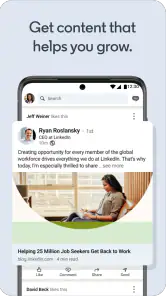
In today’s fast-paced world, staying updated with the latest industry news is vital. The app’s business news section keeps you informed with articles and updates from reputable sources. It’s perfect for catching up on trends during your morning commute or coffee break. This feature ensures you’re always in the loop and ready to engage in insightful discussions with peers.
I find the news most useful when I give it a purpose: for example, checking developments in an industry before a networking conversation or interview, then saving a couple of points to discuss. It is less useful as an endless feed to scroll whenever I have a spare minute. If I want a dedicated news experience with broad coverage unrelated to work, I’d choose a general news app; here, the advantage is that professional updates sit alongside career activity, not that it replaces every other source.
Use the feed with a specific goal
A realistic weekday routine might be to check job alerts before work, save one promising listing, and come back to it later when there is time to read the requirements carefully. At lunch, a short look at business updates could help me prepare a question for a colleague or learn what people in a particular field are discussing. I’d keep those tasks separate from casual scrolling: opening the app with a clear reason makes it easier to leave once I’ve found what I need.
The trade-off is that professional news and job activity share the same space as posts from people in a network. That can make the app feel lively, but it also asks me to filter what deserves attention. If I’m preparing for an interview, I’d prioritize the company and role rather than assume that a busy feed is equivalent to research. For broad, impartial coverage of current events, a general news source remains the better tool; this feed is most relevant when my interest is specifically work and industry.
Enhance Your Professional Profile
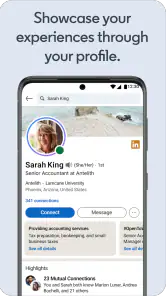
Your LinkedIn profile is more than just a digital resume; it’s your personal brand. The app offers tools to help you showcase your skills, achievements, and projects. Adding endorsements and recommendations from colleagues can boost your credibility and attract more job offers. Remember, a well-crafted profile can make all the difference in standing out to recruiters.
I’d keep profile edits specific and truthful rather than trying to make every section sound impressive. A concise description of a project, what you contributed, and the skills involved gives a reader something concrete to understand. It also makes the profile easier to review on a phone, where long blocks of text are tiring. Recommendations are most persuasive when they reflect real working relationships; asking for them only makes sense when the other person can speak honestly about your work.
Make profile upkeep manageable
I’d treat profile maintenance as occasional housekeeping, not a daily chore. After finishing a project or changing responsibilities, a short, accurate update is easier to write while the details are fresh. That habit also helps when a recruiter or former colleague looks at the profile months later: the information is more likely to reflect what I actually do now. I wouldn’t add skills simply to chase visibility if I can’t explain how I use them in practice.
For a friend helping someone prepare, the most useful review may be asking whether the profile makes the person’s intended work clear within a quick scan. That is more actionable than rewriting every sentence to sound grand. It preserves the applicant’s own voice and keeps the profile credible. Since a professional page can be visible to people beyond the household, I’d also pause before adding personal details that do not help explain work experience or goals.
There is a trade-off here: a fuller profile can help people understand your background, but maintaining a professional presence takes attention. If you are not job hunting, networking, or sharing work-related updates, you may get little from that effort. The app is free to download, while in-app purchases range from about $7 to about $900 per item, so I’d check the terms of any paid option before choosing it; the basic reason to try the app does not require treating an upgrade as essential.
If you’re wondering whether you need to pay to make it useful, I’d start with the free experience and see whether its job search and networking tools suit your routine. A paid option is a separate decision, not a prerequisite for building a profile or exploring the app. I’d only consider spending if I understood the specific benefit I wanted and expected to use it; the wide range of in-app purchase prices makes checking the exact offer particularly sensible.
It is also not the best match for every kind of job search. If I only need a quick list of local openings, a dedicated vacancy board may be less distracting and easier to scan. If I want to keep up with friends or coordinate family plans, a messaging or calendar app is a more natural choice. LinkedIn earns its place when job listings, professional relationships, and work-related context genuinely support the same goal.
For a household deciding who should use it, I’d recommend it to adults or other suitable job seekers who want one place for networking, career research, and work news. I’d skip it for someone who only needs a family calendar, a private group chat, or a simple local vacancy board. The app has an average rating of 4.2 from around 3.4 million ratings and more than 1 billion installs, which shows how widely it is used, but popularity does not remove the need to manage one’s own profile carefully. It is free, rated Everyone, and LinkedIn lists version 4.1.1147 with Android 9 as the minimum operating system. LinkedIn released the app on April 7, 2011, and its catalog includes around 102,000 written reviews, but neither longevity nor a large audience means it will suit everyone’s job-search style.
My household verdict is that this works best as a personal career tool used with clear boundaries, not as a shared account or family coordination hub. One person can offer feedback or talk through a decision, but the account holder should control their profile, messages, and applications. For anyone who wants professional contacts and job research in one place, that combination can be worthwhile; for people who need only basic listings or household organization, a simpler alternative will probably feel more comfortable.
In conclusion, whether you’re actively seeking a new position or simply looking to grow your professional network, the app is a useful resource. It connects career research with opportunities and keeps work-related updates close at hand, though it works best when you manage your profile carefully and choose what deserves your attention. I’d give it a try if those needs match yours, while keeping expectations realistic: it can help you discover possibilities, but the decisions and follow-through remain yours.
LinkedIn: Jobs & Business News Frequently Asked Questions
What should I know about LinkedIn’s cost and optional purchases before downloading?
LinkedIn is free to download, and a free basic membership gives you access to many core features, including creating a profile, connecting with other users, and searching for jobs. Optional paid offerings and in-app purchases are available for people who want additional tools. The app’s listed in-app purchase range runs from $7.49 to $899.88 per item, so check the purchase details before buying.
When was LinkedIn released, and does it receive app updates?
LinkedIn was released on April 7, 2011, and its current version is 4.1.1147. App updates can bring changes to features, compatibility, or the overall experience, so it is sensible to keep the app current when updates are available. Before downloading, check that your device meets the minimum operating system requirement, which is version 9.
Can I browse LinkedIn without creating an account?
LinkedIn is built around member profiles and professional connections, so creating an account is the best way to use its job-search and networking features. With a profile, you can present your experience, connect with other professionals, and explore opportunities that match your interests. The app is free to download, and its basic membership includes access to many core features.
Is LinkedIn suitable for people who are just starting their careers?
Yes. LinkedIn can be useful for students, recent graduates, and anyone beginning a new career, as well as experienced professionals. A profile gives you a place to highlight your education, skills, projects, and work experience, while job recommendations and alerts can help you spot relevant openings. You can also follow companies and connect with people in fields you hope to enter.
What features does LinkedIn offer for job seekers?
LinkedIn offers a variety of features for job seekers, including a comprehensive job search engine, personalized job recommendations, and the ability to apply for jobs directly through the platform. Users can also set up job alerts, network with professionals in their industry, and showcase their skills and experiences on their profile to attract potential employers. Its store summary also highlights AI job alerts and insights, which can help users keep an eye on opportunities and make more informed career moves.
Pros
- Extensive job listings.
- Networking opportunities.
- Industry news updates.
- Skill endorsements.
- Professional profiles.
Cons
- Limited job alerts.
- Premium features costly.
- Overwhelming notifications.
- Privacy concerns.
- Complex interface for new users.
- Category
- Business
- Version
- 4.1.1147












