NBA: Live Games & Scores
- 7.87K
- 4.4
- Installs
- 10.00M
- Price
- Free

Screenshots


Analysis by Reviewed
I turn to the official NBA app when I want a single place to follow a game without keeping a broadcast open in the background. It suits the particular rhythm of basketball: a score can swing quickly, and a short check during a commute or work break can tell me whether a close finish is brewing. The NBA: Live Games & Scores app is free to download, but some content and viewing options involve in-app purchases, so I would treat it as a useful starting point rather than assume every part of the experience is included at no cost.
What to expect when you open it during a game
My main reason to use the app is speed of access to NBA information, not to replace every way I watch basketball. Scores, schedules, game details, and news belong together here, which makes it easier to move from “What is happening?” to “How did that quarter unfold?” without searching across several sources. The app is published by NBA Properties, Inc., and its focus is firmly on the league rather than on sports coverage in general.
There is a practical difference between checking a score and following the texture of a game. A score is enough when I only need to know who is ahead; play-by-play and box-score details become more useful when I cannot watch but still want to understand why the margin changed. I would use those views selectively. Opening every stat line during a busy game can turn a quick check into a longer reading session, while a score glance keeps the app in its most convenient role.
How I would use the schedule and alerts
The schedule is especially useful when I follow a team whose games do not fit neatly into my routine. I can check what is coming up, then use team and player preferences to make updates more relevant. My tip is to be deliberate about what you follow: choosing only the teams and players you genuinely care about makes notifications easier to act on, while selecting too broadly risks filling your phone with alerts that no longer feel helpful.
For a realistic weekday example, I might check a game time before leaving home, glance at the score during lunch, and return later for a recap if I missed the finish. That workflow is more sensible than trying to monitor every possession while doing something else. It lets the app fill gaps in my attention without pretending that a string of notifications is the same as watching the game.
When video is the better option
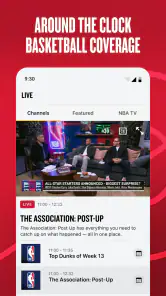
Highlights and recaps give the app a second job beyond scorekeeping. If I miss a game, a short video can show the defining plays more clearly than a written summary, and the news and feature stories help me follow developments around the league between games. Interviews and analysis add context for fans who like hearing more than the final result.
Video is also where I would be more careful about expectations. It is a richer way to catch up than reading a score, but it takes more time and attention, and watching clips on a mobile connection may not suit every moment. If I am in a quiet break with a reliable connection, video makes sense; if I am walking into a meeting or trying to save data, a score and a quick text update are the more practical choice.
More From Our News Desk

Weather by Xiaomi Review: Clear at a Glance, Less Clear Up Close

X Under Pressure: Can It Recover When Posting Goes Wrong?

Clash of Clans Is Won Between the Battles

Android Auto Makes the Case for Quieter Car Software

MobiOffice: Transforming Mobile Productivity with Seamless Integration

EA SPORTS FC™ Mobile Soccer: Redefining Mobile Sports Gaming
Who gets the most from it
I think this is a strong fit for regular NBA followers who want league-specific updates, especially people who follow a few teams and cannot watch every game live. It is also handy for fantasy-minded fans who want to check player performances, though I would still use a dedicated fantasy service for managing a team or making decisions that require tools beyond general NBA coverage.
Casual viewers can get value from it too, as long as they keep their use simple. Checking a schedule before a big game or looking at a final score the next morning is straightforward. On the other hand, someone who only wants broad sports headlines may be better served by a general sports app, and someone who wants to watch full live games should compare the available League Pass options and costs before relying on the app as a viewing subscription. The name and NBA focus do not mean every video or live viewing option is automatically included with a free download.
How it compares with other ways to follow basketball
Compared with a general sports-news app, the NBA app has a narrower focus, which is an advantage when the league is what I care about: schedules, game information, and NBA stories are not competing for attention with unrelated competitions. A live television or streaming service can be better for the full experience of watching a game, while a web search may be faster for a single isolated fact. I see this app as the middle ground: more connected than a quick search, but not necessarily a substitute for a full broadcast.
There is a trade-off in that specialization. If I want to follow several sports in one place, opening a dedicated NBA app may feel like an extra stop. If I mostly follow basketball, however, that focus can make it easier to keep team preferences and game updates in one routine. The best choice depends on whether I value a broad dashboard or deeper attention to the NBA.
Speed, busy moments, and reliability
For a live game, speed matters most when I am checking a close score or trying to catch up after stepping away. I would expect the app to be most useful as a quick reference, but I would not treat a mobile score display as a substitute for a live broadcast or assume every update reaches every device at precisely the same moment. Network conditions and the way I am using the phone naturally affect how quickly content appears. If a score seems behind, refreshing or reopening the relevant game view is a reasonable first step before deciding the app itself is at fault.
The busiest moments are also the ones when I would keep my workflow simple. During a final stretch, repeatedly switching between a game page, statistics, clips, and news can make the phone feel like a distraction rather than a companion. I would choose one view for the moment—score and play-by-play if I am following remotely, or a recap after the game if I am catching up later. That small habit makes the app more useful and helps avoid turning a quick check into a long chain of taps.
Reliability matters in a different way when I depend on alerts. I would not make a single notification my only plan for remembering a game; checking the schedule directly is a sensible backup, particularly if the timing matters to me. I also prefer to review team and player selections when alerts feel too frequent or too quiet. Personalization is helpful only when the settings reflect what I actually want to follow, and adjusting those choices is better than abandoning notifications altogether.
Storage, battery, and everyday phone use
Live information and video can place different demands on a phone. A quick score check is a lighter everyday task than watching multiple clips, so I would reserve video catch-up for moments when I have enough battery and a suitable connection. I cannot infer a particular device’s performance from the app’s league focus alone; older or more constrained phones can behave differently from newer ones, especially when several apps are open or the connection is unstable.
If the app feels sluggish, I would first distinguish between a slow connection and a slow interface. A score page that takes time to populate on weak service does not necessarily mean the whole app is unstable. Closing other demanding apps, checking the connection, and returning to the game view are basic steps worth trying. For a long trip, I would also avoid assuming that video will be convenient throughout; text-based updates are the safer way to keep up when connectivity or battery life is uncertain.
Cost and what to consider before relying on it
The app itself is free, and it is rated for Everyone, but optional purchases range from under a dollar to several hundred dollars per item. That is a wide span, so I would read the purchase details on the screen before confirming anything and distinguish the free app from paid offerings. If my goal is just to check scores and read league news, I would start with those everyday uses and only investigate paid viewing if I know I want that kind of access.
Its audience is substantial: it has more than ten million installs, an average rating of 4.4 from around 240,000 ratings, and about 7,900 written reviews. Those figures suggest many people use it, but they do not tell me whether it matches an individual fan’s habits or device. I would weigh the app by the tasks I need most—following a team, checking scores, or watching games—and not treat popularity as a promise that every feature is right for me.
The app was released on October 27, 2020. That history makes it an established way to access NBA coverage, but the more useful question for me is whether its current combination of updates, video, and optional purchases fits the way I follow the league. I would install it for the convenience of having game information and NBA-focused coverage together, then decide whether any paid viewing is worthwhile only after checking the current options in the app.
Following games without making the phone the whole experience
Have you ever found yourself constantly searching for the latest updates on your favorite basketball team or player? Well, look no further because the NBA: Live Games & Scores app is here to keep you in the loop with all things basketball. Whether you're a hardcore fan or just a casual viewer, this app promises to deliver a slam dunk experience.
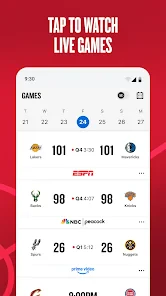
One of the most impressive features of the app is its ability to provide real-time scores. Imagine sitting at work or on a crowded train, yet being able to catch up on every basket and buzzer-beater happening in the NBA. The app's interface is sleek, ensuring that you get a seamless experience without any lag.
All Your Favorite Teams in One Place
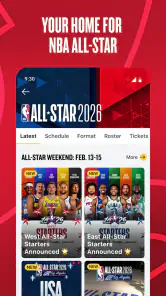
Ever missed a game because you couldn't keep track of the schedule? This app's got your back. With its comprehensive schedule feature, you can easily keep track of all upcoming games. Just select your favorite teams, and you'll receive notifications about their game times and scores. It's like having a personal assistant dedicated to basketball!
Moreover, the app provides detailed box scores and play-by-play updates. This means you can analyze each player's performance as if you were courtside. It's an absolute dream for those who love to dive into the statistics of the game.
Watch Highlights and Recaps
Can't watch the game live? No worries! The app offers video highlights and recaps of every game. Now, you can relive those epic moments, whether it's a jaw-dropping dunk or a game-winning three-pointer. The videos are high quality, ensuring you don't miss a single detail.
On top of that, the app includes interviews and expert analysis, giving you insights straight from the locker rooms and commentary boxes. It’s like having a front-row seat to all the action without ever leaving your couch.
Customizable Experience
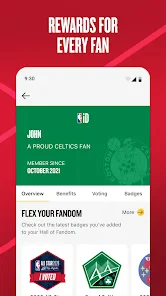
What sets this app apart is its customizable experience. You can tweak the settings to ensure that you only receive notifications and updates about the teams and players you care about. It's a personalized basketball experience tailored just for you.
Not only does the app cover live scores and highlights, but it also offers news and feature stories. So, if you're interested in player trades, injury updates, or even off-court drama, this app has it all covered. It’s like having your own basketball news channel right in your pocket.
To sum it up, the app is a useful companion for any basketball enthusiast who wants a convenient way to follow the NBA. It's packed with features that make keeping up with the league easier and more enjoyable. I would recommend it to fans who value quick updates and league-specific coverage, while anyone mainly seeking full-game viewing should check the available options and costs first. Used for the right job, it makes it easier to stay connected with the action without needing to watch every minute.
NBA: Live Games & Scores Frequently Asked Questions
Can I use NBA: Live Games & Scores to follow games when I’m away from home?
Yes. The app is designed to keep NBA information within reach, so you can check scores and follow game-related updates while away from home. A reliable internet connection is important for live updates and streaming features. If you plan to watch a game, consider your connection and whether NBA League Pass access is available for the content you want.
Do I need an NBA League Pass subscription to use the app?
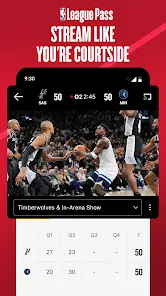
You can use the app for NBA access without necessarily subscribing, including following scores and news. NBA League Pass is the route for live games, and streaming access may require a subscription or an in-app purchase. The app is free to download, but some premium content comes at an additional cost, so check the subscription options before relying on it for viewing.
What devices and operating systems can I use with NBA: Live Games & Scores?
NBA: Live Games & Scores is a sports app for Android and iOS, so it is intended for use on supported phones and tablets running those platforms. Before downloading, check that your device can install the app through its app store and has a reliable internet connection, particularly if you plan to follow live updates or use NBA League Pass features.
Who makes NBA: Live Games & Scores, and is it suitable for all ages?
The app is developed by NBA Properties, Inc. and is rated Everyone, making it suitable for a broad audience, including younger basketball fans. It brings NBA content together in one place, with access to scores, news, and game-related features. Its audience size is reflected in a 4.4 average from around 240,000 ratings.
What features does the NBA: Live Games & Scores app offer?
The NBA: Live Games & Scores app provides live updates, real-time scores, and stats for all NBA games. Users can watch game highlights, follow their favorite teams and players, and receive personalized notifications. Additionally, the app offers in-depth analysis, team standings, and news updates to keep fans informed throughout the season.
Pros
- Real-time updates on games and scores.
- Detailed player and team statistics.
- User-friendly interface for easy navigation.
- Customizable alerts for favorite teams.
- Access to video highlights and recaps.
Cons
- Requires stable internet connection.
- Frequent ads can disrupt experience.
- Limited features in free version.
- Occasional app crashes reported.
- High data usage for video content.
- Category
- Sports
- Version
- Varies with device





