File Commander Manager & Vault
- 11.05K
- 4.2
- Installs
- 100.00M
- Price
- Free

Screenshots

Analysis by Reviewed
I reach for a file manager when the item I need is somewhere between a download, a message attachment, a cloud folder, and a photo library. File Commander Manager & Vault is designed to bring those jobs together, and its appeal is less about replacing every app on my phone than about giving me one place to sort, find, and handle files. I find that approach especially useful when work and personal documents are mixed across different sources.
That quick-find promise matters most in ordinary situations: I might download a document while travelling, save a photo from a message, then need to attach the right file to an email later. A file manager is useful when it gives me one place to browse those different kinds of content rather than making me remember which app created each item. File Commander is a business app from MobiSystems, and its broad toolkit is aimed at people who want that central workspace without learning a complicated system.
Simplifying File Management
First off, what caught my eye was how user-friendly the File Commander Manager & Vault interface is. As someone who’s not exactly a tech wizard, I appreciated not having to dive into a manual just to figure out where things are. The layout is clean and intuitive, making it easy to navigate through various options.
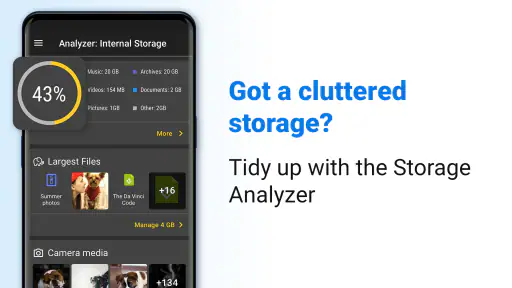
One feature I absolutely loved is the file categorization. Whether it’s documents, images, videos, or music, everything is neatly categorized. This means no more scrolling endlessly through your gallery to find that one PDF you downloaded ages ago.
Those categories are most helpful when I know what a file is but not exactly where it was saved. If I remember that it was a document, I can start there instead of browsing folders one by one. For a less obvious item, such as a renamed attachment or an old download, folder browsing and search still matter; categories are a shortcut, not a substitute for understanding where files live. I’d use the search field with a distinctive word from the filename, then check the surrounding folder before moving or deleting anything.
Making File Categories Work for You
A useful habit is to treat categories as a starting point, then use folders to make decisions. If I find several similarly named documents, I check their folder and context before choosing one to share. That quick check helps avoid sending an outdated draft simply because it appeared near the top of a category view.
I’d also use consistent filenames for recurring paperwork. Adding a clear subject or month to a name makes later searches more reliable than depending on memory or scrolling through a long list. This matters most for receipts, forms, and work attachments that arrive through different apps and end up in separate locations.
More From Our News Desk

Weather by Xiaomi Review: Clear at a Glance, Less Clear Up Close

X Under Pressure: Can It Recover When Posting Goes Wrong?

Clash of Clans Is Won Between the Battles

Android Auto Makes the Case for Quieter Car Software

MobiOffice: Transforming Mobile Productivity with Seamless Integration

EA SPORTS FC™ Mobile Soccer: Redefining Mobile Sports Gaming
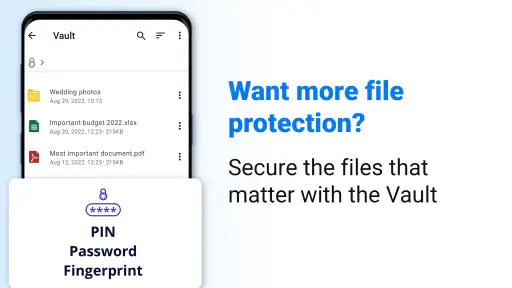
Vault: Your Personal Safe
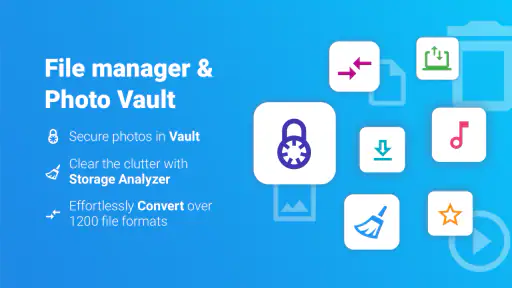
Now, let’s talk about the Vault feature. Think of it as your personal digital safe. Any sensitive files you don’t want prying eyes to see can be securely stored here. The encryption is top-notch, ensuring your data stays private. I tested it with some personal documents, and it felt reassuring to know they were protected.
Setting up the Vault was a breeze. Just a quick password setup, and you’re good to go. It’s a lifesaver for anyone who values their privacy.
I’d treat a private vault as a useful layer for keeping selected items out of casual view, not as my only copy of important paperwork. Before moving anything sensitive, I’d keep a separate backup somewhere I trust and make sure I can remember the password. That small bit of planning avoids turning a privacy feature into a recovery headache if I later need the document on another device or after changing phones. For files that must be shared frequently, the extra step of retrieving them from a protected area may also be less convenient than keeping a working copy in an ordinary folder.
Choosing What Belongs in the Vault
The Vault is a better fit for files I consult occasionally than for documents I need to send or edit several times a day. For example, I might keep a personal scan there, but retain a separate, ordinary working copy of a form I’m actively completing. I’d be deliberate about which version is current so I don’t accidentally share an older copy.
It is also worth thinking through access before placing something out of sight. If I expect to need a document while away from my usual device, I want to know where its backup is and how I’ll retrieve it. A private area can reduce casual exposure, but it doesn’t replace a sensible backup routine or careful control of the device itself.
Cloud Integration and More
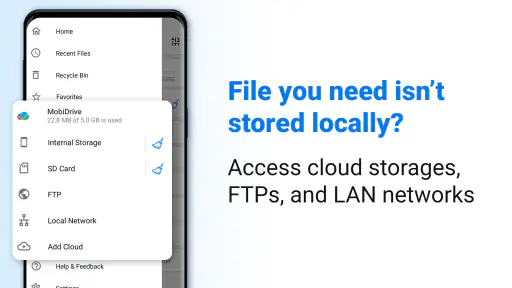
One of the standout aspects of File Commander is its seamless integration with cloud services. Whether you’re a Google Drive, Dropbox, or OneDrive user, you can easily sync and manage your files across platforms. This is a game-changer for those of us who hop between devices throughout the day.
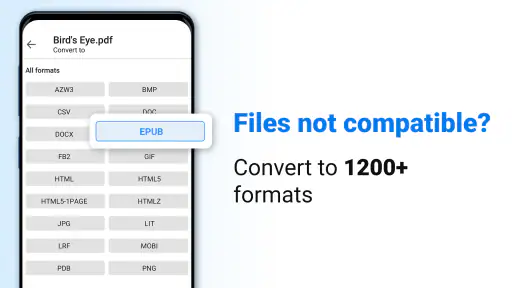
Another handy feature is the file converter. This nifty tool lets you convert files to different formats without needing a separate app. I tried converting a PDF to a Word document, and it worked like a charm.
A practical workflow is to use cloud storage for documents you need in more than one place, while leaving large or temporary items in local folders until they are actually worth keeping. That distinction helps prevent a tidy-looking file manager from becoming a second, cluttered cloud archive. I’d also open a converted document and check its layout before sending it on: conversion can be convenient, but complex formatting, tables, or scanned pages may not come through exactly as expected. For basic edits and routine office files, having the conversion option nearby can save a trip to another app; for precise publishing work, a dedicated document editor is the safer choice.
A Practical Cloud-and-Conversion Routine
When I’m preparing an attachment for someone else, I’d first locate the original, make sure it is the right version, and then convert only if the recipient needs another format. After conversion, I’d reopen the new file and check the pages that matter rather than trusting the extension alone. This is particularly sensible for forms with tables or documents where spacing affects readability.
Cloud access is most valuable when it solves a real handoff problem: for instance, finding a document on the phone that I last saved from another device. It is less compelling if I use only one cloud service and already handle all sharing inside that service’s app. In that case, File Commander can still be a handy general file browser, but it may not need to become my main place for managing shared work.
Performance and Usability
Performance-wise, File Commander is solid. It’s quick, responsive, and didn’t crash on me once during my trial. It doesn’t hog your device’s resources, which is a big plus if you’re like me and always running low on storage.
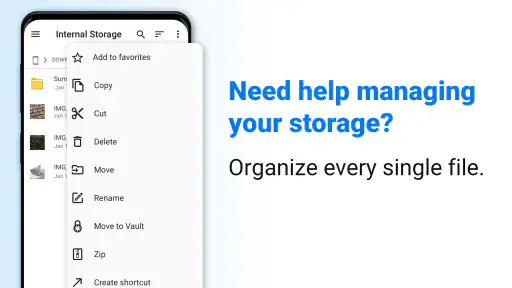
Usability is where this app truly shines. With its simple drag-and-drop feature, moving files around is a piece of cake. It’s also got a search function that’s both fast and accurate, helping you find what you need without the hassle.
Speed expectations should stay practical: browsing a familiar folder and locating a clearly named file are different from sorting a crowded collection or working with cloud content over a slow connection. When I’m moving a group of files, I’d do it in smaller batches and confirm the destination before deleting the originals. That makes mistakes easier to spot and reduces the risk of losing track of an important item. Drag-and-drop is handy when arranging files, but it rewards care; copying first is a sensible choice for anything I cannot easily replace.
For heavier use, such as organizing downloads, checking cloud documents, and converting a file in one session, the benefit is having those jobs together rather than repeatedly switching tools. The trade-off is that a file manager with extra services can feel busier than a lightweight browser built into a phone. If I only need to open a recent download now and then, the default file app may be enough. If I regularly move work between storage locations, File Commander’s broader approach is more useful.
Keeping Busy Sessions Manageable
A realistic day might involve downloading a meeting document, locating it by category, moving it into a work folder, and then finding a cloud copy when I need it on another device. Keeping each step small makes it easier to notice whether I’m handling the local original or a cloud-stored version. I wouldn’t start a large cleanup while also trying to convert and share several files; doing one task at a time makes mistakes easier to catch.
When a transfer seems slow, I’d first check whether the file is local or depends on a cloud connection, then give the current operation time to finish before starting another. That simple distinction helps set realistic expectations: a file manager can organize access, but it cannot remove delays caused by a weak connection or a large collection. For important moves, I prefer to verify the destination before clearing the source.
Choosing It for Your Device and Routine
File Commander is free to install, and it has a 4.2 average from around 921,000 ratings, with more than 100 million installs. It is rated for Everyone and supports Android 7.0 and up. Those figures suggest a widely used option, but they don’t guarantee that every feature will feel equally smooth on every device. On an older or nearly full phone, I’d keep the file collection manageable, avoid starting several large transfers at once, and leave room for temporary working files. The app itself cannot make a slow connection or a crowded device behave like a newer one.
Compared with a phone’s built-in file browser, this app makes more sense if you want cloud accounts, a private area, and extra file tools gathered in the same place. A basic browser is often the simpler pick for occasional folder checks and usually asks less of you in terms of setup. A cloud provider’s own app can be better when the main job is collaboration or managing shared folders within that one service. I’d choose File Commander when I need a general-purpose organizer across local and cloud files, rather than when I want a specialized cloud workspace.
There are optional in-app purchases, priced from $0.99 to $49.99 per item, so I’d check what an upgrade offers before paying and start with the free experience to see whether the features I actually use are already covered. The app first appeared on November 6, 2012, and MobiSystems has built it around more than simple folder browsing. For me, the right question is not whether it has the longest feature list, but whether its vault, cloud access, and file tools solve a recurring problem in my own routine.
Who Benefits Most—and Who May Prefer Something Else
I’d recommend it to someone who often gathers documents from different sources, wants to browse local folders and cloud files in one place, and values having a private area available for selected items. It can be particularly useful for a person who handles forms, receipts, and attachments on a phone but doesn’t want to rely on the gallery or downloads screen to keep everything findable.
I’d skip it if my needs were limited to opening the occasional download, or if I preferred a minimal file browser with no extra tools to learn. Someone whose work revolves around collaboration in a single cloud service may be better served by that provider’s own app. And if the priority is detailed document editing, layout control, or a dependable archive with a carefully managed recovery plan, a dedicated editor or backup solution is a better companion than expecting a file manager to cover everything.
Final Thoughts
So, is File Commander Manager & Vault worth it? If you’re looking for a reliable, user-friendly app to manage your files and keep them safe, I’d say definitely give it a shot. It’s packed with features that cater to both casual users and those who need a bit more from their file manager.
From its straightforward interface to its robust security features, this app is designed to make your digital life easier. And honestly, who doesn’t need a little more simplicity in their life?
My performance verdict is positive for everyday organization, with the sensible caveat that large collections, cloud transfers, and complex conversions call for patience and a quick check of the result. I’d recommend it to someone who often handles documents and wants local browsing, cloud access, and a place for private files in one app. I’d skip it if I only open an occasional download, prefer the smallest possible tool, or need advanced document editing and dependable archival recovery above all else. Used with backups and careful file moves, it can make routine housekeeping feel less scattered.
Ready to dive into a more organized digital world? Check out File Commander Manager & Vault on your app store and start managing your files like a pro.
File Commander Manager & Vault Frequently Asked Questions
What can I use File Commander Manager & Vault for besides browsing folders?
File Commander Manager & Vault is designed to bring everyday file tasks together in one app. Its focus includes exploring files and folders, managing cloud storage files, and hiding private photos in a vault. That can be useful if you prefer to handle documents and personal media from a single place rather than switching between several file-related apps.
Can I hide private photos with File Commander Manager & Vault?
Yes. Hiding private photos is part of the app’s stated purpose, alongside file management and cloud storage browsing. The vault is intended for keeping selected personal files separate from ordinary browsing. If this is your main reason for downloading, consider whether the app’s vault workflow fits the way you want to organize and access private photos.
Will File Commander Manager & Vault work on my Android device?
The app requires Android 7.0 or later, so check your device’s operating-system version before downloading. File Commander Manager & Vault is an Android app from MobiSystems, and it is rated Everyone. Its general file-browsing and organization focus can suit people who want to manage files from one place, whether they are organizing personal items or working with business files.
Is File Commander Manager & Vault free to download?
File Commander Manager & Vault is free to download, so you can try its file-management tools without paying upfront. It also offers in-app purchases, with options ranging from $0.99 to $49.99 per item. Consider which features you need before making a purchase, and check the app’s purchase details before confirming anything.
What devices and users is File Commander Manager & Vault intended for?
File Commander Manager & Vault is an app in the business category from MobiSystems, and it is rated Everyone. It requires Android 7.0 or later, so check your device’s operating system before downloading. The app has been available since November 6, 2012, and its general file-browsing and organization focus can suit people who want to manage files from one place.
Pros
- Intuitive user interface for easy navigation.
- Comprehensive file management features.
- Built-in vault for secure file storage.
- Cloud storage integration for backups.
- Supports a wide range of file formats.
Cons
- Contains ads in the free version.
- Advanced features require a premium upgrade.
- Some features are complex for beginners.
- Occasional performance lags reported.
- Limited customer support options available.
- Category
- Business
- Version
- Varies with device













