Duo Mobile
- 6.06K
- 4.5
- Installs
- 10.00M
- Price
- Free

Screenshots
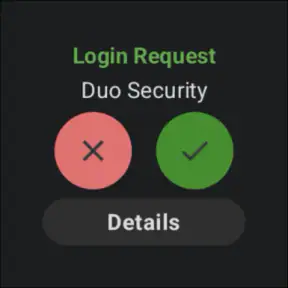
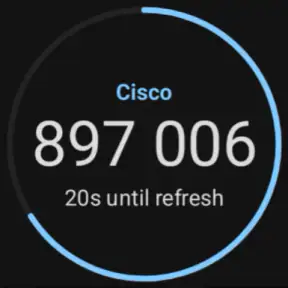
Analysis by Reviewed
When I decide whether to trust an authentication app, I separate two questions: does it make sign-ins easier to protect, and can I tell what I’m being asked to approve? Duo Mobile is designed to help with the first by serving as a second step for accounts that use Duo. That role is useful, but it also means the app is only one part of a wider sign-in process: the service you’re accessing decides how verification works.
That distinction matters in practice. Installing an authenticator does not automatically secure every account on a phone, and a familiar app name should not make an unexpected approval feel routine. I treat each sign-in request as a decision to check, not as a button to tap on autopilot. The app can make an account’s extra verification step convenient; it cannot make a weak password or a careless approval harmless.
What trust looks like during a sign-in
The practical trust question is whether I can connect a prompt with an action I just started. If I am logging in on my own laptop and a request appears, that context makes sense. If I am not signing in, I would not approve it simply because it arrived on my phone. This small habit is more valuable than treating push approval as a shortcut that deserves no thought.
I also keep expectations grounded: Duo Mobile is a business-oriented authentication app from Duo Security LLC, not a general account manager or a replacement for every security measure. Its usefulness depends on the services I need to access and on how those services have configured verification. Before relying on it for a particular account, I check that account’s own sign-in setup and recovery instructions so I know what to expect if my phone is unavailable.
Choices, friction, and a cautious setup
When a service offers more than one verification method, I weigh speed against the situation. A push is handy when my phone is nearby and I initiated the login; entering a code can be a more deliberate alternative when a prompt is inconvenient. I avoid making assumptions about which choices an account supports, because that depends on the organization or service rather than on the app alone.
My setup advice is simple: add the account through its own enrollment process, then test a normal sign-in while you still have access to the setup instructions. Keep the phone’s screen lock in place, and learn the account’s recovery route before you need it. If the account belongs to work or school, its administrator may set the available methods and rules, so follow those directions rather than trying to improvise.
That cautious approach suits the app’s purpose. It is free, carries an Everyone age rating, and has been available since May 3, 2011. Its current version is 4.102.0, with a minimum OS requirement of 11. Those details make it easy to assess basic fit, but the meaningful test for me is whether the organizations and accounts I use actually support its verification flow.
More From Our News Desk

Weather by Xiaomi Review: Clear at a Glance, Less Clear Up Close

X Under Pressure: Can It Recover When Posting Goes Wrong?

Clash of Clans Is Won Between the Battles

Android Auto Makes the Case for Quieter Car Software

MobiOffice: Transforming Mobile Productivity with Seamless Integration

EA SPORTS FC™ Mobile Soccer: Redefining Mobile Sports Gaming
Why Duo Mobile Feels Like a Digital Guardian
First things first, installing Duo Mobile is like a breeze on a summer day. It's available on both Android and iOS, and you can grab it from the respective app stores. Once it's on your device, setting it up is a walk in the park. The app guides you step-by-step, making you feel like a tech wizard even if you're not.
Now, why do I call it a digital guardian? Because, my friend, it adds an extra layer of security to your online accounts. How? By asking for a second form of verification every time you log in. So, even if someone sneaky gets your password, they're still locked out without that second factor. It’s like having a secret handshake only you know.
The User Experience: Smooth as Butter
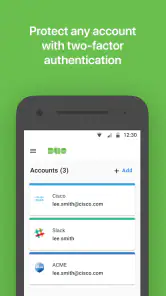
Using Duo Mobile is as smooth as butter. The interface is clean and intuitive, so you won't find yourself lost in a maze of confusing options. You can easily add new accounts by scanning a QR code, and the app takes care of the rest. It's like having a personal assistant who never gets tired.
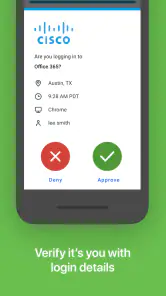
One of the cool features is the push notifications. Instead of typing in a code, you get a notification on your phone, and with a tap, you’re in. It's quick, efficient, and feels like you're living in the future. Plus, it supports multiple accounts, so you can have all your online services secured in one place without breaking a sweat.
When Duo Mobile Becomes Your Best Friend
Imagine this: you're at a café, sipping on your latte, and suddenly remember you need to check your email. You open your laptop, hit the login button, and bam! Duo Mobile sends that push notification right to your phone. A quick tap and you’re in. It's seamless and reassuring, knowing that even in public Wi-Fi spots, you’ve got that extra shield of security.
Moreover, it integrates well with various services and platforms, so whether it's your social media, email, or work accounts, Duo Mobile has got your back. It’s like having a bodyguard who’s not just strong but also incredibly versatile.
In conclusion, Duo Mobile is more than just an app; it's peace of mind in the digital age. It’s reliable, easy-to-use, and a crucial ally in protecting your online presence. So, if you haven’t already, give it a try. Your future self will thank you for it!
Where its business focus makes a difference
The business category is not just a label here: Duo Mobile is especially relevant when an employer or school already uses Duo for access. In that setting, the app can be part of a familiar routine for signing into work tools, rather than another unrelated security utility. Duo has a 4.5 average from around 85,000 ratings, with roughly 6,100 written reviews and over 10 million installs. That broad adoption suggests many people encounter it as a practical sign-in companion, though popularity alone does not tell me whether a particular organization’s setup will suit me.
I would recommend it most readily to someone who needs to approve access to work or school accounts and wants a phone-based second step close at hand. It can also make sense for people whose other services explicitly support it. I would not install it expecting it to secure every personal account automatically: each service must offer compatible enrollment, and some may use a different authenticator or verification method.
A more useful way to handle approval prompts
Here is a small habit that improves the experience: begin the login yourself, then look at the phone prompt before responding. I check whether I was expecting it and whether the account I am trying to reach matches the moment. If I am busy or distracted, I wait until I can confirm the context instead of treating a notification as a harmless interruption. That pause is especially useful when signing in between meetings or while switching between personal and work devices.
Push approval is convenient, but convenience can also encourage reflexes. A code-based step, when the account provides one, asks me to move information between screens and can feel slower; that extra pause may be welcome when I want to be deliberate. Neither route is automatically best in every situation. I choose based on what the account supports, whether I initiated the login, and how much attention I can give the request.
Planning for a phone change or a disrupted day
A common practical question is what happens when a phone is replaced, lost, or temporarily out of reach. I would not wait for that moment to learn the answer. Before depending on Duo for an important account, I check the account’s recovery process and any instructions from its administrator. For a workplace login, the organization may control enrollment and recovery, so contacting its support channel is more sensible than assuming the app itself can restore access.
This is also why I treat a new-phone setup as an account-by-account task. I make sure I can still reach the organization or service that manages each login, then follow its directions to enroll the replacement device. Keeping recovery details somewhere accessible and secure can prevent a routine device change from turning into an urgent access problem. The exact steps depend on the account, so a quick check before changing phones is worthwhile.
How it compares with other verification habits
Compared with relying only on a password, a second factor adds a separate checkpoint, which is the main reason I would use Duo Mobile where it is supported. Compared with a text message or an authenticator that simply displays codes, its push-based flow can reduce typing during an ordinary login. That is a convenience comparison, not a claim that one method fits every service or threat model. The organization’s chosen setup determines what is available, and a code may be preferable when a push is not practical.
It is also different from a password manager. A password manager helps organize and fill credentials; Duo Mobile’s role is to support an additional verification step. Some people may need both kinds of tools, while someone looking only to generate codes for services that do not work with Duo should first check which authenticator those services accept. Picking an app because it is well known does not solve a compatibility mismatch.
Where the convenience has limits
The main trade-off is dependence on the phone and on the account’s configuration. If the device is out of battery, not nearby, or unavailable, a quick push-based login may no longer feel quick. That does not make the app a poor choice, but it does make recovery planning part of using it responsibly. I would be cautious about making it the only route into an important account without understanding what that account offers when the usual device is unavailable.
There is also a real boundary to what the app can protect. A second step helps only when the service has enabled it and when I reject requests I did not initiate. It does not replace careful password habits or turn every online interaction into a secure one. For someone who dislikes phone prompts, rarely signs in to supported services, or cannot use the required account workflow, another method offered by that service may be a better fit.
What I would check before relying on it
Before installing, I would confirm that the relevant account names Duo as an accepted verification method and that my device meets the minimum OS requirement. During enrollment, I would follow the account’s instructions rather than scanning a code from an unexpected message or an unfamiliar page. After setup, I would make one ordinary sign-in while I have time to resolve any confusion, then learn where the account’s recovery guidance is kept.
For someone deciding whether it is worth keeping, the answer is fairly straightforward: if work, school, or another service directs you to use Duo, it is a focused tool for that job. If you are choosing an authenticator independently, compatibility should come before reputation or convenience. The app is free, but the more important cost is the attention needed to enroll correctly and respond thoughtfully whenever access is requested.
My cautious verdict
Duo Mobile makes the most sense when it is part of an account system you already need to use. I like the idea of keeping verification close to the sign-in and having a push option for routine access, but I would not treat approval as a mindless tap or assume recovery will take care of itself. The app’s strongest case is a clear one: supported accounts, an enrolled phone, and a user who checks that each request matches an action they started.
If that describes your situation, I think it is a sensible, approachable companion for business and personal access where Duo is accepted. If you need a universal authenticator, a password manager, or a login method that does not rely on your phone, compare the options your accounts actually provide before committing. I would choose Duo Mobile for compatibility with a real sign-in need, not simply because adding another security app sounds reassuring.
Duo Mobile Frequently Asked Questions
What does Duo Mobile do when I sign in to a supported account?
Duo Mobile adds an identity-verification step to sign-ins for accounts and services that support it. Depending on the setup, you may approve a push notification or enter a passcode generated by the app. This extra check is intended to make it harder for someone to access an account using only a password. The service you are signing in to determines how Duo is configured.
Who develops Duo Mobile, and is it suitable for everyday users?
Duo Mobile is developed by Duo Security LLC and is a business-focused app with a simple security purpose: helping people verify their identity when signing in. Its role is easy to understand even if you are not familiar with security software, though the organization or service you use generally needs to support Duo for you to connect an account. The app is rated for Everyone.
What is Duo Mobile and how does it enhance security?
Duo Mobile is an authentication app that provides two-factor authentication (2FA) to enhance security for your online accounts. It generates passcodes for login and can receive push notifications for easy, one-tap verification. By requiring two forms of identification, Duo Mobile significantly reduces the risk of unauthorized access to your accounts, making it a critical tool for protecting personal and sensitive information.
Is Duo Mobile available for both Android and iOS devices?
Yes, Duo Mobile is available for both Android and iOS devices. You can download it from the Google Play Store for Android devices and the Apple App Store for iOS devices. This cross-platform availability ensures that you can secure your accounts regardless of the type of smartphone or tablet you use, making it versatile and accessible for all users. Before downloading, check that your device meets the app’s operating-system requirements.
How easy is it to set up and use Duo Mobile?
Setting up Duo Mobile is straightforward. After downloading the app, you can easily link it with your accounts by scanning a QR code provided by the service you wish to secure. The user-friendly interface allows for seamless navigation, and the ability to receive push notifications makes the verification process quick and hassle-free, even for those who are not tech-savvy. You will need a supported account or service to complete the linking process.
Pros
- Easy to set up and use.
- Supports multiple accounts.
- Integrates with many services.
- Offers biometric authentication.
- Minimal battery usage.
Cons
- Limited offline functionality.
- No cloud backup option.
- Occasional sync issues.
- Basic user interface design.
- Limited customer support.
- Category
- Business
- Version
- 4.102.0











