Zedge™ Wallpapers & Ringtones
- 952.82K
- 4.7
- Installs
- 500.00M
- Price
- Free

Screenshots
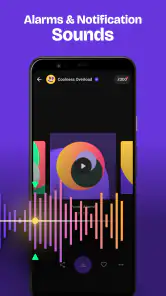
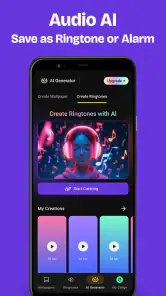
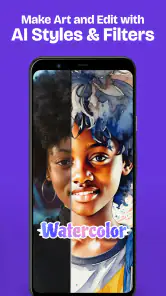
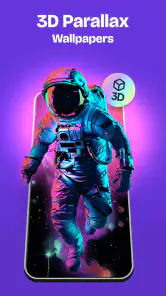
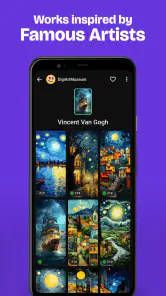
Analysis by Reviewed
I judge a personalization app by a simple question: can it help me find a look or sound that feels like mine without turning a quick change into a project? Zedge™ Wallpapers & Ringtones is built around that everyday choice, bringing visual backgrounds and ringtone options together rather than making me hunt through separate apps. It’s a free app from Zedge, rated for teens, and version 9.0.1 requires Android 9 or later. Its 4.7 average from around 17 million ratings and more than 500 million installs suggest it has broad appeal, though popularity alone won’t tell you whether its style suits you.
Choose based on how you personalize
If you like changing your screen with the season, your mood, or a new interest, browsing a large library is more useful than a small hand-picked set. If you rarely change your wallpaper and prefer a carefully curated collection, your phone’s built-in options or a focused wallpaper app may be simpler. I’d also ask whether you want wallpapers, sounds, or both: Zedge is most convenient when you want to explore those choices in one place, while a specialist may suit someone who cares about just one of them.
One practical way to use it is to browse with a specific purpose instead of endlessly scrolling. For example, I might look for a calmer lock-screen image that keeps the clock easy to read, then choose a distinct ringtone for calls. A striking picture can look great in a preview but compete with icons or text once it is applied, so I’d check how it works with my actual home screen before settling on it. For sound, I’d listen with the volume I normally use and consider whether the tone will be appropriate in a shared office or on public transport.
The Latest on Zedge™ Wallpapers & Ringtones
Customization Galore
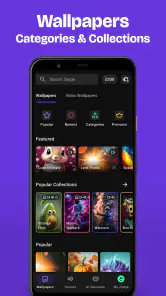
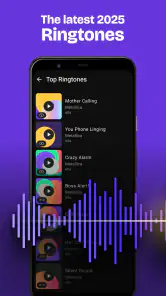
If there’s one thing Zedge™ Wallpapers & Ringtones excels at, it’s variety. I mean, seriously, the app is like the Netflix of phone customization. You’ve got thousands of options to choose from, whether you're hunting for that perfect HD wallpaper or a snazzy new ringtone. And the best part? It’s updated regularly, so there’s always something fresh to catch your eye.
User-Friendly Experience
Let’s talk about ease of use, because who has time for complicated interfaces? Navigating through Zedge is as smooth as butter. With its intuitive layout, you can effortlessly browse through categories, search for specific themes, or even discover trending selections. Plus, the app doesn’t bombard you with ads every five seconds, which is a huge win in my book.
Quality Over Quantity
While Zedge offers a plethora of options, it doesn’t skimp on quality. Whether you’re setting a wallpaper for your lock screen or picking a ringtone that won’t annoy your coworkers, you’ll find high-quality choices across the board. I’ve tried a bunch of apps before, and let me tell you, not all of them hit the mark when it comes to clarity and sound quality. But Zedge? It’s got your back.
Community and Creativity
One of the more unique features of Zedge is its community aspect. Users can upload their own creations, which means you’re not just limited to what the app’s developers think is cool. This opens up a whole new world of creativity and personalization. Ever wanted to create your own ringtone and share it with the world? Zedge makes it possible!
More From Our News Desk

Clash of Clans Is Won Between the Battles

Android Auto Makes the Case for Quieter Car Software

MobiOffice: Transforming Mobile Productivity with Seamless Integration

EA SPORTS FC™ Mobile Soccer: Redefining Mobile Sports Gaming

How Microsoft OneDrive Became a Mobile Productivity Giant

How Google Translate Breaks Language Barriers Effortlessly
Small choices that make a difference
A useful habit is to save a few contenders before committing, then compare them against your screen layout and daily routine. A busy image may be better suited to a lock screen than a home screen crowded with app icons. Likewise, a ringtone that sounds distinctive in a quiet room may be too attention-grabbing at work. Treating wallpapers and sounds as separate choices helps: matching them can make a phone feel coordinated, but there’s no need to make every part of its look follow one theme.
For a weekday commute, I might choose a low-key background that is easy to glance at and a ringtone I can recognize without turning the phone’s volume up too high. At home, I could switch to something more colorful or playful. That kind of small, reversible change is where a broad personalization library is handy: I can experiment without having to redesign the phone or settle on one permanent style.
Where another option may be better
The main trade-off with a large catalog is the work of choosing. When many results catch your eye, browsing can take longer than using a familiar image already saved on your device. Someone who wants a minimal interface, a tightly curated aesthetic, or only a few dependable sounds may prefer built-in phone settings or a narrower specialist app. Those alternatives can reduce choice overload; Zedge makes more sense when discovery is part of the fun.
There is also a difference between finding a sound and knowing it will fit every situation. I’d preview a ringtone before using it as a default, especially if calls might come through in quiet places, and keep a more restrained option in mind. For wallpapers, I’d favor readability over a visually busy image if I rely on seeing notifications quickly. These checks take little effort and make personalization feel useful rather than purely decorative.
Cost, switching, and the audience it suits
The app is free to download, with optional in-app purchases listed from $0.49 to $399.99 per item. I’d treat paid choices as optional rather than assume I need to spend to try the basic idea of changing a wallpaper or sound. If you’re comparing it with your phone’s built-in personalization tools, the real switching cost is mostly time: browsing, choosing replacements, and setting them up. You can keep your current favorites while you explore, so trying a different look needn’t mean giving up what already works.
I’d recommend it to anyone who enjoys trying different backgrounds and tones, especially if having both kinds of customization in one app is appealing. It may be a poor fit if you want a very small, editorially selected range or have no interest in changing your phone’s appearance. The teen content rating is worth keeping in mind for families choosing apps together; I would still make choices about what to browse and apply with the intended user in mind.
A practical first session
When I try a customization app, I like to make one change at a time. I’d begin with a wallpaper and use the phone normally for a day before deciding whether it works with widgets, icons, and notification text. Then I’d audition a ringtone in a quiet room and again in the sort of place where I need to notice calls. That simple sequence makes it easier to tell whether I genuinely like each choice, instead of being swept along by a preview or a matching theme.
There’s also a useful distinction between a wallpaper that looks impressive full-screen and one that remains comfortable as a daily background. High contrast, detailed artwork, or bright colors can be enjoyable, but they may make the home screen feel cluttered when app icons sit on top. If quick access matters more than visual impact, I’d pick an image with calmer areas behind the icons and reserve a busier design for a screen I see less often. That’s a small adjustment, but it can make a downloaded image feel deliberately chosen rather than merely new.
How it compares with other ways to customize
Compared with built-in phone settings, Zedge is the option I’d reach for when I want more to browse and want wallpapers and sounds gathered together. Built-in choices are usually the straightforward route if I already have an image or tone in mind and just want to apply it. A wallpaper-only service can make more sense for someone who cares about screen art but has no interest in changing sounds, while a ringtone specialist is the more focused choice for someone who wants to spend their time on audio. The trade-off is simple: Zedge offers a broader path through personalization, while narrower options can make a specific task feel less distracting.
I wouldn’t assume that every item in a large collection will fit my taste equally well. The benefit is the chance to discover something outside the handful of images I usually choose; the cost is having to judge each result for suitability. Search and category browsing are useful when I already have a theme in mind, but if I’m not sure what I want, I’d set a time limit or pick a clear goal before opening the app. That keeps discovery enjoyable rather than turning a quick refresh into a long scroll.
Keeping choices useful over time
A good personalization choice should still work after the novelty wears off. I’d keep a reliable, easy-to-recognize ringtone for everyday calls and use a more playful sound only if it remains practical in public. Similarly, I’d avoid changing the background every time I see a new option unless I actually want that constant rotation; one image that supports readability can be more satisfying than a series of striking but distracting picks. The app is most valuable when its range helps me find a choice I’ll enjoy living with, not simply one I like for a few seconds.
For households sharing a device or helping a younger user personalize one, I’d make the browsing and selection part of the decision rather than treating the teen rating as a substitute for judgment. The app’s broad range can be a plus when different people want different styles, but it also means each person should choose with the intended audience and setting in mind. That applies to sounds as much as images: a tone that feels funny among friends may not be welcome in a classroom or workplace.
What to expect before installing
On Android, the minimum requirement is Android 9, so I’d check the phone’s software before planning a setup around it. The app is free to start using, while optional purchases range from $0.49 to $399.99 per item; that broad span is a reason to read each purchase prompt carefully and decide whether an item is worth it to you. I’d approach the catalog with the expectation that browsing and choosing are part of the experience, rather than expecting a tiny, preselected set of finished looks.
My recommendation comes down to whether you enjoy the act of choosing. If I want one dependable background and never change it, my phone’s existing tools are probably enough. If I like matching a screen to a season, a hobby, or a change in mood—and I’m willing to preview options thoughtfully—Zedge gives me a convenient place to explore visual and audio choices together. I’d skip it if I find large catalogs tiring or want a tightly controlled selection, but for an experimental personalizer, the range is the point.
In conclusion, if you’re looking to breathe new life into your phone’s interface, Zedge is your go-to app. It’s got everything you need to keep your device looking and sounding fresh. With its vast collection, user-friendly design, and community-driven creativity, it’s no wonder so many people swear by it. So, go ahead and give it a try—I promise, your phone will thank you!
Making a choice that lasts beyond the preview
One detail I’d consider before settling on an image is how often I actually see each screen. A lock screen is viewed in short bursts, so a more expressive picture can work there even if it would feel distracting behind a full set of icons. For the home screen, I’d prioritize a visual center that leaves the areas around icons and widgets calm. This approach lets me use different styles for different purposes instead of rejecting an image simply because it does not suit every screen equally.
For sound, I’d think about recognition as well as taste. A tone that is pleasant but blends into other people’s phones may not help me notice an incoming call. I’d compare a few options at the same listening level, then choose one that is distinct without being startling. If I share spaces with other people, a restrained default is more considerate, and a more unusual sound can remain an occasional choice rather than the tone I use everywhere.
Who should keep looking
I would skip this app if the goal is simply to apply a photo I already have, or if I want a narrow, carefully controlled collection with almost no browsing. In those cases, the phone’s own settings or a single-purpose tool can get me to the finish line with less exploration. Zedge suits someone who treats choosing as part of the enjoyment; it is less compelling when the choice itself feels like work.
My clearest recommendation is to start with one specific need: a more readable background, a seasonal change, or a ringtone that is easier to recognize. Browse with that goal, test the result in ordinary use, and keep it only if it improves the phone rather than just looking appealing in the selection screen. That makes the app’s breadth useful without letting the catalog decide for you.
Zedge™ Wallpapers & Ringtones Frequently Asked Questions
What kinds of content can I browse in Zedge™?
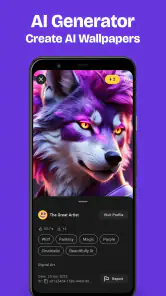
Zedge™ brings together visual and audio options for phone personalization, including wallpapers and ringtones. The app’s summary also describes millions of items to discover and the ability to make your own content with AI. This gives you a choice between browsing existing creations and exploring a more creative approach when deciding how you want your phone to look or sound.
Can Zedge™ help me find a wallpaper that fits my phone’s style?
The app is built around browsing wallpapers and ringtones, so you can look through its visual choices and decide which ones suit your preferences. Zedge™ also highlights AI creation, giving you another route if you want to make something rather than select an existing item. Since style is personal, exploring the available wallpapers is the best way to judge whether the library fits you.
Can I use Zedge™ to make my own content with AI?
Yes. Zedge™’s summary highlights an option to make your own content with AI, adding a creative feature alongside its library of wallpapers and ringtones. You can explore it if you want something more personal than an existing selection. The app also supports user uploads, so browsing and creation are both part of its personalization appeal.
Does Zedge™ focus on phone personalization?
Yes. Zedge™ is a personalization app centered on wallpapers and ringtones, giving you a place to explore changes to your phone’s appearance and sound. Its library is complemented by an option to make your own content with AI. Whether you want a visual update, a different ringtone, or both, you can browse the available choices and see what suits your device.
Is Zedge™ available for Android and iOS?
Zedge™ is available for Android and iOS devices. Before downloading, check that your phone runs operating-system version 9 or later, which is the stated minimum requirement. Once installed, you can explore its wallpapers and ringtones and choose content for personalizing your device. The way you apply a selected item may depend on your phone and its settings.
Pros
- Extensive library of wallpapers.
- Diverse ringtone options.
- User-friendly interface.
- Regularly updated content.
- High-quality downloads.
Cons
- Contains ads.
- Some content is premium.
- Limited customization options.
- Occasional app crashes.
- Requires internet connection.
- Category
- Personalization
- Version
- 9.0.1