Facebook Lite
- 136.12K
- 4.5
- Installs
- 1.00B
- Price
- Free

Screenshots
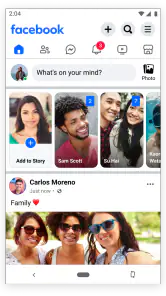
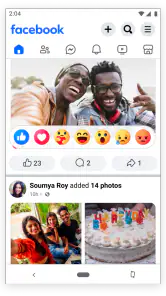



Analysis by Reviewed
I reach for Facebook Lite when I want to check in on Facebook without asking my phone to do more than the task requires. It is a social app from Meta Platforms, Inc., and its appeal is practical: a simpler way to keep up with friends and groups, especially when a connection is inconsistent or a device has limited resources. I would not call it a replacement for every part of the regular Facebook experience, but for everyday browsing, its lighter approach can be a sensible trade-off.
How the lighter approach feels day to day
The speed advantage is most noticeable when I open the app to do one small thing: read a post, leave a comment, or check a group update. A lighter app can feel more responsive on a modest phone than a fuller, more demanding one, though the network still matters. If a feed takes time to appear on a weak connection, that is not necessarily a sign that the app itself has stopped working; loading online content depends on the connection as well as the device.
For a realistic routine, imagine checking a neighborhood group while waiting for a bus, then replying to a friend before putting the phone away. Facebook Lite suits that sort of brief visit better than a session built around browsing every kind of media or polishing posts. If you mainly use Facebook to keep up with familiar people, groups, and basic updates, the pared-back experience may be enough. If your use revolves around richer presentation or features you expect in the full app, the compromise will be more noticeable.
The Latest on Facebook Lite
Where it helps—and where it asks for patience
The app is free to download, with in-app purchases listed from about twenty-nine cents to around one hundred eighty dollars per item. That does not make spending necessary for ordinary social browsing, but it is worth noticing that “free” does not mean every possible in-app item has no cost. It is rated Teen, so families should take that age guidance into account when deciding whether it suits a younger user.
Facebook Lite has an average rating of 4.5 from around thirty-seven million ratings and has been installed over a billion times. Those figures suggest that many people find a lighter Facebook option useful, but they do not guarantee that it will feel right on every phone or connection. Meta released it on March 15, 2018, and its long-running purpose remains easy to understand: offer access to Facebook with fewer demands on data and device resources.
Who should choose it
I would try it first on an older or entry-level phone, or when mobile data is something I need to use carefully. It can also make sense as a practical backup for checking Facebook when the regular app feels too heavy for the device or connection. Before switching completely, I would spend a few days using it for the tasks I actually care about—checking groups, reading updates, and replying—then decide whether anything I rely on is missing from the simpler layout.
Against the standard Facebook app, Lite prioritizes a leaner experience over a fuller presentation. Against other social apps, it has a different advantage: it keeps me in the Facebook network of friends and groups rather than asking me to move those conversations elsewhere. That matters if the people and communities I follow are already there. It is not the right choice just because it is smaller; someone who wants a polished, media-rich browsing experience may be happier with the regular app, while someone who wants less overhead may prefer this one.
More From Our News Desk

Clash of Clans Is Won Between the Battles

Android Auto Makes the Case for Quieter Car Software

MobiOffice: Transforming Mobile Productivity with Seamless Integration

EA SPORTS FC™ Mobile Soccer: Redefining Mobile Sports Gaming

How Microsoft OneDrive Became a Mobile Productivity Giant

How Google Translate Breaks Language Barriers Effortlessly
Have you ever found yourself scrolling endlessly on Facebook, only to feel your phone's battery drain faster than you can say "like"? Well, if you're nodding your head, then let me introduce you to Facebook Lite. This app is like the little sibling of the regular Facebook app, designed to be less demanding on your phone's resources while still keeping you connected to the world.
Lightweight but Mighty
Facebook Lite is particularly targeted at those who are living in areas with limited internet connectivity or those who have phones that just can't handle the bulk of the full Facebook app. What immediately struck me about this app is how small it is - we're talking megabytes instead of the hundreds that the standard app demands. Imagine having more space for your pics and music!
Despite its small size, it packs quite a punch. You can still do all the basic things like post status updates, comment on your friend's latest vacation photos, and even explore new groups.
Performance and Usability
One of the first things I noticed when I fired up the app was how fast it loaded. Seriously, I blinked, and it was up and running. The interface is straightforward and functional, which is a breath of fresh air if you're tired of apps that seem to require a PhD to navigate.
I've also found it to be incredibly efficient when it comes to data usage. If you're on a limited data plan or just want to save some MBs, this is definitely a plus. The app compresses data to make sure you aren't blowing through your plan just to see what your cousin's cat is up to.
What You Might Miss
Alright, let’s get real for a moment. While Facebook Lite covers most of the basics, it does leave out some of the flashy features of the full app. There are no stories, and the interface, while functional, doesn’t have the same sleek design. But hey, if you’re looking to save data and battery life, these might be small sacrifices.
Also, the app might feel a bit stripped down if you're used to the full Facebook experience. It's like going from a five-course meal to a tasty snack. But sometimes, that's exactly what you need, right?
Final Thoughts
In conclusion, Facebook Lite is a fantastic option for those who want to stay connected without all the extra baggage. It's efficient, fast, and incredibly user-friendly. If you’re someone who values performance over pizzazz, this might just be your new favorite way to access Facebook. So, why not give it a whirl and see if it fits your lifestyle?
A few practical trade-offs
One useful way to judge whether Lite fits is to notice what you do after opening Facebook. If your routine is mostly reading, reacting, and replying, the reduced interface can keep the app focused. If you often switch between several media-heavy tasks, you may find the simpler version less satisfying. I would treat it as a tool for staying connected, not as a promise that every screen will feel instant in every network condition.
For better results on a tight connection, I would keep visits purposeful: open the group or conversation I need, finish the task, and leave rather than repeatedly refreshing a slow feed. That is a general habit rather than a special setting, but it helps separate network delays from app performance. It also reduces the temptation to spend a long session loading posts I did not intend to see.
When another choice makes more sense
If the most important part of Facebook for you is a polished, feature-rich interface, the standard app is the more natural choice despite its heavier feel. If your goal is to follow a small number of public updates rather than interact with your Facebook friends and groups, another social platform may fit your routine better. Lite is most convincing when your existing Facebook connections matter and you want a less demanding way to reach them.
My overall take is that this is a useful option rather than a universal upgrade. It can make an older phone or limited connection feel more manageable, but it cannot remove the delays caused by a poor signal, and its stripped-down feel is a real compromise. I would install it when conserving resources matters more than having the fullest presentation, then keep the regular app only if its extra experience is genuinely worth the added load for me.
A useful way to test it before switching
I would make the first few sessions deliberately ordinary rather than trying to judge the app from one quick launch. Check the groups you visit most, reply to a message or comment, and look at the kind of posts you normally open. That gives you a better sense of whether the lighter presentation supports your actual routine, instead of simply feeling unfamiliar because the layout differs from the full Facebook app.
It is also worth paying attention to where the slowdowns happen. If the app opens promptly but a particular post or feed takes time to load, the wait may be tied to the connection or the content being requested. If the phone feels strained even while moving between simple screens, that is a stronger reason to favor a lighter option. I would avoid judging stability by one bad moment on a weak signal; repeat the same basic tasks later under a more reliable connection and compare the experience.
Everyday situations where Lite earns its place
For someone who checks a local group for a lost item, a community notice, or a change in plans, the main value is access to the people already sharing that information. I can open the group, read the relevant update, and respond without turning a quick check into a long browsing session. The same pattern works for keeping up with relatives who post on Facebook more often than they use messaging apps elsewhere.
It can also serve as a sensible second option when travelling or moving between places where reception varies. I would not expect any app to make an unreliable connection dependable, but a lighter interface can make brief checks less burdensome when conditions are not ideal. A practical habit is to load what matters, make the reply while the connection is available, and avoid repeatedly reopening a feed just to see whether it has changed.
Choosing between Lite, full Facebook, and other networks
The decision is less about which app is universally better and more about what you need to reach. The full Facebook app is preferable when its richer presentation and broader-feeling experience are central to how you use the service. Lite makes more sense when familiar groups and friends matter more than visual polish, or when you want to reduce the demands of a routine visit. Moving to another social network is only a real substitute if the people and communities you care about are active there too.
That distinction matters for families and community organizers as well as casual users. If important notices, conversations, or event updates live in Facebook groups, switching platforms may mean missing the very information you want. On the other hand, if Facebook is only an occasional source of general browsing and you prefer a more media-focused experience, the standard app—or a different service you already use—may be a better fit than Lite.
What to expect from a leaner setup
A common question is whether “Lite” means that every visit will be fast. I would not read it that way. Its lighter approach can help on a less capable phone and can be useful when data is limited, but posts still have to arrive over a network, and an inconsistent connection can make any online social app feel slow. The advantage is a more restrained way to access Facebook, not a guarantee that loading will never pause.
Another reasonable question is whether it can handle ordinary social tasks. For checking updates, posting, commenting, and exploring groups, it covers the basics I would expect from a Facebook companion. The trade-off becomes clearer when my routine depends on features or presentation that the full app offers and Lite does not emphasize. If those details matter, I would keep the regular app rather than assume the lighter edition is a complete substitute.
For a phone with limited storage or resources, trying Lite is a low-commitment way to see whether the balance suits you. I would pay attention not only to launch speed but also to how comfortably the app handles the few actions I repeat every day. The small but important test is whether I can find a group, understand the feed, and finish a reply without frustration. If those basics feel natural, the simpler design is doing its job; if I keep reaching for missing presentation or richer browsing, the extra lightness may not be worth the compromise.
In the end, I see Facebook Lite as a practical choice for people whose Facebook life is built around familiar connections and quick, purposeful visits. It is not a shortcut around bad reception or a perfect match for heavy media browsing, and that distinction helps set fair expectations. If you are curious, I would try it for the tasks you already do rather than switching based on the name alone. Keep it if it makes those tasks easier on your phone; choose the fuller app or another network if the simpler experience leaves too much of your routine behind.
Facebook Lite Frequently Asked Questions
Can I change my Facebook account’s privacy settings through Facebook Lite?
Facebook Lite is a way to access Facebook, so your experience is tied to your Facebook account and its privacy choices. Before using the app, review who can see your posts and profile information, and think carefully about what you share. Privacy preferences are worth checking whether you access Facebook through Lite or another version of the service.
Will my Facebook messages and notifications be available in Facebook Lite?
Facebook Lite is designed to provide a lighter way to access Facebook, but its available features may differ from those in the regular app. If messages or particular notification options are essential to your routine, check what is available in Lite on your device after installing it. Keep in mind that accessing online content and updates requires an internet connection.
Can I switch between Facebook Lite and the regular Facebook app using the same account?
Facebook Lite and the regular Facebook app are two ways to access Facebook, not separate social networks. You can use the Facebook account you already have when signing in to Lite. If you switch between apps, consider which experience suits you better and whether keeping both installed makes sense for your device and the features you use.
Will my Facebook profile, friends, and posts change if I install Facebook Lite?
Facebook Lite is a lighter way to access Facebook, rather than a separate profile system. It is built around Facebook accounts, so installing the app does not mean you need to create a different social network identity. Sign in with your existing credentials if you have an account, and continue to consider your privacy choices and what you choose to share.
Can I browse Facebook Lite while traveling or using a different network?
Facebook Lite is intended to work in all network conditions, which may make it useful when you are away from your usual connection. It still needs internet access to show online Facebook content, and how responsive it feels can depend on the connection available. Its lower-data focus may be helpful, but your usage depends on how you browse.
Pros
- Fast performance on low-end devices
- Consumes less data compared to full app
- Quick installation and update process
- Supports older Android versions
- Minimalist and user-friendly interface
Cons
- Limited features compared to full app
- Lower image and video quality
- Lacks advanced security features
- Occasional bugs and crashes
- Some features require full app download

- Category
- Social
- Version
- Varies with device