NFL
- 172.12K
- 2.7
- Installs
- 100.00M
- Price
- Free

Screenshots

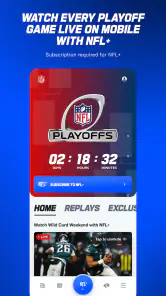
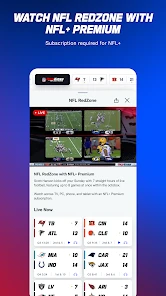
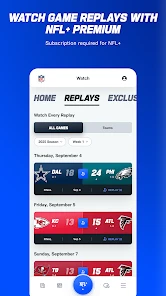
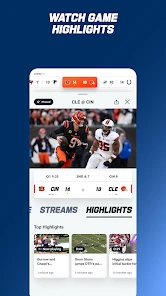
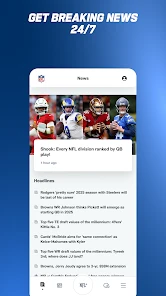
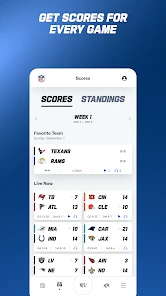
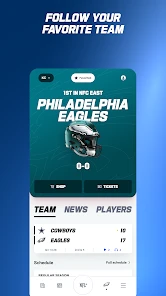
Analysis by Reviewed
If you're a football fan, the NFL App is like having the gridiron in your pocket. Dive into the world of touchdowns, tackles, and tailgates without ever leaving your couch. The app is designed for fans who don't want to miss a single play, whether you're a die-hard supporter or just enjoy the occasional Sunday game.
The first-week appeal
My first impression is that this sports app gives NFL followers a convenient place to check in on the league. The official app is made by NFL Enterprises LLC, and it has a familiar purpose: helping fans keep the season in view. It is free to install, though in-app purchases range from $0.99 to $99.99 per item, so I would look carefully at any purchase prompt rather than assume every option is included at no cost. The age rating is Everyone, and it is available for devices running Android 9 or later.
For a new user, the easiest way to judge its fit is to decide what you actually need during a football week. If you mainly want a quick score check, an official league app may be more than you need; a general sports app can be simpler when you follow several leagues. If your attention is centered on the NFL, having league-related updates together can make the first few visits feel useful. I would start with one clear habit, such as checking in before a game or catching up afterward, instead of turning on every possible alert and letting the app compete for attention all day.
That first week is also a good time to work out whether you want depth or just reassurance that a game is still close. A fan watching one team may appreciate team and player updates, while someone who follows the whole league may prefer to browse game coverage as the schedule unfolds. I would resist setting up a routine around every headline at once. Starting with one or two teams makes it easier to notice which parts actually help and which simply add another stream to check.
Getting Started with the NFL App
First things first, downloading the NFL App is a breeze. Available on both Android and iOS, it’s just a few taps away from bringing the excitement of the league into your daily routine. Once installed, you’re greeted with a sleek and intuitive interface that even the most tech-averse can navigate with ease.
Features That Score Big
The app is loaded with features that cater to every kind of fan. Want live game streaming? Check. Need up-to-the-minute scores and stats? Double check. It’s like having a personal assistant dedicated to keeping you updated on all things NFL. And let’s not forget the personalized content; you can select your favorite teams and players to get tailored news and updates, which is a game-changer for any fan.
One of the standout features is the Game Center, which offers in-depth coverage of each game. You can view detailed play-by-play analysis, track player stats, and even watch video highlights without having to switch to a different app. It’s like having a front-row seat to every game, no matter where you are.
More From Our News Desk

Weather by Xiaomi Review: Clear at a Glance, Less Clear Up Close

X Under Pressure: Can It Recover When Posting Goes Wrong?

Clash of Clans Is Won Between the Battles

Android Auto Makes the Case for Quieter Car Software

MobiOffice: Transforming Mobile Productivity with Seamless Integration

EA SPORTS FC™ Mobile Soccer: Redefining Mobile Sports Gaming
Making it useful beyond game day
The practical value is strongest when I use the app in short visits rather than treating it as something that must stay open. For example, if I have a few minutes between errands on a Sunday, I can check a game’s progress and use the play-by-play view to understand how the score changed without watching from kickoff. After a game, highlights can help me catch up on the key moments I missed. That workflow is especially useful when watching live is not realistic, though it is not a substitute for a full broadcast if seeing every possession matters to you.
A useful trade-off is deciding whether to follow one team closely or browse the league more broadly. Team and player updates can make a focused routine easier, while frequent news and stats may feel like clutter if you only care about final scores. I would keep the setup centered on the teams and players I genuinely follow, then use the Game Center when I want more detail. That way, the app serves as a reference during the season instead of becoming another feed I feel obliged to clear.
Here is a realistic use case: I might be away from the television while a game is underway, with only a short break to check what happened. I can use the score and play-by-play information to understand whether a change came from a scoring drive or a stretch of back-and-forth play, then return later for highlights. The key is to treat that as a catch-up tool rather than expect a quick check to recreate the feel of watching the whole game. For a fan who cares about context, the play sequence is more useful than a bare score; for someone who only needs the result, it may be more detail than necessary.
Stay Connected and Engaged
The social aspect of the app is also a highlight. You can connect with other fans, share your thoughts, and even engage in friendly banter with rival supporters. The in-app community is vibrant and active, making every game feel like a shared experience with thousands of other fans worldwide.
The app also offers exclusive content, including interviews, behind-the-scenes footage, and expert analysis. If you’re someone who craves more than just the score, these extras will keep you entertained and informed all season long.
Month-to-month value and fatigue
Whether those extras keep earning their place depends on how much football I follow. During the season, the combination of updates, game details, and video can give me reasons to return between match days. In quieter stretches, or if I only watch one game now and then, that daily pull naturally weakens. This is where the official app differs from a broad sports-score alternative: it is more directly focused on NFL coverage, while a general app is often the better everyday home for someone tracking multiple sports.
There is also a maintenance cost in attention. A busy stream of news and community discussion can make a quick score check turn into a longer scroll, and social features are not essential for someone who simply wants game information. I would treat the community and extra content as optional, not as required parts of the experience. If the app starts feeling noisy, trimming what you follow and checking it only around games is a sensible way to preserve its useful parts.
A small but helpful habit is to decide in advance what counts as a reason to open it. I might check before kickoff, look at the Game Center during a break, and return for highlights afterward. That gives the app a clear job instead of letting every update become a prompt to interrupt something else. It also makes it easier to tell whether personalized team coverage is valuable to me or whether I would be happier with a simpler scores-only routine.
One question many casual fans have is whether they need to keep the app open to get value from it. I would not build the habit that way. Its practical role can be brief, on-demand visits: checking a score, catching up on a game sequence, or watching highlights when time allows. If you prefer to follow games continuously, a live broadcast is the more natural choice; if you only need an occasional update, the app can sit unused between those moments without losing its usefulness when you return.
The NFL app has a 2.7 average from around 644,000 ratings, alongside roughly 172,000 written reviews. That low average is a reason to keep expectations measured rather than assume every visit will be smooth. It has been available since 2010 and has passed 100 million installs, showing that it has a wide audience, but popularity alone does not guarantee it will suit your habits. I would try it for the specific league coverage I want and judge it on whether it reliably helps me follow games, not on how many features it appears to contain.
The purchase prompts are another reason to take a measured approach. The app is free to install, but optional purchases can carry a wide range of prices. I would not tap through a payment screen just to reach a piece of content without first checking what the purchase is for and whether it matches what I want. If my main goal is scores, team coverage, and occasional game details, I would first see how far the free experience takes me rather than treating paid options as a necessary part of following the league.
Is It Worth the Download?
In a word, absolutely. The NFL App is perfect for anyone who wants to stay connected to football 24/7. Whether you’re tracking your fantasy league or just want to catch the highlights of last night’s game, this app has got you covered. It's like having the entire NFL universe at your fingertips, offering something for every type of fan.
So, if you haven’t already, give it a shot. It’s more than just an app; it’s your new best friend for the football season. Trust me, once you start using it, you'll wonder how you ever watched football without it.
Who should keep it installed?
For me, it earns lasting space if I follow NFL games often enough to use its team-focused updates, game coverage, or videos throughout the season. It is also a reasonable choice for a casual fan who wants to check in without building a complicated routine: open it when a game is on, catch up afterward, and leave it alone when there is nothing worth checking. If I wanted one place for scores across many sports, preferred a quieter source, or rarely followed the NFL, I would choose a broader sports app instead.
It is less compelling for someone whose routine already revolves around a television or streaming broadcast and who rarely needs a second screen. It is also not my first pick for someone who follows several sports equally and wants one uncluttered place for all of them. A general sports app can be more convenient in that situation, while a broadcast better suits anyone who wants the full live experience. The league app makes most sense when the NFL itself is the reason for opening it.
My long-term recommendation is to keep the app only if it becomes a useful part of how you follow football, not simply because it is the official option. Start with the information you care about, avoid purchases unless you understand what they add, and see whether the updates and game details still help after the novelty wears off. For a committed NFL fan, that recurring convenience can justify the space; for an occasional viewer, a quick web search or a general scores app may be enough.
NFL Frequently Asked Questions
Does the NFL app require an account, and can I use it without signing in?
You can download the NFL app for free and explore its general NFL-focused content, but some services may involve a sign-in or another form of access. For example, live game streaming can depend on your location and subscription package, and certain features may call for a cable provider login or NFL Game Pass. Check the access requirements for the feature you want to use.
Will the NFL app send notifications, and can I control them?
The NFL app can provide updates about teams you follow, and notifications may be part of that experience. Choosing favorite teams can help tailor the news, updates, and alerts you receive to your interests. If you prefer fewer interruptions, review the app’s notification settings and your device’s notification controls after installing it, so you can decide which alerts are useful to you.
Is the NFL app suitable for all ages, and what devices can run it?
The NFL app has an Everyone content rating, so its age classification is suitable for a broad audience. It is available for Android and iOS devices, with Android support starting at version 9. Before downloading, check that your device meets the minimum operating-system requirement and has enough available space for the installation.
Who develops the NFL app, and is it the official NFL app?
The app is developed by NFL Enterprises LLC and is presented as the official app of the NFL. Its stated purpose is to help fans keep up with the season. If you want NFL-focused information and features in a mobile app, this official option is the one to look for in your device’s app store.
What platforms is the NFL app available on?
The NFL app is available for download on both Android and iOS platforms. Users can find it on the Google Play Store for Android devices and the Apple App Store for iOS devices. This ensures that fans of American football can stay updated on their favorite teams and games regardless of their mobile device.
Pros
- Live game streaming available
- Real-time score updates
- Comprehensive team stats
- Customizable notifications
- User-friendly interface
Cons
- Requires stable internet connection
- Frequent ads interrupt usage
- Some features need subscription
- App crashes on older devices
- High battery consumption
- Category
- Sports
- Version
- Varies with device





