MobiOffice: Word, Sheets, PDF
- 24.66K
- 4.4
- Installs
- 100.00M
- Price
- Free

Screenshots
Analysis by Reviewed
Ever found yourself in the middle of a document crisis without your laptop? Well, worry no more because MobiOffice: Word, Sheets, PDF has got your back! This app is like a Swiss Army knife for all your document needs, right in your pocket. Let me take you through my experience with it.
The appeal of keeping documents together
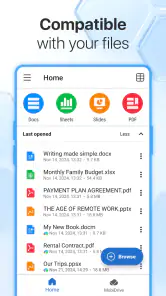
What I find most useful about MobiOffice is the idea of handling different kinds of office files in one place. I can move from a text document to a spreadsheet or a PDF without having to switch between separate apps just to deal with the next item on my to-do list. That matters most when I’m away from a desk and need to check a file quickly, make a small change, then get back to whatever I was doing.
MobiSystems makes this free business app, and its broad audience is reflected in its Everyone age rating. It has an average rating of 4.4 from around 1.5 million ratings, with over 100 million installs. Those numbers suggest it has reached many people, but they don’t tell me whether it fits a particular workflow. My practical test is simpler: can I open the file I need, understand what I’m seeing on a small screen, and make the change without turning a quick task into a project?
The Latest on MobiOffice: Word, Sheets, PDF
The current version is 15.9.57971, and the app supports devices running Android 7.0 or later. It is free to install, with optional in-app purchases ranging from $1.49 to $149.99 per item. I would check the available options before relying on a paid tool for a regular work routine, especially if I only need to read documents or make occasional edits. For basic, infrequent jobs, the free starting point is easier to justify than paying for a larger office suite I might rarely use.
One place for everyday document work
The first thing you notice about MobiOffice: Word, Sheets, PDF is its versatility. Whether you're drafting a last-minute proposal in Word, crunching numbers in Sheets, or reviewing a PDF, this app does it all. And it does it without any hiccups. The interface is sleek and intuitive, making navigation a breeze even for those who aren’t exactly tech-savvy. Plus, the transition between different document types is seamless, which is a huge plus when you're multitasking.
How the all-in-one approach works in practice
For me, the strongest case for a combined office app is not that a phone suddenly becomes a full desktop replacement. It is that one small interruption can be handled from start to finish without hunting for a different tool. Imagine a weekday morning when a colleague sends a proposal to review, a spreadsheet with a revised figure, and a PDF that needs a quick look before a meeting. I can open each kind of file in the same app, check what matters, and make a modest edit if needed. That is a realistic convenience; a long report or intricate workbook is still more comfortable on a larger screen.
I also treat the different file types as separate jobs rather than assuming they all suit touch editing equally well. A short paragraph is manageable on a phone, while a dense table can be difficult to inspect because rows and columns compete for screen space. For that reason, I zoom in and check the surrounding cells before changing a number. A quick correction made on a small screen is only useful if I can verify that it has not shifted the wrong value or broken the context of the sheet.
More From Our News Desk

Clash of Clans Is Won Between the Battles

Android Auto Makes the Case for Quieter Car Software

EA SPORTS FC™ Mobile Soccer: Redefining Mobile Sports Gaming

How Microsoft OneDrive Became a Mobile Productivity Giant

How Google Translate Breaks Language Barriers Effortlessly

Why Google Sheets Is the Ultimate Mobile Productivity Tool
When I receive a file from someone else, I first work out whether I need to read it, annotate it, or actually revise its content. Those are different tasks, and choosing the smallest one that solves the problem helps avoid unnecessary editing. I keep the original untouched when the change is important, then make a clearly named working copy if I expect to send it back. That simple habit is valuable in any mobile office workflow: it gives me a way to recover if I edit the wrong version or later need to compare what changed.
Word Processing on the Go
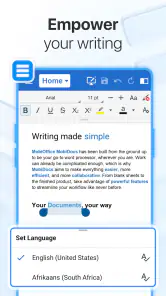
Writing and editing documents on a smartphone has always been a bit of a hassle, but not with this app. The Word feature offers a full suite of tools that you’d expect on a desktop application, right from text formatting to inserting images. And if you’re someone who collaborates often, the real-time commenting and editing features are a game-changer. It’s like having a mini office in your hand!
My own advice is to reserve phone-based writing for focused, contained changes: correcting a sentence, adding a short note, or updating a heading while the information is fresh. For a lengthy draft, I would still choose a keyboard and a larger display if one is available. On a phone, repeated formatting and careful restructuring can take longer than the writing itself. If I need to make a bigger revision, I jot down the point I want to fix, make only the necessary edits, and reread the surrounding passage before sharing the document.
There is also a practical distinction between reviewing someone else’s writing and collaborating on it. Comments can help keep feedback attached to the relevant part of a document, but I would not assume that every recipient has the same app or sees the file in exactly the same way. Before sending an important revision, I check the final document as a reader would: are the changes clear, is the intended version being shared, and does the file still look sensible when opened for review? That check takes little effort and can prevent confusion when a mobile edit is passed back to a team.
Spreadsheet Mastery
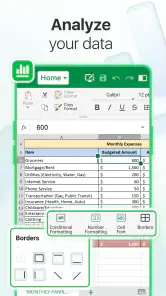
Now, let’s talk about Sheets. If you’re anything like me, spreadsheets might not be your favorite thing in the world, but this app makes them a lot less intimidating. With its easy-to-use formulas and data visualization tools, managing spreadsheets becomes less of a chore. Plus, the ability to share and collaborate on Sheets directly from the app makes it incredibly convenient for team projects.
On a phone, a spreadsheet is most useful to me as a reference or a place for a small, deliberate update—not as a comfortable workspace for rebuilding a complicated model. A useful workflow is to find the relevant row, confirm its label, then check the column heading before touching a cell. It sounds obvious, but a narrow screen makes it easier to lose track of which column I am viewing, particularly when the sheet contains many fields. After editing, I review the nearby values rather than trusting that a single tap landed exactly where I intended.
For example, if I am away from my desk and need to check a shared project budget before answering a message, I can use the phone to inspect the figure and respond with more confidence. If the task turns into reorganizing several tabs, comparing many entries, or building a chart for a presentation, I would switch to a computer. That is not a failure of the mobile app; it is a sensible division of labor. The phone is excellent for access and small adjustments, while a larger display makes complex relationships easier to see.
Spreadsheet sharing also calls for care. Before making an edit to a file that others use, I would confirm that I am in the intended document and know whether I am changing a working version or a reference copy. If the number affects a decision, I make a note of the change and check the result after editing. This is a more reliable habit than treating a quick mobile update as automatically harmless, especially when several people depend on the same figures.
Effortless PDF Management
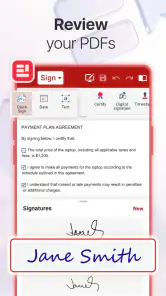
PDFs can be a pain, right? But not anymore. The PDF feature in MobiOffice allows you to view, edit, and even sign documents with just a few taps. Whether it’s a contract that needs your John Hancock or a report that needs some last-minute tweaks, this app handles it with ease. It’s super handy, especially when you’re on the go!
In everyday use, I would separate signing from substantive document revision. If someone sends a form that only needs my attention and signature, handling it on the phone can save a trip to a computer. If the PDF contains dense legal language, tiny footnotes, or several pages of detailed conditions, I would rather read it on a larger screen before signing. Convenience should shorten the process, not make me less careful about what I am agreeing to.
A useful habit is to inspect the completed file before sending it onward. I check that the signature or edit appears where intended and that I am sharing the finished copy rather than an earlier draft. For a report that only needs a quick review, I can focus on the relevant passage; for a document where page layout and precise placement matter, I give myself more time. Mobile PDF work is strongest when the action is clear and limited, not when I am trying to perform a detailed page-design job with a fingertip.
Where it fits among other office apps
The usual alternative is to use separate apps for documents, spreadsheets, and PDFs, or to rely on a desktop office suite and keep the phone mostly for reading. Those approaches can be better if I already work deeply inside a particular ecosystem or need advanced controls that are easier to use on a computer. MobiOffice’s advantage is convenience across file types: I can deal with several ordinary office tasks in one place instead of deciding which app to open for each attachment.
That convenience does not make every task equally comfortable. Dedicated tools may feel more focused for someone who spends most of the day editing one kind of file, and a desktop program remains preferable for extensive formatting, complex calculations, or careful page layout. I see MobiOffice as a practical mobile companion rather than a reason to abandon those tools. If my work is mainly quick checks, light edits, and handling mixed attachments, the all-in-one approach is attractive; if every day involves advanced spreadsheet analysis or long-form editing, I would compare it with the specialist tools already used by my team.
One trade-off is that an all-in-one app asks me to keep my workflow organized. I pay attention to the file name, the version I have opened, and the copy I intend to send. I also avoid making a chain of edits while distracted; on a phone it is easy to respond quickly and overlook a small formatting or cell-selection mistake. Taking a moment to reopen or review the finished file is a better safeguard than assuming that a convenient interface removes the need for a final check.
Why It’s a Must-Have
In today’s fast-paced world, having a reliable and efficient document management app is crucial, and MobiOffice delivers just that. It’s perfect for professionals, students, and anyone in between who needs to handle documents on the fly. The app’s performance is solid, with no lag even when dealing with large files. Plus, it supports a wide range of file formats, which means you can open just about anything your colleagues throw at you.
I think it suits students who need to review a handout, make a short correction, or check a spreadsheet between classes, as well as professionals who regularly receive mixed office files while away from a computer. It can also help someone who travels light and wants one familiar place to inspect documents rather than juggling separate mobile apps. The strongest fit is a person whose phone is a backup workstation for small but time-sensitive tasks, not someone expecting it to provide the same comfort and precision as a full desk setup.
There are clear reasons to skip it. If I only need to read occasional files, the extra editing tools may be more than I need. If I spend hours creating polished documents, working with large spreadsheets, or adjusting PDF layouts, I would choose a computer or a more specialized workflow for the main job. And if my workplace requires everyone to use a particular office platform, matching that environment may matter more than having a broad set of tools in one mobile app.
Before installing, I would ask myself how often I actually need to change a file on my phone, rather than just view it. I would also consider whether optional purchases are worthwhile for my own routine, since the free app has in-app purchase options from $1.49 to $149.99 per item. A casual reader and a frequent mobile editor have different needs; I would decide based on the tasks I repeat, not on the idea that every available feature must be part of my workflow.
To wrap it up, if you’re looking for a comprehensive, user-friendly app that handles all your document needs, look no further than MobiOffice. It’s a powerhouse of productivity that ensures you’re never caught unprepared, no matter where you are.
My more measured recommendation is to use it for the document problems a phone handles well: opening a file at short notice, making a small change, reviewing a PDF, or checking a figure before replying to someone. For those jobs, keeping Word documents, Sheets files, and PDFs together is genuinely handy. I would still move demanding edits to a larger screen and take care with shared versions, but as a free mobile office app from MobiSystems, MobiOffice earns a place on my phone when document access matters more than desktop-level comfort.
MobiOffice: Word, Sheets, PDF Frequently Asked Questions
Can I use MobiOffice to create documents as well as view them?
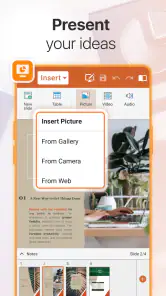
Yes. MobiOffice is intended for working with office documents, not just opening them. You can create and edit Word documents, spreadsheets, presentations, and PDFs from a mobile device. If you need to make substantial changes or depend on particular formatting, review the finished file before sharing it so you can confirm it looks the way you expect.
What does MobiOffice include for working with PDFs?
MobiOffice includes PDF tools alongside its Word, spreadsheet, and presentation features. The app’s document offering includes a PDF editor, making it relevant if you want to handle different kinds of office files in one mobile app. As with any mobile editing tool, it is sensible to check a PDF after making changes, especially before sending an important document to someone else.
Can MobiOffice open documents I receive from other people?
MobiOffice is designed to work with common office document formats, including Word documents, spreadsheets, presentations, and PDFs. That makes it useful for opening files shared by colleagues, friends, or other apps, as well as creating and editing documents of your own. If you regularly exchange files, check that the document opens and displays as expected before relying on it for important work.
What features does MobiOffice offer for document management?
MobiOffice is a comprehensive suite that provides users with tools for word processing, spreadsheets, and PDF management. It allows for the creation, editing, and saving of documents directly from your mobile device. With a user-friendly interface, it supports various file formats and ensures compatibility with different office applications, making it an ideal choice for on-the-go productivity.
Is MobiOffice compatible with both Android and iOS devices?
Yes, MobiOffice is designed to be compatible with both Android and iOS platforms. Users can download the app from the Google Play Store or Apple App Store, ensuring a seamless experience across different devices. This cross-platform compatibility makes it convenient for users who switch between different operating systems.
Pros
- User-friendly interface for easy navigation
- Supports multiple file formats seamlessly
- Offline access to documents
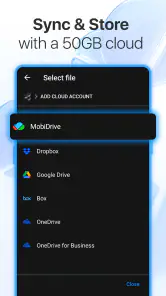
- Integrated cloud storage options
- Regular updates with new features
Cons
- Some features require a premium subscription
- Occasional lag with large files
- Limited advanced editing tools
- Ads can be intrusive in free version
- Compatibility issues with some file types
- Category
- Business
- Version
- 15.9.57971













