IMDb: Movies & TV Shows
- 66.19K
- 4.4
- Installs
- 100.00M
- Price
- Free

Screenshots


Analysis by Reviewed
I often open IMDb: Movies & TV Shows with one small question in mind—who was in that film, what else has that actor appeared in, or whether a show is worth adding to my evening plans. It works best as an entertainment reference and discovery tool, rather than as a place to watch films. That distinction matters: I use it to decide what to look for, then turn to a streaming service or cinema listing to find where to see it.
Free to use, with a clear purpose
The app is free, so I can browse its movie and television information without treating it like another subscription decision. IMDb, the developer, has built a familiar destination for entertainment browsing; the app has a 4.4 average from around 961,000 ratings and over 100 million installs. Those figures suggest it has become a common reference point, though popularity alone does not make every recommendation a match for my taste.
For me, the value is in having cast details, summaries, user opinions, trivia, news, and personal watchlist tools gathered in one place. Its Teen content rating is also useful context for households deciding whether the app’s material suits younger users. I’d still check individual titles and their subject matter rather than treating an app-wide age label as a guide to every film or show.
The Latest on IMDb: Movies & TV Shows
Your Go-To Entertainment Guide
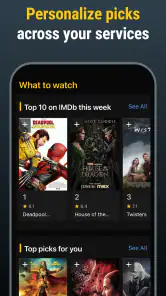
There's no denying that the IMDb: Movies & TV Shows app is like that friend who knows everything about movies and TV shows. From the latest blockbusters to timeless classics, this app has it all. When you first open it, you'll be greeted with a sleek interface that’s as welcoming as a warm tub of popcorn. The homepage showcases trending movies and TV shows, ensuring you’re always in the loop about what's hot.
Dive Into a World of Information
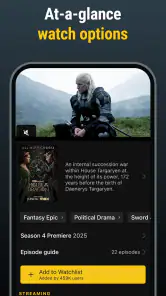
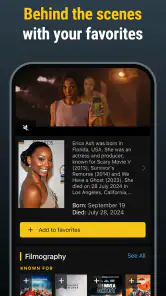
Now, let's talk about the heart of IMDb – its database. With millions of titles, the app offers a treasure trove of information. Whether you're looking for a movie's synopsis, checking out actor filmographies, or reading user reviews, IMDb has got your back. I found myself going down the rabbit hole, exploring related titles and discovering hidden gems I had never heard of before.
One of the features I absolutely love is the trivia section. Did you know that Tom Hanks was not the first choice for Forrest Gump? Well, now you do! Such nuggets of information make IMDb not just informative but also incredibly entertaining.
Stay Updated with Ease
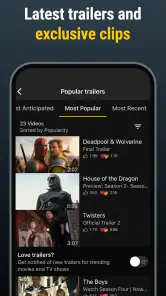
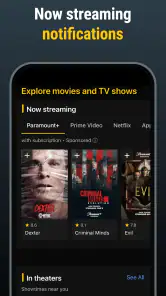
For those who love staying ahead of the entertainment curve, IMDb’s news section is a must-visit. It curates the latest news, trailers, and even interviews with your favorite stars. It's like having a mini-entertainment magazine right in your pocket. Plus, the app allows you to set notifications for new trailers or updates about your favorite shows. Never miss out on a premiere again!
More From Our News Desk

Android Auto Makes the Case for Quieter Car Software

MobiOffice: Transforming Mobile Productivity with Seamless Integration

EA SPORTS FC™ Mobile Soccer: Redefining Mobile Sports Gaming

How Microsoft OneDrive Became a Mobile Productivity Giant

How Google Translate Breaks Language Barriers Effortlessly

Why Google Sheets Is the Ultimate Mobile Productivity Tool
And if you're someone who loves making lists (who doesn't?), the app lets you create your own watchlist. Keep track of what you’ve watched, plan your next movie night, or simply dream about all the shows you want to binge on.
Community Vibes
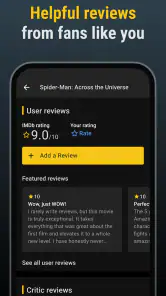
Another aspect worth mentioning is the community feel. The user reviews and ratings are always a helpful guide. It's like having a worldwide audience giving you their two cents on whether a title is worth your time. I often find myself scrolling through reviews, nodding in agreement or, sometimes, in complete shock at differing opinions. But hey, that's the fun of it!
Where it fits into a viewing routine
A useful way to get more from the app is to start with a specific question instead of endlessly browsing the trending rows. If a friend mentions a new series, I can look up its cast, read the synopsis, and check the audience response before deciding whether it suits my mood. Following an actor’s filmography can also turn one good performance into a practical shortlist of older films to explore.
For a realistic movie-night workflow, I’d add possible picks to the watchlist during the week, then compare a few titles when everyone is ready to choose. That makes the list more useful than a running pile of things I once thought sounded interesting. I also treat reviews as a way to spot common reactions, not as a verdict: a divisive film may still be exactly right for my group.
How it compares with other entertainment tools
Compared with a streaming app, IMDb is better for background and discovery than for actually starting a film. A streaming service is the more direct choice when I already know what I want to watch; IMDb is more useful when I’m weighing options, checking who made a title, or following a trail of related work. Search engines can answer quick factual questions, but the app’s linked cast pages, reviews, trivia, and lists make it easier to keep exploring without rebuilding the context each time.
That breadth can also be a trade-off. Browsing a large catalogue may send me down side paths when I only wanted a quick answer, and popular titles can dominate discovery even when I’m looking for something less obvious. I get better results by using a title or performer as my starting point and treating recommendations as prompts rather than a personalized guarantee.
Practical limits and who should choose it
The app’s role is informational: a watchlist helps me remember what to seek out, but it does not replace the separate step of checking a streaming service or local cinema for availability. I also avoid making a decision from a single rating or one strongly worded review. Audience reactions are useful context, but they reflect other viewers’ preferences, not a promise that I’ll feel the same way.
IMDb is a strong fit for curious viewers, film fans who like cast and career details, and households that need a shared shortlist for choosing something to watch. It may be less appealing if you want a quiet, minimal catalogue with no news or extra browsing, or if your only goal is to play a video immediately. The current version is 9.2.3.109230200 and requires iOS 11 or later, so it is worth checking device compatibility before installing on an older iPhone or iPad.
Getting more from a quick search
When I’m checking a title, I try to separate three questions that can blur together: what it is about, who is involved, and whether its audience response gives me a useful clue. The synopsis answers the first; cast and crew pages help with the second; reviews add perspective on the third. Moving through those details in that order keeps me from letting one striking comment decide for me before I know what the film actually offers.
For a less obvious discovery route, I’ll sometimes begin with a performer rather than a genre or trending title. A filmography can reveal a smaller role or an older project that would be easy to miss in a general browsing feed. I still check the title itself before adding it to my list, because a familiar actor is a starting point, not proof that the whole film will suit me.
Lists that remain useful
A watchlist works best for me when I treat it as a decision aid, not a storage bin for every passing idea. I use it for titles I would genuinely consider watching, and I remove items when I have seen them or no longer feel curious. Otherwise, a long list can become another catalogue to scroll through instead of making the next choice easier.
It is also helpful to add a title while I am already looking at its details, rather than trusting myself to remember it later. If I am planning with other people, I can open the shortlist together and compare a few different kinds of options—a familiar pick, a new discovery, and something shorter or lighter. IMDb helps gather candidates; the final choice still depends on the group and what is available to watch.
What ratings and news can—and cannot—tell me
Audience scores are most useful as a signal to investigate, not a quality guarantee. If a title has a strong response, I still ask whether the reasons people praise it match what I enjoy. When opinions split, reading a few reviews can show whether the disagreement is about pacing, tone, or expectations. That context is more actionable than treating a number as a simple instruction to watch or avoid something.
News and trailer updates suit viewers who like keeping up with entertainment, but they can make the experience feel busy if I only opened the app to look up a cast member. I would use notifications selectively and focus them on titles or people I genuinely follow. That way, the app can serve as a reference first and an entertainment feed only when I want it to.
When another option is the better fit
If I know exactly what I want to watch, a streaming service is usually the faster next step because it is built around playback and its own catalogue. If I want a broad factual answer, a web search may be quicker for a single detail. IMDb earns its place when I want the details to connect: a film leads to a performer, a performer leads to other work, and those discoveries can feed a watchlist I revisit later.
It is not the best choice for someone who wants only a clean, no-frills list of titles or who expects a watchlist to confirm where each item is currently available. It is also a poor substitute for checking age suitability title by title. The app’s Teen rating describes the app’s content context, not every movie or show a person might look up, so families should still make their own judgment about individual selections.
Worth installing for the right kind of viewer
In practical terms, I see the strongest value for people who often ask “Who is that actor?” or who want to turn a good viewing experience into their next few picks. Casual viewers can use it for quick checks without paying for access, while dedicated film fans can spend longer following cast connections, trivia, and audience discussion. The amount of material is a strength when curiosity is the point, but it can be a distraction when I just need one answer.
IMDb is free, and that makes trying it a low-commitment choice for anyone who wants a movie and television reference on their phone. I would install it for discovery, background, and planning, not for watching content or as the final authority on taste. If those are the jobs you need done, it is a useful companion to the services you already use; if you want playback or a very restrained interface, I would choose a different tool for that main purpose.
In conclusion, whether you’re a casual viewer or a hardcore cinephile, the IMDb app offers something for everyone. Its comprehensive database, user-friendly interface, and up-to-date content make it a must-have for anyone who loves the world of movies and TV shows. So, grab your phone and start exploring. Who knows, you might just discover your next favorite film or series!
IMDb: Movies & TV Shows Frequently Asked Questions
Can I use IMDb without an internet connection?
IMDb is designed for exploring entertainment information, so expect to need an internet connection to load and update movie, television, and celebrity pages. If you are going somewhere with limited connectivity, you can look up details beforehand, but you should not treat the app as an offline library of full movies or TV episodes. Its role is primarily as an entertainment guide.
Does IMDb help me decide what to watch?
Yes. IMDb can help you discover movies and television programs by letting you explore titles, view trailers, browse photos, and read reviews. You can also use a watchlist to keep track of titles that interest you. It works well as a place to research a choice before watching, while full viewing takes place through the relevant streaming or other viewing service.
Do I need an account to use IMDb: Movies & TV Shows?
You can use IMDb to browse entertainment information, explore movies and TV shows, and look up celebrities. An account is useful if you want to personalize your experience with features such as a watchlist, ratings, or reviews. If you plan to contribute information or reviews, signing in gives you a way to associate those contributions with your IMDb profile.
Will IMDb: Movies & TV Shows work on my phone?
The app is available for Android and iOS devices, but your phone must meet the minimum operating-system requirement to install it. Check your device’s OS version before downloading, particularly if you have an older phone or tablet. IMDb is an entertainment guide, so its main uses include browsing movie and television details, celebrity information, and related discovery features.
What can I do with the IMDb app?
The IMDb app is a comprehensive resource for movie and television enthusiasts. Users can explore an extensive database of movies, TV shows, and celebrity information. The app allows you to check showtimes, watch trailers, browse photos, track your watchlist, rate programs, and even read reviews. It’s an indispensable tool for film buffs looking to stay updated on the latest entertainment news.
Pros
- Comprehensive movie database
- User-friendly interface
- Personalized recommendations
- Watchlist and rating system
- Latest entertainment news
Cons
- In-app ads can be intrusive
- Limited offline access
- Occasional app crashes
- Some info lacks updates
- Heavy data usage
- Category
- Entertainment
- Version
- 9.2.3.109230200











