- 703.04K
- 4.3
- Installs
- 1.00B
- Price
- Free

Screenshots


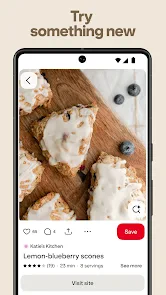
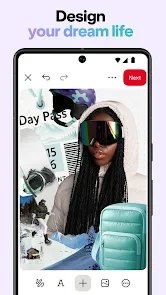

Analysis by Reviewed
Ever found yourself in a creative rut, scrolling endlessly for inspiration but coming up short? That's where Pinterest comes in. This app is like a bottomless treasure chest for anyone with a thirst for ideas. Whether you're planning a wedding, redecorating your living space, or just looking for a new recipe, Pinterest has you covered. I've been using it for a while, and let me tell you, it's a game-changer.
What Makes Pinterest Special?
Imagine a digital scrapbook, but a thousand times better. That's the essence of Pinterest. It's a platform where you can discover and save ideas in the form of 'Pins.' Each Pin is essentially a bookmark that you can categorize on different boards. Have a board for home decor, another for travel, and maybe one more for your secret obsession with knitting – it’s all up to you. The beauty of Pinterest is its endless variety. You can find Pins on virtually any topic you can think of.
Features That Hook You In
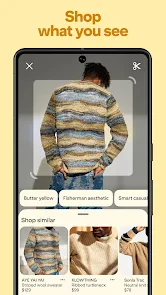
One of my favorite features is the visual search capability. Let's say you come across a Pin of a fabulous living room setup. You can zoom in on a particular item, like a chic lamp, and Pinterest will show you similar items. It's like having a personal shopper at your fingertips! Another cool feature is the 'Shop the Look' option, which allows you to purchase products directly from Pins. This is particularly handy for fashionistas and home decor enthusiasts.
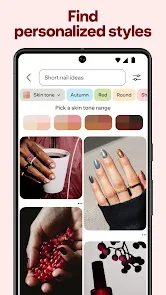
Then there's the community aspect. You can follow other users and see what they're saving, which opens up a whole new world of ideas. The algorithm is pretty smart too, learning from your interactions to suggest Pins that are right up your alley. I found myself going down a rabbit hole of amazing ideas curated just for me, and it was delightful.
Why You Should Dive In
If you're someone who loves to plan and organize, Pinterest is your playground. It's like having a personal vision board that you can update anytime. Plus, the app is incredibly user-friendly. The interface is clean and intuitive, making it easy for even the least tech-savvy among us to navigate.
Latest News
And let's not forget the inspiration factor. On days when I'm feeling particularly uninspired, a quick scroll through my Pinterest feed always reignites my creativity. It's like a wellspring of inspiration that never runs dry. I often find myself saying, "Why didn't I think of that?" as I discover new ideas and tips.
So, whether you're a DIY enthusiast, a fashion guru, or someone who just loves to look at beautiful things, Pinterest is a must-have app. It's not just about collecting ideas; it's about sparking your creativity and helping you bring those ideas to life. Give it a try, and who knows—you might just find your next big project!
Pros
- Visually appealing and user-friendly interface.
- Excellent platform for discovering new ideas.
- Seamless integration with other social media.
- Rich variety of content across multiple genres.
- Effective personalized recommendations.
Cons
- Requires account creation to save pins.
- Occasional irrelevant content suggestions.
- Can be addictive to frequent users.
- Limited offline access to saved content.
- Ads can be intrusive for some users.

- Category
- Lifestyle
- Version
- Varies with device