- 556.38K
- 4.1
- Installs
- 10.00B
- Price
- Free

Screenshots
Analysis by Reviewed
I often open a search app with a small, practical problem: I need a quick answer, a place, or a useful page, and I don’t want to spend time figuring out where to look. That is where Google earns its place on my phone. It is a free tools app from Google LLC, and its appeal is less about one spectacular trick than about reducing the little pauses that build up through a day. It is rated for Everyone, has a 4.1 average from around 29 million ratings, and has been installed over 10 billion times. Those figures suggest how familiar it is, but the real test is whether it helps you get from a question to a useful next step without adding extra hassle.
When a quick search is the whole point
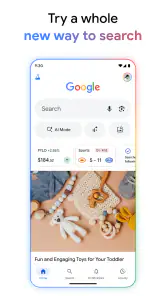
Google works best for me when I know roughly what I need but not exactly where to find it. A search can lead to a definition, a nearby business, a news story, or a practical how-to without requiring me to open several specialist apps first. I also use voice input when typing is awkward, such as when I’m carrying groceries or trying to look something up while cooking. It is a small convenience, but those quick moments are where this app saves the most friction.
The trade-off is that a broad search can return a lot to sort through. For a very specific task, a dedicated maps, calendar, or news app may give me a more focused experience. I treat Google as a useful starting point rather than assuming its first result is always the best answer. Checking the source and wording the query more precisely often makes the difference between a helpful result and a page of near-matches.
A sensible first setup
Before relying on the personalized parts, I’d spend a few minutes reviewing the app’s settings and choosing what you want it to remember or show. Personalization can make repeated searches and topics feel more relevant, but it is not automatically a benefit for everyone. If you prefer a quieter, less tailored experience, turn off or reduce the options you do not want and use search on its own. The app is still useful without treating every suggestion as something you need to follow.
I’d also check that voice search behaves the way you expect and try a couple of ordinary queries before depending on it in a rushed situation. Speaking naturally is convenient, but a noisy room, an unfamiliar name, or a question with several parts can make voice input less precise than typing. For names, addresses, and anything where a typo could send me to the wrong place, I read the recognized words before acting on the result.
How it fits into an ordinary day
Imagine I’m heading across town and someone suggests a café I haven’t heard of. I can search its name, check the location, and look for current information without switching between several starting points. Later, if I have a spare moment, I can use the same app to catch up on topics I follow or answer a question that came up in conversation. That continuity is useful: I don’t have to remember which app handles every small curiosity.
For work or study, it is handy for early research: finding a term, locating background reading, or comparing a few perspectives before opening a more specialized source. I would not use a general search result as a substitute for checking important medical, legal, or financial advice. The speed is valuable, but the responsibility to judge the source still belongs to me.
More From Our News Desk

Weather by Xiaomi Review: Clear at a Glance, Less Clear Up Close

X Under Pressure: Can It Recover When Posting Goes Wrong?

Clash of Clans Is Won Between the Battles

Android Auto Makes the Case for Quieter Car Software

MobiOffice: Transforming Mobile Productivity with Seamless Integration

EA SPORTS FC™ Mobile Soccer: Redefining Mobile Sports Gaming
Compared with a browser that makes the web page itself the main focus, Google puts the search box and quick answers front and center. Compared with a specialist search tool, it is broader and more convenient for mixed everyday questions, though sometimes less focused. If your main need is private browsing with minimal personalization, a privacy-oriented search option may suit you better; if it is route planning, a dedicated maps app is usually the clearer choice.
The App That Knows It All
Let’s be real: the Google app is like having a mini genius in your pocket. It’s not just about searching for the nearest coffee shop or checking the weather anymore. With features like Google Assistant, you can literally talk to your phone and get answers. "Hey Google, what's the capital of France?" Boom, there’s your answer. It’s almost like having a personal assistant who never sleeps.
Seamless Integration Across Devices
One of my favorite things about using Google is how seamlessly it integrates across all my devices. Whether I’m on my Android phone, iPad, or even my trusty old laptop, everything is synced up. I can start reading an article on my phone and finish it on my tablet without missing a beat. It’s like magic, but it’s just good tech.
And don’t even get me started on the calendar feature. Have you ever forgotten an important meeting? With Google Calendar, those days are over. It sends me reminders, syncs my events, and even suggests meeting times. It’s like having a super organized friend who’s got your back 24/7.
Customization and Personalization
Now, let’s talk about how personal you can get with Google. The app learns from you. Yes, it literally learns your habits, preferences, and even your quirks. For instance, if you’re a sports junkie, it’ll keep you updated with scores and news about your favorite teams. It’s like the app gets you, you know?
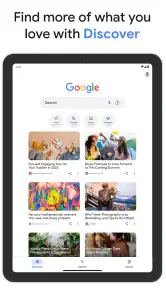
And let’s not forget about the news feed. Some mornings, I just want to sip my coffee and catch up on what’s happening in the world. Google gives me a personalized news feed that’s always spot-on. It’s like having a newspaper that knows exactly what you want to read.
Privacy Concerns
Alright, I know what you’re thinking. "What about privacy?" It’s a valid concern. Google does collect a lot of data, but it’s all about balance. They offer robust privacy settings where you can control what data you want to share. You can even manage your ad preferences. The key is to dive into those settings and tailor them to your comfort level.
Google also provides transparency reports and regular updates on how they’re keeping your data safe. It’s not perfect, but they’re definitely making an effort to keep things secure.
That concern is worth treating as an ongoing choice, not a one-time setup. I would revisit the controls when my habits change, especially if I use the app on a shared device or prefer not to see personalized suggestions. Convenience and privacy are not an all-or-nothing decision here; the useful approach is to decide which features earn access to your attention and information, then adjust accordingly.
A Universe of Apps
When you download the Google app, you’re not just downloading a solitary app; you’re stepping into a universe. From Google Maps to Google Photos, each app has its own unique flair and utility. For instance, Google Maps isn’t just about getting from point A to point B. It’s about exploring, discovering new places, and even avoiding traffic like a pro.
Then there’s Google Photos, which, by the way, is a lifesaver. I can never keep track of all the photos I take, but this app organizes them, backs them up, and even creates fun little animations. It’s like having a photo album that updates itself.
Where I’d draw the line
The app’s breadth is its strength, but it can also make the experience feel busier than a simple search box. Suggestions and personalized content are useful when they surface something I genuinely care about; they are distracting when I only want to look up one fact and leave. I keep that distinction in mind rather than treating every panel or recommendation as essential. If I want a single-purpose tool, opening the dedicated app is often faster and easier to understand.
It is also worth remembering that the Google app is a doorway to several services, not a replacement for every one of them. Searching for a place can help me decide where to go, but detailed navigation belongs in Maps. Looking up a calendar-related question does not mean I should rely on search to manage an event. That separation keeps expectations realistic and avoids blaming the search app when a more specialized workflow is what I need.
For people who regularly move between quick questions, web results, and personalized updates, I think it is a practical everyday choice. Someone who wants a minimal interface, strong separation from a broader Google account experience, or one dedicated task may be happier with a different search provider or specialist app. It is free, which makes trying it straightforward, but the better reason to keep it is whether its shortcuts actually save you time.
Making searches more useful
A small habit that improves my results is to include the detail that changes the answer: a neighborhood, a model name, a date, or the kind of source I want. Searching for a broad topic can be fine for exploration, but adding those constraints helps when I’m trying to solve one specific problem quickly. If the first result is not right, I revise the query instead of opening several almost-identical pages. That keeps the app useful as a starting point without turning every search into a browsing session.
I also separate discovery from decisions. If I’m checking a business before leaving home, I use search to find the relevant details, then verify the information that matters before committing to the trip. For an unfamiliar product or a claim that could affect an important choice, I compare sources rather than relying on a short answer. The convenience is real, but it works best when I use it to narrow the field, not to outsource judgement.
Who gets the most from it
I’d recommend it most to someone who asks a mix of ordinary questions throughout the day and likes having one familiar entry point for web searches, voice queries, and updates. It can be especially handy for people who are already comfortable with Google services and want a quick way to move from a question to a relevant tool. If you mostly search for local places, definitions, current topics, or practical instructions, that range can save a little effort repeatedly.
On the other hand, I would skip it as a primary choice if my priority were a deliberately sparse search experience or a firm separation from personalized services. It is also not the best fit for someone who needs one polished specialist workflow above all else. A dedicated navigation app is better when the task is detailed directions; a browser may feel more natural when I want to manage many web pages; and a privacy-oriented search service makes more sense when minimizing personalization is the leading concern.
Final Thoughts
In the end, Google is more than just a search engine. It’s a powerhouse of apps and services that can simplify your life in ways you didn’t even know you needed. Whether you want to manage your schedule, explore new places, or just learn something new every day, Google’s got your back.
So, if you haven’t already, give it a whirl. Dive into the settings, explore the features, and make it your own. Trust me, once you start using it, you’ll wonder how you ever lived without it.
My recommendation is measured rather than universal: I’d keep it close if I value quick answers and a convenient route into Google’s wider tools, while staying alert to where a focused app or a different search service would serve me better. Its long-running presence since August 12, 2010, gives it a familiar role, but familiarity alone is not a reason to use every feature. I get the most from it by asking clear questions, checking important results, and adjusting the experience to suit how much personalization I actually want.
Google Frequently Asked Questions
Can Google Search help me compare information from different sources?
Yes. Google Search can help you explore a topic by presenting relevant results from across the web, giving you places to investigate and compare. It is a starting point rather than a substitute for checking the sources themselves, especially when accuracy matters. Open the results that look useful and consider their context, authorship, and supporting information before drawing a conclusion.
Can I use Google to find information while I’m away from home?
You can use the Google app to search while you are out, and its location-based results can help surface information relevant to your area. The app also supports voice and visual searches, which can be convenient when typing is awkward. What you see may depend on your settings and use, so review location and personalization options if you want to tailor the experience.
Is the Google app useful for learning about unfamiliar topics?
Yes. You can search for a subject, follow relevant results, and use suggestions to discover related questions or areas to explore. Voice search and visual search can offer other ways into a topic when you do not have the right words for a query. As with any search tool, compare sources when you need a well-rounded understanding.
Can I use Google Search if I prefer not to type?
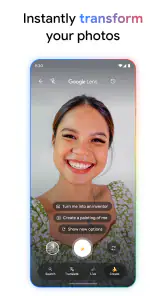
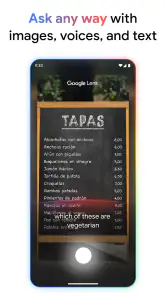
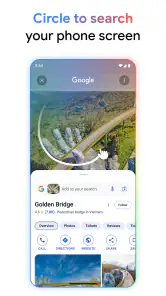
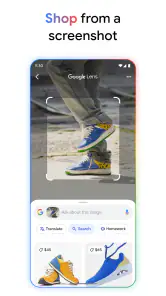
Yes. The Google app includes voice search, letting you speak a query instead of entering it on the keyboard. Visual search features such as Google Lens can also help you explore something you see. Text search remains available whenever it is more convenient, so you can choose the method that fits the situation and your preferences.
Does the Google app cost anything to download or use?
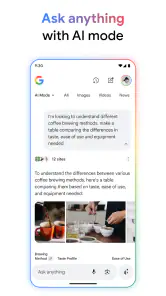
The Google app is free to download. It gives you access to Google Search and features such as voice search and visual searches in one place. You can also use Google Search through a web browser. For everyday questions, research, or exploring topics, the app offers a convenient starting point without a purchase price.
Pros
- Seamless integration with Android devices.
- Wide range of features and tools.
- Regular updates improve functionality.
- Syncs effortlessly across devices.
- User-friendly interface for easy navigation.
Cons
- Can consume significant device resources.
- Privacy concerns with data collection.
- Frequent updates may be disruptive.
- Some features require a strong internet connection.
- May have compatibility issues on older devices.
- Category
- Tools
- Version
- Varies with device









