Google News - Daily Headlines
- 57.63K
- 4.0
- Installs
- 1.00B
- Price
- Free
Screenshots
Analysis by Reviewed
Staying updated with the world’s happenings is crucial in our fast-paced lives, and Google News is one app that promises to keep you informed with its daily headlines. I recently took this app for a spin, and here's what I found.
First Impressions and User Interface
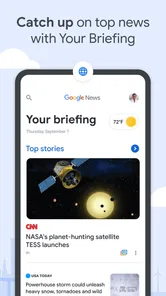
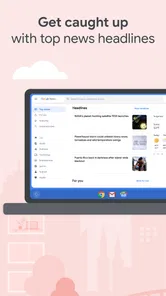
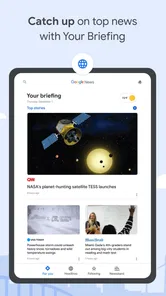
When I first launched Google News, I was greeted by a clean and user-friendly interface. The design is straightforward, so even if you’re not tech-savvy, you’ll find it easy to navigate. The headlines are prominently displayed, and you can easily scroll through to catch up on the latest news. Plus, the app loads swiftly, which is a big win for those moments when you need to check the news in a hurry.
Personalized Content
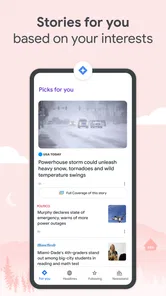
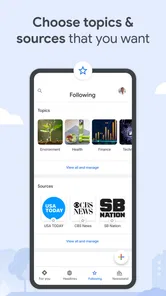
One of the standout features is the app’s ability to offer personalized content. By analyzing your reading habits, it tailors the news stories you see to match your interests. For instance, if you're a sports enthusiast, expect to see more sports-related stories. This feature makes the app feel like it knows you, delivering news that’s relevant to your life.
Comprehensive Coverage
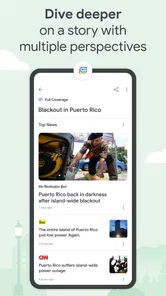
Google News doesn’t just focus on giving you the headlines; it provides comprehensive coverage from various sources, offering different perspectives on the same story. This is perfect for anyone who likes to get a well-rounded view of the events happening worldwide. It’s like having a buffet of news at your fingertips!
That breadth is useful when a story is moving quickly: I can compare how different outlets frame the same event instead of treating the first headline I see as the whole picture. I still check the source and read beyond the headline, especially when the subject is sensitive or a short summary leaves out important context. For a reader who wants several viewpoints in one place, that is a practical advantage over opening separate news sites one by one. Someone who already trusts a particular newspaper and wants its full reporting, however, may be better served by that publisher’s own app.
Offline Reading
Another handy feature is offline reading. You can save articles to read later when you’re offline, which is perfect for long commutes or when you find yourself in areas with spotty internet connections. This ensures you’re never out of touch with the world, no matter where you are.
A useful routine is to save a few pieces while connected, then open them during a train ride or before entering a place with unreliable reception. I would not treat saved reading as a complete offline news service: it helps with articles you have already chosen, rather than guaranteeing a fresh feed without a connection. That small distinction makes the feature most valuable for planned reading, not for checking a breaking update mid-journey.
More From Our News Desk

 Gmail
Gmail in a Busy Inbox: Who Benefits Most?
From first account to crowded workday, Gmail earns its place through dependable search and flexible sorting—but its best fit depends on how much inbox maintenance you can tolerate.

 Prime Video
Switching to Prime Video: What Changes in Your Viewing Routine
Prime Video can make a compelling second home for streaming, but switching means learning a different catalog, rental layer, and route from browsing to playback.

 Universal TV Remote Control
 Works Best as a Reliable Backup
A phone remote earns its place through quick setup and reliable habits. Here is how to get more from Universal TV Remote Control—and where its limits show.

 Weather - By Xiaomi
Weather by Xiaomi Review: Clear at a Glance, Less Clear Up Close
Xiaomi’s weather app makes everyday forecasts quick to scan, but its calm surface can leave useful details and recovery paths harder to find than they should be.

 X
X Under Pressure: Can It Recover When Posting Goes Wrong?
A resilience-focused review of X, examining setup, mistaken posts, interruptions, weak connections, and the gaps that matter when recovery needs to be dependable.

 Clash of Clans
 Is Won Between the Battles
Its raids are quick; its community is a long-term project of coordination, teaching, rivalry, and shared responsibility—with all the friction that entails.
Latest News



Notifications and Alerts
The app also lets you manage notifications so you won't be bombarded with alerts that don’t interest you. You can customize these settings to only receive the most important news updates, ensuring you stay informed without feeling overwhelmed.
For long-term use, I’d start with a quiet notification setup and add alerts only if I find myself repeatedly missing a topic I care about. A phone full of news interruptions can make even a useful app feel like work, while checking the feed at a chosen time keeps the habit more deliberate. If you prefer news to arrive only through a short list of trusted outlets, that more controlled approach may suit you better than a personalized, broad-ranging feed.
Everyday Use and Who It Suits
In a normal weekday, I can imagine opening the app over breakfast, scanning local and world stories, and saving one longer article for a commute. Later, comparing coverage of an important development can help me see where accounts agree and where their emphasis differs. This makes Google News particularly handy for curious readers who want a quick overview without maintaining a folder of publisher apps.
It is less compelling if you want a carefully ordered front page chosen entirely by an editor, or if you dislike recommendations shaped by your reading. Personalization is convenient, but it can also keep serving familiar subjects; deliberately exploring stories outside your usual interests helps make the feed less narrow. I would use it as a discovery and reading hub, not as a substitute for checking original reporting on consequential issues.
Keeping the App Useful Over Time
I find the app’s longer-term usefulness depends less on checking it every day than on giving each visit a purpose. A quick scan can help me spot what deserves closer attention, while saved reading gives me a reason to return when I have time. The next section looks at how that routine can stay convenient without letting a steady flow of headlines take over my attention.
Month-to-Month Value
The app is free, comes from Google LLC, and sits in the News & Magazines category. It has been available since June 27, 2012, carries a Teen content rating, and has a 4.0 average from around 1.9 million ratings, with roughly 57,000 reviews and over a billion installs. Those figures suggest it has become a familiar option for many readers, but they do not decide whether it deserves space on my phone; the real test is whether its mix of local and broader coverage keeps helping after the first week.
For me, the lasting value depends on a simple habit: check in briefly, save what deserves more attention, and leave when I have enough context for the moment. If I find that I am scrolling without learning anything or repeatedly seeing the same themes, I would adjust what I follow or take a break rather than turn news browsing into a constant background activity. That makes the app more useful as a regular checkpoint than as an endless stream to keep open.
Making a Reading Routine That Lasts
The first week is often the easiest time to enjoy any news reader: every section feels fresh, and recommendations quickly surface subjects I already like. The more meaningful test comes later, when the novelty of a personalized feed has worn off and I need a reason to return. I find the strongest reason is convenience, not a promise that every visit will uncover something surprising. It puts a broad set of stories within easy reach, so I can use a short break to get oriented without choosing a publication before I know what is happening.
A practical way to keep that convenience from turning into aimless scrolling is to decide what I want from each visit. In the morning, I might look for a quick sense of the day’s major developments; later, I might return only to follow a specific story. Saving an article when I have time to read it properly gives that second visit a purpose. This small change makes the app feel more like a reading queue and less like a feed that demands constant attention.
It also helps to treat personalization as a starting point rather than a fixed picture of my interests. If the front page repeatedly leans toward familiar subjects, I can deliberately open coverage that sits outside my normal routine and compare the sources presented there. That is a useful counterweight to the comfort of recommendations, though it still takes some effort from me. Readers who want an editor to make those choices on their behalf may find a curated publication more satisfying.
How It Fits Beside Other News Apps
Compared with installing several individual publisher apps, Google News is more convenient for scanning across outlets and topics from one place. That makes it especially useful when I do not yet know which publication is covering a developing story well. The trade-off is that a news hub can make a collection of sources feel like one seamless product, even though their reporting, framing, and level of detail differ. I try to notice which outlet produced an article before treating its presentation in the feed as a reason to trust it.
A publisher’s own app is usually the better fit when I want that outlet’s complete reading experience, a familiar editorial voice, or a more direct relationship with its reporting. A simple browser routine can also work better for someone who prefers to choose every site manually and does not want recommendations shaping the next story. I see Google News as the middle ground: broader and quicker to browse than a single source, but less deliberate than a reading list I have assembled myself.
That middle ground is not equally valuable for everyone. If I follow local developments closely, having local and wider stories together can make the morning scan feel more complete. If my main interest is in a specialist subject, a dedicated publication or specialist news service may offer more depth and a clearer sense of what matters within that field. The app is strongest when breadth and discovery matter more than a single publication’s full archive or a deeply tailored specialist experience.
Small Habits That Reduce Friction
My first adjustment would be to keep alerts restrained. A headline notification can be useful when I actively want timely updates, but a steady flow of interruptions can make the phone feel like a news ticker I never chose. I would let the app earn a place in my routine through a planned check-in before enabling more alerts. If I notice that I am opening it because a notification has pulled me in rather than because I have time to read, I would scale back again.
For offline reading, a little preparation makes a difference. I can save articles while connected when I know a commute or waiting period is coming, then use that time for pieces I already judged worth reading. This is more reliable as a personal reading plan than as a way to stay current without a connection. If I need to follow a changing situation in real time, I would check for a connection rather than assume saved articles will keep the picture current.
When several outlets cover one event, I find it useful to compare not only their headlines but also what each story actually emphasizes. One may focus on immediate consequences while another supplies background or a local angle. The app’s value is not that it resolves every disagreement; it gives me a convenient way to notice that accounts differ. For important subjects, I still want to read the full articles and assess their sources rather than rely on a quick summary or a cluster of headlines.
Where the Convenience Can Wear Thin
The same personalization that makes the first visit feel relevant can become repetitive over time. If I mostly click on one kind of story, recommendations may make the feed feel narrower than the range of news I want to follow. I would respond by actively exploring other subjects and checking whether the mix becomes more useful, rather than assuming the default page is a neutral overview of everything important.
There is also a difference between seeing many headlines and understanding a complicated issue. A fast scan can tell me what is being discussed, but it cannot replace patient reading when context, history, or competing claims matter. That distinction is easy to lose when stories are presented in a convenient stream. I use the feed to find a direction for further reading, not to decide that a few headlines are enough to understand a consequential event.
Another possible source of fatigue is the pressure to keep up. News never runs out, and an app that makes fresh stories easy to reach can encourage repeated checking even when there is no useful reason to return. I prefer to set a natural stopping point: once I have caught up on the subjects that matter to me, I close the app. That makes it easier to preserve the useful part of the service without turning attention to the news into a constant task.
Who Should Keep It, and Who Might Skip It
I would recommend trying it if you want one place to discover stories from different publishers, keep an eye on both local and wider events, and save worthwhile reading for later. It suits someone who likes to browse before choosing which article deserves more time, or who would rather not maintain separate apps just to scan a variety of coverage. The free price also makes it easy to test whether that workflow fits without committing to a paid subscription.
I would be less likely to recommend it as a primary source for someone who already has a trusted publication that meets their needs, or for a reader who wants an editor-led front page with little personalization. It may also frustrate anyone who finds recommendations intrusive or who expects an offline feed to provide new information while disconnected. In those cases, a publisher’s own app, a manually chosen set of sites, or simply fewer news checks may be a better match.
Parents choosing news software for a younger reader should also pay attention to its Teen content rating and consider whether the app’s broad range of current events suits that person. A news feed can include difficult subjects, so I would not assume that an easy-to-use interface means every story is appropriate for every age or moment. The right choice depends as much on the reader’s comfort and habits as it does on the app’s convenience.
Final Thoughts
All in all, Google News is a solid app for anyone looking to stay informed on the go. Its personalized content, comprehensive coverage, and offline reading capabilities make it a must-have for news junkies. Whether you're commuting, taking a break, or just curious about what's happening around the world, this app has got you covered. Give it a try, and you might just find it becomes your go-to source for daily headlines.
My recommendation is more measured than “must-have”: it is a convenient free reader for people who value quick discovery, topic-based personalization, and the chance to compare coverage. It is not automatically the best choice for someone who wants one publication’s complete experience or prefers an editor-led selection. I would keep it installed if it helps me build a manageable news routine; if the feed becomes repetitive or distracting, the app earns less lasting space than a focused source I already trust.
Google News - Daily Headlines Frequently Asked Questions
Can I use Google News to follow local stories as well as world headlines?
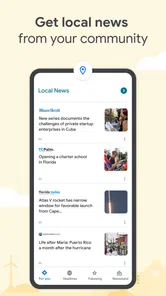
Yes. Google News is designed to bring together the latest local and world news, and its personalized feed can reflect the interests and locations you follow. That can make it useful when you want a mix of broader headlines and stories closer to home. You can also browse beyond your regular feed to discover coverage on other topics.
Do I need a Google account to read news in the app?
Google News is an app for discovering and reading news, with a feed that can be personalized to your interests. Signing in can help tailor that experience, but you can also assess the app by exploring the headlines and stories it presents. If you want a feed shaped around particular topics, sources, or locations, personalization options are part of the experience.
Can I read full articles in Google News, or only headlines?
Google News presents headlines and links to reporting from publishers, so what you can read in full may depend on the individual story and its source. Some publisher pages may make an article available directly, while others can require a subscription or impose a paywall. The app itself is free, but access conditions for linked publisher content can differ.
Is Google News suitable for teenagers?
Google News is rated Teen, so it is intended for a teenage audience and older. It brings together headlines and reporting from a range of publishers, and the subjects covered can vary with current events and your interests. If you are choosing an app for a younger user, consider whether its news coverage and linked publisher content are appropriate for them.
Who makes Google News, and is it widely used?
Google News is developed by Google LLC and is a news and magazine app. It has over one billion installs and an average rating of 4.0 from around 1.9 million ratings. Those figures give a sense of its reach, while the app’s usefulness will still depend on whether its coverage and personalized feed suit your interests.
Pros
- Timely and reliable news updates.
- Personalized news feed tailored to interests.
- User-friendly interface for easy navigation.
- Diverse news sources for comprehensive coverage.
- Offline reading for news on-the-go.
Cons
- Occasional ads can disrupt reading.
- Limited customization of news topics.
- Some news sources may have bias.
- Requires internet for full functionality.
- May drain battery with frequent updates.