Disney+
- 190.67K
- 4.3
- Installs
- 500.00M
- Price
- Free

Screenshots

Analysis by Reviewed
When I open Disney+ with a particular plan in mind—say, finding something for a quiet evening rather than scrolling until bedtime—the biggest question is whether its catalog and browsing flow can narrow the choice quickly. The app is Disney’s entertainment streaming service, and its strongest appeal is the way it brings familiar franchises and newer releases together. I find it most satisfying when I arrive knowing the kind of mood or story I want; browsing without a destination can make the breadth feel less helpful than it sounds.
From a quick search to a shared screen
My practical routine is simple: I start on my phone, scan the featured rows or search for a title, then decide whether I want to watch there or move to a larger screen. That handoff matters in everyday use. A phone is handy for choosing an episode while someone else has the television, while a living-room screen makes a film feel like an event. If I am planning a trip, I think about downloads before leaving rather than assuming a connection will be available when I need one.
A useful habit is to choose the next episode or movie before the household settles in. It avoids turning a shared viewing session into a long debate through rows of recommendations. I also treat the app’s themed collections as a starting point, not a verdict: they can help me rediscover a familiar corner of the library, but searching for a specific title is usually faster when I already know what I want.
Making the handoff work
For an ordinary evening, I might search on my phone while dinner is finishing, then let everyone agree on a title before switching to the television. This small sequence is more useful than expecting recommendations to settle a disagreement. If the choice is between a film and a series, I think about whether we have time to finish a film or want an episode that can become part of a routine. The app is most convenient when the decision happens before everyone is ready to press play.
When I am watching away from home, I treat offline viewing as a separate preparation step. I choose what I want while I have a dependable connection and check that the download is ready before leaving. That gives me a practical fallback for a commute or a trip, rather than relying on a mobile signal at the exact moment I want to watch. It is a small bit of planning, but it prevents the common frustration of discovering that a streaming plan depended on reception I do not have.
Who gets the most from it
I would point families toward Disney+ when different ages want a familiar place to browse, and I can see the appeal for anyone who returns to Disney, Pixar, Marvel, or Star Wars stories. It also suits viewers who like following a series over several evenings or revisiting films they already know. On the other hand, someone who mainly wants live television, a broad mix of unrelated independent films, or a service chosen around one particular non-Disney favorite may be happier comparing other streaming options before committing.
The app is free to install, but watching is tied to a paid subscription; in-app purchase options are listed from $11.99 to $999.99 per item, so I would check the checkout screen carefully before confirming a purchase. Disney+ is rated Teen, a useful signal for families, though it is still sensible to review a title yourself when a child’s comfort level matters. The service has a 4.3 average from around 4.9 million ratings and over 100 million installs, which gives a sense of its broad reach without telling me whether every show will suit my household.
More From Our News Desk

 Clash of Clans
Clash of Clans Is Won Between the Battles
Its raids are quick; its community is a long-term project of coordination, teaching, rivalry, and shared responsibility—with all the friction that entails.

 Android Auto
Android Auto Makes the Case for Quieter Car Software
The car interface is no longer judged by how much it can do, but by how quietly it helps. Android Auto shows what drivers now expect—and what still gets in the way.

 MobiOffice: Word, Sheets, PDF
MobiOffice: Transforming Mobile Productivity with Seamless Integration
MobiOffice: Word, Sheets, PDF is redefining mobile productivity with a surprising blend of functionality and innovation.

 EA SPORTS FC Soccer Mobile 26
EA SPORTS FC™ Mobile Soccer: Redefining Mobile Sports Gaming
Dive into EA SPORTS FC™ Mobile Soccer, where immersive gameplay and strategic depth transform mobile sports gaming.

 Microsoft OneDrive
How Microsoft OneDrive Became a Mobile Productivity Giant
Discover how Microsoft OneDrive defies expectations, reshaping mobile productivity with its surprising features and unmatched integration.

 Google Translate
How Google Translate Breaks Language Barriers Effortlessly
Google Translate is not just a tool; it's a cultural force breaking language barriers with unprecedented ease and accuracy.
Latest News



Choosing between streaming services
Compared with a general-purpose streaming app, Disney+ makes more sense when the people watching already care about its familiar story worlds and want to move between films, series, and originals in one place. A broader service may be a better fit for someone whose watchlist spans unrelated studios and independent films, while a live-TV option is the more direct choice for someone who wants channels rather than an on-demand library. I would compare actual titles I plan to watch, not just the size or reputation of a service’s catalog.
That distinction matters for occasional viewers too. If I only want one particular movie, renting or buying it through a service I already use may be simpler than adding a subscription. If I regularly revisit several Disney, Pixar, Marvel, or Star Wars titles, a dedicated library is easier to return to. The right choice depends less on whether the app is popular and more on whether the household has a continuing reason to open it.
Where the convenience has limits
Downloads are helpful for a commute or flight, but they work best as preparation, not a last-minute fix: I would pick the content while connected and check that it is ready before heading out. More generally, streaming quality and convenience depend on the device and connection in front of you, so I would not judge the whole service from one session on a weak network. If uninterrupted playback is essential, a downloaded title can be a better choice than relying on mobile reception.
There is also a real trade-off in having a large, recognizable catalog. Familiar brands make it easy to decide what to watch with children or guests, but they do not guarantee that every recommendation is a good fit or that every viewer will find enough variety. I would compare the current catalog with the specific films and series I care about, rather than subscribing just because a few well-known names are included. That is the most practical way to avoid paying for a library I only browse occasionally.
Disney+ has been available since November 8, 2019, and Disney continues to update the app; version 4.19.3+rc1-2025.11.21 requires Android 5.0 or later. Those details matter most if you are installing it on an older device. For my own use, the bigger question is still whether the people watching with me have titles they genuinely want to return to. If they do, the app can make an easy evening plan. If not, another service with a better match for their tastes is the smarter choice.
The Magic Begins
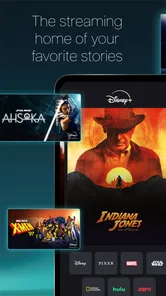
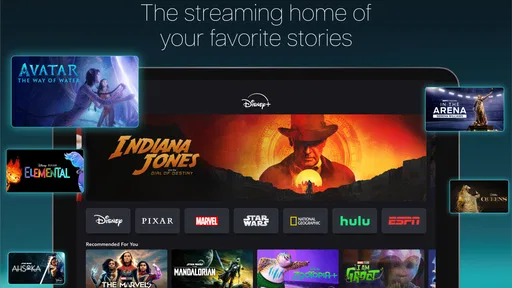
From the moment I opened the app, I was greeted by an incredibly user-friendly interface. Disney+ doesn’t just throw content at you; it curates an experience. You’re immediately welcomed by a carousel of featured titles, making it super easy to jump into something exciting. Whether you're in the mood for some classic Cinderella magic or the latest episode of The Mandalorian, it’s all right there.
A Library Full of Wonders
Now, let's talk about the content. With a subscription to Disney+, you gain access to an extensive library that includes Disney classics, Pixar masterpieces, Marvel superhero sagas, Star Wars adventures, and National Geographic documentaries. It's like having a theme park on your device. I found myself lost in nostalgia watching The Lion King and couldn’t resist the allure of binge-watching the Marvel Cinematic Universe.
Exclusive Content and Originals
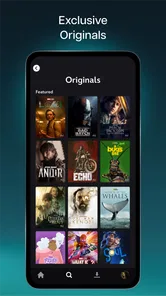
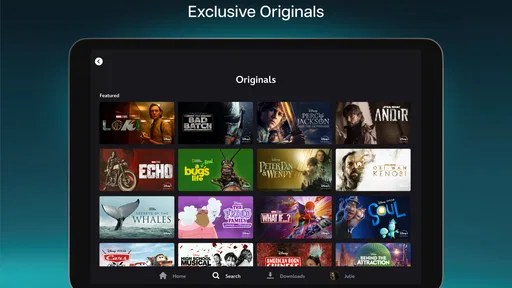
But wait, there’s more! Disney+ isn’t just resting on its laurels by offering old content. It’s producing a range of original shows and movies that are exclusive to the platform. The much-talked-about The Mandalorian is just the tip of the iceberg. If you're a fan of Marvel, shows like WandaVision and Loki are must-sees. The quality of these originals is top-notch, making the subscription fee feel worth every penny.
Device Compatibility and Performance
One of the things that impressed me the most is how seamlessly Disney+ works across various devices. Whether you're streaming on your phone, tablet, or smart TV, the app maintains its high-quality performance. I noticed no lag or buffering, even during peak hours, which is a huge plus for any streaming service. Plus, the ability to download shows for offline viewing is a lifesaver for those long commutes or flights.
Family-Friendly Features
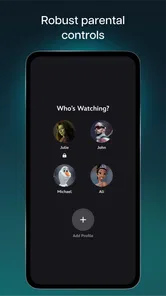
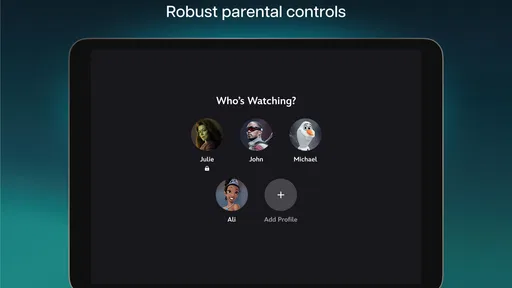
Another highlight of Disney+ is its family-friendly features. The app allows you to set up multiple profiles, which is perfect for families with kids. Parents can rest easy with the robust parental controls, ensuring that the little ones only access content appropriate for their age. Plus, the kids’ profiles are designed to showcase content that appeals to younger audiences, making it a win-win for everyone.
Planning a family viewing session
One practical way I would use those separate profiles is to keep a shared family watchlist distinct from each person’s own viewing. Before a weekend movie night, I could look through titles with the family and settle on a short list, then let the group choose together. That is more reliable than assuming one person’s recommendations will suit everyone. It also helps keep a child’s browsing experience from becoming the default for adults who use the same screen.
For a busy evening, the useful handoff is not just phone to television; it is also from one person’s plan to the group’s decision. I would have a specific title ready, but keep a backup in mind in case its tone or length does not suit the moment. A familiar animated film may work when attention is divided, while a story-heavy series asks for more focus. Thinking about the room and the time available can make the catalog feel easier to use than simply scrolling through it.
For parents, I would make profile and viewing choices part of the setup rather than leaving them until a child is already browsing. A Teen age rating describes the app’s overall content classification, not the suitability of every individual title for every child. I would still check what is selected and keep the household’s own boundaries in mind. That extra care is especially worthwhile when several people use the same service and have different ideas about what is appropriate.
When another option fits better
I would skip this service if my main goal were to keep up with live broadcasts, browse a wide range of unrelated films, or watch only one title and then stop. In those cases, a live-TV service, a broader on-demand library, or a one-off rental may be a more sensible match. The decision is not whether Disney’s franchises are recognizable; it is whether their particular mix gives me enough to watch repeatedly. A subscription becomes easier to justify when several people in the household have different titles they actually plan to use.
For viewers comparing subscriptions, I would make a small watchlist before signing up: a few films for a shared night, a series for solo viewing, and something suitable for a trip. Then I would check whether those choices are available in the current catalog and compare that list with what I already watch elsewhere. This avoids choosing on brand familiarity alone. It also makes the next question clearer: whether I expect to return often enough to prefer a dedicated library over occasional rentals or another service I already have.
My final take
In conclusion, Disney+ is a delightful gateway to a world of entertainment that’s both nostalgic and fresh. It offers something for everyone, from die-hard Disney fans to those just looking for quality content to enjoy. Whether you're there for the classics or the captivating originals, this app does not disappoint. So, if you haven't yet taken the plunge, grab your popcorn, cozy up on the couch, and let the magic of Disney+ sweep you away.
Disney+ Frequently Asked Questions
Can I download Disney+ for free, and what does the free app include?
Disney+ is free to download, so installing the app does not itself require payment. Streaming its movies, TV shows, and Originals requires a subscription, however, and the available purchase options can vary by region. Before subscribing, check the terms and renewal details displayed for your account so you know what you will be charged and what access the selected option provides.
What kind of app is Disney+, and who is it designed for?
Disney+ is an entertainment app for watching movies, TV shows, and Originals. It is intended for people who want to stream that kind of content on a compatible device, with programming that can appeal to different audiences. The app carries a Teen content rating, so families should consider that rating and review suitable viewing options before letting younger users browse.
Can I use Disney+ while traveling or away from home?
You can use Disney+ on a compatible mobile device away from home, provided you have an internet connection for streaming. If you expect to be somewhere with limited connectivity, downloading titles beforehand can make offline viewing more convenient. Keep in mind that offline playback applies to downloaded content on supported mobile devices, not to every feature or part of the app.
Who develops Disney+, and how popular is the app?
Disney+ is developed by Disney and is an entertainment app for streaming movies, TV shows, and Originals. It has passed 100 million installs, with an average rating of 4.3 from around 4.9 million ratings and roughly 185,000 written reviews. Those figures suggest that it has reached a broad audience, though whether its catalog and subscription suit you is best judged by the titles and terms available in your region.
What operating system does my Android device need to run Disney+?
For Android, Disney+ requires version 5.0 or later. Check your device’s software version before downloading, as an older operating system may prevent you from installing or using the app. The app is free to download, but streaming content requires a subscription. If you use an Apple device, make sure it supports the current version of Disney+ before installing.
Pros
- High-quality streaming available.
- Extensive library of Disney classics.
- Bundled with Hulu and ESPN+.
- User-friendly interface.
- Offline downloads supported.
Cons
- Limited to Disney-owned content.
- Not all content available offline.
- Occasional streaming issues.
- Higher price compared to competitors.
- No free trial option available.