Uber Eats: Food Delivery
- 368.27K
- 4.6
- Installs
- 100.00M
- Price
- Free

Screenshots

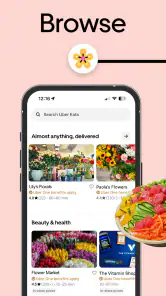
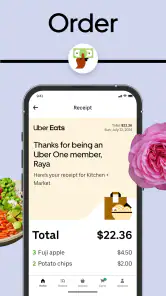
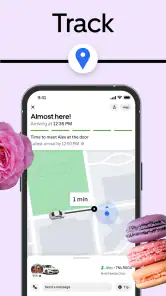
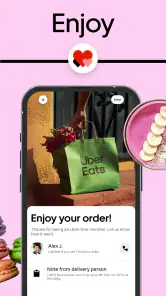
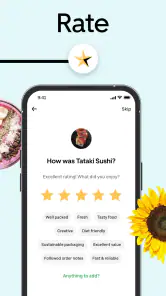

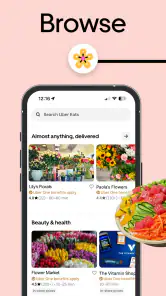
Analysis by Reviewed
I find the most frustrating food-delivery problems are often small mismatches: an address that points to the wrong entrance, a menu that looks appealing until the final total appears, or an order that seems frozen while the kitchen is busy. In my experience, Uber Eats works best when I treat it as a way to compare options and coordinate a delivery, not as a guarantee that every restaurant, price, or arrival time will suit me.
Why the first few screens can cause confusion
The app is free to download, but that does not make every order inexpensive. Restaurant prices, delivery and service fees, and a tip can all affect the checkout total. I make the decision only after checking that final amount; comparing menu prices alone can give a misleading impression of what dinner will cost.
Availability is another common source of frustration. A restaurant visible while browsing may not serve the destination I select, and what is available can vary by area. I set the delivery address early, then check that it matches the place where I will actually meet the courier. For an apartment, office, or someone else’s home, clear drop-off details can prevent avoidable back-and-forth.
Before browsing: checks I make first
I start by confirming the destination and then look at the options shown for it. If I am ordering for someone else, I make sure the recipient can receive the delivery and that the instructions are useful to a person arriving for the first time. This is a small step, but it matters more than scrolling through menus before I know which restaurants can deliver there.
At checkout, I read the order summary carefully. I check the selected items and any customizations, then weigh the full cost against the convenience. If the total feels too high, I can change the restaurant or consider pickup rather than hoping the final amount will somehow be different after placing the order.
Uber Technologies, Inc. makes this free Food & Drink app, which is rated for Everyone. It has a 4.6 average from around 7.1 million ratings and over 100 million installs, so it is a familiar option for people who want meals brought to them. The current version is 6.299.10001, and it runs on Android 9 or later.
What the app is like to use
With a name like Uber Eats, you'd expect a wide variety of cuisines and restaurants at your fingertips, and boy, does it deliver! From the comfort food classics to trendy eateries, the app serves up an impressive smorgasbord of options. It's like having a menu for the world right in your pocket.
More From Our News Desk

Clash of Clans Is Won Between the Battles

Android Auto Makes the Case for Quieter Car Software

MobiOffice: Transforming Mobile Productivity with Seamless Integration

EA SPORTS FC™ Mobile Soccer: Redefining Mobile Sports Gaming

How Microsoft OneDrive Became a Mobile Productivity Giant

How Google Translate Breaks Language Barriers Effortlessly
User experience: finding a meal without much fuss
One of the first things I noticed was the clean and intuitive interface. Navigating through the different sections was a breeze, thanks to the well-organized categories and smart search function. Whether you're craving sushi or a juicy burger, the app makes it super simple to find exactly what you're looking for.
Ordering is straightforward. Just select your food, customize any options, and check out with a few clicks. The app even remembers your past orders, which is a lifesaver when you want to reorder your favorites without scrolling through endless options.
Choosing well without turning dinner into a research project
When I am torn between several places, I narrow the choice by deciding what matters most tonight: a familiar meal, a particular cuisine, or the shortest estimated wait. Then I compare a few menus rather than endlessly browsing. This is a useful trade-off in a large catalog: more choice is only helpful until it starts delaying the decision.
Past orders are handy, but I still review the details when repeating a meal. A restaurant may change its menu, and a dish that worked for one person may not suit a shared order. For a family or group, I find it clearer to settle on a place first and check everyone’s choices together, instead of placing separate orders that can complicate timing and cost.
Making a shared order less chaotic
For a group meal, I find it helps to agree on the restaurant before everyone starts picking dishes. That keeps the decision focused and makes it easier to review the basket as a whole. I also double-check quantities and customizations together, since a quick reorder or an extra tap can change what is being sent. This is more useful than assuming each person’s favorite past order will still fit the occasion.
When several people are splitting the cost, I decide how to handle payment before checkout rather than trying to sort it out after the order is placed. The app can bring the menu and order details together, but it cannot resolve a disagreement about what to buy or how to divide the bill. A little coordination outside the screen often saves more time than additional browsing.
Delivery estimates and tracking: helpful, not exact
When it comes to delivery, timing is everything. Most of the time, my orders arrived within the estimated delivery window, which is a huge plus. The app also provides real-time tracking, so you can watch your meal make its way to you. It's like tracking Santa on Christmas Eve, but with food!
However, there have been instances where delivery times ran a bit late, especially during peak hours. But let’s be real, who hasn’t experienced a delay in food delivery at some point?
When an order feels stuck: a calm recovery routine
If an order seems to be taking longer than expected, I first check the delivery estimate and tracking rather than immediately starting over. A busy period can make the wait less predictable, and placing a second order could leave me with two meals if the first one is still moving. If the screen does not seem to reflect what is happening, I check the order details and use the available in-app help options instead of guessing or repeatedly changing the order.
For a time-sensitive meal, I build in some slack rather than ordering at the last possible moment. If I need food at a fixed time, pickup or eating somewhere nearby may be a better fit than relying on a delivery estimate. Tracking is useful for knowing whether to stay available, but I do not treat it as a guarantee that every order will arrive at an exact minute.
Separating app trouble from a restaurant or delivery delay
Not every frustrating order points to a problem with the app itself. A restaurant may be busy, an item may no longer be available, or a courier may take longer than expected. I look at the order status and the details on screen before deciding what to do; if the order is still progressing, repeatedly refreshing or placing another one is unlikely to make the meal arrive sooner.
If something appears incorrect, I keep the issue tied to the specific order and use the help route shown in the app. I avoid sharing sensitive account details in messages or trying to solve a delivery problem through an unrelated contact. For a simple delay, waiting for the status to update may be sensible; for a missing or incorrect order, the order-specific help options are the more appropriate next step.
Price: judge the total, not the menu alone
Now, let's talk about the cost. While the app itself is free to download, the prices can vary greatly depending on the restaurant and your location. There are delivery fees, service fees, and tips to consider, which can add up quickly. That said, frequent promotions and discounts can help soften the blow to your wallet.
Plus, if you’re savvy with the app, you can spot some great deals that make it more affordable. I often find myself checking the "Deals" section for any offers that could save me a few bucks.
Food delivery versus the other practical choices
I see this as most useful when convenience and variety matter more than getting the lowest possible total. Compared with calling a restaurant, browsing in the app makes it easier for me to compare menus and keep the order details in one place. A restaurant’s own ordering route or picking up the meal can be a better choice if I want to check its direct options or avoid delivery-related charges; the best route depends on the restaurant and what is available locally.
The app also covers grocery shopping from local supermarkets, which gives it a different role from a meal-only service. That can help when I am short on a few basics and would rather have them brought to the door than make a separate trip. For a full planned grocery shop, though, I would compare the final basket and delivery arrangements with my usual supermarket option before deciding. A convenient basket is not automatically the cheapest one.
Groceries for the forgotten essentials
I find grocery delivery most compelling for a small, practical need: realizing I am out of a few basics while already committed to staying home, for example. It can spare a separate trip, but I would make a short list before browsing so that convenience does not turn into an impulsive, oversized basket. For a regular weekly shop, my usual supermarket route may be easier to plan and compare, especially when I know exactly what I need.
For either groceries or a prepared meal, I check that the selected destination and basket still make sense before committing. The app’s convenience is strongest when it solves a specific problem; it is weaker as a substitute for comparing every option in town or planning a whole household’s food budget.
Who gets the most from it—and who may not
For a realistic weeknight, imagine getting home late with little energy to cook and only a rough idea of what sounds good. I can set the address, filter my thinking by cuisine or familiar past orders, compare the checkout totals, and choose a meal without calling several places. That convenience is especially useful when I am juggling work or looking after someone at home. It is less compelling if I already have food ready, live where the nearby selection is limited, or need a meal at a precise time.
If keeping spending predictable is the priority, I would use the app to compare the full total and then consider pickup, cooking, or ordering directly from a restaurant. If broad choice and an easy repeat order matter more, the remembered order history can make the process quicker. These are different needs, not proof that one method is always better.
When I would choose another option
I would skip delivery when I have a strict arrival deadline, when the local selection does not include what I want, or when extra charges make the meal poor value for me. Pickup is often the more sensible alternative if I can collect the order without much trouble. Cooking from what is already at home is better when cost control matters most, while a restaurant’s own ordering option is worth checking if I want to compare its direct route.
That does not make the app unhelpful; it clarifies its job. I use it when seeing several nearby choices and organizing delivery in one place outweigh the added cost and uncertainty. If those conditions are not true, choosing a simpler route can be the better decision.
Final thoughts: a useful option, not a promise
So, is Uber Eats worth the download? In my opinion, absolutely! It’s a game-changer for those nights when cooking is out of the question or when you're just in the mood to try something new. With its vast selection of restaurants, user-friendly interface, and real-time tracking, it makes food delivery a seamless experience.
Sure, there might be a few hiccups with delivery times and costs, but overall, the convenience and variety it offers far outweigh the cons. So next time you find yourself hungry with an empty fridge, give Uber Eats a whirl. You might just discover your new favorite dish!
Uber Eats: Food Delivery Frequently Asked Questions
Can I browse Uber Eats before deciding whether to place an order?
Yes. After installing Uber Eats, you can explore food and grocery options available in your area before deciding whether to order. Browsing can help you see whether local restaurants or supermarkets offer what you are looking for. The app is free to download, while purchases and any applicable charges are separate from the app itself.
How much storage space does Uber Eats need?
Before installing any app, it is sensible to check that your phone has enough free storage for the download and its use. The amount Uber Eats needs can vary depending on the device and app version, so check the installation page on your device for the current requirement. Keeping some space available also helps avoid download or update interruptions.
Can I use Uber Eats in a language other than English?
Uber Eats is intended for browsing restaurant and grocery choices through a smartphone app. The language options you see may depend on your device settings and the app’s availability in your area. Before ordering, take a moment to review the menus, item descriptions, and checkout information shown in the app so you are comfortable with the details you are selecting.
Can I save my favorite restaurants or grocery stores in Uber Eats?
If you often order from the same places, it can be convenient to check whether the app offers ways to save or revisit preferred restaurants and grocery stores. The options presented may depend on your account and the app version. You can browse available local listings first and decide whether the way the app organizes choices suits your ordering habits.
Can I use Uber Eats with a slow or unreliable internet connection?
Uber Eats relies on a smartphone connection to browse local listings, place orders, and review order information. A slow or unstable connection may make these tasks less smooth, particularly during checkout or while checking updates. If the app does not load properly, try again when your connection is more reliable, and review the order screen carefully before confirming.
Pros
- Wide variety of restaurants available
- Fast delivery times
- User-friendly interface
- Real-time order tracking
- Multiple payment options
Cons
- Delivery fees can be high
- Limited delivery areas
- Occasional late deliveries
- App glitches sometimes
- Food may arrive cold

- Category
- Food & Drink
- Version
- 6.299.10001