WhatsApp Business
- 55.34K
- 4.7
- Installs
- 1.00B
- Price
- Free

Screenshots



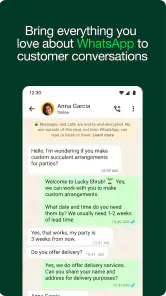
Analysis by Reviewed
I would think of WhatsApp Business less as a complete customer-service system and more as a familiar front door for a small business. It can make everyday questions easier to handle, but the same casual chat format also shapes what customers expect: quick answers, direct access, and an ongoing conversation. Whether that feels helpful or exhausting depends as much on how you manage the inbox as on the app itself.
Choose the channel your customers already use
If a customer is already comfortable messaging you on WhatsApp, asking about availability or arranging a pickup there can feel simpler than sending them to a separate form or support portal. That convenience matters for a sole trader or local shop where conversations are short and personal. I would not move every business interaction into chat, though. For complex requests, records that need to be easy to search later, or customers who prefer email or a phone call, another channel may be clearer.
The distinction from ordinary WhatsApp is practical rather than dramatic: the familiar conversation style remains, while business-oriented tools can help with recurring enquiries and basic organization. That makes it easier to adopt than a full help-desk platform, but it does not provide the same kind of structured case handling. I see it as a good fit when the owner can still recognize the important conversations and decide what needs attention next.
Make the inbox easier to hand back to yourself
One small workflow improvement is to end each inbox check by deciding the next action for unresolved chats. A customer who needs to choose a collection time is different from someone whose question still needs an answer, even if both conversations are currently open. Labels can make that distinction visible, but they work best when their names describe what happens next rather than trying to capture every detail of the customer relationship.
I would also keep reusable replies short enough to invite a real conversation. A standard answer can cover a routine point, but a message that tries to anticipate every possible follow-up often feels impersonal and is easy to send without noticing a changed detail. If the customer’s circumstances matter, use the saved text as a draft in your head, then respond to the actual question in front of you.
If you've ever found yourself juggling between personal and business communications on WhatsApp, then you know the struggle is real. Enter WhatsApp Business! This app is like your regular WhatsApp but on steroids, tailored specifically for business communication. Whether you're a small business owner or managing customer relations on-the-go, this app might just be the game-changer you've been searching for.
When a customer chat needs a different rhythm
I find this app most useful when customer questions arrive throughout the day, mixed in with ordinary messages. A small shop can use it to answer stock questions, coordinate a pickup, and follow up on an order without forcing customers into a separate support portal. The trade-off is that the same easy access can make work feel permanently open: a message arriving at dinner still looks like something that could be answered now.
More From Our News Desk

Weather by Xiaomi Review: Clear at a Glance, Less Clear Up Close

X Under Pressure: Can It Recover When Posting Goes Wrong?

Clash of Clans Is Won Between the Battles

Android Auto Makes the Case for Quieter Car Software

MobiOffice: Transforming Mobile Productivity with Seamless Integration

EA SPORTS FC™ Mobile Soccer: Redefining Mobile Sports Gaming
For example, imagine a customer asking in the morning whether a product is available, then writing again later to arrange collection. A saved reply can handle the routine details, while labels help keep that chat distinct from a new enquiry or an order that still needs attention. I would treat those tools as a lightweight workflow, not a replacement for deciding when the business is actually available to reply.
Setting Up: A Breezy Experience
First things first, setting up WhatsApp Business is a breeze. You download it from the Play Store or App Store, and it’s ready to go in just a few taps. The app allows you to use a landline or a mobile number, which is great if you want to separate your business and personal communications. Trust me, this is a lifesaver for those who are tired of mixing work and play.
The app is free to download, and WhatsApp LLC develops it. It is a communication app with an Everyone age rating, and it runs on Android 5.0 or later. Its current version is 2.26.21.75. I would check that the number you plan to use is the one you want customers to associate with the business, because changing how customers reach you later can create confusion. If you already use ordinary WhatsApp, think through how you want to separate business and personal messages before setting up rather than treating the choice as a minor detail.
Features That Stand Out
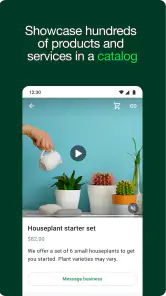
Once you’re in, the app offers a suite of features tailored for business needs. You get the usual WhatsApp feel, but with added perks like automated messages, quick replies, and even a catalog to showcase your products or services. These features are like having a mini customer service assistant in your pocket.
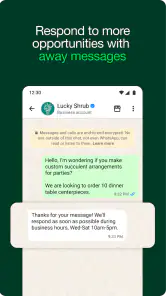
One of the coolest features is the automated greeting message. Imagine a customer reaching out to you and instantly receiving a warm welcome message—it’s like walking into a store and being greeted by a friendly face. Plus, the quick replies feature is a real time-saver. You can set up responses for frequently asked questions, which allows you to respond to customers faster than ever.
A useful way to keep replies clear is to reserve saved answers for stable information, such as opening details or how to arrange a pickup, and write a personal response when a customer’s situation is unusual. That prevents a quick reply from sounding dismissive when someone needs more than a standard answer. A catalog can also make a chat more concrete: instead of repeatedly typing the same product basics, you can point a customer to an item while keeping the conversation available for questions and decisions.
Staying Organized
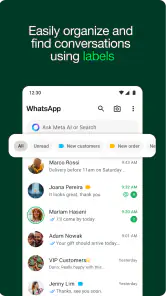
For those who struggle with organization, this app has got you covered. It allows you to label chats, which helps in keeping track of conversations. Whether it’s new customers, pending orders, or completed deals, you can label them all. This way, you’re not scrolling endlessly trying to find a specific chat—it’s all neatly organized.
Labels are most useful when they represent the next action, not just a broad customer type. I would use a small set such as “reply needed,” “waiting for pickup,” and “finished,” then move a conversation as its status changes. That makes a quick scan more actionable and reduces the chance of reopening a chat just to remember what remains to be done. If several people need to handle the same incoming messages, though, a chat label alone is not a full assignment or team-management system.
Managing attention without losing the personal touch
Quick replies and greetings can shorten repetitive exchanges, but they do not remove the need to read carefully. A customer may ask a familiar question with a detail that changes the answer, so I would use saved text as a starting point and check it before sending. That small pause matters more than sending every response instantly; accuracy and a human tone are part of the service.
There is also a useful distinction between being reachable and being on call. A greeting can acknowledge someone when you cannot answer immediately, while a clear routine for checking chats helps stop every notification from interrupting other work. If you run a one-person business, decide which conversations deserve an immediate interruption and which can wait for your next check-in. The app makes a fast response convenient, but the boundary has to come from your working habits.
Building Customer Relationships
Let’s talk about customer relationships, shall we? WhatsApp Business makes it easy to build rapport with your customers by providing insights into your messaging statistics. You can see how many messages were sent, delivered, and read, allowing you to tweak your communication strategy for better engagement. It's like having an analytics team on your phone!
I would use those message indicators as context rather than as a scorecard. A read message does not necessarily mean a customer is ready to decide, and a delivered message is not a promise of a response. They can help you notice whether a message reached someone, but they cannot tell you why a person has not replied or whether your wording was helpful. For sensitive or time-dependent matters, a polite follow-up is more useful than drawing a firm conclusion from a status.
Moreover, the app's ability to integrate with Facebook Shops allows you to reach a broader audience. You can even link your WhatsApp Business account to your Facebook page, making it easier for customers to find you. This integration is seamless and offers a unified experience for both you and your customers.
Compared with ordinary messaging apps, the business-focused tools make recurring enquiries easier to sort and answer without changing the familiar chat format. That is appealing if your customers already prefer messaging and your workload is modest. If you need a formal ticket queue, detailed staff assignments, or a shared support process, a dedicated customer-service platform may be a better fit. And if most of your communication is personal rather than customer-facing, regular WhatsApp is likely the simpler choice.
The app is free, though in-app purchases are listed from around $0.29 to $2,799.99 per item; I would not assume every business needs to buy anything to use its basic messaging workflow. Its scale is considerable, with over a billion installs, an average rating of 4.7 from around 23 million ratings, and about 55,000 written reviews. Those figures suggest broad familiarity, but they do not guarantee that its approach will suit every business or solve a particular team’s needs.
Who will get the most from it?
I would recommend it to independent sellers, local services, and small businesses whose customers already contact them through WhatsApp. It is especially handy when the same questions recur, orders need simple follow-up, and one person can keep track of the inbox. A catalog, quick replies, and status labels can make those everyday exchanges feel less improvised without turning each customer interaction into a formal support case.
I would skip it as the main communication system if your customers expect a phone line, email trail, or a structured help desk, or if a large team needs clear ownership of every conversation. It is also a poor fit if you do not want customer contact entering the same general messaging routine that you use elsewhere. In those cases, a separate business phone or a dedicated service tool can provide a clearer division of responsibilities.
A practical routine for a busy day
For a one-person business, I would check the inbox at set points rather than let each new message dictate the day. In the morning, I might sort chats by what needs a reply, what is waiting on a customer, and what is ready for collection. During a quieter block, I could answer straightforward questions with checked quick replies, then leave unusual requests for a more considered response. This keeps the convenience of messaging without turning every task into an interruption.
That routine also helps when a customer returns to an older conversation. Rather than starting over, the existing chat can provide the context for a pickup or follow-up, while the label reminds me of the next step. I would still avoid putting a customer’s entire order process in my head: labels are useful prompts, but they are not a substitute for whatever record-keeping the business needs.
Where the convenience has limits
Messaging is quick, but it can blur expectations. Customers may see a familiar chat interface and assume a reply will arrive immediately, even when the business is closed or busy. A greeting can set a courteous first impression, but it cannot enforce working hours or prevent someone from sending repeated messages. I would make the expected response rhythm clear in the wording I use and stick to it consistently.
It is also worth thinking about the kind of information customers send. A chat can be convenient for basic questions and coordination, but it may not be the right place for every sensitive detail or a complicated dispute that needs a formal record. When a conversation becomes difficult to track, moving it to email, a phone call, or a dedicated support system can be clearer for both sides.
My verdict for small businesses
In conclusion, WhatsApp Business is more than just a messaging app; it’s a comprehensive tool designed to enhance your business communication. From setting up quick replies to maintaining customer relationships, it streamlines your business operations like a pro. If you’re looking to boost your business communication and efficiency, give this app a try. It’s like having an entire business team right in your pocket, ready to tackle any customer query with ease!
My recommendation is more specific: choose it when your customers already use WhatsApp, your conversations are manageable, and a familiar chat is the simplest way to handle questions and orders. Before you move business contact there, decide who will answer, when the inbox will be checked, and which replies can safely be reused. If you need a shared queue, formal case histories, or a firmer line between work and personal messaging, another channel will serve you better. For a small operation that values direct contact and can set its own boundaries, it is a practical place to start.
A simple test before committing
Before making it the main route for customer contact, I would try it with a narrow, low-risk part of the business: routine availability questions or pickup coordination, for example. That quickly shows whether customers actually prefer messaging and whether the owner can keep the conversation flow manageable. If the inbox becomes hard to review or customers begin treating every message as urgent, that is useful evidence to add another channel rather than trying to solve every problem with more saved replies.
The best result is not necessarily the fastest possible response. It is a clear answer, a customer who understands what happens next, and an inbox that can be closed when the working day ends. For a small business with straightforward conversations, WhatsApp Business can support that kind of direct service—provided the person behind the account sets the pace instead of letting the chat set it.
WhatsApp Business Frequently Asked Questions
Is WhatsApp Business free to download?
WhatsApp Business is free to download, making it possible to try its business messaging tools without an upfront download fee. Keep in mind that optional in-app purchases are also listed, so review any purchase details shown in the app before confirming a transaction. Whether you need a paid option depends on what you choose to use; installing the app itself does not require payment.
What age group is WhatsApp Business suitable for?
WhatsApp Business has an Everyone content rating, making its app content suitable for a broad audience. The app is intended as a communication tool for businesses and their customers, so suitability also depends on how it is used and who manages the business account. If younger people may interact with a business through the app, consider your usual communication and privacy practices.
How much storage space does WhatsApp Business need?
The amount of storage available on your phone is worth checking before you install WhatsApp Business. The app may also accumulate customer conversations and other content as you use it, so leaving room for installation and future updates can help avoid problems. You can review your device’s storage settings before downloading and manage stored content later according to your business needs.
Does WhatsApp Business receive updates?
WhatsApp Business has a current version of 2.26.21.75, and keeping an app updated is a practical way to use the version made available for your device. Check your device’s app store for update options and install updates when appropriate. It is also sensible to review your settings after an update, particularly if you depend on particular business tools or notification preferences.
Can I use WhatsApp Business for a nonprofit or community organization?
WhatsApp Business is described as a simple tool for businesses to talk to their customers, and its business profile and messaging tools may also be useful when an organization needs to communicate with the people it serves. Consider whether your group’s conversations fit that business-to-customer approach and whether someone can manage replies consistently. Set clear expectations about the account’s purpose before inviting people to contact it.
Pros
- Easy integration with Facebook and Instagram.
- Automated responses save time.
- Labels help organize chats.
- End-to-end encryption ensures privacy.
- Free to use and widely adopted.
Cons
- Limited to one device per account.
- Lacks advanced CRM features.
- No support for third-party integrations.
- Internet connection required for use.
- Limited broadcast message features.
- Category
- Communication
- Version
- 2.26.21.75