Image to PDF - PDF Maker
- 11.84K
- 4.9
- Installs
- 50.00M
- Price
- Free

Screenshots
Analysis by Reviewed
I judge a small utility by what happens after the first few satisfying uses: does it keep removing a real annoyance, or does it become one more app I forget to open? Image to PDF - PDF Maker makes its best case when photos of paper regularly need to become a single, orderly file. I find that narrow job useful, but its lasting value depends less on novelty than on whether image-based paperwork is part of your routine.
When the quick win becomes a habit
The first time I collect several photographed pages into one PDF, the payoff is easy to see. The more interesting question comes later: will I remember this app the next time a form, receipt, or set of notes needs tidying? Its focused workflow gives me a reason to return when the source material is already on my phone and I want a shareable document without opening a broad editing suite.
It is especially suited to people who handle small batches of paper digitally: a student organizing notes after class, a household member keeping a copy of a completed form, or someone sending a few pages to a colleague while away from a computer. It is less compelling for someone who almost never handles photographed paperwork, or whose phone already has a scanning feature that reliably covers the same task.
A practical test before sharing
For a useful everyday routine, I would photograph pages in a consistent order, select them together, then check the thumbnails before creating the file. That brief pause can catch a duplicate shot or a page that belongs earlier in the sequence. Afterward, I would open the PDF and inspect its orientation before sending it; a quick visual check is more dependable than assuming that a correctly assembled file must also be ready to share.
There is a trade-off between convenience and document quality. Turning a picture into a PDF packages it neatly, but it cannot make a blurry image legible or turn photographed text into a document that is easy to edit. When accuracy matters, I would retake a poorly framed page rather than rely on conversion to rescue it. For clean paper capture, a built-in scanner may be the better first step; this app is most useful when the images already exist.
Keeping the routine lightweight
I would also decide where completed files belong before making this a regular habit. A clear filename and a sensible destination make the result easier to find later, while keeping the original photos gives me the option to retake or reorganize pages. That is a small maintenance step, but it prevents a quick conversion from creating a second, messier archive alongside the camera roll.
Document handling can involve more than convenience. Password protection may be helpful for a file that should not be casually opened, but I would send the password separately and follow any rules that apply to the paperwork. For sensitive records, the app’s protection option should not be treated as a complete security plan. That distinction matters most when the document contains personal, financial, or workplace information.
You May Like

Clash of Clans Is Won Between the Battles

Android Auto Makes the Case for Quieter Car Software

MobiOffice: Transforming Mobile Productivity with Seamless Integration

EA SPORTS FC™ Mobile Soccer: Redefining Mobile Sports Gaming

How Microsoft OneDrive Became a Mobile Productivity Giant

How Google Translate Breaks Language Barriers Effortlessly
Ever been in a situation where you needed to convert an image to a PDF on the fly? If you have, let me introduce you to the Image to PDF - PDF Maker app! This app has been my go-to tool whenever I needed to quickly convert my photos into a neat PDF document. It’s like having a mini scanner and PDF creator in your pocket, ready to go whenever you need it.
Why it feels useful in the first week
The appeal is immediate: a handful of photos can become a document without sending them through a desktop editor or a more elaborate scanning workflow. I find that especially handy after photographing paper forms, receipts, or class notes. Rather than leave a loose collection of pictures in my gallery, I can turn them into one file that is easier to share and keep together.
A realistic example is sorting a few photographed pages before sending them to a teacher or colleague. I can put the pages in reading order, choose how the finished document should sit on the page, and create a PDF in one place. That small amount of control matters: a form photographed sideways or in the wrong sequence can look careless even when every page is present.
Turning Images Into PDFs: A Simple Process
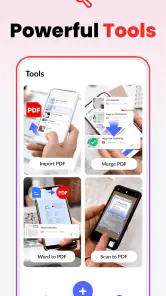
One of the first things that struck me about the Image to PDF - PDF Maker is how user-friendly it is. Right off the bat, the app welcomes you with a clean interface that doesn’t overwhelm you with too many options. It’s got those big, easy-to-tap buttons which make navigating through the app a breeze. All you have to do is select the images you want to convert, tap on "create PDF," and voila! Your images are now a sleek PDF document.
Features That Stand Out
The app offers a bunch of cool features that make it stand out from other PDF creator apps. For starters, you can rearrange the order of the images before creating your PDF, which is a lifesaver if you’re trying to keep things organized. Plus, it allows you to choose the page size and orientation, giving you more control over how your final PDF looks.
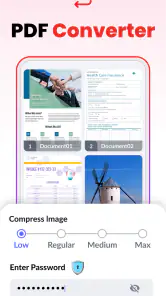
Another nifty feature is the ability to password-protect your PDFs. This is a great touch, especially if you're planning to send sensitive information. It gives you that extra layer of security, knowing that your documents are safe from prying eyes.
One practical habit that makes this workflow more reliable is checking the image sequence before tapping create. A quick review of the thumbnails can catch a page that was photographed twice or placed out of order. I would also open the finished file before sharing it, particularly when page orientation matters; the ability to assemble a PDF does not replace a final visual check.
Password protection is useful when a document should not be casually readable, but it is not a substitute for careful sharing. I would make sure the recipient can access the password through a separate channel and avoid assuming that adding a password solves every privacy concern. For ordinary paperwork, the feature is reassuring; for highly sensitive records, I would use the handling process required by the organization involved.
Who benefits, and where alternatives fit
This is a good fit for someone who regularly needs to package existing images as a straightforward PDF: students collecting photographed notes, people submitting forms, or anyone tidying up scans for email. It is also a practical option when the source is already in the phone’s photo library and there is no need to edit the text itself.
Compared with using a general document editor, the advantage is focus: the task is turning pictures into a shareable document, not learning a large set of editing tools. A built-in phone scanning tool may be better when the main job is capturing paper with automatic edge detection or correcting a skewed page. A full PDF editor is the better choice if you need to revise text, annotate pages extensively, or manage complex documents. I would skip this app if image-to-PDF conversion is a rare need and your existing device tools already handle it comfortably.
For everyday upkeep, I would treat the app as a utility rather than a place to store every document indefinitely. Give files clear names when saving or sharing them, and keep originals if you may need to crop or retake a photo later. That simple routine prevents a useful one-tap conversion from becoming another pile of unnamed files to sort through.
Why I Keep Coming Back
So, why do I keep coming back to this app? It’s simple – reliability and efficiency. The app does exactly what it promises without any hiccups. There’s no unnecessary fluff or complicated processes involved. It's straightforward and gets the job done quickly.
Not to mention, the app doesn’t bombard me with ads every five seconds, which is a huge plus in my book! It’s refreshing to use an app that respects your time and doesn’t interrupt your workflow with constant ad pop-ups.
Its place in a regular routine
Its lasting value depends on whether image-based paperwork comes up in your life more than once in a while. If you often receive or create documents as photos, the quick conversion and ordering controls can earn it a place in your routine. If that need fades, there is little reason to keep a dedicated tool at the front of your home screen; the app is most useful when it solves a repeated, specific task.
Image to PDF & PDF Reader is a free productivity app from Simple Design Ltd. It is rated for Everyone, and its current version is 1.7.2, with Android 6.0 or later required. In-app purchases are listed at $1.99 per item, so I would check the purchase details in the app if I plan to use anything beyond the free experience. Its 4.9 average from around two million ratings and more than 50 million installs suggest broad use, though popularity alone cannot tell me whether it suits my own workflow.
The main trade-off is scope. This is not the tool I would choose to make a polished, text-heavy report from scratch, and image-based PDFs can be less convenient to search or edit than documents created digitally. The conversion step also depends on having usable source pictures: blurry, shadowed, or poorly framed photos will still look poor in the result. Taking a moment to retake a bad page is often better than hoping the PDF process will fix it.
What makes it worth keeping
Over time, the strongest reason to keep a dedicated image-to-PDF tool is not that it replaces every document app; it is that it removes a recurring little obstacle. If I repeatedly receive photos that need to be combined, the focused path from selection to an ordered file is easier to remember than opening a more complicated editor and hunting for the right export option. If I only need a PDF once in a long while, that advantage shrinks, and the built-in tools I already use may be enough.
There is also a useful distinction between assembling pages and preparing a polished document. This app makes sense when each page is already a picture and the goal is to bundle those pictures. If I need selectable text, searchable records, detailed markup, or extensive edits, I would choose a scanner or PDF editor designed around those jobs instead. Being clear about that boundary keeps the app useful rather than frustrating.
For repeated paperwork, I would create a simple personal checklist: confirm the pages are readable, put them in the right order, choose a suitable page layout, and inspect the finished file before sending it. This is not busywork; it catches the mistakes most likely to make an otherwise convenient PDF look unprofessional. The app’s controls help with assembly, while the user still needs to judge whether the source images are good enough.
Overall, if you’re looking for a reliable app that can convert images to PDFs without any hassle, I’d recommend giving this one a try. It’s a straightforward option for students who submit photographed work or professionals who need to send paperwork while away from a computer. I would not keep it solely for occasional conversion if another tool already fits, but for recurring image-based documents, its simple workflow and page-order controls make it easy to justify keeping around.
Image to PDF - PDF Maker Frequently Asked Questions
Is Image to PDF - PDF Maker suitable for everyday document tasks?
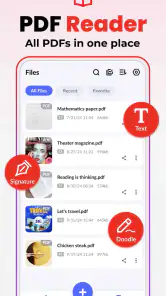
Image to PDF - PDF Maker is a productivity app for turning images into PDF files, with PDF reading and local file management included. It may suit everyday tasks such as assembling image-based documents or opening PDFs saved on your phone. Its focus is practical rather than elaborate: create, access, and manage local PDFs from one app.
What does the app do with the images I select?
The app converts selected images into a PDF, letting you arrange the images before conversion and choose page sizes and orientations. It supports image formats including JPG, PNG, and BMP. This can be useful when you want several pictures collected into one document, though it is worth reviewing the order and layout before creating the finished PDF.
Is Image to PDF - PDF Maker free, and are there in-app purchases?
The app is free to download, and it offers in-app purchases priced at $1.99 per item. You can use its core image-to-PDF function without paying, while any optional purchase depends on what you choose to access within the app. If you prefer not to make purchases, check the options shown in the app before confirming any transaction.
Can I create a PDF without an internet connection?
Yes. Image to PDF - PDF Maker can perform its core task of converting images to PDF offline, so you can work with files on your device without being connected. An internet connection is needed for online actions such as sending a PDF through email or a cloud service. This makes offline conversion convenient, while sharing depends on your connection and chosen service.
Can I share a PDF after creating it?
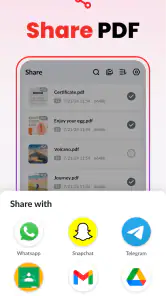
Yes, the app lets you share converted PDF files from within the app through email, cloud services, or other supported apps on your device. This provides a direct way to pass a document along without first switching to a separate file manager. Online sharing options generally require an internet connection, and availability can depend on the apps and services installed on your device.
Pros
- Easy to use interface
- Fast conversion process
- Supports multiple image formats
- No internet required
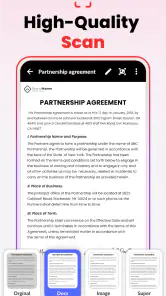
- High-quality PDF output
Cons
- Contains ads
- Limited free version
- No cloud integration
- Basic editing tools
- Occasional bugs

- Category
- Productivity
- Version
- 1.7.2













