HP Print Service Plugin
- 356.48K
- 4.1
- Installs
- 500.00M
- Price
- Free

Screenshots
Analysis by Reviewed
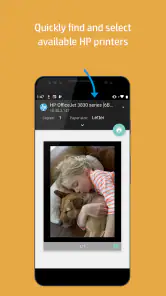
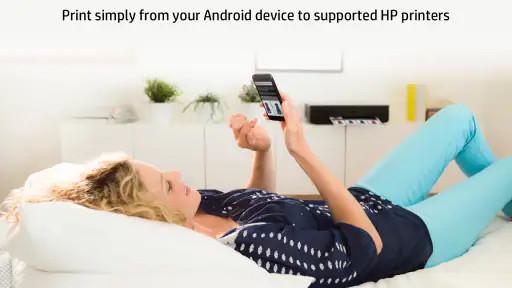
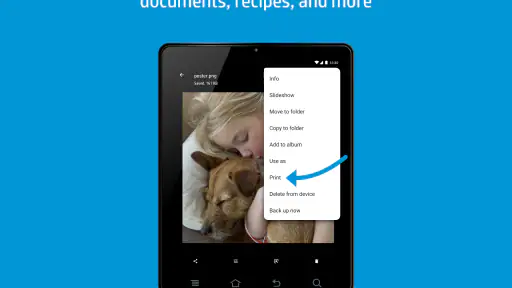
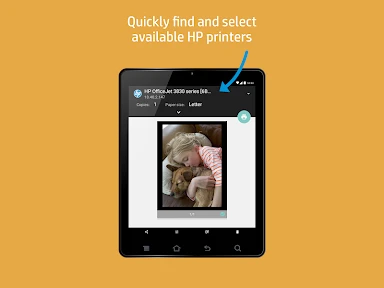
I find the HP Print Service Plugin most useful when I treat it as part of Android’s normal sharing workflow rather than as a printer-control app I need to open first. From a document or photo, I can choose the system print option, select an available HP printer, check the preview and send the job. That straightforward path is the main appeal: it cuts out transferring a file to a computer just to print a single page.
That makes it a practical fit for a household with an HP printer, or for someone who occasionally needs paper copies while working from a phone. HP Inc. makes this free productivity app, which is rated for everyone. Its 4.1 average from around 3 million ratings and more than 500 million installs suggest it has become a familiar tool for many Android users, though popularity alone does not guarantee a smooth setup with every printer and network.
A useful routine, not a separate destination
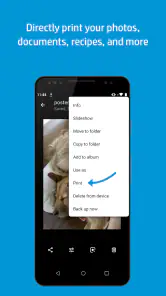
For everyday use, I’d start with a small test job: open a document, choose Print from the app’s menu, select the printer shown on the same Wi-Fi network, and inspect the preview before confirming. This is especially worthwhile with forms, boarding documents or school pages, where a clipped edge or unexpected color output can waste paper. If the printer does not appear, I first check that the phone and printer are on the same network and that the printer is awake, rather than repeatedly tapping Print.
Settings that prevent avoidable reprints
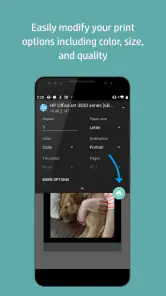
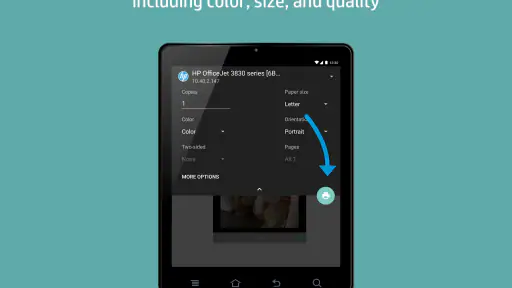
The useful habit is to pause at the print settings instead of accepting the defaults. I check paper size, color, and copy count against the job: a short reference sheet may not need color, while a photo or presentation page may. Preview is valuable for spotting layout problems, but it is not a substitute for checking the actual paper size and orientation. If the result looks wrong, changing the setting before sending another job is easier than printing the same file again and hoping for a better outcome.
The plugin is currently at version 23.2.5.3169 and supports Android 6.0 and later, so it is aimed at Android rather than serving as a universal mobile-printing solution. I would not choose it as the answer for an iPhone, nor would I assume it replaces a printer’s own setup or management tools. Its job is narrower: make printing from compatible Android apps convenient when an HP printer is available.
Where the convenience has limits
Compared with moving a file to a computer and printing from there, the phone route is quicker for a one-off page, but a desktop workflow may be better for complex documents or detailed layout adjustments. The plugin also depends on the printer being reachable on the network; it is not a fix for a sleeping, disconnected or misconfigured printer. For people who rarely print, the built-in print option may be enough without changing any habits. For frequent mobile printing, keeping the printer connected and checking the preview becomes a simple, repeatable routine.
Effortless Printing Experience
First off, the HP Print Service Plugin is super easy to set up. I remember thinking, "Oh boy, another app that’s going to take forever to configure," but I was pleasantly surprised. All you have to do is download the app, and it automatically detects any HP printers available on the same Wi-Fi network. Within minutes, I was printing away without a hitch. It’s like the app knows what you need before you even ask for it!
More From Our News Desk

Weather by Xiaomi Review: Clear at a Glance, Less Clear Up Close

X Under Pressure: Can It Recover When Posting Goes Wrong?

Clash of Clans Is Won Between the Battles

Android Auto Makes the Case for Quieter Car Software

MobiOffice: Transforming Mobile Productivity with Seamless Integration

EA SPORTS FC™ Mobile Soccer: Redefining Mobile Sports Gaming
Compatibility Galore
One of the standout features of this app is its compatibility. Whether you have a newer model HP printer or one that's a bit older, chances are, this app has got you covered. Plus, it supports a wide range of file types. From PDFs to JPEGs, and even Word documents, I found myself printing a variety of materials with ease. No more converting files to fit the printer’s whims!
User-Friendly Interface
The interface is a breeze to navigate. With just a few taps, you can adjust print settings like color options, number of copies, and paper size. I particularly appreciate the preview feature, which lets you see exactly how your document will look once printed. It’s those little details that make the HP Print Service Plugin stand out in a crowded field of printing apps.
Performance and Reliability
Nobody likes waiting, especially when deadlines are looming. Thankfully, this plugin doesn’t keep you hanging. The speed at which documents are sent to the printer is impressive, and I experienced zero lag during my testing. It's incredibly reliable, which is crucial when you need to print in a pinch.
In conclusion, if you're looking for a hassle-free way to print from your Android device, the HP Print Service Plugin is a solid choice. Its ease of use, wide compatibility, and reliable performance make it a must-have tool for anyone who frequently prints from their phone. It's like having a personal assistant for all your printing needs, and who wouldn't want that?
Small habits that make mobile printing smoother
A repeatable routine matters more than speed claims. For example, if I need to hand in a signed form, I open the file from the app where it lives, use Android’s print command, confirm the printer and paper size, then check the preview before sending. If the printer is shared at home, I also make sure nobody has left a different paper size loaded. That quick check avoids the common frustration of a job being sent successfully but coming out on the wrong stock.
When a file is stored in cloud storage or an email attachment, I use the document’s own share or menu options and look for Print. If Print is not offered there, saving or opening the file in an app that supports Android printing is a sensible fallback. This is more dependable than assuming every screen or file viewer will expose the same controls. For several separate documents, I prefer to inspect and send them one at a time so I can catch a wrong page range or setting before a small stack becomes a pile of waste.
Who gets the most from it
I’d recommend this to someone who already owns an HP printer and wants occasional paper output without booting a laptop: a parent printing a school notice, a renter keeping a copy of a signed document, or a traveler preparing a confirmation before leaving home. It is less compelling if most of your work is digital, if you need intricate page layout, or if your printer is not an HP model. In those cases, a computer’s print dialog or the printer manufacturer’s matching service is the more natural choice; on iOS, use an option designed for that platform instead.
The app is a printing service rather than a place to organize documents, edit files, or troubleshoot hardware. I would keep those tasks in the apps already meant for them, then call the print service only when paper is needed. That separation keeps the workflow predictable and avoids expecting a small Android printing component to do the work of a full document editor or printer-management suite.
My verdict after building a routine
The best reason to use this plugin is not that it turns a phone into a complete print station, but that it removes unnecessary steps for simple jobs. Once the printer is available on the network, choosing Print, checking the settings and preview, and sending the job is an easy pattern to repeat. Its limits are clear enough: it is for Android printing to HP printers, and more involved work may still be easier from a computer.
When it fits that narrow but common need, I think it earns a place in the background of an Android device. I would keep expectations practical, verify the first page of an unfamiliar document, and choose another workflow when layout control or a different printer brand matters more. For straightforward pages and occasional photos, that balance makes it a useful, no-cost convenience rather than a tool everyone needs.
Making the first print less of a guess
Before relying on the service for something time-sensitive, I’d test it with a document I can afford to print twice. That gives me a chance to learn which print controls appear for the particular file and printer combination, and whether the preview reflects the layout I expect. It also helps separate a phone-side issue from a printer-side one: if the printer is missing from the selection screen, I can check the network and device status before spending time changing document settings.
A useful small distinction is whether a problem belongs to the file or the connection. If the printer is selectable but the preview looks wrong, I would check the source document and the available page settings. If the printer is not selectable, repeatedly reopening the same file is unlikely to help; I’d verify that both devices are on the same network and that the printer is ready. This simple troubleshooting order keeps the plugin in its proper role instead of treating it as a repair tool.
Everyday jobs that suit a phone
A realistic use is printing a school notice received in an email while preparing breakfast. I can open the attachment, call Android’s print command, check the page preview and paper setting, then send it without moving the file to a laptop. The same approach works well for a return form or a recipe page when I only need a readable copy. For documents with private details, I’d also take the time to collect the pages promptly rather than leaving them on a shared printer.
For a batch of unrelated items, I wouldn’t rush through a single sequence of repeated taps. I’d open each file separately and confirm its preview, because a photo, a multi-page PDF and a short form may call for different choices. That costs a little attention but reduces the chance of using the wrong color or paper setting across the whole batch. The plugin is at its best when the task is simple enough to do from a phone but varied enough that a quick check matters.
Choosing between phone, printer tools and a computer
Android’s print path is convenient when a compatible app exposes the system command and the HP printer is available. A printer’s own management app can be a better place to handle device-focused tasks, while a computer usually gives me a more comfortable view for page layout, editing, or a document that needs careful formatting. These options do not have to compete: I use the plugin for quick output and move to a desktop when I need more control than a phone screen provides.
That distinction also answers a common question about whether this service replaces a printer’s setup software. I would not treat it as a complete replacement. It helps send a print job from Android; it does not turn the phone into a general-purpose printer dashboard. If the device needs configuration or the printer itself is not functioning, I’d use the appropriate printer tools or resolve the connection first.
What to expect from compatibility
The plugin is intended for printing to HP printers from Android, but the exact path still depends on the app holding the file and the printer being reachable. If a particular viewer has no Print command, I’d try opening the same file in another app that supports Android printing rather than assuming the file itself cannot be printed. That is a practical workaround, not a guarantee that every app presents the same controls.
For people weighing this against a generic mobile-printing option, the deciding question is usually the printer they already own. If it is an HP device and the goal is ordinary pages from Android, this focused service is a straightforward fit. If the household has another brand, or the main phone is an iPhone, a service designed for that printer or platform is the better starting point. Choosing the matching route avoids installing a tool that cannot serve the actual setup.
A measured recommendation
I would keep this plugin installed if I regularly print from an Android phone to an HP printer, especially for short documents where sending the file to a computer feels like needless work. I would skip it if printing is rare, if I need detailed layout control, or if my printer and phone do not fit its intended pairing. The practical payoff comes from having a repeatable path ready, not from expecting it to solve every printer problem.
My strongest recommendation is to build a two-part habit: confirm the printer is reachable, then inspect the preview and settings before sending. That catches the issues a simple print service can help prevent while making its limits clear. For quick, ordinary output, it is a useful Android convenience; for editing, printer maintenance, unsupported devices or carefully composed pages, I’d choose a more suitable tool.
HP Print Service Plugin Frequently Asked Questions
Is the HP Print Service Plugin available for iPhone or iPad?
The HP Print Service Plugin is intended for Android devices, so it is not the printing option to choose for an iPhone or iPad. If you are considering downloading it, check that you are using an Android device and that it meets the app’s operating-system requirement. The plugin’s purpose is to enable printing from compatible apps to HP printers.
What can I print with the HP Print Service Plugin?
The plugin enables printing from compatible apps to HP printers, which can be useful for items such as documents and photos when the app offers a print option. What you can send depends on the app you are printing from and the printer you use. It is a printing utility rather than a tool for creating or editing content.
Who develops the HP Print Service Plugin, and what is it used for?
HP Inc. develops the HP Print Service Plugin, a productivity app that enables printing from apps to HP printers. It adds a print option to compatible Android apps, so you can send a document or photo to a printer without relying on a separate printing app for every task. Its purpose is focused on connecting app-based printing with HP printers.
Can I install the HP Print Service Plugin on my Android device?
The plugin is intended for Android devices, and compatibility depends on the Android version your device runs. Its minimum supported operating system is Android 6.0, so check your device’s software version before installing. If your device meets that requirement, the plugin can provide printing support within compatible apps; the printer must also be an HP printer for the intended use.
What is the HP Print Service Plugin and how does it work?
The HP Print Service Plugin is an application designed to simplify printing from Android devices without needing additional software. Once installed, it allows users to print directly from their smartphones or tablets to HP printers connected to the same network. The plugin integrates seamlessly with the OS, making printing as easy as selecting the print option from any app that supports printing, thereby eliminating the need for complex setup procedures.
Pros
- Easy to set up and use.
- Supports a wide range of HP printers.
- Seamless wireless printing.
- Reliable print quality.
- Integrates well with Android devices.
Cons
- Limited to HP printers only.
- Occasional connectivity issues.
- No advanced editing features.
- May slow down device performance.
- Requires Wi-Fi connection.
- Category
- Productivity
- Version
- 23.2.5.3169













