Google One
- 42.98K
- 4.1
- Installs
- 1.00B
- Price
- Free

Screenshots
Analysis by Reviewed
Have you ever found yourself in a situation where managing your phone's storage is akin to juggling a dozen balls at once? If you're nodding your head, then let me introduce you to the savior of our digital storage woes, Google One. This app is like having a personal assistant that not only organizes your files but also makes sure you never run out of space for those precious photos and important documents.
What the app is useful for day to day
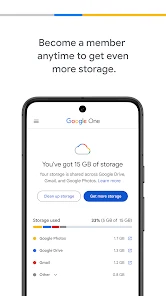
I find Google One most useful when I want a clear view of how my Google storage is being used and a straightforward way to manage it. It is a free productivity app from Google LLC, but the storage space beyond what is included with a Google account is tied to a paid plan. That distinction matters: installing the app does not automatically give you unlimited room, and buying more space only helps if storage is the problem you are trying to solve.
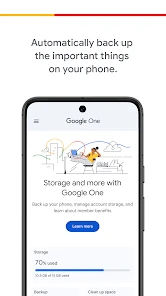
A realistic example is a phone that keeps warning about limited space just before a family event. I can use the app to check the account’s storage situation and set up phone backup before taking more photos. The useful habit is to check what is included in the backup and whether the account has room for it, rather than assuming every item on the device is protected. A backup is only reassuring if it has completed and the account can continue storing new material.
The Latest on Google One
Current state: a storage companion, not a clean-up cure
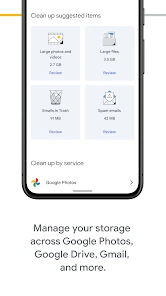
The first distinction I keep in mind is that Google One manages space connected to a Google account; it is not a magic button that expands the physical memory inside a phone. If the device itself is full, moving backed-up material out of local storage may help, but paying for more cloud capacity does not automatically make every app or download take up less room. I would diagnose which kind of storage is causing trouble before choosing a plan.
That makes the app most useful for people who already rely on Google services and want to understand their account storage without piecing together the picture themselves. It is less useful as a general-purpose file manager for someone whose documents are scattered across unrelated services. In that case, a cloud drive built around folders and manual file handling may feel more direct, while Google One’s strength is the connection between account capacity and phone backup.
Expanding Your Digital Universe
First things first, let's talk about the storage expansion. With Google One, you're not just getting a few extra gigabytes; you're unlocking a whole new dimension of storage possibilities. Whether you're a photo hoarder or someone who likes to keep every single email since 2010, Google One has got your back. It offers plans starting from 100GB and goes up to a whopping 30TB. Yes, you read that right, 30 terabytes! Now that's what I call a storage paradise.
What changes—and what existing users should check
The app has a long-running role as a place to manage Google storage and backup, and the current version is 1.289.836849477. I would not treat a version number by itself as proof that a particular feature has changed, or as a reason to alter a setup that is working. For an existing user, the practical question is whether the available plan, account usage, and backup status still match the household’s needs.
More From Our News Desk

Weather by Xiaomi Review: Clear at a Glance, Less Clear Up Close

X Under Pressure: Can It Recover When Posting Goes Wrong?

Clash of Clans Is Won Between the Battles

Android Auto Makes the Case for Quieter Car Software

MobiOffice: Transforming Mobile Productivity with Seamless Integration

EA SPORTS FC™ Mobile Soccer: Redefining Mobile Sports Gaming
When I open the app to reconsider a plan, I would look at actual usage rather than guessing based on how many photos I take. A busy month can make a short-term storage warning feel urgent, but the better decision depends on whether that growth is typical and whether old material can be removed. If a plan is shared, I would also check how much of the allowance each person uses before moving to a larger tier. That prevents one person’s temporary upload from quietly becoming everyone’s reason to pay more.
Family Sharing Made Easy
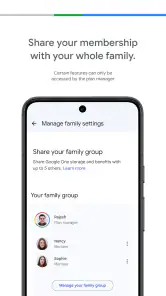
One of the coolest features, in my opinion, is the family sharing option. You can share your storage plan with up to five family members. It's like having a communal digital attic where everyone gets their own corner. And the best part? Each member gets their own private space, so no need to worry about your sister accidentally deleting your files. It's organized, it's efficient, and it's a lifesaver for those of us with tech-challenged parents.
Shared capacity is most helpful when several people are regularly adding photos and files to their own Google accounts. I would agree on a simple household routine: each person keeps their own account, while one person checks whether the shared allowance is getting tight. That avoids the common misunderstanding that family sharing means everyone can browse everyone else’s files. It also makes the trade-off visible: one heavy uploader can use a large portion of the shared space, so sharing is convenient but does not make storage unlimited.
Backups, storage choices, and trade-offs
When deciding whether to pay, I would first look at what is taking up space and whether I want those items kept in my Google account. Google One is a natural fit if my photos, mail, and files already live in Google services; it is less compelling if I mainly need a place for files that I rarely open or already store with another provider. A computer-focused cloud drive may suit someone who wants a traditional folder workflow, while Google One makes more sense for someone who wants account storage and phone backup managed together.
One practical tip is to review storage before a backup becomes urgent. If the account is close to full, remove items you genuinely no longer need or choose a larger plan before relying on it for new backups. I would also check the backup status after setting it up, especially before switching phones. This is a small step, but it helps distinguish “backup is configured” from “my latest content is safely backed up.”
A useful routine for a busy phone
For example, imagine I am preparing to replace my phone after years of taking family photos. I would first check the account’s available space, then confirm that the content I care about is included in backup and that the process has completed. Only after that would I make decisions about clearing local files or setting up the new device. This sequence is more reliable than waiting until the old phone is already being traded in and discovering that the newest pictures never reached the account.
I would also avoid treating backup as a substitute for a personal archive. If a photo or document is especially important, I would make sure I know where it is stored and how I would retrieve it, rather than assuming that every item on every device is covered. Google One can reduce the hassle of keeping account data available, but careful users should still understand which account they are using and check that the desired material appears there.
Perks That Keep on Giving
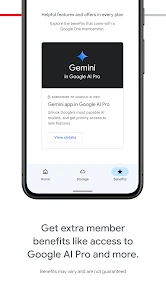
Now, Google One isn't just about storage. Oh no, it's packed with perks that make you feel like a VIP. We're talking about access to Google experts, extra benefits on Google Play, and even hotel discounts. It's like joining an exclusive club where the only requirement is loving your phone a little too much. And let's not forget the seamless backup feature, ensuring that your phone's data is safe and sound in case of any mishaps. Trust me, once you've experienced this level of digital security, there's no going back.
I would treat the extras as a bonus rather than the main reason to subscribe. Perks can vary in usefulness from person to person, while the ongoing value of a plan depends on how much storage I need and whether the included support or benefits matter to me. The app also offers in-app purchases, with listed items ranging from $0.99 to $249.99, so I would check the plan details and billing choice carefully before confirming a purchase.
Design and Usability
On the design front, Google One is as sleek as they come. The interface is intuitive, making navigation a breeze even for those who aren't tech-savvy. Everything is laid out in a way that just makes sense. From managing your plan to accessing support, it's all a few taps away. Plus, the app is available on both Android and iOS, so no one's left out of the loop.
Google One has an average rating of 4.1 from around 817,000 ratings, and it has been installed over a billion times. Those figures suggest it is widely used, though they do not tell me whether a particular storage plan suits my needs. The current version is 1.289.836849477, and the app first arrived on May 24, 2018. It is rated for Everyone, making it suitable for a broad audience, but the purchase decision still depends on the account holder’s storage needs and budget.
The app’s appeal also depends on how much of my digital life already sits in Google’s ecosystem. If I use a different provider for photos and files, adding another subscription may divide my habits rather than simplify them. I would compare the cost and workflow with that provider before moving anything. Switching makes most sense when having backup and account storage managed together solves a real irritation, not merely because another storage plan is available.
Who should choose it—and what to watch
I would recommend it to people who already use Google services, take plenty of phone photos, or want one place to check storage and backup. I would skip it if my account has ample room, if I prefer keeping files outside Google’s ecosystem, or if I want a one-off transfer rather than ongoing cloud storage. In those cases, clearing out old material or using a different storage service may be the simpler choice.
For existing users, the app’s current version gives a practical place to manage a service that has been around since 2018; that alone is not evidence of a particular new feature or a reason to change plans. I would watch for changes in the plan options and benefits shown in the app before renewing, and compare them with how much space my household actually uses. Google One is free to install, but the extra capacity is not free, so the best choice is the smallest plan that comfortably fits real use—not the largest one that sounds impressive.
One question people often have is whether installing the app means they must subscribe. I would not assume that: the app is free, while paid storage is a separate choice for people who need capacity beyond what their account already has. The sensible first step is to check current usage and decide whether the pressure is persistent. If it is only a short-lived shortage, deleting unneeded items may be enough; if the account keeps filling, a paid plan may be more practical.
Another useful check is whether a shared plan would actually help. It is a better fit for people who want separate accounts but need to pool storage capacity, rather than for anyone expecting a shared family folder. Likewise, if I mainly need to move a few files once, I would use a direct transfer or a different drive workflow instead of paying for continuing capacity. Those distinctions make it easier to avoid buying a service for a job it was not chosen to do.
In conclusion, if you're looking for a hassle-free way to manage your digital life, Google One is the way to go. It combines storage, security, and exclusive benefits all in one neat package. So why not give it a shot? Trust me, your phone (and your sanity) will thank you.
Google One Frequently Asked Questions
Will Google One work on my phone’s operating system?
Google One is a mobile app for managing cloud storage and phone backup. On Android, it requires version 9 or later, so check your device’s operating system before downloading. Google One is also available for iOS, making it an option for people who use Apple devices. Once installed, sign in with the Google account whose storage you want to manage.
Who makes Google One, and what kind of app is it?
Google One is a productivity app developed by Google LLC. Its central purpose is to bring cloud storage and automatic phone backup into one place, alongside tools for managing your account’s storage. It may suit you if you already use Google services and want a mobile way to review storage and backup options rather than managing them as a separate service.
Is Google One free to download, and is it suitable for everyone?
Google One is free to download and is rated for Everyone, so its general audience is broad. Some storage options and related features require payment, however, so downloading the app does not mean every option is free. Before choosing a plan, review the costs and features presented for your account and consider how much storage you expect to use.
Do I need a Google account to use Google One?
Google One is designed to work with your Google account, which connects the app to your cloud storage and related services. After installing it, sign in with the account whose storage you want to manage. This is useful if you already use Google services, since you can check your storage and backup options from one place rather than treating the app as a separate file-storage account.
What can I back up with Google One on my phone?
Google One’s phone backup features can help keep selected information from your device available if you switch phones or need to restore data. The app’s store summary describes cloud storage and automatic phone backup as core features. Backup choices depend on the device and the options available in the app, so review the settings and choose what you want included before relying on a backup.
Pros
- Seamless backup across devices.
- Offers family sharing options.
- Enhanced photo storage.
- Access to Google experts.
- VPN for online security.
Cons
- Limited storage on free plan.
- Subscription can be pricey.
- Not all regions supported.
- Features vary by country.
- Complex for non-tech users.
- Category
- Productivity
- Version
- 1.289.836849477