Google Assistant
- 48.10K
- 3.8
- Installs
- 5.00B
- Price
- Free

Screenshots
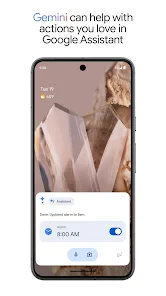
Analysis by Reviewed
Have you ever wished for a virtual assistant that could actually help you out with daily tasks, answer questions, and even crack a joke or two? Well, let me introduce you to Google Assistant. I’ve been using it for a while now, and I must say, it's like having a mini-Google in my pocket that I can talk to anytime.
Where everyday requests can get stuck
The smoothest experience comes when I treat voice requests as shortcuts, not magic. A spoken reminder is useful when my hands are busy, but I still need to say what I want clearly and check that the request was understood. If a task matters, I make sure it appears where I expect rather than assuming that a quick exchange has completed every step.
A practical example is getting ready to leave home: I can ask a question while packing, then use a separate, direct request for a reminder about something I might forget. That keeps each instruction simple. Long, bundled requests are more likely to be frustrating than asking for one action at a time, especially when names, places, or timing matter.
The Latest on Google Assistant
Small habits that make voice requests more reliable
I get better results by treating each request as a short exchange: say one action, wait for the response, and correct it if needed. That is especially useful when a request involves a person’s name or a specific time. If I’m asking for a reminder while moving around, I repeat the key detail back to myself and check the confirmation instead of assuming the assistant caught every word.
This approach also helps me decide when voice is the wrong input. In a quiet room, speaking can be quicker than typing, but in a noisy place or around other people, the microphone may pick up the wrong words or the request may feel awkward. I switch to tapping and typing when accuracy matters more than speed. The point is not to use voice for everything, but to choose it for the moments when it genuinely removes friction.
Getting Started with Google Assistant
First things first, setting up Google Assistant was a breeze. If you’re already using an Android phone, you’ve probably seen the little microphone icon or heard of the "OK Google" command. For iOS users, it’s just a quick download away on the App Store. Once installed, you’re all set to start chatting away.
Setup checks that save time
Google LLC makes this free productivity app, which is rated for Everyone and runs on Android 6.0 or later. Its current version is 0.1.884448652. I’d check that the app is up to date and that the phone is responding to voice input before troubleshooting a particular command. If speech recognition is unreliable, trying the same request by tapping the microphone can help distinguish a voice-trigger issue from a misunderstanding of the request.
More From Our News Desk

X Under Pressure: Can It Recover When Posting Goes Wrong?

Clash of Clans Is Won Between the Battles

Android Auto Makes the Case for Quieter Car Software

MobiOffice: Transforming Mobile Productivity with Seamless Integration

EA SPORTS FC™ Mobile Soccer: Redefining Mobile Sports Gaming

How Microsoft OneDrive Became a Mobile Productivity Giant
On iOS, I’d think of it as an app I open to make a request, rather than assuming it will behave exactly like an assistant built into the phone. That difference matters if hands-free access is your main reason for installing it. On either platform, clear wording and a moment to listen for the response make the first few tries less confusing.
What to try before giving up on setup
If the app opens but a spoken request doesn’t work, I start with the simplest checks: make sure the phone is not muted in a way that hides the reply, try a short request, and compare speaking with tapping the microphone. If tapping works but speaking does not, the problem is more likely related to how the phone is listening than to the task itself. If neither route gets a useful response, I try a different basic question before changing several settings at once.
I also avoid judging the experience from one failed first attempt. A request can be unclear because I rushed, because there is background noise, or because I combined several actions into one sentence. A clean test such as asking a simple question gives me a useful baseline. Once that works, I can add reminders or other tasks and check each result separately.
Features that Make Life Easier
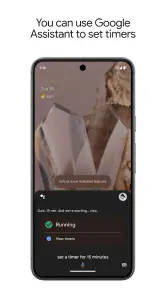
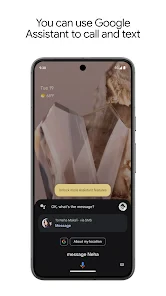
One of the standout features of Google Assistant is its ability to understand natural language. I can just say, "Hey Google, what's the weather like today?" or "Remind me to call mom at 6 PM," and it gets the job done without any fuss. Whether it's setting reminders, sending texts, or playing music, it feels like the Assistant is just a friendly nudge away from taking care of it all.
Plus, it’s not just about productivity. Want to kick back and relax? Just ask Google Assistant to play your favorite playlist or even tell you a joke. "Hey Google, make me laugh," never fails to bring a chuckle.
Making it useful without handing over the whole routine
I find the assistant most valuable when I give it a narrow job that would otherwise interrupt what I’m doing. While cooking, for example, I can ask a quick question or set a reminder without stopping to open a separate app. When I’m planning the whole week, though, I’d rather look at a calendar or task list. That distinction keeps the tool useful: it can help me capture a thought in the moment, while a visual app remains the place to review and refine a larger plan.
A helpful habit is to use spoken requests for capture and a screen for review. I can ask for a reminder when the thought occurs, then later check that it landed in the right place and says what I intended. This reduces the chance that a quick voice interaction becomes a forgotten promise. It also suits people who share their day with others: the assistant can help capture a task, but it doesn’t replace the conversation needed to agree who will do it.
Recovering when a workflow goes wrong
If a reminder or other request doesn’t produce the result I expected, I don’t repeat the same broad command louder. I narrow it down: state the action, then the time or person, and listen to the confirmation. For a message, I’d review the recipient and wording before relying on it; voice input can mishear names, and convenience is no substitute for checking something important.
It also helps to separate the assistant from the service a request depends on. If asking for music fails, I’d check whether the music app itself can play normally. If a device command fails, I’d first test that device in its usual controls. This small bit of troubleshooting avoids blaming the assistant for a problem elsewhere in the chain.
When a request fails for reasons outside the assistant
There are times when the assistant may understand me correctly but the next step still doesn’t happen. A music request depends on the music service being available and usable; a smart-device request depends on the device responding through its ordinary controls. I test the relevant service directly before repeating the same instruction. If it fails there too, I know that changing my wording is unlikely to solve the underlying problem.
For important tasks, I use a simple recovery rule: verify the result in the place where I expect it to appear. A spoken confirmation is reassuring, but checking a reminder or reviewing a message gives me stronger confidence. If the task is time-sensitive and I can’t confirm it, I use the relevant app directly rather than relying on an uncertain voice exchange.
Integration with Smart Devices
Now, if you’re into smart home devices, Google Assistant is your best buddy. I’ve got it synced with my smart lights and thermostat. Saying "Hey Google, turn off the lights," without getting off the couch is the kind of convenience I never knew I needed until now. It’s like living in the future, today!
Choosing between voice help and familiar apps
For quick spoken actions, this is more natural than opening a calendar, typing a search, or navigating through several screens. But it isn’t a replacement for every productivity tool. I’d choose a dedicated calendar or task app when I need to review a detailed schedule, sort a long list, or carefully edit several entries. The assistant is strongest at getting a small action started; a visual app is better when I need to inspect and organize the full picture.
It may also be the wrong choice if you prefer typing, want a quiet interface, or need every instruction to work without checking the result. Voice is convenient in a kitchen or while carrying bags, but less appealing in a shared room or a noisy street. In those moments, opening the relevant app and handling the task directly can be clearer and more dependable.
Where it fits among other assistants
Compared with using a phone’s built-in voice assistant, Google Assistant makes the most sense to me when I already rely on Google services or want a familiar way to ask questions and start everyday actions. A device’s built-in assistant may feel more immediate for controls tied closely to that phone, while a dedicated calendar or notes app is better for careful editing and browsing. These tools overlap, but they are not interchangeable: I choose based on whether I need a quick spoken action, a phone-level command, or a screen full of organized information.
That choice matters most on iOS. I would install this app for the requests I want to make inside it, not because I expect it to replace every behavior of the phone’s own assistant. On Android, the experience may feel more naturally woven into routines, but I still wouldn’t assume every command works the same way on every device. If hands-free use is essential, I’d test that specific interaction early and keep a direct app-based backup for anything important.
The Personal Touch
What really sets Google Assistant apart is how it learns and adapts to your preferences over time. The more you interact, the better it gets at predicting what you need. It starts to feel less like an app and more like a personalized companion. Need directions to your favorite café? Google Assistant remembers and guides you there with ease.
Moreover, its ability to switch between different languages seamlessly is impressive. Whether you’re bilingual or learning a new language, the Assistant has you covered.
In a world where technology often feels cold and distant, Google Assistant manages to add a touch of warmth and personality. Google Assistant isn’t just about voice commands; it’s about creating a more connected and convenient lifestyle.
Privacy, context, and the limits of convenience
I also think about where and how I use a voice assistant. Speaking a request aloud can be practical at home, but it may reveal information to people nearby or simply feel uncomfortable in public. For private or sensitive details, I prefer to handle the task on screen. That isn’t a special flaw of this app; it is a basic trade-off of talking to a device in shared spaces.
Personalization can make repeated requests feel smoother, but I don’t treat it as a guarantee that the assistant will infer what I mean. I still name the action and important details clearly, especially when there are multiple possible people, places, or times. A little precision at the start is quicker than correcting a mistaken result later.
Who will get the most from it
I’d recommend it to someone who already uses Google services and wants a quick spoken route to everyday questions, reminders, or simple device controls. It has broad reach, with over five billion installs, and a 3.8 average from around 1.3 million ratings. Those figures suggest plenty of people have tried it, though they don’t guarantee that every voice request will suit every phone or routine.
People who mainly want a detailed planner, or who dislike speaking to a phone, may be happier with conventional apps. The useful question is not whether an assistant can do everything, but whether a few repeated tasks become easier enough to justify using it. I’d start with one reliable habit, such as setting a reminder, before building more of my routine around it.
My practical verdict
For a realistic day, I’d use it to capture a reminder while my hands are full, ask a quick question while getting ready, and control a compatible smart device when I’m at home. Later, I’d check the reminder and manage any complicated planning in a calendar or task app. That division of labor is where I see the strongest value: the assistant reduces the effort of starting small tasks without pretending that voice is the best way to manage everything.
Google Assistant is free, and its Everyone age rating makes it broadly approachable, but the right fit still depends on how you use your phone. I’d try it if quick spoken requests would remove small interruptions from your day, especially if Google services are already part of your routine. I’d skip it if you want a full visual organizer, prefer not to speak to your device, or need every action to be dependable without checking it. For me, it earns its place as a convenient helper when I keep requests simple and verify anything that matters.
So, if you haven’t already, give Google Assistant a try. It just might become your new favorite app on your phone. Whether it’s managing your schedule or just entertaining you with jokes, it’s a handy little helper that’s always up for the task.
Google Assistant Frequently Asked Questions
Can I use Google Assistant without speaking out loud?
Google Assistant is centered on voice interactions, but it can also be useful when you enter a request by typing, depending on the device and the way you access it. This can help in places where speaking is inconvenient or when you prefer to write a question. Available input options and responses can vary across Android and iOS devices.
Does Google Assistant need an internet connection?
Many requests rely on online services to understand questions and provide current information, so an internet connection is useful for getting the most from Google Assistant. How it behaves when a device is offline can depend on the request and the device. If you plan to use it while traveling or away from reliable connectivity, consider which tasks you need it for.
Can Google Assistant work with services and apps I already use?
Google Assistant can connect with services and devices to carry out certain requests, though the available integrations depend on what you use and how it is set up. You may find it most helpful when the services you want to access are compatible and connected to your Google account. Check the options on your device to see which actions are available to you.
Can I use Google Assistant while driving?
Google Assistant may help with hands-free requests, such as asking a question or controlling compatible connected devices, depending on your phone, vehicle, and setup. Features can differ between devices, so check how it works in your particular car before relying on it. Keep your attention on the road and follow local rules; do not interact with the app in a way that distracts you.
Can more than one person use Google Assistant on the same device?
Google Assistant can be used by different people, but the experience may depend on the device, account settings, and any voice or personalization features enabled. If a device is shared, review the account and privacy settings so that responses and connected services suit the people using it. What each person can access may vary with the setup.
Pros
- Voice recognition is highly accurate.
- Integrates with smart home devices.
- Provides personalized recommendations.
- Supports multiple languages.
- Can send texts and make calls hands-free.
Cons
- Requires internet connection to function.
- Privacy concerns over data collection.
- Limited functionality in some regions.
- Occasionally misunderstands commands.
- Consumes significant battery power.
- Category
- Productivity
- Version
- 0.1.884448652