Fonts Keyboard Themes & Emoji
- 3.53K
- 4.8
- Installs
- 50.00M
- Price
- Free
Screenshots



Analysis by Reviewed
When I first open a new keyboard app, I want to know one thing: can I make a message feel more like mine without turning every conversation into a project? Fonts Keyboard Themes & Emoji is a free personalization app from Simple Design Ltd. that puts decorative text styles and keyboard customization within reach. It suits people who like adding a visual signature to social posts and casual chats; if you mainly want fast, plain typing, your phone’s built-in keyboard may already do the job.
What to expect from a style-focused keyboard
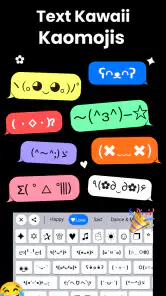
The main appeal here is choice: themes change the keyboard’s appearance, while decorative fonts, emojis, and symbols give short messages a more personal feel. I’d think of it as a creative layer for typing rather than a complete writing tool. It is most useful when the appearance of a caption, profile detail, or casual message matters to you, and less compelling when you simply want a keyboard that stays out of the way.
That distinction helps set expectations before you install it. A keyboard can change how text looks as you type, but the result still needs to work in the app where you send or post it. I’d treat unusual lettering as an accent rather than a guarantee that every line will look identical everywhere. For everyday clarity, ordinary text remains the dependable option.
The Magic of Personalization
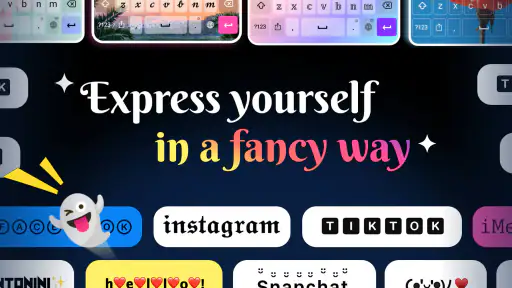
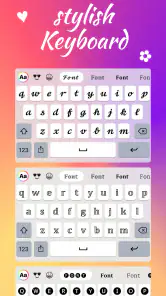
First up, let’s talk about the keyboard themes. If you’re anything like me, you appreciate a bit of personality in your gadgets. With Fonts Keyboard Themes & Emoji, you can choose from a plethora of vibrant and fun themes. I found myself spending way too much time just browsing through the options, each more eye-catching than the last. Whether you’re into sleek minimalism or wild patterns, there’s something for everyone. And the best part? Switching between themes is a breeze, so you can always match your keyboard to your mood.
For a first-time user, the useful goal is not to customize everything at once; it’s to pick a look you can comfortably type with. A busy design might feel fun while browsing but make keys harder to distinguish during a quick reply. I’d start with a theme that keeps the lettering clear, then try more expressive choices when you have time. That small choice makes personalization practical rather than just decorative.
Fonts that work best in short bursts
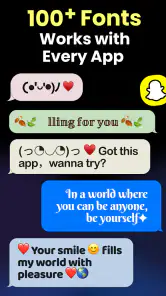
Now, onto the fonts. This feature is nothing short of a textual revolution. Gone are the days of boring, uniform typefaces. With this app, you have access to a wide array of fonts, from the quirky and bold to the elegant and understated. I particularly enjoyed having the ability to switch up my texting style depending on the context. Want to emphasize a point? There’s a font for that. Feeling whimsical? There’s definitely a font for that too!
A good first test is to type a short caption or message in a style you like, then check how it reads before using it in a longer post. Decorative characters can look striking, but they may be less comfortable to scan than ordinary text. I keep standard lettering for anything important or lengthy and save unusual styles for a name, a brief emphasis, or a playful line. This is also a useful way to see whether a style suits the tone you want.
More From Our News Desk

Weather by Xiaomi Review: Clear at a Glance, Less Clear Up Close

X Under Pressure: Can It Recover When Posting Goes Wrong?

Clash of Clans Is Won Between the Battles

Android Auto Makes the Case for Quieter Car Software

MobiOffice: Transforming Mobile Productivity with Seamless Integration

EA SPORTS FC™ Mobile Soccer: Redefining Mobile Sports Gaming
There’s a practical trade-off behind that advice. Special lettering may be less accessible to readers who rely on clear, familiar characters, and a recipient’s device or app may display a symbol differently from yours. I avoid putting a date, location, instruction, or other essential detail only in a decorative style. That way, the personality is still there, but nobody has to decode the message to understand it.
Emojis and symbols with a little restraint
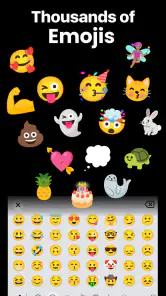
No keyboard app would be complete without emoji, and this one certainly doesn’t disappoint. The emoji collection is extensive, giving you the ability to express every conceivable emotion and reaction. Plus, the app regularly updates its emoji library, so you’re never left out of the loop with the latest trends. I found myself frequently using the search function to quickly find the perfect emoji for every situation.
In an everyday routine, I might use a distinctive font for a short social caption, then switch back to ordinary typing for a work message and add an emoji only where it helps the tone. That kind of selective use is where the app makes most sense: it gives you options without requiring every sentence to look different. If you share text with people who use different devices, I’d also avoid relying on a special character to carry essential meaning; a plain-language version is safer and easier to read.
For a more deliberate workflow, I’d draft the message first and decorate only after I know what I want to say. That keeps the keyboard’s visual choices from slowing down the writing itself. A symbol can work well as a small separator or accent in a short bio, for example, but a row of them can make the same text harder to scan. The best result is usually the one that adds character without competing with the words.
Getting from installation to the first message
One of the standout features for me was how seamlessly Fonts Keyboard Themes & Emoji integrates with other apps. Whether I was sending a message on WhatsApp, typing an email, or updating my social media status, the keyboard was right there, ready to serve. The intuitive design means there’s virtually no learning curve, and even the least tech-savvy among us can get to grips with it in no time.
Getting to that first useful moment is straightforward: choose a theme, select a text style, open the app where you want to write, and try a short message. If the keyboard does not appear immediately, check the device’s keyboard settings and make sure it is selected for typing; installing a keyboard and making it active are separate steps on many phones. I’d test it in a casual note first, rather than discovering a layout preference or selection issue while composing something time-sensitive.
My first low-pressure test would be a caption I can edit before posting. I’d type a plain version, try one font on just a few words, and compare the two for readability. If I like the result, I can keep that style in mind for future posts; if not, I can return to regular text without having made the whole message harder to understand. This small trial also helps answer a common first-time question: whether the app is useful before committing to a fully customized keyboard routine.
Another sensible habit is to keep important writing in a familiar app or draft until it is ready, then use the keyboard to add the finishing touch. I would not make a decorative keyboard the only way I can enter a time-sensitive message. Switching between keyboards can take a moment to get used to, so a quick practice message makes the process more comfortable before using it in a conversation where speed matters.
Where it fits among keyboard alternatives
That setup also raises a sensible question: should this replace the keyboard you already know? I’d treat it as a style-focused alternative, not an automatic upgrade for every task. A standard keyboard is often the better choice when you depend on familiar text prediction, a particular layout, or an uncluttered writing surface. This app is more appealing when visual variety is part of the point, especially for short-form social writing.
Compared with a typical built-in keyboard, the difference is less about basic typing and more about having decorative choices close at hand. If your current keyboard already handles your languages, corrections, and everyday messages well, there may be no reason to replace it for routine use. On the other hand, if you often create short social captions or enjoy adjusting your phone’s appearance, a dedicated style-focused option can feel more convenient than repeatedly searching for special characters elsewhere.
I’d recommend it most to people who enjoy customizing their phone, post regularly to social platforms, or want a quick way to give casual text a distinct look. It may also suit someone who uses emojis and symbols often and prefers them within a keyboard workflow. I’d skip it if your priority is the fastest possible plain-text typing, if you strongly prefer the layout you already use, or if most of your writing is formal, long, or accessibility-sensitive.
A realistic day-to-day use is a quick social update between errands: I could type the message normally, add one decorative word or symbol, then read the whole caption once before sharing. For a longer note to a colleague, I’d use ordinary lettering instead. The app’s value is not that every message needs styling; it is that a little visual variation is available when the moment calls for it.
Cost, compatibility, and a balanced verdict
The app has a 4.8 average from around 446,000 ratings and has been installed over 50 million times, which suggests broad interest in this kind of customization. It is rated for Everyone, runs on Android 6.0 and later, and version 1.0.55 is the current release. There are more than 100 style options described for fonts, emojis, and symbols, while optional in-app purchases range from $0.25 to $12.99 per item. I’d begin with the free experience and only consider a purchase if a particular extra is clearly worth it to me.
One trade-off is consistency: a decorative font can look different across apps or devices, and some people may find stylized lettering harder to read. I wouldn’t use it for passwords, long forms, or messages where clarity matters more than appearance. If a style seems awkward in a recipient’s view, switch back to standard text rather than forcing the effect. That flexibility is more useful than trying to make every conversation look curated.
Because this is a keyboard rather than just a collection of stickers, it is also worth being thoughtful about when you make it active. I use a custom keyboard for casual writing where its appearance is useful, but I’m comfortable switching back to a familiar option for sensitive or important entry. That is not a reason to avoid customization; it is a sensible way to choose the right tool for the message in front of you.
For a first-time user, my advice is to take the setup in small steps: choose a readable theme, try a short message, and then decide whether you want to explore more styles. You do not need to buy anything or redesign every part of your typing to find out whether it suits you. If the keyboard makes social writing more enjoyable without slowing down ordinary replies, it has already earned a place in your routine.
In essence, if you’re looking to add a splash of color, a hint of style, and a whole lot of personality to your typing experience, I wholeheartedly recommend giving Fonts Keyboard Themes & Emoji a shot. It’s a nifty little tool that has transformed my mobile communication, and I’m pretty sure it will do the same for you. Happy texting!
Fonts Keyboard Themes & Emoji Frequently Asked Questions
Can I use Fonts Keyboard Themes & Emoji without making it my main keyboard?
You can explore the app’s personalization options before deciding whether to use its keyboard for everyday typing. If you do enable it, you can still switch to another keyboard through your device settings whenever you like. That makes it possible to try the fonts, emojis, and themes without treating the app as a permanent replacement for your current keyboard.
Does the app offer enough variety to personalize different messages and posts?
Fonts Keyboard Themes & Emoji focuses on changing the appearance of what you type, with fonts, emojis, symbols, and keyboard themes. Its store summary highlights more than 100 stylish fonts, emojis, and symbols, giving you options to vary text for different posts or conversations. The range is useful for expressive typing, though the best choice depends on the look you want and where you plan to use it.
Does Fonts Keyboard Themes & Emoji work with social media apps such as Instagram and TikTok?
The app is designed for expressive typing, and its store summary highlights stylish fonts, emojis, and symbols for Instagram and TikTok. You can use its keyboard to add decorative text when composing posts or messages, though how a particular font appears can depend on the social app and the device viewing it. It is a personalization app rather than a social network.
What is Fonts Keyboard Themes & Emoji, and how does it enhance my typing experience?
Fonts Keyboard Themes & Emoji is a versatile app designed to enhance your typing experience by providing a wide range of fonts, keyboard themes, and emojis. It allows you to customize your keyboard's appearance and functionality, making typing more fun and expressive. Whether you're looking to add a personal touch to your text messages or stand out on social media, this app offers creative options to do so. Its store summary highlights more than 100 stylish fonts, emojis, and symbols, giving you several ways to vary the look of what you type.
Is Fonts Keyboard Themes & Emoji compatible with my device?
Fonts Keyboard Themes & Emoji is compatible with devices running Android 6.0 or later. Before downloading, check that your device meets this minimum operating-system requirement. The app is listed for Android, so confirm that the version available in your device’s app store matches your platform. Keeping your operating system up to date can also help you get the best experience.
Pros
- Variety of font styles available
- Easy integration with existing apps
- User-friendly interface design
- Offers custom keyboard themes
- Includes diverse emoji collection
Cons
- Some fonts require in-app purchases
- May slow down keyboard response
- Limited free theme options
- Occasional ad pop-ups
- Not all emojis are updated frequently
- Category
- Personalization
- Version
- 1.0.55













