Video Downloader - Downloader
- 4.24K
- 4.7
- Installs
- 100.00M
- Price
- Free

Screenshots


Analysis by Reviewed
When I first open Video Downloader - Downloader, I want to know one thing: can I get a video saved for later without turning the process into a project? This app is built for that straightforward goal. It is a free video-downloading app from Simple Design Ltd., in the video players and editors category, and it has a 4.7 average from around 575,000 ratings. Its 100 million-plus installs suggest it has become a familiar option, but I’d still approach it as a practical tool rather than a guarantee that every video on every site can be saved.
Get Started with Ease
First things first, the installation process is a walk in the park. With just a few taps, Video Downloader - Downloader is ready to roll on your device. The user interface is clean and straightforward, which means you won’t need a PhD to figure out how to use it. As soon as you open the app, you’re greeted with a simple search bar and a list of trending videos. It’s intuitive and perfect for tech novices and savvy users alike.
What to expect from the first session
The most reassuring way to begin is to treat the app as a tool for saving a video you are allowed to keep, not as a universal bypass for every website’s restrictions. Video availability and download behavior can depend on the source. If a page does not offer a saveable video, trying another format or repeatedly tapping download may not solve the underlying issue. I’d start with a short, ordinary clip so it is easy to check that the file is usable before building a larger queue.
The app is rated Teen, runs on Android 6.0 or later, and its current version is 1.4.8. There are in-app purchases listed at $2.99 per item, so the app is free to try but not every possible purchase is necessarily included at no cost. I would install it with enough free space for the videos I actually want, rather than assuming that a download manager can compensate for a nearly full phone.
Features Galore
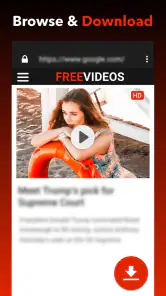
What really sets this app apart is its wide array of features. You can download videos from a multitude of platforms with just a URL. And it’s not just limited to one format; you can choose from various resolutions and formats like MP4, AVI, and more. This flexibility allows you to enjoy your videos on different devices without any hassle. Plus, the built-in browser is a nifty addition, allowing you to surf and download without leaving the app.
For a first successful action, I’d use the browser or paste a video address, then check the detected options before starting the download. That small pause matters: a lower resolution can be a sensible choice for a phone screen or a tight data plan, while a higher-quality file may be worth the extra storage when you plan to watch it on a larger display. If the app presents format choices, I’d pick one that the device I intend to use can play rather than choosing the longest list simply because it is available.
Useful habits for queues and storage
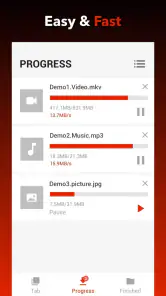
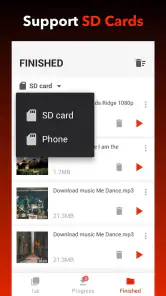
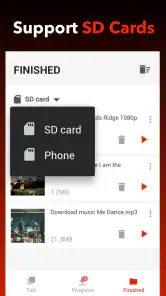
Moreover, the app supports batch downloading. This means you can queue up multiple videos and let the app do its magic while you sit back and relax. And for those who are worried about space, the app provides an option to store downloads directly to your SD card. How cool is that?
More From Our News Desk

Weather by Xiaomi Review: Clear at a Glance, Less Clear Up Close

X Under Pressure: Can It Recover When Posting Goes Wrong?

Clash of Clans Is Won Between the Battles

Android Auto Makes the Case for Quieter Car Software

MobiOffice: Transforming Mobile Productivity with Seamless Integration

EA SPORTS FC™ Mobile Soccer: Redefining Mobile Sports Gaming
Batching is most helpful when I already know what I want to watch—for example, saving several permitted tutorial clips before a commute—rather than collecting links casually and forgetting what each file is. I’d queue a few items, confirm that the first one completes and opens correctly, and then add more. That simple check can prevent a whole batch from filling storage with files that are not useful. An SD card can ease pressure on internal storage, but it still needs enough room and may be less convenient if you regularly move the card between devices.
Performance and Usability
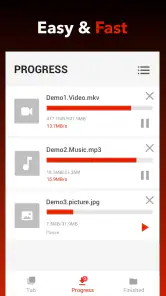
In terms of performance, Video Downloader - Downloader delivers. The downloads are fast, and the app runs smoothly without any noticeable lag. I’ve tried it on both Wi-Fi and mobile data, and it works flawlessly on both. The app also includes a handy download manager that keeps all your files neatly organized. You can easily pause, resume, or delete downloads with just a few taps.
In everyday use, I would favor Wi-Fi for larger files and use mobile data only when I have a clear reason to do so. A download manager is useful when a connection drops or I need to free space, but it does not remove the need to check the final file: open it once, make sure the sound and picture are right, and then decide whether to keep it. If the file is for a lesson or recipe, a descriptive filename or a tidy folder makes it much easier to find later than relying on memory.
Where it fits among alternatives
Compared with saving a video through each individual platform, a dedicated downloader can make several permitted downloads feel more consistent by keeping the browsing and download steps in one place. The trade-off is that platform rules and technical limits still apply, and an app cannot make every source behave the same way. If I only need one clip from a service that already offers a reliable offline-save feature, I would use that official option. If I regularly gather videos from different accessible pages for personal offline viewing, this app’s browser, queue, and file controls are more useful than repeatedly switching between separate site tools.
Common snags and sensible limits
If a download does not begin, I would first recheck the address and confirm that the video itself is accessible in the app’s browser. I would also try one item at a time before assuming a batch is broken. A page may contain video that cannot be handled as a normal downloadable file, and retries will not necessarily change that. Likewise, saved copies are best treated as local files for personal use; I would respect the creator’s rights and the source’s terms rather than reposting or sharing material without permission.
One practical trade-off is convenience versus control. Keeping everything in one downloader can simplify a small collection, but people who need detailed library cataloguing, editing tools, or a full media-player experience may be happier with a dedicated player or file manager alongside it. This app is aimed at getting videos onto a device; it is not a substitute for editing footage or organizing a large archive with elaborate labels.
Choosing what to save and when
A useful routine is to decide the purpose before downloading. For a long train ride, I might save a couple of accessible clips I know I’ll watch, then check that they play while I’m still connected. For a how-to video, I’d save the exact lesson rather than a whole page of related material. This keeps the collection intentional and makes the app’s queue a practical preparation tool instead of a place where links accumulate without a plan.
There is also a small but important difference between having a file and having a dependable offline copy. If I need a video for a presentation or a task, I would not wait until the last minute to test it. I’d download it ahead of time, play it once, and keep an alternative source available if the content is essential. The app can make saving convenient, but the source’s availability and the file’s playback still deserve a quick check.
Who will get the most from it
I can see this fitting people who regularly save permitted clips from accessible pages and want a simple place to handle the process. It is especially convenient for someone who watches short tutorials, cooking demonstrations, or reference videos away from a steady connection. A casual user can begin with one link, while someone with a recurring routine can make more use of the queue and storage choices. The appeal is practical: fewer separate steps between finding a video and having a local copy to watch later.
On the other hand, I would skip it if my main goal were to download from services that deliberately restrict saving. I would also choose a different tool if I needed to edit footage, maintain a searchable archive with extensive organization, or rely on a platform’s official offline feature. Those options may suit specific needs better than a general-purpose downloader. The right choice depends less on how many buttons an app offers and more on whether the videos I want are accessible and whether I need anything beyond saving and managing files.
Next steps and final thoughts
What’s more, the app is constantly updated, ensuring that any bugs are squashed timely and new features are added. It definitely seems like the developers are committed to providing a top-notch experience.
All in all, Video Downloader - Downloader is a must-have app for anyone who loves to save videos for offline entertainment. With its plethora of features, ease of use, and reliable performance, it’s a standout in the world of video downloading apps. Whether you’re a casual user or someone who downloads videos regularly, this app is bound to impress you. Give it a try, and you might just find it’s the video downloading solution you’ve been searching for.
I’d recommend it most to someone who wants an approachable way to save a few accessible videos, manage a short queue, and watch them later without relying on a connection. It is less suitable if you expect every streaming service to permit downloads, want sophisticated editing, or need a carefully indexed media library. Start with one small, permitted download, verify that it plays, and only then settle into a bigger routine. That first check is the difference between a useful offline collection and a folder of files you never open.
Video Downloader - Downloader Frequently Asked Questions
How much storage space should I have available before downloading videos?
It is sensible to check your device’s available storage before using Video Downloader - Downloader, since downloaded video files can take up space and the amount depends on the content you save. If you expect to keep several videos, consider whether you have room for them or can remove files later. The app is intended for downloading videos from the Internet to your device.
Can I use Video Downloader - Downloader without an Internet connection?
The app’s purpose is to download videos from the Internet, so an Internet connection is needed to access online video links and retrieve content. Once a video has been downloaded, it may be available on your device for offline viewing, depending on how it is saved and the player you use. Make sure the content is permitted for downloading before saving it.
Is Video Downloader - Downloader suitable for beginners?
Its basic process is straightforward: copy a video link, paste it into the app, and proceed with the download options shown. That makes it approachable for users who are comfortable copying links on a phone. The available choices can still require a little attention, especially when selecting a format or resolution, so first-time users may want to check those settings before starting a download.
Does Video Downloader - Downloader let me choose a video quality?
Yes. After adding a video link, users can choose among different resolutions, ranging from standard definition to high definition, as well as formats such as MP4, AVI, or MOV. The options available can depend on the video and the source. Choosing a lower resolution may be useful when saving space, while a higher one may suit viewing on a larger screen.
Can I download music or audio files with Video Downloader - Downloader?
Video Downloader - Downloader is presented as a video downloader, with its main purpose being to save videos from the Internet. Its described choices focus on video formats and resolutions, so users looking specifically for a dedicated music or audio downloader should consider whether this app matches that need. Respect copyright and the rules of the site hosting any content you access.
Pros
- Supports multiple formats for download
- Fast download speeds
- Simple and intuitive interface
- Allows background downloading
- Supports HD video quality
Cons
- Contains ads during usage
- Limited to certain websites
- Requires in-app purchases for some features
- No built-in video player
- Occasional download failures
- Category
- Video Players & Editors
- Version
- 1.4.8













