Microsoft OneDrive
- 114.10K
- 4.6
- Installs
- 5.00B
- Price
- Free

Screenshots
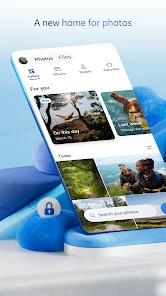
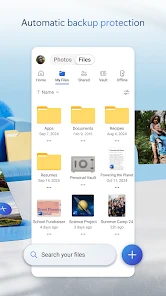
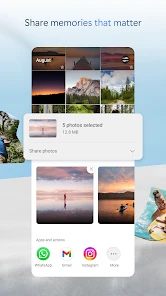


Analysis by Reviewed
When I need to move a document from my phone to a laptop, or find a photo without guessing which device has it, Microsoft OneDrive can make that handoff much less fiddly. I see it as a practical productivity app from Microsoft Corporation: a shared place for files that matters most when I already work across devices or use Microsoft tools. It is free to install, rated for Everyone, and has a 4.6 average from around 7.1 million ratings. That popularity is reassuring, but what matters more to me is whether its workflow suits yours.
Begin with the files you actually need
I would not begin by moving every file I own into cloud storage. I would start with a small, useful set: a document I edit regularly, a receipt I may need later, or a few photos I want to reach from more than one device. That gives me a straightforward way to judge whether the app solves a real problem before I reorganize my whole digital life.
This is also a sensible way to avoid creating a second, confusing copy of everything. If I already use another cloud service for family photos or shared work, I would keep that arrangement unless OneDrive gives me a specific advantage, such as a more convenient route to the Microsoft documents I edit. The best starting point is one folder with a clear purpose, not an ambitious migration that leaves me checking two places for the same file.
The Latest on Microsoft OneDrive
Starting with a mixed-up camera roll and a few documents
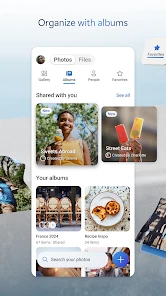
My most useful way to approach cloud storage is to decide what should travel with me before uploading everything. For a typical day, that might mean a set of work documents, a travel confirmation, and selected photos rather than every file on my phone. OneDrive is built for keeping files available across devices, but a little organization at the start makes later searches and sharing less frustrating. I would create a few clear folders and use names that make sense when I am in a hurry, instead of treating the cloud as one enormous drawer.
That selective approach is especially useful when a phone is running low on space or a large camera roll makes important items hard to find. I would check that the files I care about have finished syncing before relying on them elsewhere; a cloud copy is only useful for a handoff once it is actually there. If I am heading somewhere with poor connectivity, I would also plan ahead rather than assume that every file will be available offline.
A simple routine for keeping files findable
I would make a small set of folders for ongoing tasks rather than mirror every folder on my phone. For example, keeping a trip itinerary beside booking documents gives me one place to check while travelling, while separating finished material from current work makes the active files easier to spot. This is a modest habit, but it matters more as the collection grows: cloud storage removes the need to carry files between devices, not the need to decide where they belong.
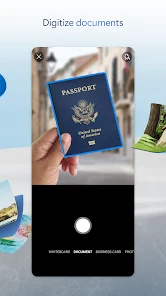
When I take a phone photo of a receipt or a paper note, I would treat it as a record that still needs a useful name and destination. A quick rename and move can save me from searching through a camera roll later. I would also avoid relying on a single vague filename such as “final”; adding a project or subject makes it easier to distinguish a current copy from an older one when I return from another device.
More From Our News Desk

X Under Pressure: Can It Recover When Posting Goes Wrong?

Clash of Clans Is Won Between the Battles

Android Auto Makes the Case for Quieter Car Software

MobiOffice: Transforming Mobile Productivity with Seamless Integration

EA SPORTS FC™ Mobile Soccer: Redefining Mobile Sports Gaming

How Google Translate Breaks Language Barriers Effortlessly
A realistic day-to-day test
Imagine I am leaving home, remember that a form is on my laptop, and need to send it from my phone before an appointment. If I saved it in a clearly named OneDrive folder beforehand, I can look for that one document rather than search email threads or message myself an attachment. The important detail is preparation: a consistent folder and a completed sync turn a hurried retrieval into a short, predictable task.
For a student, the same pattern might mean saving a draft in a course folder, opening it later on another device, and sharing the working copy with a classmate. For a household, it could be keeping a travel confirmation where the person arranging the trip can find it and then passing the relevant file to someone else. I find these small, repeated handoffs more persuasive than the idea of putting everything online just because the option exists.
Working across devices and handing files off
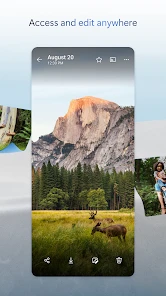
One of the standout features of Microsoft OneDrive is its integration with the Microsoft ecosystem. If you're already using Microsoft Office apps like Word, Excel, or PowerPoint, then you're in for a treat. OneDrive effortlessly syncs with these apps, allowing you to edit documents directly from the cloud. No more hassle of downloading and re-uploading files. It’s like a personal assistant that makes sure you have everything you need at your fingertips.
Easy File Sharing and Collaboration
Sharing files with friends, family, or colleagues is a breeze. You can send a link to anyone, and they can access the file without needing a Microsoft account. Plus, if you're collaborating on a project, OneDrive offers real-time editing, which is a game-changer. Imagine working on a presentation with your team, and everyone can see the changes as they happen. It’s like magic, but real!
A handoff that works best with a little planning
For a real everyday example, I might save a draft on my phone while commuting, open it later on a computer, then share it with a colleague for feedback. Keeping the working document in one shared location is cleaner than sending several attachments, and it reduces the chance that I will edit an old copy. I still pay attention to which file I am opening, especially when there are similarly named drafts; cloud access does not replace sensible version habits.
OneDrive is most compelling if your documents already live in Word, Excel, or PowerPoint. Compared with a storage service chosen mainly for device-wide photo backup, its clearest advantage is that file storage and Microsoft document work can sit together. If your household or team already uses a different cloud platform, though, moving everything may add another place to check rather than simplify your routine. I would pick one main home for active files and use OneDrive when its Microsoft connection solves a real problem.
Sharing without losing track
A link is convenient, but I would treat it as a handoff that deserves a quick check: make sure I am sharing the intended file, not a folder or an outdated draft, and confirm that the recipient can open what I sent. For recurring collaboration, a shared working copy is generally easier to manage than passing attachments back and forth. For a one-off family photo or document, a link can be simpler than asking everyone to install the same app.
For a group assignment, I would agree with collaborators on which shared document is the working copy before everyone starts editing. That tiny bit of coordination prevents the familiar problem of collecting several “latest” attachments after the work is done. If another person would rather work in a different service, I would not force a migration for a single file; an ordinary attachment or their existing shared workspace may be the smoother handoff.
Security You Can Trust
In today's digital age, security is paramount. With OneDrive, you get advanced encryption and two-factor authentication to keep your data safe. It's comforting to know that your precious files are secure from prying eyes. Plus, with the Personal Vault feature, you can add an extra layer of protection to your most sensitive files.
For practical use, I would separate “stored online” from “ready to use right now.” If a document is essential during a flight, a commute through a dead zone, or a presentation in a room with unreliable internet, I would make sure I have a usable copy before leaving a connection. Testing one important file in advance is better than discovering at the last minute that a cloud-only copy is not available when I need it.
Where the workflow can break
The main friction I watch for is assuming that sync means instant, unconditional access. A weak connection can interrupt the step between saving a file and opening it somewhere else, and a folder full of poorly named items can make retrieval slower than expected. I would test the path with an unimportant file first: save it on one device, check it from another, and try the sharing process before depending on it for a deadline. That small rehearsal makes it easier to spot a sign-in or connectivity snag while there is still time to work around it.
I would also think about the people receiving a shared file. A link can reduce the need for recipients to adopt the same app, but it does not guarantee that every person will find the access process equally straightforward. If someone needs a simple attachment and the file is small, sending it directly may be less confusing. For sensitive material, I would be deliberate about the sharing choice and avoid treating convenience as a substitute for checking who can reach the file.
Choosing a plan and the right fit
OneDrive is free to download, and optional in-app purchases range from $0.99 to $129.99 per item. I would first see whether its available space and features fit my actual routine rather than upgrading because the app offers a paid option. The app has been around since Aug 28, 2012, and its reach—over 5 billion installs—shows how widely it is used, though popularity alone cannot tell me whether it suits a particular workflow.
It is a strong fit for students moving assignments between devices, people who edit Office documents, and anyone who needs to share working files without repeatedly attaching new copies. I would be less inclined to choose it as my main solution if I want a cloud service centered on a different ecosystem, or if I prefer to keep files entirely local. The best choice is the one that fits the devices and habits I already have, not the one with the most familiar name.
When another storage approach makes more sense
If my main goal were simply to browse a large photo library across devices, I would compare OneDrive with services built around photo discovery and automatic camera-roll organization. If most of my active work happens in another office suite, that platform’s own cloud storage may involve fewer app switches. OneDrive’s advantage is not that every cloud service should be replaced by it; it is that Microsoft documents and shared files can follow a coherent route when those tools are already part of the day.
I would also skip making it my only archive if I need an offline-first setup or want direct control over every local copy. A synced folder is convenient, but it is not the same thing as a deliberate backup strategy with separate copies. For important personal records, I would keep an independent backup rather than assuming that one cloud account should be the sole place they exist.
Storage Plans for Every Need
Whether you're a student with heaps of assignments or a professional with countless projects, OneDrive has a storage plan that fits your needs. You start with a decent amount of free storage, and if that's not enough, you can easily upgrade. The plans are affordable, and considering the seamless integration and security features, it's worth every penny.
In practice, I would check my actual storage use before deciding whether to pay. Photos and large files can change the picture quickly, while someone who mainly keeps a few documents may find a free setup sufficient. The available paid options are in-app purchases, so I would compare what I need with the current offer in the app instead of treating an upgrade as an automatic next step.
Who will get the most from it
I would recommend OneDrive to someone who regularly moves Office documents between a phone and computer, or who needs a straightforward shared location for school or work files. It is also useful for a family member who wants to pass along a few documents or photos without coordinating a complicated setup. Its appeal is strongest when cross-device access and Microsoft document work are part of the same routine.
On the other hand, a person who rarely leaves one device may not gain much from syncing, and someone already settled into another cloud ecosystem may only add complexity by duplicating everything. The app is free to install and has an Everyone age rating, but those points do not make it the right fit for every storage habit. I would start with a small, useful folder and see whether the handoffs genuinely become easier.
Making the choice practical
One question I would ask before settling on it is whether my collaborators can follow the same file routine. If the answer is yes, shared documents can reduce the clutter of attachments and the uncertainty of competing drafts. If the answer is no, I would keep the workflow simple for them: share only what they need, choose a format they can use, and avoid asking a whole group to move its files for one short project.
I would also treat a phone as a useful access point rather than a full replacement for a computer. It is convenient for checking a document, locating a saved item, or passing along a file while away from a desk. For lengthy editing or sorting a large collection, I would still prefer the device and tools that make that work comfortable. That distinction helps me judge the app by the jobs it handles well rather than expecting one mobile interface to cover every task equally.
A grounded final take
In conclusion, Microsoft OneDrive is more than just a cloud storage service. It’s a comprehensive tool that enhances productivity, ensures security, and offers flexibility. Whether you're deeply embedded in the Microsoft ecosystem or just looking for a reliable cloud service, give OneDrive a try. It's like having an extra hard drive that follows you everywhere - only better!
Microsoft OneDrive Frequently Asked Questions
Can I use OneDrive to back up photos automatically?
OneDrive is designed to keep photos and files backed up, protected, and in sync, which makes it a useful option for keeping phone content in cloud storage. If you want it to handle photos as part of your routine, look through the app’s settings and choose the backup behavior that suits you. Uploading and later accessing cloud content works best with an internet connection.
Will Microsoft OneDrive help me keep files in sync across devices?
Yes. OneDrive is built to keep files in sync, so it can help you reach the same cloud content from different devices. This may be especially useful if you move between a phone, tablet, and computer or use Microsoft Office for work or study. You can manage cloud files from the mobile app, while an internet connection helps keep changes and uploads current.
Can I use OneDrive to collaborate on documents?
OneDrive can support collaboration by letting you share files with other people and connect cloud-stored documents with Microsoft Office applications. This can be handy for work, study, or personal projects when several people need to access a document. Before sharing, consider who should be able to see the file and review the sharing choices in the app to select an arrangement appropriate for the task.
Is OneDrive useful if I already use Microsoft Office?
OneDrive connects cloud-stored documents with Microsoft Office applications, making it useful for people who already use Microsoft’s productivity tools. You can save and access documents through OneDrive and collaborate with others on files. The experience may suit work, study, or personal projects where you want files available across devices and want to use them alongside Office.
Can I use OneDrive from a phone or tablet?
Microsoft OneDrive is available as a mobile app for Android and iOS, so you can manage cloud files from a phone or tablet. It is a productivity app developed by Microsoft Corporation and is free to download. If you use more than one kind of device, OneDrive’s cross-device approach can make it easier to reach the same files from different places.
Pros
- Seamless integration with Windows OS.
- Generous free storage tier available.
- Supports file version history.
- Robust collaboration tools.
- Accessible on various devices.
Cons
- Limited offline access options.
- Paid plans can be pricey.
- Requires stable internet for sync.
- Occasional sync issues reported.
- Privacy concerns with data storage.
- Category
- Productivity
- Version
- Varies with device