Google NotebookLM
- 1.15K
- 4.8
- Installs
- 5.00M
- Price
- Free

Screenshots
Analysis by Reviewed
I’d reach for Google NotebookLM when I have a real pile of reading to work through, not when I just need to jot down a grocery item. That distinction shapes the whole experience: it is a research-focused productivity app, and it is most useful when I bring material to it and want help understanding or revisiting that material. If you’re choosing between another notes app and a place to make sense of documents, that is the decision to make first.
A research workspace, not a general-purpose notebook
The name can make this app sound like a place for ordinary notes, but I’d approach it as a focused research assistant. Its appeal is strongest when I’m trying to understand a topic using material I’ve gathered, rather than simply recording reminders or building a to-do list. That difference matters: if your main need is quick capture, a lightweight notes app may feel faster; if you want help making sense of a collection of reading, this tool has a more compelling role.
As a free productivity app from Google LLC, it is an easy one to try without turning the decision into a budget calculation. It is rated for Everyone, and it has a 4.8 average from around 81,000 ratings, which suggests that many users find a clear place for it in their routines. I would still judge it by the shape of your own work: popularity cannot make a research-focused workflow useful to someone who only wants a simple scratchpad.
Who gets the most from it
I think it makes the most sense for students organizing readings, professionals preparing a brief from existing documents, and curious readers who want to compare several sources without losing track of where an idea came from. It can also suit someone returning to a personal project after a gap: instead of relying on memory, they can revisit a topic through the material they collected. Google reports over 5 million installs, but a large audience does not change the basic fit test: the app pays off when you have sources to work with.
It is less compelling for someone whose day is mostly reminders, shopping lists, quick meeting notes, or calendar planning. Those jobs benefit from immediate capture and familiar organizational tools, while a research workspace asks you to make a deliberate choice about what belongs in it. I would not replace a dependable notes app just to gain an AI layer if I rarely need to interrogate source material.
Getting Started with Google NotebookLM
So, first things first, downloading and setting up Google NotebookLM is a breeze. You just head to the Play Store or App Store, and in a couple of taps, you're ready to roll. The interface is sleek and makes you feel like you’re handling something super sophisticated, yet it’s surprisingly intuitive. No need to fumble around; everything is where you’d expect it to be. Within minutes, I was jotting down my thoughts and organizing them into neat little sections.
Features That Stand Out
One thing that struck me about Google NotebookLM is its ability to sync seamlessly across devices. I could start a note on my phone and pick up right where I left off on my tablet. This feature is a lifesaver for those of us who are always on the move. And let’s talk about the search functionality—it’s like having a mini Google search within your notes. Just type a keyword, and boom, you're directed to exactly what you need.
More From Our News Desk

Weather by Xiaomi Review: Clear at a Glance, Less Clear Up Close

X Under Pressure: Can It Recover When Posting Goes Wrong?

Clash of Clans Is Won Between the Battles

Android Auto Makes the Case for Quieter Car Software

MobiOffice: Transforming Mobile Productivity with Seamless Integration

EA SPORTS FC™ Mobile Soccer: Redefining Mobile Sports Gaming
Another highlight is the app's integration with Google’s suite of services. Whether it’s pulling data from your Gmail or linking with Google Calendar, it feels like this app understands what you need and when you need it. Plus, the option to add images, links, and even voice notes makes it incredibly versatile. It’s like having a Swiss Army knife for note-taking.
Make the source collection do some of the work
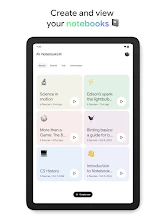
A useful habit is to give a notebook a narrow purpose before adding material. “Research for my history paper” is easier to work with than a catch-all notebook containing class notes, recipes, and work documents. When sources share a topic, it becomes easier to spot where they agree, where they differ, and which question is still unanswered. I would also name sources in a way I can recognize later, rather than relying on a vague label or my memory of when I added them.
One non-obvious trade-off is that an answer is only as useful as the collection and question behind it. If I ask something broad of a mixed set of documents, I may get a response that sounds tidy but is hard to evaluate. I’d start with a question that has a clear boundary, then follow up on a specific claim and check the relevant source. That extra step is not busywork; it is how I keep a helpful summary from turning into an unchecked conclusion.
Where it fits into an everyday routine
Imagine I’m preparing for a meeting about a project that has sprawled across several documents and a long email thread. Rather than rereading everything from scratch, I can use a research workspace to collect the relevant material, then ask focused questions that help me find connections or identify what still needs checking. I would treat the response as a starting point, not as a replacement for the original documents: before sharing a key detail or making a decision, I’d return to the source and verify it.
That source-first habit is one of the more useful ways to get value from a tool like this. I would keep separate notebooks for topics with different purposes, such as one for a class and another for a work project, instead of piling unrelated material into a single space. Clear source names and a narrow question make it easier to judge whether an answer actually addresses the right material. If I’m only capturing a quick thought while walking, I’d use a basic notes app first and bring it into a research workflow later only if it becomes relevant.
Questions worth answering before you rely on it
Can it replace a normal notes app? I would not treat it as a full replacement if your routine depends on instant capture, task tracking, or a carefully customized personal filing system. It can sit alongside those tools: use the ordinary notebook for fleeting thoughts and the research space for material you plan to question, compare, or return to. Keeping those roles distinct can prevent a useful research tool from becoming another cluttered inbox.
Does it remove the need to read the sources? No. I’d use it to get oriented, identify likely relevant passages, and formulate better questions, then check the original material before relying on a detail. This is especially important when the answer will be used in a report, a class assignment, or a decision that affects someone else. A fluent response can save time, but it is not the same thing as doing the verification.
What should I do if I need to work without a connection? I would plan around the limitation rather than assume the app will be available offline. If travel, patchy reception, or a restricted network is central to your routine, keep essential reading and notes in a tool that you know works in those conditions. Likewise, I would test access to important material before depending on the app during a time-sensitive meeting.
What Could Be Better?
Now, nothing’s perfect, right? While I genuinely enjoy using the app, there are a couple of things I wish were a bit different. For starters, the customization options are somewhat limited. Sure, you can change the theme and font, but I’d love to see more options to personalize the experience. Also, while the app is generally fast, there were moments when it lagged slightly, especially when I was switching between large notes.
Another small gripe is the lack of offline functionality. If you find yourself without an internet connection, the app becomes a bit of a pretty paperweight. But hey, I’m optimistic that future updates will address these hiccups.
When another tool is the better choice
For a personal archive that needs elaborate folders, visual control, or a carefully tuned writing environment, a conventional notes app may remain the better home base. For discovering new websites and material beyond a collection I already have, a search engine is the more natural first stop. NotebookLM occupies a narrower middle ground: it helps me work through selected information, but it cannot compensate for missing sources or make an incomplete collection comprehensive.
There is also a practical choice between using a phone and a larger screen. A phone is convenient for checking a detail or asking a quick question while away from a desk; comparing lengthy documents or refining a complex line of inquiry is easier when I have room to read carefully. I would treat mobile access as a useful continuation of research, not necessarily the best place for every stage of it.
Trade-offs to consider before settling in
The main comparison I’d make is with a conventional note-taking app or a search engine. A conventional notebook is usually better for fast capture, personal organization, and working through a checklist. A search engine is better when I need to discover material beyond what I already have. NotebookLM’s niche is between those habits: it can help me examine a chosen body of information, but the usefulness depends on what I bring into that workspace and how carefully I check the result.
I would skip it if I need reliable access while travelling offline, extensive visual customization, or a straightforward daily planner. It is also not the right place to assume that every generated answer is automatically complete or correct. For school research, a team brief, or a personal reading project, I’d use it to get oriented and surface questions; I would still consult the underlying sources before citing, acting on, or forwarding a claim.
What has changed, and what I would watch next
The app’s current version is 2025.11.13.832462702, and its release date is May 16, 2025. Those facts give a useful point of reference for someone deciding whether to try it now, but they do not by themselves show which features have changed or how a particular update affects an existing notebook. I would check the version shown on my device when troubleshooting and make a habit of reviewing what an update actually changes rather than assuming that every new version brings a particular capability.
For someone already using it, the practical question is whether the app continues to fit the way they collect and revisit material. I’d keep important source files in their original locations as well as using a research notebook, so the workflow does not depend on remembering where a particular item was gathered. Before making NotebookLM part of a shared or time-sensitive process, I’d also test the steps I rely on—especially access to the material and checking answers against sources—rather than relying on a feature expectation.
A measured recommendation
My recommendation is to start with one real task rather than trying to move your whole productivity system into the app. Choose a small set of relevant sources, give the notebook a clear purpose, and ask a question whose answer you can verify. If that helps you understand the material faster or notice a useful connection, you have a reason to build the habit. If you find yourself wanting a planner, offline notebook, or highly personal filing system instead, that is a sign to keep using a different tool for that job.
It is a free app for Everyone, and its broad appeal is reflected in around 1,100 written reviews alongside its larger rating pool. I would take that as a reason it is worth exploring, not as proof that every workflow will suit it. The best test is whether you return to your collected material and get something practical out of asking questions about it.
The Final Word
All in all, Google NotebookLM is a fantastic tool for anyone looking to streamline their note-taking process. It’s got the backing of Google’s robust ecosystem, which is a huge plus. Whether you’re a student, a professional, or just someone who loves to keep their thoughts organized, this app has something to offer. Just remember to keep an eye out for those updates because this app is only going to get better.
In a world where productivity is king, having an app like this in your arsenal can make all the difference. So, give it a whirl and see how it fits into your workflow. I, for one, am excited to see how NotebookLM evolves and continues to make note-taking a breeze.
Google NotebookLM Frequently Asked Questions
Can Google NotebookLM help with research and studying?
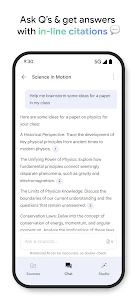
Google NotebookLM is presented as a personalized AI research assistant for helping users understand information. That makes it relevant to people who want a productivity app for exploring material and working through research or study tasks, rather than only keeping brief reminders. Its usefulness will depend on how you plan to use it and the information you want to work with.
What devices and operating systems can run Google NotebookLM?
Google NotebookLM is available on Android and iOS. For Android, the current version requires Android 10 or later, so check your device’s operating system before downloading. The app is intended to make its research-assistant experience available on mobile, while the exact experience can vary depending on the device and platform you use.
Is Google NotebookLM free, and what kind of app is it?
Google NotebookLM is a free productivity app from Google LLC, intended to help people work with information through a personalized AI research assistant. Its store summary describes the aim as helping users understand anything, so it is positioned as more than a conventional place to store short notes. It is rated for Everyone and has an average rating of 4.8 from around 81,000 ratings.
What is Google NotebookLM and how does it work?
Google NotebookLM is a digital note-taking app that allows users to organize, manage, and access their notes efficiently across multiple devices. It provides a user-friendly interface where you can create, edit, and categorize notes with ease. The app syncs across your Google account, ensuring that your notes are always up-to-date and accessible from anywhere. It also offers features like collaborative note sharing and integration with other Google services, enhancing productivity for both individual and group tasks.
Is Google NotebookLM available for both Android and iOS devices?
Yes, Google NotebookLM is available for both Android and iOS platforms. Users can download the app from the Google Play Store for Android devices or the Apple App Store for iOS devices. The app is designed to provide a seamless experience on both operating systems, allowing users to switch between devices without losing any data or functionality. The Android version requires Android 10 or later.
Pros
- Seamless integration with Google Workspace.
- User-friendly interface enhances productivity.
- Offers real-time collaboration features.
- Supports multimedia content integration.
- Advanced search and organization tools.
Cons
- Limited offline functionality.
- Requires a Google account to use.
- May have a learning curve for new users.
- Data privacy concerns with cloud storage.
- Occasional sync issues reported.
- Category
- Productivity
- Version
- 2025.11.13.832462702













