Google Meet
- 707.41K
- 4.4
- Installs
- 10.00B
- Price
- Free

Screenshots




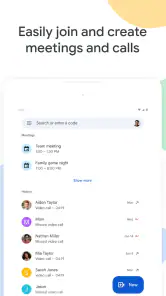

Analysis by Reviewed
When I need to bring people together quickly, I care less about a long feature checklist than about whether everyone can join and follow the conversation. Google Meet is a communication app from Google LLC that feels most at home with people who already use Google services. It is free, rated for Everyone, and available on phones, tablets, Google Nest devices, and the web. Its average rating is 4.4 from around 12 million ratings, with over 10 billion installs; that reach makes it familiar to many people, though popularity alone does not make it the right fit for every group.
Who benefits most from a familiar meeting space
I would consider Meet for a team that needs a straightforward place to talk through a document, a family coordinating across different devices, or a tutor and learner who want a face-to-face discussion rather than a long message thread. Its main advantage is that it gives a planned conversation its own space instead of burying a call inside a busy chat. That distinction is useful when a meeting has a purpose and participants need to pay attention to the same topic.
It is less compelling when everyone already uses another calling app comfortably and a new meeting link would only add friction. I would also steer someone away from it if they do not want to use a Google account or if their organization has already standardized on another service. A familiar tool that the whole group can join is often better than a theoretically stronger app that half the participants need help using.
The Latest on Google Meet
Setting Up and Getting Started
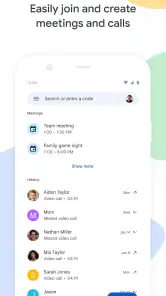
First things first, getting started with Google Meet is a breeze. You can easily download it from the Google Play Store or Apple App Store, and it takes just a few minutes to install. Once installed, all you need is a Google account to sign in, and you're ready to go. The interface is clean and user-friendly, which means you won't be spending hours trying to figure out how to schedule a meeting or invite participants.
How quickly a call feels ready
For an ordinary one-to-one call, the app’s appeal is that the main task is easy to understand: join or start a meeting, then focus on the conversation. It was released on August 16, 2016, and has had time to become a familiar option across devices. I would still plan to open a meeting a little early if I need to present, find a quiet place, or check that the right microphone and camera are in use. That small buffer is more useful than assuming any video call will connect perfectly at the exact moment you need it.
The experience depends on more than the app itself. A weak or busy connection can make video choppy or audio hard to follow, so switching to a steadier network—or turning video off when it is not needed—can make a call more manageable. I would not treat a brief delay as proof that the app is generally slow; video quality has to adjust to the conditions at both ends of a call.
Features That Stand Out
One of the standout features of Google Meet is its real-time captions. This is particularly useful if you're in a noisy environment or having a hard time catching what's being said. The captions are surprisingly accurate, and I found that they added a layer of accessibility that is often missing in other meeting apps.
More From Our News Desk

Clash of Clans Is Won Between the Battles

Android Auto Makes the Case for Quieter Car Software

MobiOffice: Transforming Mobile Productivity with Seamless Integration

EA SPORTS FC™ Mobile Soccer: Redefining Mobile Sports Gaming

How Microsoft OneDrive Became a Mobile Productivity Giant

How Google Translate Breaks Language Barriers Effortlessly
Another feature worth mentioning is the ability to share your screen. Whether you're presenting slides, showing a document, or even demonstrating a process, Google Meet makes it easy to share your screen with just a couple of clicks. Plus, you can switch between apps without any fuss, which is a lifesaver during presentations.
Making calls work for real life
A useful workflow for a small project group is to send the meeting details before the call, then share one document on screen while everyone discusses the same point. I find it helps to keep the document open before joining, so I am not searching through files while other people wait. Captions can also help when a participant is in a noisy room, but they are a support for listening rather than a substitute for clear speech; names, specialist terms, and overlapping voices may still need clarification.
For a family check-in, a brief call from a phone can be more convenient than asking everyone to install or learn a separate desktop tool. For a formal presentation, though, I would test screen sharing and audio beforehand and keep a copy of the material accessible outside the call. That is not a workaround unique to Meet: it is simply sensible preparation when a conversation depends on showing the right thing at the right moment.
Performance and Reliability
When it comes to performance, Google Meet doesn't disappoint. The video and audio quality are top-notch, and the connection is usually stable, even with multiple participants. I did notice that it handles large groups quite well, so if you're planning a big meeting or webinar, this app has got you covered.
That said, like any online service, it can occasionally suffer from connectivity issues. However, these instances are rare and usually resolve quickly. It's always a good idea to have a strong internet connection to avoid any hiccups.
What can affect stability
Calls become more demanding when several people are speaking, cameras are on, and someone is presenting at the same time. On a phone that is already busy or running low on battery, I would close unrelated apps and reduce video use if the call starts to stutter. Those steps may ease pressure on the device and connection, but they cannot fix a poor network at the other end. If audio matters more than seeing everyone, switching priorities toward listening can be a practical compromise.
Meet’s main strength compared with many general-purpose messaging apps is its focus on joining a dedicated video meeting across mobile devices and the web. A chat app may be more convenient if the group already lives in its messages, while another conferencing tool may suit an organization whose workflow is built around it. I would choose Meet when the participants can join easily and the call needs straightforward video or screen sharing, not simply because it is a familiar name.
Device fit and everyday limits
The same call can feel different on a tablet, phone, Nest device, or computer. A larger screen is more comfortable when I need to follow several faces or present material; a phone is better for a spontaneous call but leaves less room to manage the conversation and other apps. If the device struggles with video or becomes warm during a long session, lowering the workload—especially by limiting other active apps—is a reasonable first move. Meet is less suitable for someone who wants an app that works independently of a Google account, or for a group that has already settled on a different service everyone knows.
As an app with over 707,000 reviews and an Everyone content rating, it is approachable for a broad range of users, but that does not remove the need to check who is joining and what will be shared. Before showing a screen, I close personal material I do not want others to see. For a short appointment, I also keep the meeting details easy to find rather than relying on memory when the call is about to start.
Joining from a different device
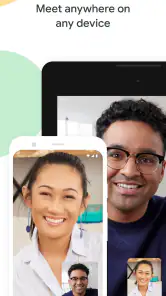
Meet’s availability on phones, tablets, Google Nest devices, and the web gives a group more than one way to participate. That flexibility is useful when one person is away from a desk and another wants a larger display, but it does not mean each device is equally comfortable for every task. I would use a phone for a quick catch-up, then move to a tablet or computer when I need to read shared material or keep track of several speakers. Before switching devices mid-conversation, I would make sure I know how to rejoin so a device change does not interrupt the point being discussed.
Choosing it over another calling app
If your friends or colleagues already use a messaging app for daily conversation, its built-in calling may be the path of least resistance. Meet makes more sense when the call itself deserves a clear meeting space, especially for a planned discussion or a screen-sharing session. The deciding question is often not which app has the longest feature list, but which one every participant can join without confusion. I would ask the group what they already use before making Meet the default for an ongoing project.
For a first-time guest, I would send the meeting details in the same message as a short note about when to join and what to have ready. That small bit of context helps avoid the familiar delay where someone is searching for the invitation while everyone else waits. If a person cannot or does not want to use a Google account, I would confirm the joining route in advance rather than assume the experience will be identical for every participant.
Making a call easier to follow
For a weekly planning call, I would keep a short agenda in front of me and nominate one person to share the relevant document. This is a practical way to prevent screen sharing from becoming a stream of unrelated windows. When captions are useful, I treat them as a second channel for catching a missed phrase, not as a transcript I can rely on without checking. If several people talk at once, pausing and asking one person to repeat a point is usually more effective than trying to infer it from captions.
For a lesson or appointment, the person leading the call can make things easier by stating the next step aloud before changing what is on screen. Participants joining on small displays may not see details as comfortably as someone at a desk, so I would avoid leaving important instructions visible only in a tiny document. Meet can bring people together, but the host still has to account for how they are joining.
Practical preparation and recovery
If a call begins to break up, I would make changes in a simple order: check whether the connection is stable, close apps that are doing unnecessary work, and reduce video if audio is the priority. I would avoid changing several things at once, because then it is harder to tell what helped. If the problem continues, reconnecting may be worth trying, but I would first make sure I can find the meeting details again. For an important conversation, keeping those details accessible is a small precaution that can save time after an unexpected interruption.
Long calls also deserve a little planning on a phone. I would start with enough battery for the conversation, set the device somewhere steady, and avoid holding it in a way that makes the camera view tiring for everyone else. A tablet or computer is often the more comfortable choice when the call involves a long presentation, while a phone remains convenient when the goal is simply to talk. These are ordinary device trade-offs, not a reason to expect the app to behave the same under every workload.
When I would choose something else
A practical comparison is with the calls built into messaging apps: those are usually the natural pick for an unplanned catch-up that grows out of an existing chat. Meet feels more purposeful when people need to gather around one conversation and share what is on screen. For a group already committed to another conferencing service, switching can create more trouble than it solves, particularly if members have to learn a new routine just for occasional calls.
I would also avoid making Meet the sole plan for a critical presentation if the device or connection is unreliable. Keep the source document available outside the call, and agree on a simple way to reconnect if someone drops out. That preparation does not make interruptions impossible, but it means the discussion can resume without rebuilding the whole session from memory.
Wrapping It Up
In conclusion, Google Meet is a solid choice for anyone looking for a reliable and easy-to-use video conferencing app. From its intuitive interface to its robust feature set, it caters well to both casual users and professionals. If you haven't tried it yet, I'd say it's definitely worth a shot—especially if you're already embedded in the Google ecosystem. So next time you need to hop into a virtual meeting, give Google Meet a go!
My practical verdict is that Meet works best when convenience and broad device access matter more than having every participant use the same kind of device. I would recommend it for school or work check-ins, remote family conversations, and simple presentations, while someone who dislikes signing in with Google or needs a different team’s established meeting workflow may be happier elsewhere. It is free to use, but the real trade-off is not price: it is dependence on a suitable connection, a capable device, and a group willing to join the same meeting space.
Google Meet Frequently Asked Questions
What should I know about Google Meet before downloading it?
Google Meet is a communication app from Google LLC for video calling on Android and iOS phones and tablets, Google Nest devices, and the web. It is intended for people who want to talk face to face remotely, whether for personal conversations or meetings. Before downloading, consider which device you will use and whether you have a dependable internet connection and suitable audio equipment.
Is Google Meet free to download and use?
Google Meet is free to download and use for video calls, making it accessible for personal conversations as well as many everyday meetings. Google also offers paid plans through Google Workspace for users who need additional capabilities for business or organizational use. The app is a communication tool rather than a paid download, so you can install it and explore its basic calling experience without an upfront purchase.
Can I make calls with Google Meet without using video?
Google Meet is built around video calling, but you can participate with your camera turned off and use audio instead. That can be useful when you are in a place where video is inconvenient or when you prefer not to appear on screen. You will still need an internet connection, and your microphone and speaker or headphones should be ready for the conversation.
Can I join a Google Meet call from a web browser instead of installing the app?
Yes. Google Meet supports joining from the web as well as through its apps for Android and iOS phones and tablets. Using a browser can be convenient if you are at a computer or would rather not install the app on that device. Whichever option you choose, make sure your device has working audio and video hardware and a dependable internet connection.
Can I use Google Meet for one-to-one calls as well as group meetings?
Yes. Google Meet is a communication app for video calling, so it can suit both a personal conversation and a meeting with several participants. You can use it on a phone, tablet, Google Nest device, or the web, depending on how you prefer to join. Before installing, consider which device you are most likely to use and whether you have a reliable internet connection.
Pros
- High-quality video calls
- Integration with Google Workspace
- Easy screen sharing
- Real-time captions support
- Free to use for basic features
Cons
- Requires Google account
- Limited features for free version
- Occasional connectivity issues
- No built-in virtual backgrounds
- Limited to 1 hour for group calls
- Category
- Communication
- Version
- Varies with device