Google Gemini
- 144.16K
- 4.6
- Installs
- 1.00B
- Price
- Free

Screenshots




Analysis by Reviewed
When I first opened Google Gemini, I found it easiest to think of it as a place to work through a question or a rough idea in conversation, not as a magic button that gets every task right. That distinction makes the first try less intimidating: I can ask for a starting point, then clarify what I actually need. As a free productivity app from Google LLC, it is approachable for someone curious about AI, while still benefiting from a little patience and judgment.
What to expect from an AI assistant
The basic rhythm is simple: write what you want help with, read the response, and follow up with details if the first answer is too broad. I get more useful results when I include the audience, purpose, and constraints. “Help me plan a study session” leaves many things open; asking for a short plan around a particular subject and available time gives the conversation something concrete to work with.
That conversational approach is its main difference from a conventional search engine or a notes app. Search is usually better when I need to locate a specific page or verify a source; a notes app is better for keeping my own material in a stable, organized form. Gemini is more useful for turning an unclear starting point into a draft, outline, explanation, or set of options. I treat its output as a working suggestion, not a final authority.
The Latest on Google Gemini
Getting started without overthinking setup
After installing it, I would begin with a low-stakes request rather than trying to configure a complicated workflow. Ask it to explain a term in plain language, reshape a few rough notes into a polite message, or suggest an outline for a task you already understand. This lets you judge the tone and usefulness of its answers before relying on it for anything important.
Google Gemini is rated Teen, so it is not positioned as an unrestricted experience for young children. The app has an average rating of 4.6 from around 36 million ratings, and it has passed one billion installs. Its current version is 1.0.913571982, with Android 9 as the minimum operating system. Those figures show that it is widely used, but popularity does not guarantee that every answer will suit your needs.
Your first useful result
A practical first win is turning a messy task into a sequence of manageable steps. For example, if I have a weekend project but feel stuck, I can describe the goal and ask for a simple checklist. I then check whether the steps fit my actual time and resources, remove anything unrealistic, and ask a follow-up about the part that still feels unclear. The value is not that the app knows my whole situation; it is that the conversation gives me something specific to react to.
For writing, I find it helps to provide the facts that must stay unchanged and say what kind of edit I want: shorter, warmer, clearer, or more formal. I still reread the result, especially names, dates, and claims. For planning, ask it to expose assumptions or offer alternatives rather than accepting the first schedule as a perfect fit. These small habits make the assistant more useful without handing over decisions that should remain yours.
More From Our News Desk

Weather by Xiaomi Review: Clear at a Glance, Less Clear Up Close

X Under Pressure: Can It Recover When Posting Goes Wrong?

Clash of Clans Is Won Between the Battles

Android Auto Makes the Case for Quieter Car Software

MobiOffice: Transforming Mobile Productivity with Seamless Integration

EA SPORTS FC™ Mobile Soccer: Redefining Mobile Sports Gaming
Where it can frustrate you
An assured-sounding response is not the same as a verified one. I would independently check consequential advice and any detail where an error could cause trouble. Vague prompts can also produce generic answers, and repeated follow-ups may be needed to bring a response closer to the context you had in mind. That is normal friction in a conversational tool, but it can be slower than directly using a trusted reference or a dedicated app.
I would skip Gemini if what I really need is a dependable archive, a precise specialist tool, or a source I can cite without checking. It can help me prepare questions and organize ideas, but I would not make it the sole basis for a medical, legal, financial, or safety-critical decision. For those situations, a qualified professional or authoritative source is the better choice.
Making it part of a real routine
Google Gemini is developed by Google LLC and sits in the productivity space, though its conversational style also makes it useful for learning and early-stage creative work. Its store release date is February 5, 2024. For me, the best fit is someone who wants help getting from a blank page to a workable first draft, or who likes asking follow-up questions while learning. Someone who prefers fixed menus, predictable templates, or fully manual control may feel more comfortable in a traditional productivity app.
A realistic use is preparing for a busy morning: I can ask for help turning my own list of errands into a sensible order, then adjust it around the details the assistant could not know unless I supplied them. I would not assume that a suggested order accounts for live conditions or personal commitments. The useful trick is to give the app the constraints that matter, then treat the result as a draft to edit rather than a schedule to obey.
Getting to Know Google Gemini
First things first, what exactly is Google Gemini? Well, this app is essentially an AI-powered assistant that helps you with a variety of tasks, from answering questions to providing recommendations based on your preferences. It's designed to learn from your interactions and get smarter over time. Imagine having a personal assistant who knows you better with each passing day. That's the magic of Google Gemini.
User Interface: A Breeze to Navigate
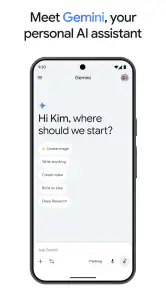
One of the first things you'll notice about Google Gemini is its sleek and intuitive user interface. The app is designed with simplicity in mind, making it easy for users of all ages to navigate. Whether you're tech-savvy or a complete beginner, you'll find it a breeze to use. The design is clean, with a minimalistic approach that focuses on functionality rather than flashy visuals.
Features That Make Life Easier
Now, let’s talk about features. Google Gemini comes packed with a range of capabilities that can make your daily routine a whole lot easier. From setting reminders and sending messages to providing weather updates and news briefings, this app covers it all. It's like having a Swiss Army knife of apps, ready to assist you at any moment.
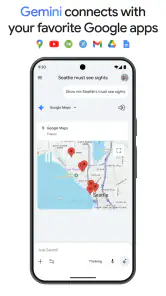
What really sets it apart is its ability to integrate with other Google services seamlessly. Whether it's syncing with your Google Calendar or pulling information from Google Search, the integration is smooth and efficient. You don't have to worry about jumping between apps; Google Gemini does the heavy lifting for you.
Performance and Reliability
Performance-wise, Google Gemini is top-notch. The app is fast and responsive, delivering answers and performing tasks in real-time. You won't find yourself waiting around for it to catch up, which is a huge plus in today's fast-paced world. Plus, with Google's robust infrastructure backing it, reliability is almost a given.
Even so, I would not use a smooth interaction as a reason to skip checking important details. A polished answer can still miss a constraint or present an uncertain point too confidently. I get better results by keeping a request narrow, asking it to separate known details from assumptions when that matters, and checking anything that would affect a real decision. If I need a lasting record, I copy the final version into the document or task manager I already use rather than treating a chat as my filing system.
Another helpful trade-off is to use Gemini for the part of a task that benefits from conversation, then switch tools for the part that needs structure. I might ask it to brainstorm possible headings, choose the ones that fit, and put the finished outline into my writing app. For a calendar entry or a reminder, I would verify the details in the relevant service rather than assume that discussing an action is the same as completing it. This boundary keeps expectations practical and avoids confusing suggestions with completed work.
Choosing the right job for Gemini
For a first-time user, I recommend picking one small task with a clear finish line. A useful example is replying to a message that feels awkward to word. Explain who the message is for, what you need to say, and the tone you want; then compare the draft with your own facts before sending anything. That is a safer and more revealing test than asking a broad question and judging the whole app by a generic answer.
It can also help when a task is not difficult so much as hard to begin. I might ask for three ways to organize a short presentation, then choose one and build it out myself. The useful, less obvious move is to ask for alternatives with different trade-offs, such as a simpler plan and a more detailed one. That gives me choices rather than encouraging me to accept the first polished response as the only sensible route.
Compared with a standard search tool, Gemini is better suited to shaping an answer around follow-up instructions, while search is often the clearer choice when I need to inspect original pages and judge their sources. Compared with a notes or task app, Gemini can help me think through wording and sequence, but a dedicated organizer is better for keeping a dependable record and tracking work over time. I use the assistant at the point where I am thinking, not as a replacement for the tools where I store or verify the result.
Small habits that improve the conversation
If a response misses the mark, I do not start over immediately. I point to the exact part that is wrong or too vague and add the missing constraint. For example, I can say that a draft must keep a particular detail, fit a more casual tone, or avoid suggesting extra tasks. This targeted correction is usually more useful than repeating the same request with only slightly different wording.
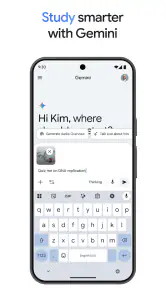
Another practical habit is to separate brainstorming from checking. First, ask for ideas or a rough structure; then review each claim and replace anything that needs a source with information you have verified elsewhere. This is especially useful for school notes, travel preparation, and work drafts, where a plausible-sounding mistake can slip through precisely because the rest of the answer reads smoothly.
The conversational format is not ideal when I already know exactly what I need and can do it faster in a dedicated app. It can also feel like extra work if I have to repeatedly supply context that is obvious to me but not present in the prompt. I would choose a direct search, a calculator, a calendar, or a specialist tool when accuracy and a predictable action matter more than discussion. The best use is selective: bring Gemini in when a question benefits from drafting, explaining, or comparing options.
Final Thoughts: A Handy Companion
In conclusion, if you're looking for an app that can genuinely make your life easier, Google Gemini is worth checking out. It's user-friendly, packed with useful features, and reliable. Whether you need help managing your schedule or just want to explore the capabilities of AI, this app has something for everyone.
So, why not give it a try? You might just find that having a virtual assistant like Google Gemini is exactly what you need to navigate the hustle and bustle of everyday life. Until next time, happy app exploring!
Google Gemini Frequently Asked Questions
Can I use Google Gemini for tasks beyond writing and planning?
Yes. Google Gemini’s chat experience is presented as a way to start writing, planning, creating, learning, and more with Google AI. You can bring a task or idea to a conversation and see whether the response helps you make progress. For important decisions or finished work, use your own judgment and review the result before relying on it.
Is Google Gemini a separate app or a feature inside another app?
Google Gemini is an app developed by Google LLC. Its central experience is chatting with Google AI, which can help you get started with activities such as writing, planning, creating, and learning. If you are looking for this particular app, check its name and developer in the app store before downloading so you select Google Gemini rather than another app with a similar name.
Can Google Gemini give me a finished answer or should I expect a conversation?
Google Gemini is built around chat, so you can describe what you need and continue the conversation as you work through a task. That can make it useful for exploring an idea or getting a first draft or plan underway. Treat responses as assistance rather than a guarantee of finished, error-free work, and review anything you intend to use.
What kinds of requests can I try first in Google Gemini?
You can begin with a straightforward request connected to writing, planning, creating, or learning, since these are among the activities highlighted for Google Gemini. Explain what you are trying to accomplish in ordinary language, then add useful context if the first response does not fit. This gives you a practical way to see whether the chat experience suits your needs.
Can I use Google Gemini for personal or work-related productivity?
Google Gemini is a productivity app whose chat is intended to help with tasks such as writing, planning, creating, and learning. Those activities can arise in personal projects as well as everyday work, so you can try describing the kind of task you have in mind. Review its responses and decide whether they are appropriate for your particular purpose before using them.
Pros
- User-friendly interface for easy navigation.
- Real-time collaboration enhances productivity.
- Wide range of tools for creativity.
- Seamless integration with other Google apps.
- Regular updates with new features.
Cons
- Requires stable internet connection.
- Limited offline functionality.
- May have a steep learning curve.
- Consumes significant device resources.
- Privacy concerns with data sharing.
- Category
- Productivity
- Version
- 1.0.913571982