Grok - AI Assistant
- 23.10K
- 4.9
- Installs
- 50.00M
- Price
- Free

Screenshots
Analysis by Reviewed
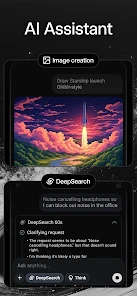
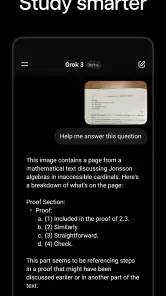
I usually reach for an AI assistant when I have a question that would otherwise send me bouncing between search results, notes, and a blank document. Grok - AI Assistant is a free productivity app from xAI that brings conversational answers and image generation into one place, with real-time information from X as part of its appeal. I find that combination most useful when I want to move quickly from a question to a rough idea or a visual starting point, rather than manage a whole schedule inside an app.
When a quick answer is only the first step
The app makes the most sense when I already have a small task in mind: clarify a term, get a first outline, compare possible approaches, or turn a rough visual idea into a prompt. It is less compelling as a place to organize every part of a workday. That distinction matters because the word “assistant” can suggest a complete personal organizer, while Grok’s clearest value is helping me think, draft, and explore through conversation.
For example, if I have ten minutes before a meeting and only a vague grasp of a topic, I can ask for a plain-language explanation, then request a short list of questions to raise. I would not copy that answer straight into meeting notes without checking it. Instead, I use it to identify what I still need to understand, look up anything consequential, and carry the useful points into my own notes. The benefit is a faster starting point, not a shortcut around judgment.
From a quick question to a usable result
A realistic day might start with me trying to understand a topic before a meeting, then asking for a plain-language explanation and a short list of points worth checking. From there, I can refine the request, ask for a different angle, or try an image prompt when a visual would help communicate the idea. The useful habit is to treat the first answer as a draft: narrow the question, supply context, and check important claims before passing anything along.
Getting Started with Grok
The first thing you'll notice when you fire up Grok - AI Assistant is its sleek and user-friendly interface. It's like the developers really understood that no one wants to spend ages just trying to figure out how to navigate an app. Within minutes, you'll have set up your profile and be ready to explore the myriad of features this app offers.
Making answers useful beyond the chat
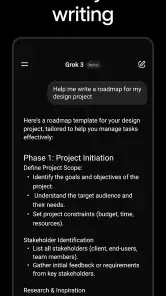
One non-obvious way I’d use an assistant like this is to ask it to reshape the same material for different readers: first a quick explanation for myself, then a concise note I can share with a colleague. That can save drafting time, but it doesn’t remove the handoff work. I still need to review the wording, verify details that matter, and move the finished text into whatever document or message I actually use. Grok is most helpful as a thinking and drafting stop along that route, not as a guarantee that the final version is ready to send.
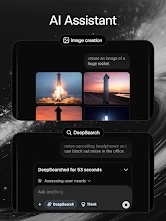
Image generation offers a related workflow. I’d start with a concrete purpose—such as a mood-board idea or a visual to help explain a concept—then make the prompt more specific if the first result misses the mark. This is better suited to exploration than to a task that requires exact branding, precise labels, or a production-ready asset. If accuracy and fine control matter more than speed, a dedicated design tool is the safer final step.
You May Like

Clash of Clans Is Won Between the Battles

Android Auto Makes the Case for Quieter Car Software

MobiOffice: Transforming Mobile Productivity with Seamless Integration

EA SPORTS FC™ Mobile Soccer: Redefining Mobile Sports Gaming

How Microsoft OneDrive Became a Mobile Productivity Giant

How Google Translate Breaks Language Barriers Effortlessly
Features That Stand Out
One of the standout features of Grok is its ability to integrate seamlessly with your existing apps and calendars. Whether you're a Google Calendar devotee or loyal to Apple, Grok has got you covered. It pulls in your schedule and sends you reminders that are actually helpful, not just the kind that pop up at the most inconvenient times.
Another cool feature is its task management capability. You can create to-do lists for different aspects of your life, like work, home, or personal projects. The app allows you to set priority levels for tasks, ensuring you focus on what really matters each day.
Where real-time context helps—and where it needs care
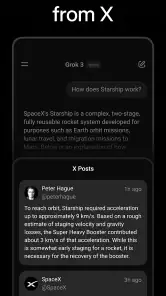
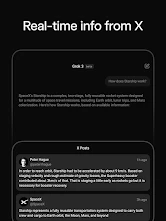
For a question tied to current discussion, access to real-time data from X can be a useful starting point: I can get a sense of what people are talking about without opening a string of separate tabs. But a fast-moving feed is not the same as settled, independently checked reporting. I would use it to find leads or understand the conversation, then confirm consequential details through sources I trust. For evergreen explanations or careful research, a conventional search workflow may be easier to inspect because I can compare source pages directly.
That distinction also answers a practical question: should I rely on Grok for work that has to be exact? I wouldn’t make it the final authority for medical, legal, financial, or other high-stakes decisions. It can help me frame questions and organize options, but a qualified professional or primary source is the better place to verify them. For casual learning, brainstorming, and first drafts, the balance is much more favorable.
The AI Element
But wait, there's more! The AI in Grok is not just for show. It learns from your habits and preferences, making suggestions that are eerily spot-on. Forgot that meeting with your boss? Grok's got your back with timely reminders and even suggests optimal times to schedule your next big agenda based on past activity.
Plus, there's the added bonus of smart notifications. Grok doesn't just bombard you with alerts; it knows when to nudge you and when to let you be. And trust me, that makes a world of difference when you're trying to focus on deep work.
A practical way to handle a busy day
Suppose I’m putting together a short presentation and have a loose idea, a few notes, and a question about a current topic. I’d separate the work into small requests rather than ask for a finished presentation all at once: clarify the topic, suggest an outline, then help me turn the outline into speaking points. If an image could make the idea easier to discuss, I’d try a prompt as a sketching step. The useful trade-off is that conversational iteration can make a fuzzy task feel manageable, but I still have to choose what belongs in the final presentation and check each claim.
A second helpful habit is to give the assistant constraints that affect the outcome: who the audience is, what I already know, what I need to leave out, and whether I want a brief answer or a more careful explanation. That tends to produce material I can evaluate more easily than a broad prompt. I also keep requests for separate tasks distinct. Mixing research, drafting, and image instructions into one sprawling message can make it harder to spot which parts need verification or revision.
For everyday use, I’d treat any output as a handoff rather than a finished product. A student might use an explanation to find the right chapter to reread; a writer might take a draft into a word processor and edit it in their own voice; someone following a developing story might use the answer to identify search terms and then check reliable reporting. In each case, Grok can reduce the friction at the beginning, while the user remains responsible for the destination.
Who will get the most from it
Grok makes the most sense for someone who likes asking follow-up questions, wants a quick route from an idea to a draft, and is curious about current conversation on X. Students can use it to get an initial explanation before doing their own reading; writers can use it to break through a blank page; and busy people can use it for quick summaries or image concepts. Those examples work best when the user stays involved rather than treating the output as finished work.
If your main need is a dependable calendar, a tightly controlled task system, or a polished graphic editor, I’d choose a specialist app for that job. A conversational assistant can help plan what to do, but it is not automatically a replacement for tools built around recurring schedules, detailed project tracking, or precise design workflows. The practical trade-off is convenience in one place versus the deeper controls of a focused tool.
Compared with ordinary web search, the conversational format is handy when I need to ask a follow-up or request a different explanation without rebuilding the search from scratch. Search is still the better choice when I want to inspect several original sources side by side, judge their publication context, or keep a clear trail of references. Compared with a traditional notes app, Grok can help generate or reshape ideas, but a notes app remains better for maintaining a deliberate personal archive that I can organize and revisit.
I would skip it if I mainly want an app that executes a predictable routine without much supervision, or if I need every answer to come with source material I can audit before using it. It is also a poor fit for someone who finds generated images distracting or prefers to create visuals with precise manual controls from the start. The app is most rewarding for curious users who are comfortable checking and editing, rather than anyone looking for a hands-off authority.
Cost, age, and everyday trade-offs
The app is free to install, while in-app purchases range from $29.99 to $299.99 per item. I’d try the free experience against a few real tasks before deciding whether any paid option makes sense for my routine; the presence of purchases alone doesn’t tell me which features I personally need. It is rated Teen, so families should consider whether an AI chat and generated imagery are appropriate for the young person using it.
Grok has a 4.9 average from around 1.7 million ratings, with over 50 million installs and about 23,000 written reviews. Those figures suggest a large audience, but they don’t settle whether its style or workflow will suit me. The app’s current version is 1.0.82-release.02, it first appeared on March 24, 2025, and it requires Android 9 or later. I’d check that requirement before installing on an older device.
One question I’d ask before paying is whether I use the app often enough for its extra options to matter. I would first test it on recurring, low-stakes tasks—explaining unfamiliar terms, creating a first-pass outline, or exploring a visual direction—rather than judge it from one impressive response. If those uses become part of my routine, I can weigh the available purchase against what I actually gain. If I only open it occasionally, the free starting point may be enough.
Personal Experience
On a personal note, using Grok has genuinely made my days more organized and less stressful. It's like having a personal assistant who doesn't just remind you of tasks but actually helps you plan them out in a way that maximizes productivity. I've found myself getting more done in less time, and who doesn't want that?
Of course, no app is perfect, and while Grok is a fantastic tool, it's worth mentioning that it does take a bit of time to get used to all its features. But once you do, it's like riding a bike – you never forget how to make the most of it.
My recommendation after weighing the workflow
The main friction for me is the gap between a quick, confident answer and a result I’m ready to rely on. I have to add context, ask follow-ups, inspect the response, and then carry it into another tool when the task needs a polished document, a lasting record, or a precise design. That sequence is not a flaw unique to conversational AI, but it does mean the app saves time only when I’m willing to do the checking and finishing work.
Grok - AI Assistant is worth trying if you want a conversational way to explore questions, generate a first draft, or develop an image idea, especially when current discussion on X is relevant. I wouldn’t choose it as my only tool for project management, source-based research, or final creative production. Used as a flexible first stop—with a clear handoff to trusted sources and specialist apps when needed—it can be a useful addition to a productivity routine without pretending to replace the rest of it.
Grok - AI Assistant Frequently Asked Questions
How can I get real-time information from X in Grok?
Grok’s store description highlights access to real-time data from X, which can help when you want to explore current topics or follow information appearing there. Treat responses as a starting point rather than a substitute for checking important details yourself, particularly when the topic is changing quickly. This feature may be especially useful if you already use X as a source of updates.
Who develops Grok - AI Assistant, and how popular is it?
Grok - AI Assistant is developed by xAI and is a productivity app. It has an average rating of 4.9 from around 1.7 million ratings, with about 23,000 reviews and over 50 million installs. Those figures suggest that many people have tried it, but they do not guarantee that its features or style will suit every user.
What does Grok - AI Assistant do, and what kind of help can I expect from it?
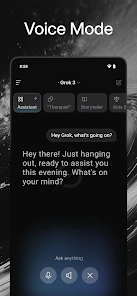
Grok - AI Assistant is a productivity app from xAI that can answer questions, generate images with AI, and provide real-time data from X. It may be useful when you want help exploring a topic, creating visual ideas, or keeping up with information on X. As with any AI assistant, review its responses and generated content before relying on them.
Is Grok - AI Assistant suitable for teenagers?
The app is rated Teen, so it is intended for a teenage audience and older users. That rating is worth considering before installing it for a younger family member. Grok can answer a broad range of questions and generate images, so parents may want to discuss responsible use and check the app’s settings and experience themselves.
What platforms is Grok - AI Assistant available on?
Grok - AI Assistant is available for both Android and iOS platforms, allowing a wide range of users to access its features no matter what type of smartphone they use. This cross-platform availability ensures that users can take advantage of Grok's capabilities, whether they are on Apple's iOS or Google's Android system.
Pros
- Intuitive user interface design
- Fast response time for queries
- Supports multiple languages
- Integrates with popular apps
- Personalized recommendations
Cons
- Limited free version features
- Occasional connectivity issues
- Requires constant updates
- High battery usage
- Complex setup for beginners

- Category
- Productivity
- Version
- 1.0.82-release.02











