AI Chatbot - Nova
- 23.78K
- 3.9
- Installs
- 50.00M
- Price
- Free

Screenshots
Analysis by Reviewed
I usually reach for an AI chatbot when I need a first draft, a clearer explanation, or a quick way to get unstuck. AI Chatbot - Nova is aimed at those everyday tasks, but the useful question is how well it fits into a real routine—and where it still needs a careful human check.
Where a chat can get stuck
A prompt that is too broad often leads to a broad answer. I get more useful results by stating the audience, purpose, tone, and length up front. For example, asking for a short, friendly note to reschedule a meeting gives the chatbot a clearer job than simply asking it to “write an email.” If the first answer misses the mark, I refine one detail at a time rather than starting over.
That matters because AI output can sound confident even when it needs checking. I treat factual answers as a starting point, not a source of record, especially for health, legal, financial, or time-sensitive questions. For writing, I read the result aloud and replace wording that does not sound like me. That small edit is often what turns a passable draft into something I would actually send.
Simple checks before relying on it
Nova is a free productivity app from ScaleUp, with in-app purchases ranging from $0.99 to $199.99 per item. It is rated for Everyone. I would check the purchase details before choosing anything paid, particularly if I only need occasional help. The app has a 3.9 average from around two million ratings, and more than 50 million installs; those figures suggest broad use, but they cannot tell me whether its answers will suit my particular task.
If a response seems off, I first make the request more specific and check that I have not combined several unrelated tasks into one prompt. For a longer piece, I ask for an outline before asking for the full draft. For a decision, I request the main options and trade-offs, then verify important claims elsewhere. These steps make the conversation easier to steer without assuming that a chatbot will interpret an underspecified request exactly as intended.
Making Nova useful in an ordinary day
Say I have a busy morning and need to turn scattered notes into a concise message for a colleague. I can ask for a clear draft, then add the recipient and the details that must stay unchanged. Before sending, I check names, dates, commitments, and tone myself. This is where an AI writing assistant can save time: it helps with phrasing, while I retain responsibility for the facts and the final message.
Getting more from a short prompt
One practical habit is to separate drafting from editing. First ask for a rough structure; then request a version that is shorter, warmer, or easier to scan. Keeping the second request focused makes it simpler to judge whether the change helped. I also avoid sharing private or sensitive details unless I am comfortable entering them into an online service. That is a sensible boundary for any chatbot, not a special trick for Nova.
More From Our News Desk

Weather by Xiaomi Review: Clear at a Glance, Less Clear Up Close

X Under Pressure: Can It Recover When Posting Goes Wrong?

Clash of Clans Is Won Between the Battles

Android Auto Makes the Case for Quieter Car Software

MobiOffice: Transforming Mobile Productivity with Seamless Integration

EA SPORTS FC™ Mobile Soccer: Redefining Mobile Sports Gaming
For learning, I might ask it to explain a difficult idea in plain language and then provide a small example. If I am preparing for a conversation or presentation, I can use it to brainstorm questions or organize points. These uses suit a chatbot better than asking it to make a consequential decision on my behalf: the first set gives me material to review, while the second risks treating a generated answer as authority.
How it compares with other ways to get help
Compared with a conventional search engine, a chatbot is more convenient when I want a draft, a reformulation, or a back-and-forth explanation. Search is usually the better next step when I need to inspect original sources, confirm a current detail, or compare evidence directly. Compared with a notes app or a dedicated calendar, Nova may help me phrase or organize information, but I would not assume that a conversational answer has actually saved a reminder or changed an appointment. I check the relevant tool when a real action needs to happen.
The app’s store summary describes a chatbot powered by current AI models and intended for writing, but model capability does not remove the usual trade-offs: answers can be generic, follow-up prompts take time, and polished wording is not proof of accuracy. Nova makes the most sense for someone who wants a flexible writing and brainstorming companion in one place. If my main need is dependable scheduling, source-based research, or a specialist tool with a fixed workflow, I would choose that dedicated option instead.
Choosing a task that suits a chatbot
I get the most value when I give Nova a bounded job with an output I can inspect. Turning a rough list into a polite message, suggesting several headings for a presentation, or explaining an unfamiliar term are good examples: I can quickly accept, reject, or edit the result. A useful test is whether I can spot a mistake before acting on the answer. If I cannot, I slow down and consult a more reliable source or a qualified person.
For a realistic everyday use, imagine I have a few minutes between errands and need to write a note asking a school, landlord, or service provider to clarify a detail. I can describe the situation without including unnecessary personal information, ask for a concise and courteous draft, and then restore any exact dates or account details myself. The time-saving part is getting past the blank page; the important part is checking that the final message says only what I mean.
Making follow-ups more efficient
A small prompt-writing trick is to tell the chatbot what must not change. If a draft needs to preserve a deadline, a particular request, or a neutral tone, I state that constraint clearly and ask for one revision at a time. I also keep an eye out for invented connective details: a smooth paragraph may add a reason, promise, or assumption that I never supplied. Comparing the draft against my original notes is a quick way to catch that drift.
When the first response is weak, I do not always need a longer prompt. Sometimes the better recovery is to split the request: ask for a short outline, choose the useful parts, and then request one section in the desired style. If the conversation starts moving in the wrong direction, I restate the goal and include the essential context again instead of layering contradictory corrections on top. That approach reduces rework and makes it easier to tell whether the problem is the prompt or the answer.
Who is likely to enjoy it
I would recommend trying Nova if you regularly face small writing tasks, want a conversational way to explore an idea, or need a plain-language starting point before doing your own research. It can also help people who know what they want to say but find it tiring to organize the first draft. The free entry point makes it easy to consider for occasional use, though I would review any purchase choice carefully rather than assuming every useful interaction requires a paid option.
It is less suitable for someone who expects a chatbot to act as a dependable personal organizer, verify every fact, or produce finished work without review. It is also a poor fit for tasks where an error could cause serious harm or where confidential information is central to the request. In those cases, a specialist service, a trusted reference, or direct human advice is a better match than a general conversational assistant.
Setup checks and sensible expectations
Nova was released on March 3, 2023, and ScaleUp presents it as an AI chatbot for writing and conversation. The app is rated for Everyone, but that age label is not a reason to share private information or treat generated answers as dependable advice. Before settling into a routine, I would check the app’s current purchase screen and make sure I understand what any paid choice covers. In-app purchases range from $0.99 to $199.99 per item, so the range is wide enough to make a deliberate check worthwhile.
If the app seems unresponsive or a reply does not arrive as expected, I start with basic checks rather than assuming the answer itself is broken: confirm that the request is clear, try a shorter prompt, and check that the device has a working internet connection. If a problem continues, closing and reopening the app or checking for an available update are ordinary troubleshooting steps. I would avoid repeatedly submitting the same long request, since that can make it harder to tell whether anything has changed.
When the app is not the cause
Some disappointing results come from the limits of the task, not a setup fault. A chatbot cannot reliably settle a question just because it phrases an answer neatly, and a request involving current details may need a fresh source. Likewise, if I ask it to infer missing context, I should expect it to make assumptions. I get a fairer test by supplying the necessary background and then checking the response against something independent when accuracy matters.
There is also a difference between asking for help and handing over a decision. Nova can help me list options or prepare questions for a conversation, but I remain responsible for deciding what to do and confirming any action in the proper service. I would not rely on a chat response as proof that a calendar entry, reminder, booking, or message has been created. For a task that needs a confirmed change, I use the relevant app and check the result there.
Getting Started with Nova
Jumping into AI Chatbot - Nova is like having a mini techie assistant right in your pocket. Setting it up is a breeze, no tech wizardry required! Once you're in, you’re greeted with a sleek interface that screams simplicity. And let me tell you, it’s not just a pretty face – it’s functional too.
Features That Stand Out
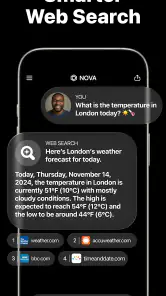
Now, let's talk about what makes Nova tick. At its core, it’s an AI that learns from you. The more you chat, the smarter it gets, tailoring its responses to fit your style. It’s like having a buddy who just gets you. Plus, it’s packed with features that make your life easier. Need to set a reminder? Nova’s got your back. Want to know the weather? Just ask. It’s like your personal assistant that never sleeps.
What I found particularly cool is its multilingual capability. Whether you're chatting in English, Spanish, or even Mandarin, Nova handles it like a pro. This makes it super handy for globetrotters or anyone looking to brush up on a new language.
Some Cool Uses
The app isn’t just about answering questions. You can use Nova to manage your calendar, find quick facts, or even get recommendations on pretty much anything. It’s like the Swiss Army knife of apps – versatile and dependable.
And if you're someone who loves a bit of customization, Nova lets you tweak its personality settings. Want a more formal tone? Or maybe something casual and fun? You can adjust it to match your vibe, which is a neat touch.
The Verdict
So, after spending some quality time with Nova, what’s the verdict? Well, it’s safe to say it’s more than just a chatbot. It’s a companion that fits snugly into your daily routine, making tasks simpler and life a tad bit easier. Sure, like any app, it has its quirks, but the developers seem pretty committed to ironing those out.
In a world where AI is becoming increasingly prevalent, Nova stands out for its user-friendly approach and adaptability. Whether you’re tech-savvy or a newbie, this app offers something for everyone. So, if you haven’t checked it out yet, maybe it’s time to let Nova into your life and see how it can work its magic for you!
Remember, this is just my take on it after a few weeks of use. If you give it a shot, I’d love to hear your thoughts!
My practical verdict
For me, Nova is best viewed as a quick drafting and idea-shaping tool, not an all-purpose authority. Its 3.9 average across around two million ratings and more than 50 million installs show that many people have tried it, but popularity does not guarantee a perfect fit for my habits. I would start with a few low-stakes tasks, judge whether the answers save enough time to justify returning, and keep a human check in the workflow.
That balance is the reason I would suggest it to a friend who wants help getting words onto the page or making a topic easier to approach. I would point a friend elsewhere if they need reliable source citations, confirmed actions, or specialist guidance as the main feature. Used with clear prompts and a careful final read, Nova can be handy; used as a substitute for verification, it can create more confidence than the answer deserves.
AI Chatbot - Nova Frequently Asked Questions
Can AI Chatbot - Nova help with everyday writing tasks?
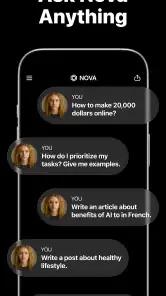
Nova is presented as an AI chatbot that can write anything, making it a potential helper for everyday writing and productivity tasks. You could consider it when you need a starting point for a draft, want help expressing an idea, or are looking for a conversational way to work through a question. As with any AI-generated writing, review the result and make changes so it fits your purpose.
Does AI Chatbot - Nova require an account or internet connection?
Whether an account is needed and how the app connects are practical details to check during setup. Before relying on Nova for a task, follow the prompts shown in the app and make sure your device can access the service. If you have a particular preference about signing in or connectivity, reviewing the app’s setup screens before making it part of your routine will help you decide whether it suits you.
Is AI Chatbot - Nova free to download, and are there any purchases inside the app?
AI Chatbot - Nova is free to download and is listed as a Productivity app. It also offers in-app purchases, with prices ranging from $0.99 to $199.99 per item. You can begin using the app without paying for the download, but check the purchase details shown in the app before choosing any paid option.
Who develops AI Chatbot - Nova, and what is it designed to do?
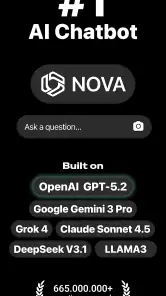
AI Chatbot - Nova is developed by ScaleUp and is described as an AI chatbot powered by the latest AI models. Its short description is simply “AI Chatbot,” while the main idea is to let you ask Nova to write anything. That makes it worth considering if you want a conversational assistant for writing and other productivity tasks.
What is AI Chatbot - Nova?
AI Chatbot - Nova is a cutting-edge application designed to provide users with an intelligent conversational experience. Leveraging advanced AI technology, it can understand, learn, and respond to a wide array of queries, making it an essential tool for both personal and professional use. Whether you're seeking assistance with daily tasks or simply looking for engaging conversation, Nova is equipped to handle it all.
Pros
- Efficiently answers queries
- User-friendly interface
- Supports multiple languages
- Customizable responses
- Integrates with other apps
Cons
- Requires internet connection
- Limited free version features
- Occasional response delays
- May misinterpret complex queries
- Data privacy concerns
- Category
- Productivity
- Version
- Varies with device