Plant App - Plant Identifier
- 4.76K
- 4.3
- Installs
- 5.00M
- Price
- Free

Screenshots
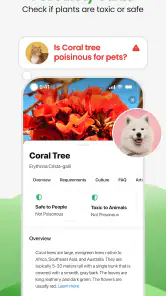
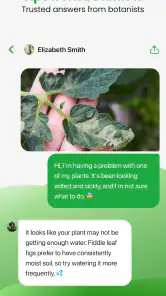
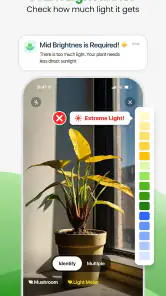
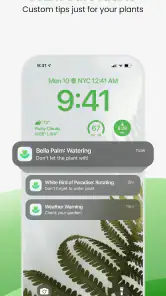
Analysis by Reviewed
I like having a way to investigate a mystery plant without turning a casual walk or a nursery visit into a research project. Plant App - Plant Identifier is an education app from ScaleUp that aims to make that first step simple: take a photo, get an identification, and use what you learn to decide what to look at next. I see it as a useful starting point, not a substitute for careful judgement when a plant’s identity matters.
Identifying Plants Made Easy
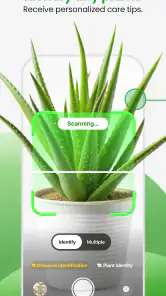
So, I downloaded the Plant App - Plant Identifier out of sheer curiosity, and boy, was I impressed! You just snap a pic of the plant in question, and bam, it tells you what it is. It's super handy when you're out and about, exploring nature, or even when you're just strolling through your local plant nursery. The app uses some fancy AI technology that’s pretty spot-on most of the time. I mean, it's not going to replace a real botanist, but it’s pretty darn close.
When a Photo Is a Good Starting Point
A useful habit is to photograph the whole plant first, then take another picture of distinctive details such as leaves, flowers, or fruit if the first result seems uncertain. Try to keep the subject clear and avoid including several plants in the same frame. Those small choices make it easier to assess whether a suggested match fits what you can actually see, rather than accepting the first name automatically.
For example, if I spot an unfamiliar shrub on a walk, I can take a picture and use the result to guide what I notice next: leaf shape, growth pattern, or whether flowers are present. That turns identification into a small learning exercise instead of treating a label as unquestionable proof. If the plant might be poisonous, edible, or otherwise important to identify correctly, I would check a trusted local source or ask an expert before acting on an app result.
More Than Just Identification
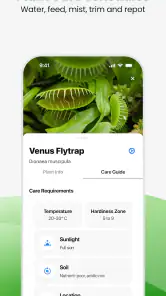
But wait, there's more! This app isn't just about identifying plants. It also gives you loads of tips on how to care for them. Whether it's about watering schedules, sunlight needs, or even soil preferences, this app's got your back. I found it surprisingly educational. It's like a mini plant encyclopedia right at your fingertips.
Care suggestions are most useful as a starting point because a plant’s needs can change with its growing conditions. A general watering tip, for instance, cannot replace checking whether the soil is actually dry, and a sunlight recommendation still needs to be weighed against the light in your own room or garden. I’d use the guidance to form better questions and build a routine, not to follow a schedule blindly.
Design and User Experience
The design is sleek and user-friendly, which I totally appreciate. You don't need a degree in tech to navigate through it, which is always a plus in my book. The interface is intuitive, and the whole process from snapping a photo to getting your plant ID is quick and seamless. The app also keeps a record of all your identified plants, which is great if you're like me and can never remember plant names.
More From Our News Desk

Weather by Xiaomi Review: Clear at a Glance, Less Clear Up Close

X Under Pressure: Can It Recover When Posting Goes Wrong?

Clash of Clans Is Won Between the Battles

Android Auto Makes the Case for Quieter Car Software

MobiOffice: Transforming Mobile Productivity with Seamless Integration

EA SPORTS FC™ Mobile Soccer: Redefining Mobile Sports Gaming
That saved record is especially handy when you come home from a nursery with several possible additions and want to revisit their names later. I’d add notes outside the app about where a plant was found or what its leaves looked like, since a name alone may not preserve the clues that helped distinguish it. If you are comparing similar-looking plants, keeping those observations alongside the identification can make the learning more useful over time.
Another neat feature is the community aspect. There’s a section where you can share your plant pics and adventures with other plant lovers. It's like Instagram, but just for plants. I found it quite fun to see plants from all around the world and learn from other users’ experiences.
Making the App Useful in Everyday Plant Care
A practical use I like is checking a plant before buying it, while there is still time to compare the label with its visible features. At a nursery, I would photograph the whole specimen and then inspect a leaf or flower separately. If the suggested identity seems plausible, I can look up its likely needs and decide whether my home or garden is a reasonable fit. The app can help me ask better questions, but I would still rely on the nursery’s care information for the particular plant being sold.
At home, the same photo-first approach can help when a plant has been passed along without a name. I would take a picture in good light, include a view of the overall shape, and then capture details that distinguish it: leaf arrangement, edges, or any blooms. The useful result is not merely a label; it is a prompt to observe the plant more carefully. That can be especially helpful for beginners who have not yet learned botanical vocabulary and might otherwise struggle to search effectively.
There is a small workflow trade-off here. If I take a photo quickly and move on, I may forget the setting and the details that made the plant interesting. I’d save the result and jot down where I saw it, whether it was growing in shade or sun, and what else stood out. This is an easy way to turn an identification history into a personal learning record, rather than a stack of names with no context.
How It Fits Among Plant Resources
Compared with searching the web manually, a photo-first tool can be less intimidating when you don’t know the words to describe a plant. Compared with a field guide, it is quicker for an initial guess, while a guide or a local specialist can offer more context when lookalike species or regional details matter. I’d use the app to narrow the possibilities, then turn to those alternatives when accuracy has practical consequences.
That distinction also answers a common concern: can it identify every plant from one picture? I wouldn’t count on a single photo being enough in every case. A close-up without flowers, a blurry image, or a plant with several similar relatives can make any visual identification difficult. Taking clearer images of different parts and treating the result as a suggestion is a sensible workflow, especially for unusual or poorly photographed specimens.
Another question is whether it replaces a field guide. I don’t think of the two as competing tools. The app is convenient when I want a quick lead or do not know where to begin; a field guide is better when I want to compare a set of features deliberately, understand a plant in its regional setting, or verify a close match. Searching the web can also be useful, but it works best once I have a likely name or a few descriptive terms. In that sense, the app can be a bridge from a photo to more informed research.
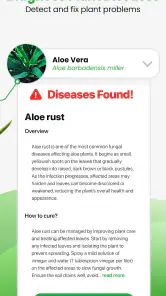
For diagnosis, I would be cautious about treating a possible match as a firm explanation for what is wrong with a plant. A yellow leaf, for example, can have several causes, and a photo may not show the soil, recent watering, or other growing conditions needed to assess the problem. I’d use any diagnosis as a reason to inspect the plant and its environment, not as an automatic instruction to change its care. If the plant is valuable or worsening, more specific advice is worth seeking.
Cost, Limits, and Who Should Choose It
The app is free to install, and its Everyone age rating makes it approachable for a broad audience. It has a 4.3 average from around 517,000 ratings and over 5 million installs, so many people have tried it, though popularity alone does not guarantee that each identification will be right. The current version is 3.3.1, and in-app purchases range from $3.99 to $299.99 per item. I’d begin with the free access and decide whether the app’s actual tools are useful to me before considering any purchase; the wide range means I would check the specific item and its terms rather than assume what a paid option includes.
That free starting point makes it easy to explore whether a photo-based approach suits the way you learn. I would spend some time with the available access before paying for anything, and I would be clear about what I expect to gain from a purchase. The presence of in-app purchases does not, by itself, tell me which tools are included in each option or whether a particular paid item is worthwhile for my needs. Since the listed prices span a broad range, checking the exact item before confirming a purchase is sensible.
For someone who identifies plants only now and then, the free access may be enough to decide whether the app belongs in their routine. A frequent gardener may place more value on returning to identifications and using care guidance, but that still depends on the specific tools they choose to use. I would not pay simply because I enjoy the first identification; I’d first ask whether I’m using the app regularly and whether the paid option solves a real problem for me.
This is a good fit for curious beginners, houseplant owners who want help recognizing an unfamiliar specimen, and gardeners who enjoy learning names while exploring. It is less suitable as the only authority for plant safety, precise diagnosis, or decisions that depend on a definitive species identification. If your main need is rigorous botanical confirmation, a specialist reference or knowledgeable local expert is the better choice. If you simply want an approachable way to start investigating plants, this app offers a convenient route in.
I’d also recommend it to families or casual nature walkers who want to make an ordinary outing more observant, as long as the goal is curiosity rather than authoritative identification. It gives a beginner a low-friction way to start noticing differences between leaves, flowers, and growth habits. Someone who already knows how to identify local species from keys and field references may find the quick result less valuable, especially when they need careful documentation or certainty.
One everyday scenario sums up the app’s role for me: I’m walking through a neighborhood and spot a flowering plant I don’t recognize. I take a clear picture of the whole plant, then another of the bloom and leaves, and use the suggested name to guide what I check next. Later, I compare those visible details with a reliable reference. If the match remains uncertain, I keep the possibilities open rather than treating the first answer as settled. The app makes that first step easier, but the observation and verification are still mine.
Final Thoughts
In conclusion, if you're a plant lover or just someone who often finds themselves asking "What's this plant?", the app is a useful companion. It's educational, fun, and handy for anyone looking to expand their plant knowledge. Whether you're a newbie just starting out with houseplants or a seasoned gardener, it can provide a wealth of information and an engaging way to explore. So next time you find a mystery plant, take a clear photo, compare the result with what you can observe, and use the app as the beginning of your investigation rather than the final word.
My buy-or-skip verdict is straightforward: I’d try the free access if I wanted a convenient first look at unfamiliar plants, and I’d hold off on paying until I knew exactly which additional option I wanted and how often I would use it. The app’s best value is as a friendly learning aid that helps turn a passing question into closer observation. Skip it if you need dependable expert confirmation for safety, treatment, or formal identification; in those situations, a specialist source is a better fit.
Plant App - Plant Identifier Frequently Asked Questions
Can Plant App - Plant Identifier help beginners learn about plants?
Plant App - Plant Identifier is an Education app aimed at identifying plants, trees, weeds, and flowers, making it a practical starting point for curious beginners as well as gardening enthusiasts. Its identification and disease diagnosis features can help users explore what is growing around them and learn more when a plant looks unwell. The app is a tool for learning, rather than a substitute for careful plant care.
Is Plant App - Plant Identifier suitable for children and families?
The app has an Everyone age rating, so it is intended for a broad audience. Families may find its plant identification focus useful for exploring flowers, trees, and other plants together, whether at home or outdoors. As with any app that offers optional purchases, parents may want to review the purchase settings on the device before letting a child use it independently.
Who develops Plant App - Plant Identifier, and who might find it useful?
Plant App - Plant Identifier is developed by ScaleUp and belongs to the Education category. Its focus on identifying plants, trees, weeds, and flowers may appeal to people who enjoy gardening, spend time outdoors, or simply want to learn more about the plants around them. The app also includes a disease diagnosis feature, which can make it relevant to people checking the health of a plant.
What devices and operating systems can run Plant App - Plant Identifier?
Plant App - Plant Identifier is available for Android and iOS devices. On Android, the listed minimum operating system is version 7.0, so it is worth checking your device’s software before downloading. The app is free to download, though purchases are available inside it. Its age rating is Everyone, making it suitable for a broad audience interested in learning about plants.
What is Plant App - Plant Identifier and how does it work?
Plant App - Plant Identifier is a mobile application designed to help users identify various plant species by simply taking a photo using their smartphone camera. The app uses advanced AI algorithms to analyze the captured image and matches it with a vast database of plants to provide accurate identification. It is an essential tool for gardening enthusiasts, botanists, and anyone interested in plant life.
Pros
- Identifies plants quickly and accurately.
- User-friendly interface for easy navigation.
- Provides care tips for each plant.
- Comprehensive plant database.
- Offline mode available for field use.
Cons
- In-app ads can be distracting.
- Limited free features.
- Occasional incorrect identification.
- Requires internet for full functionality.
- Some features need premium subscription.
- Category
- Education
- Version
- 3.3.1













