Weather Chart: Tomorrow, Today
- 102.00
- 4.3
- Installs
- 1.00M
- Price
- Free
Screenshots
Analysis by Reviewed
I use a weather app most when the forecast affects a decision I’m about to make: whether to cycle, carry laundry outside, or leave extra time for a wet commute. Weather Chart: Tomorrow, Today is aimed at that practical kind of checking, with weather charts and tools for following rain, wind, hurricanes, and humidity. I’d treat it as a useful planning aid, though not as a reason to stop checking conditions when the stakes are high.
A little context before trusting a forecast
Weather apps can disagree because they present forecasts differently and conditions change. I like having charts to inspect rather than relying only on a single sunny or rainy icon; a chart can make a developing pattern easier to notice. Still, a detailed display is not proof that every local prediction will be right. For decisions such as travel during severe weather, I would compare what I see here with official local alerts.
The Perfect Weather Companion
Let me tell you, Weather Chart: Tomorrow, Today is like that reliable friend who always has your back. With its sleek design and user-friendly interface, this app makes checking the weather feel like a breeze. No pun intended!
Features that Shine
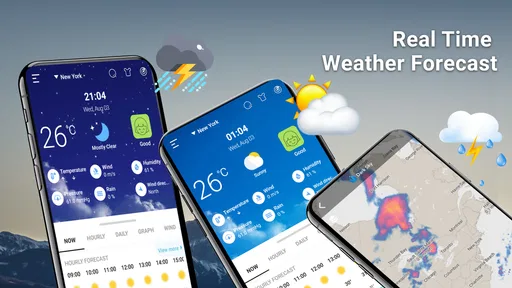
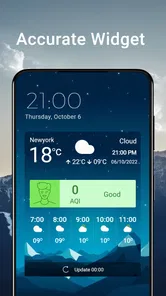
One of the first things I noticed about this app is its real-time weather updates. Whether it’s sunny, rainy, or snowing, you’ll get instant updates that keep you one step ahead. It’s like having a personal weather station right in your pocket!
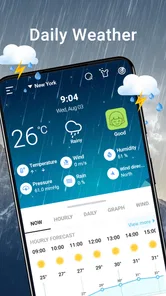
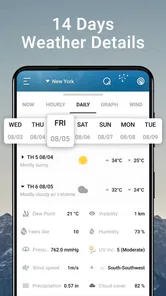
Another cool feature is the detailed hourly forecast. It breaks down the day hour by hour, so you can plan your activities accordingly. No more guessing if you should wear shorts or pack a raincoat!
And for those who love tracking weather patterns, the app offers interactive weather maps. These maps are super detailed and let you zoom in and out to see weather fronts and systems. It’s like being a mini meteorologist!
How I’d use the charts day to day
For a morning commute, I’d check the hourly view before leaving, then use the rain information to decide whether to take a jacket or change my route. If wind matters more than rain—say, for a bike ride or a day on the water—I’d focus on the wind forecast instead of treating the general daily summary as the whole story. The practical tip is to check again close to the time you’ll head out: a forecast is most useful when it informs a choice, not when it becomes a promise.
More From Our News Desk

Weather by Xiaomi Review: Clear at a Glance, Less Clear Up Close

X Under Pressure: Can It Recover When Posting Goes Wrong?

Clash of Clans Is Won Between the Battles

Android Auto Makes the Case for Quieter Car Software

MobiOffice: Transforming Mobile Productivity with Seamless Integration

EA SPORTS FC™ Mobile Soccer: Redefining Mobile Sports Gaming
Charts are most helpful when you’re comparing a trend with a specific plan. For example, someone arranging an outdoor event can look for whether rain or wind appears to be building during the planned hours, then keep a backup location ready. That is a more sensible use than assuming a single chart can settle the question days ahead. If you mainly want one quick temperature glance, a simpler forecast screen may be faster.
Reading the display without overreading it
A chart can be useful even when I don’t try to interpret every line or change. I’d start with one question—such as whether rain looks likely around the time I need to leave—and use the chart to compare that period with the rest of the day. Looking at several weather factors at once can be informative, but it can also make a routine decision feel more complicated than it needs to be. For errands, I’d keep the check brief; for a longer outdoor plan, I’d spend more time comparing the relevant hours.
One practical habit is to avoid treating a single early check as the final word. I’d look once while making the plan and again before setting out, especially if the forecast could change what I pack or whether I travel by bike. This doesn’t mean refreshing constantly. It means matching the timing of the check to the decision, rather than letting a forecast from much earlier dictate the day.
Who it suits, and what to weigh
This is a weather app for people who enjoy looking beyond a basic condition icon. The focus on rain, wind, humidity, and hurricane tracking gives it a broader planning angle, while charts can help weather-curious users make sense of changing conditions. If you only need a quick daily high and low, the extra detail may feel unnecessary; if you need authoritative emergency guidance, use official alerts as well rather than relying on any one app.
Weather Chart is free to download, with in-app purchases listed from $8.49 to $94.99 per item, so I’d look carefully at any purchase prompt before paying. It is developed by AMOBEAR TECHNOLOGY GROUP, has an Everyone content rating, and runs on Android 6.0 or later. Its current version is 2.5.8_20251203. The app has a 4.3 average from around 8,700 ratings and over 1 million installs, which gives a prospective user some context, but ratings cannot tell you whether a forecast will fit your location or routine.
Who may prefer another kind of forecast
If you plan only around the temperature and whether to bring an umbrella, the weather app already on your phone may cover the basics with less effort. That is a real advantage, not a failure: a forecast tool should fit the decision you make most often. I’d be more inclined to try Weather Chart if I regularly compare rain and wind across different parts of a day, or if I enjoy seeing weather patterns rather than just reading a short summary.
For travel or outdoor work, I’d also think about what the app is being asked to do. A visual forecast can help me prepare, but it is not a substitute for official warnings, particularly when severe weather is involved. Hurricane information may be relevant to someone following a storm, yet the label alone shouldn’t be treated as a complete safety plan. I’d use the app for awareness and turn to local authorities for instructions that affect safety.
Choices and trust in everyday use
Before granting any permission or accepting a prompt, I’d read what the screen actually asks for and decide whether it makes sense for how I plan to use the app. I would not assume a permission is necessary just because a weather app requests it. The same goes for account or data choices: review any controls presented in the app and choose only what you’re comfortable with. That cautious habit matters most when location is involved, since local forecasts are useful but location sharing is a personal choice.
For a fair comparison, I’d put this beside the weather app already on your phone and check the same place and time in both. A standard built-in forecast is often enough for a quick glance; Weather Chart’s appeal is the chart-led view and its emphasis on rain and wind patterns. If the two differ, avoid treating extra visual detail as automatic proof of greater accuracy. Use the forecast as guidance, then adapt if the sky or official warnings tell a different story.
Location, privacy, and practical control
Location is one of the moments when convenience and personal choice meet. A local forecast can be more relevant than a broad one, but I’d make a deliberate choice about how I provide a location rather than approving prompts automatically. If I’m checking weather for a trip or another place, I’d look for a way to select that location directly if the app presents one; I wouldn’t grant broader access just for convenience without first deciding that it suits me.
I also wouldn’t assume that a particular account option, privacy setting, or permission control exists unless it is visibly offered. The useful approach is simple: read each prompt, check the available choices in the app and in the phone’s settings, and keep only the access you’re comfortable with. If the choices don’t feel clear enough for your needs, using a different forecast source is reasonable. Weather information can be helpful without requiring you to ignore your own boundaries.
Why You’ll Love It
Aside from its impressive features, what really sets Weather Chart: Tomorrow, Today apart is its accuracy. I’ve tried a bunch of weather apps, but this one consistently delivers spot-on forecasts. It’s like having a crystal ball for weather predictions!
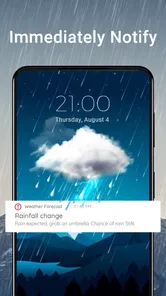
Plus, the app sends you customizable alerts for severe weather conditions. This is a game-changer, especially if you live in an area prone to sudden weather changes. It’s like having a personal weather assistant who’s always looking out for you.
A realistic day with the app
Picture a day when I have a bike commute in the morning and an outdoor appointment later. I’d use the hourly forecast to decide what to wear and whether rain could affect the ride, then consider wind separately rather than assuming a dry forecast means comfortable cycling. Before the later appointment, I’d check again and keep an indoor alternative in mind if the pattern looks unsettled. That routine uses the app to support choices without pretending it can remove uncertainty.
For laundry, gardening, or a short walk, I’d apply the same idea on a smaller scale: check the hours that matter, make a practical choice, and get on with the day. Humidity may add context when deciding what conditions will feel like, but it is not a replacement for the basic question of rain or wind. The advantage of a chart-led tool is that I can look for timing and change, not just take a single daily label at face value.
A measured recommendation
I’d consider it if you want weather charts and more than a bare-bones daily forecast, especially for planning around rain or wind. I’d skip it if you prefer a minimal screen, want only a quick temperature check, or need to make safety decisions from official warnings rather than an app forecast. The best approach is to use its information for ordinary planning and keep a backup plan for changeable conditions.
All in all, if you’re tired of unreliable weather apps and want something that’s both accurate and easy to use, give Weather Chart: Tomorrow, Today a try. Trust me, you won’t regret it!
Weather Chart: Tomorrow, Today Frequently Asked Questions
Is Weather Chart: Tomorrow, Today free to download, and are there in-app purchases?
Weather Chart: Tomorrow, Today is free to download, so you can try the app without paying upfront. It also offers in-app purchases, with items priced from $8.49 to $94.99. Check the purchase details in the app before confirming anything, especially if you plan to use it regularly, so you know which optional costs apply to the features you want.
What features does Weather Chart: Tomorrow, Today offer for weather forecasting?
Weather Chart: Tomorrow, Today provides users with real-time weather updates, detailed daily and weekly forecasts, and interactive weather maps. The app also includes features such as severe weather alerts, air quality index, and sunrise/sunset timings. Users can customize their weather dashboard to focus on the data most relevant to them.
Is Weather Chart: Tomorrow, Today available for both Android and iOS devices?
Yes, Weather Chart: Tomorrow, Today is available for download on both Android and iOS platforms. Users can find the app on the Google Play Store for Android devices and the Apple App Store for iOS devices. The app is designed to provide a seamless experience across different operating systems.
Does the app offer any premium features or a subscription model?
Weather Chart: Tomorrow, Today offers a free version with basic features and an optional premium subscription. The premium version includes advanced features like detailed weather maps, more frequent data updates, and an ad-free experience. Users can choose a monthly or yearly subscription plan according to their preference.
How accurate is the weather forecasting provided by Weather Chart: Tomorrow, Today?
Weather Chart: Tomorrow, Today is known for its high level of accuracy due to its use of advanced meteorological data and predictive models. The app sources information from reliable weather stations and employs sophisticated algorithms to forecast weather conditions. However, like all weather apps, it is recommended to regularly check for updates as weather conditions can change swiftly.
Pros
- Detailed weather forecasts
- Interactive weather maps
- Customizable notifications
- User-friendly interface
- Accurate location tracking
Cons
- Frequent ads interrupt usage
- Limited free features
- Occasional app crashes
- Slow loading times
- Requires constant internet access













