Transparent clock and weather
- 36.10K
- 4.2
- Installs
- 50.00M
- Price
- Free
Screenshots
Analysis by Reviewed
I like having the time and a useful weather glance in the same place, especially when I’m trying to decide whether to walk, drive, or carry a jacket. Transparent clock and weather puts that combination front and center, with a see-through style intended to sit naturally on a home screen. It is a free weather app from MACHAPP Software Ltd, and its appeal is less about replacing every weather service and more about making everyday checks quick and personal.
Cost: an easy way to try it
The app is free to install, with in-app purchases listed at $4.99–$15.99 per item. That makes it easy to try before spending anything, but I would separate the free starting point from the value of any paid extras: the price range alone does not tell me which purchase is worthwhile for my routine. I’d first use the features I need for a typical week, then decide whether an optional purchase solves a real annoyance rather than paying simply because the app offers it.
It has been around since August 23, 2012, and its current version is 8.99.11. The app is rated for Everyone and supports Android 6.0 and later. Its 4.2 average across around 988,000 ratings, alongside more than 50 million installs, suggests that it has reached a broad audience, though those numbers don’t guarantee it will suit every phone or preference.
The Latest on Transparent clock and weather
How it fits into a daily routine
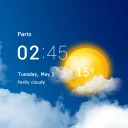
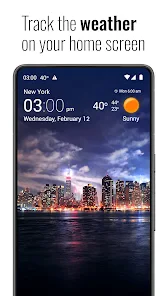
Upon firing up the app, the first thing that caught my eye was its sleek and minimalistic design. The transparent clock and weather interface is super clean, living up to its name with a see-through look that blends seamlessly with any background you choose. It doesn’t scream for attention, which is exactly what I appreciate in a utility app.
Forecast detail without opening a second app
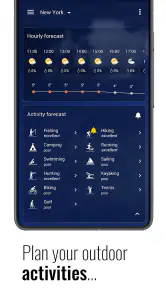
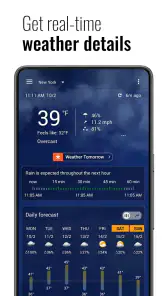
Now, let’s talk about what this app actually offers. First off, it’s not just about telling you the time and weather. Oh no, this app goes the extra mile. You get a detailed weather forecast, including hourly updates and a 10-day forecast, which is pretty neat if you’re planning ahead. It even throws in some cool extras like wind speed, humidity, and UV index. All the weather details you could ask for, right at your fingertips.
Those different forecast horizons are useful in different ways. I’d use the hourly view to judge whether a shower is likely to interfere with a commute, then look further ahead when planning an outdoor day. Wind, humidity, and UV readings also give context that a simple sun-or-cloud icon cannot: a bright forecast can still mean uncomfortable heat or strong sun. I treat these details as planning aids, not a promise that conditions will match exactly where I am.
Making the widgets work for you
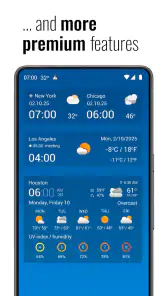
Another feature I found particularly handy is the customizable widgets. You can tweak them to show exactly what you need, whether it’s more focus on the clock or a detailed weather snapshot. Plus, the app supports multiple locations, so if you’re a traveler or just want to keep tabs on the weather in different places, it’s got you covered.
More From Our News Desk

Android Auto Makes the Case for Quieter Car Software

MobiOffice: Transforming Mobile Productivity with Seamless Integration

EA SPORTS FC™ Mobile Soccer: Redefining Mobile Sports Gaming

How Microsoft OneDrive Became a Mobile Productivity Giant

How Google Translate Breaks Language Barriers Effortlessly

Why Google Sheets Is the Ultimate Mobile Productivity Tool
A useful setup tip is to begin with the smallest amount of information you actually check. A compact clock-and-weather view can keep the home screen readable, while a more detailed widget makes sense if you often check conditions before leaving. I’d also keep a second location for a place I visit regularly, such as a family member’s city, rather than adding locations I rarely need; that makes the glance more useful instead of turning it into a crowded dashboard.
What to expect from alerts and customization
Using the app is a breeze. Navigation is intuitive, and everything is right where you’d expect it to be. I didn’t encounter any hiccups or bugs, which, let’s be honest, can be a deal-breaker with some apps. The customization options are a big win for me. Being able to personalize the look and feel to match my vibe is just the cherry on top.
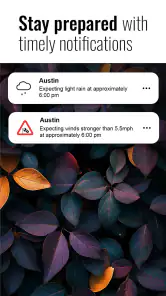
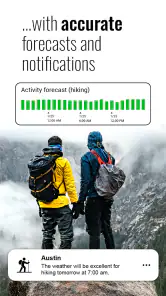
Notifications are another thing this app nails. You get timely alerts about weather changes, ensuring you’re never caught off guard by a sudden rainstorm or heatwave. And for those who like to keep things fresh, there are various themes and icon sets to choose from.
For a practical morning routine, I’d glance at the widget before getting dressed, check the hourly forecast if rain seems possible, and use the wind or UV information to decide whether I need an extra layer or sun protection. If an alert arrives, I’d use it as a prompt to recheck conditions rather than assume it will describe every street or neighborhood accurately. That small habit helps keep convenience from turning into overconfidence.
Where it differs from simpler weather options
Compared with the basic weather panel that comes with a phone, this app puts more emphasis on customizable widgets, multiple locations, and a clock that can share the same visual space as the forecast. That can be a real advantage if you want useful information visible without opening an app. On the other hand, someone who only checks whether it will rain today may be happier with a built-in forecast and fewer settings to manage.
The transparent look is also a matter of taste. It can blend nicely with a chosen background, but a busy wallpaper may make small text harder to scan. I’d choose a widget layout and background for legibility first, then adjust the appearance. If you depend on highly detailed local weather decisions, it is sensible to compare the app’s forecast with another trusted source before making a consequential plan.
Everyday trade-offs that matter
The home-screen approach is most useful when the information is genuinely readable at a glance. I’d test the widget against both a light and a dark wallpaper, and check it in the lighting where I usually look at my phone. If the transparency reduces contrast, changing the background or choosing a less decorative layout is a better fix than adding more information to the widget. A glance that takes effort defeats the main convenience.
There is also a small difference between seeing weather and interpreting it. A forecast can help me decide whether to take an umbrella, but it is not a substitute for checking the timing again before a long trip or an outdoor commitment. For a flexible walk, a quick look is enough; for an event where weather would change the plan, I’d open the fuller forecast and compare it with another source. That is a sensible limit for any phone weather app, not a reason to dismiss this one.
Who is likely to get the most from it?
I’d recommend it to people who check the weather several times a day, like tailoring their home screen, or regularly compare conditions in more than one place. It is particularly convenient for someone who wants a quick clock-and-forecast glance rather than a full-screen weather map every time. If you prefer a plain interface, rarely use widgets, or don’t want to manage extra customization, the built-in option on your phone may be the simpler choice.
A realistic use case is a weekday commute with a changeable forecast. I’d check the widget while making coffee, then look at the hourly view before deciding whether to walk to the station or allow extra time for driving. If I’m also checking weather for a destination, the second saved location saves me from repeatedly searching for it. The benefit is not that the app makes the decision for me; it reduces the steps between noticing the forecast and acting on it.
It is less compelling for someone whose main need is a visual radar display or a specialist weather tool. The app’s appeal here is the combination of clock, forecast, widget choices, and locations, rather than a single-purpose interface built around one kind of map or alert. Likewise, if I rarely look at my home screen or prefer to open one clean forecast page when needed, the widget space and customization may feel like unnecessary upkeep.
There is a substantial audience for the app: it has around 36,000 written reviews, in addition to its ratings. I see that as a sign that many people have tried it, not as proof that every feature or visual style will work for me. Since the initial download is free, testing a basic setup is a low-commitment way to find out whether its home-screen approach fits your habits.
My verdict
In conclusion, the Transparent clock and weather app does a fantastic job of combining functionality with style. It’s perfect for anyone who wants a reliable, aesthetically pleasing way to keep track of time and weather. Whether you’re planning your day or just want a quick glance at the forecast, this app delivers in spades. It’s a keeper on my home screen, and I’d highly recommend giving it a shot!
My recommendation comes with one qualification: judge it by how useful the widget and forecast are in your own routine, not by how many options appear in the app. I’d start free, set up one clear home-screen view, and see whether the extra detail saves me time. If it does, the app earns its space; if all I need is a basic daily outlook, I’d skip the additional complexity and stick with a simpler weather view.
How I’d decide whether to pay
I would treat the in-app purchases as optional rather than part of the entry requirement. The free install lets me find out whether the core routine works: can I read the widget quickly, do I use the forecast details, and do the saved locations help often enough to justify keeping the setup? Only after that would I consider a paid item, and only if its specific benefit matched something I actually wanted. The listed price range is useful context, but it is not a reason by itself to buy.
That approach also answers the practical question of whether it is worth trying: for someone curious about a combined clock and weather widget, the no-cost starting point makes experimentation straightforward. For someone already satisfied with a phone’s built-in weather panel, there is no need to switch just because this app has more customization. I’d install it when the home-screen view solves a real daily inconvenience, not merely to collect another forecast.
A final practical check
Before settling on a layout, I’d ask myself three things: can I read the weather without opening the app, do I need more than one location, and do I actually use the extra forecast context? If the answer is yes to at least one in a regular way, its personalized widget can earn its place. If not, the simplest option is likely the better one. That is the distinction I’d use to judge its value: convenient access matters more than having every available setting turned on.
Transparent clock and weather Frequently Asked Questions
Can I place the clock and weather widget on my home screen?
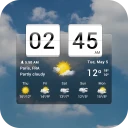
Yes. Transparent Clock and Weather pairs weather information with a clock widget, letting you check the time and conditions from your home screen. Its transparent style is a natural fit if you want information visible without making the widget feel disconnected from your wallpaper. You can adjust widget styles and backgrounds to suit the look of your device.
Can I use the app to keep track of rain and storms?
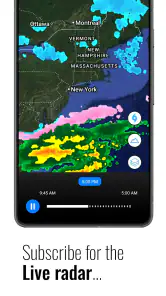
Yes. The app’s live weather radar is designed to help you track rain and storms, alongside temperature and forecasts. This can be useful when you want more than a quick glance at the current conditions and are deciding whether to check the weather before heading out. The radar and forecast features make weather monitoring a central part of the app.
What does the Everyone content rating mean for families?
Transparent Clock and Weather has an Everyone content rating, so it is presented as suitable for a broad audience. Its focus is weather information, forecasts, radar, and a clock widget, making it a practical utility rather than an entertainment app. Parents can still review the app and its optional purchases together with younger users before installing it.
Can I use Transparent Clock and Weather without paying?
The app is free to download, and its main purpose is to provide weather information alongside a clock widget. Optional in-app purchases are available, priced from $4.99 to $15.99 per item. The free option makes it possible to try the app before deciding whether any paid offering is worthwhile for your needs.
Does the app show live weather radar and forecasts?
Yes. Transparent Clock and Weather includes live weather radar and forecasts, with features intended to help you track rain, storms, and temperature. It brings these weather tools together with a transparent clock widget, so the app can serve both as a quick home-screen reference and as a place to check changing conditions.
Pros
- Highly customizable interface
- Accurate weather forecasts
- Includes clock widget
- Easy to navigate
- Supports multiple locations
Cons
- Contains ads
- Occasional glitches
- Limited free features
- Requires internet connection
- Can drain battery
- Category
- Weather
- Version
- 8.99.11