weather24: Forecast & Radar
- 857.00
- 4.8
- Installs
- 10.00M
- Price
- Free

Screenshots
Analysis by Reviewed
My first useful moment with a weather app is simple: I want to know whether I can leave now, or whether I should change my plans. weather24: Forecast & Radar is built for that everyday check, with forecasts and a radar view for following changing conditions. I’d start by looking at the forecast for the place I care about, then use the radar when the sky or the timing feels uncertain.
Getting started without overthinking it
On first opening it, focus on one location rather than trying to explore every screen at once. Check the current conditions, then look ahead to the hours when you’ll be outdoors. That gives you a practical first answer: whether to bring a layer, shift a walk, or allow extra time for a wet commute. If you prefer not to make a location choice immediately, you can still get familiar with the layout before deciding how you want to use it day to day.
The app is free to install, with optional in-app purchases listed from $0.99 to $6.49 per item. It comes from wetter.com GmbH and is a weather app for everyone. Its average rating is 4.8 from around 1.4 million ratings, and it has over 10 million installs. Those figures suggest it has broad appeal, though they can’t tell you whether its forecasts suit your particular town or routine; I’d judge that by checking it against conditions you can see for yourself.
First Impressions and Interface
Upon launching the app, the first thing that hits you is its sleek and user-friendly interface. Everything is laid out so intuitively that even a first-timer will find their way around without getting lost. The design is minimalist but effective, making use of vibrant colors to highlight different weather conditions. Navigating through weather24: Forecast & Radar feels like a breeze, and that’s something I really appreciate.
Features Galore
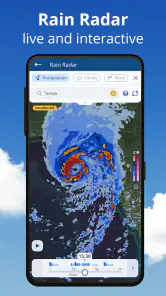
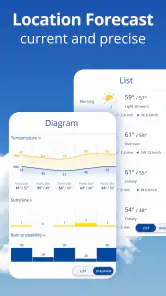
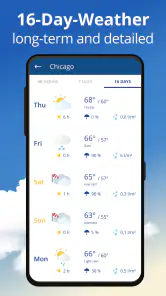
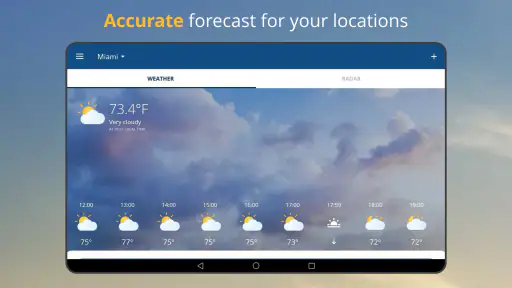
This app isn’t just about telling you whether you need an umbrella or not. It's packed with features that make it stand out from the crowd. You get detailed weather forecasts that go beyond the basics. There’s hourly and weekly forecasting, which is super helpful for planning ahead. And for those who love a bit of precision, there's the radar feature that lets you track weather changes in real-time.
For a first successful check, pair the forecast with the radar instead of treating either as a verdict on its own. The forecast helps with the broad plan; radar is more useful when you’re deciding whether a nearby shower is moving toward the route you’ll take. I find that distinction especially helpful for a short walk or school pickup: if the rain looks close, I can wait a little, while a clear stretch gives me more confidence to head out. Radar is still a snapshot of changing weather, not a promise that conditions will stay exactly the same.
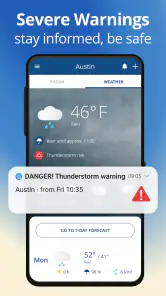
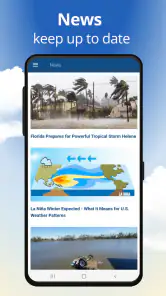
One feature that I found particularly cool is the severe weather alerts. Living in a place where weather can change at the drop of a hat, it’s reassuring to have these alerts to keep you informed and safe. Plus, the app provides weather news and articles, which adds a nice touch for those who like to stay informed about global weather patterns.
More From Our News Desk

Weather by Xiaomi Review: Clear at a Glance, Less Clear Up Close

X Under Pressure: Can It Recover When Posting Goes Wrong?

Clash of Clans Is Won Between the Battles

Android Auto Makes the Case for Quieter Car Software

MobiOffice: Transforming Mobile Productivity with Seamless Integration

EA SPORTS FC™ Mobile Soccer: Redefining Mobile Sports Gaming
Making the forecast useful in real life
A realistic routine is to check the hourly outlook over breakfast, then open the radar again before leaving if rain is part of the forecast. For a day trip, the weekly view is a planning aid, not a reason to lock every activity into a precise hour several days ahead. I’d keep a flexible backup—an indoor stop or a later departure—when the weather matters a lot. This is a small habit, but it makes the app more useful than a quick glance at a single temperature.
There’s also a useful way to judge whether the app is earning a place in your routine: note the decisions it actually changes. If the hourly outlook makes you pack a jacket, leave earlier, or move a task indoors, that is more meaningful than checking the screen repeatedly without acting on it. I’d avoid treating every shift in a forecast as a reason to reorganize the day. Weather guidance is most helpful when it narrows your options, not when it creates more uncertainty than the clouds themselves.
For a first-time user, I’d keep the setup deliberately simple. Begin with the place you check most often, learn where the forecast and radar are, and only then explore the other material. That reduces the chance of confusing a broad weekly picture with the immediate question of whether rain is approaching now. Once the basic routine feels natural, you can decide whether weather news and alerts add value to your own habits or merely add more to browse.
Compared with the standard weather screen built into a phone, weather24 gives more room to follow conditions visually and plan beyond the next few hours. Compared with a specialist radar tool, it is a more approachable all-round choice if you also want regular forecasts and weather reading in one place. If your main need is technical storm analysis, or you require information tailored to a specialist activity, a dedicated service may be a better fit. For ordinary errands, commutes and weekend planning, I prefer having the broader view without needing to switch between several apps.
Personal Experience
Throughout my time using the app, I found it to be incredibly accurate. The forecasts were spot on, and the radar feature proved its worth during a recent storm. I was able to track the storm’s path and timing, which helped me plan my day without getting caught in the rain. And honestly, who doesn’t love having that kind of power in their pocket?
One thing worth keeping in mind is that a forecast can’t remove local uncertainty. A shower may pass one street and miss another, and a radar image can change quickly. I use the app to make a better-informed choice, not to assume I can time every raindrop. If the weather is potentially dangerous, I’d treat an alert seriously and follow local safety guidance rather than relying on a single screen.
Using it when plans have several moving parts
Its mix of a longer outlook and a live radar view suits days when the weather is only one part of the decision. If I’m coordinating a walk with someone else, for example, I can use the forecast to choose a broad time window and check radar closer to departure before sending a final message. That keeps the plan flexible without making the other person wait while I refresh the app. For an outdoor event that cannot easily move, I’d still make a backup plan rather than expecting any weather app to settle the question days ahead.
For a commute, I’d use the information a little differently. The hourly forecast can help me decide whether to carry rain gear or leave a few minutes earlier, while radar can help with a near-term choice such as walking to a stop or waiting briefly. I wouldn’t use a clear-looking radar image to conclude that the whole route will stay dry; conditions can vary across a journey, and the display is better treated as guidance than as a guarantee.
Moreover, the app doesn’t drain your battery much, which is a huge plus. We’ve all been there – an app that’s super useful but leaves your phone gasping for battery life. Luckily, that’s not the case here.
Who will get the most from it
I’d recommend it most to people who make frequent small decisions around the weather: walkers, commuters, parents arranging pickups, or anyone whose plans move between indoors and outdoors. If you mostly want a quick glance at today’s conditions, the phone’s built-in weather display may already be enough. Likewise, if you need highly specialized forecasts, this general-purpose app may not replace a dedicated tool. The best test is to follow it through a few ordinary days and see whether its timing and presentation match the way you plan.
I’d also consider how you prefer to get information. If you like to see rain movement and compare it with an hourly outlook, the combined approach is more useful than a bare temperature tile. If you rarely check weather until you are already outside, or you want one uncomplicated number and nothing else, a built-in forecast may be less effort. There is no need to use every part of the app: the strongest fit is for someone who will actually act on the radar and forecast rather than browse them out of habit.
Limits and sensible expectations
The main trade-off is that more detail can invite overconfidence. Radar can make it tempting to plan a departure down to the minute, but a moving shower does not behave like a timetable. I’d use it to make a practical call—take a coat, wait a little, or choose an indoor option—not to promise another person that rain will stop at a particular moment. The further ahead I’m planning, the more I’d rely on the general outlook and keep the schedule adjustable.
Another point for a new user is to separate the app’s different kinds of information. A forecast is useful for planning, radar is useful for seeing how conditions are changing, and severe weather alerts call for a more cautious response. They answer different questions, so I wouldn’t let a reassuring view in one place override a warning in another. When conditions could put people at risk, I’d check appropriate local guidance and make safety the priority.
Final Thoughts
All in all, weather24: Forecast & Radar is a fantastic tool for anyone who likes to stay ahead of the weather. It combines functionality with a sleek design to provide a seamless user experience. Whether you’re planning your week, preparing for a trip, or just heading out for the day, this app has got you covered. It's one of those apps that once you start using, you wonder how you ever lived without it.
The version is 2.73.2, and it supports devices running Android 6.0 or later. Since the app is free to install but includes optional purchases, I’d begin with the free experience and decide later whether any paid option is worthwhile for me. It was released on May 17, 2010, and has 857 reviews alongside its much larger rating count; I would put more weight on whether the forecasts work well for my area than on popularity alone.
Because those optional purchases are not necessary to make a first judgment, I’d give the free experience a fair try before spending anything. A few regular checks can show whether the presentation works for you, whether the radar helps with the decisions you actually make, and whether the information for your usual location feels dependable. That is a more useful test than assuming a paid option will solve a mismatch between the forecast and your needs.
If you’re in the market for a reliable weather app, I’d definitely recommend giving this one a try. It’s like having a personal weather station right in your pocket, and who wouldn’t want that?
weather24: Forecast & Radar Frequently Asked Questions
Can Weather24: Forecast & Radar help me plan around rain?
Weather24: Forecast & Radar is built around live weather tracking and rain radar forecasts, making it useful when you want to check changing conditions before heading out. Radar images can help you follow rain activity, while the app’s forecasts give you another way to plan your day. As with any weather app, conditions can change, so it is sensible to check again when timing matters.
Does Weather24: Forecast & Radar work on iPhone and Android?
Weather24: Forecast & Radar is an app for Android devices, with a minimum operating-system requirement of version 6.0. Before downloading, check that your Android device meets that requirement. The app is free to download and is rated Everyone, so its intended audience is broad. If you are choosing an app for a particular device, confirm that it is compatible with your device’s operating system.
Who makes Weather24: Forecast & Radar, and what devices can run it?
Weather24: Forecast & Radar is a weather app developed by wetter.com GmbH. It is available for Android devices running version 6.0 or later, making it worth checking your device’s operating system before downloading. The app is free to download, and its age rating is Everyone, so it is intended for a broad audience.
What features does Weather24: Forecast & Radar offer?
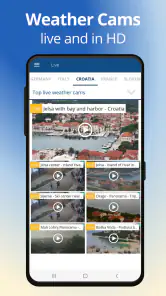
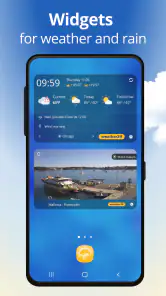
Weather24: Forecast & Radar provides comprehensive weather forecasts, including hourly and weekly predictions. It offers real-time radar images, severe weather alerts, and customizable weather widgets. Users can also access detailed information such as humidity, wind speed, and UV index. The app supports multiple locations, allowing users to track weather conditions anywhere in the world.
Is Weather24: Forecast & Radar free to use?
Weather24: Forecast & Radar is available as a free download with basic features accessible to all users. However, there are in-app purchases and subscription options that provide access to premium features, such as ad-free experience, advanced radar views, and extended forecast data. Pricing details can be found within the app's store listing.
Pros
- Accurate weather forecasts
- User-friendly interface
- Includes detailed radar maps
- Customizable alerts
- Provides hourly updates
Cons
- Contains ads in free version
- Requires internet connection
- Limited features without subscription
- Occasional app slowdowns
- Some features difficult to find
- Category
- Weather
- Version
- 2.73.2











