AccuWeather: Weather Radar
- 358.50K
- 3.4
- Installs
- 100.00M
- Price
- Free

Screenshots
Analysis by Reviewed
Before I decide whether to change an outdoor plan, I ask what I actually need to know: the broad outlook, the timing of rain, or how a weather system is developing. I use AccuWeather most as a quick planning tool: check the local outlook before leaving, then look more closely when the sky or the forecast gives me a reason to. That simple routine is where this weather app makes the most sense. It is free to download, developed by AccuWeather, and aimed at everyday forecasts as well as radar and storm tracking. With over 100 million installs, it is clearly a familiar choice, though its 3.4 average from around 2.6 million ratings suggests the experience does not suit everyone equally.
A practical routine for ordinary days
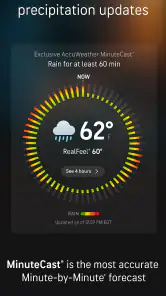
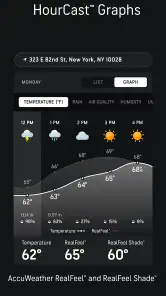
On a workday, I’d start with the hourly forecast rather than treating the daily high as the whole story. A mild afternoon can still begin with a chilly commute, and an evening shower matters more if I’ll be walking home. When rain is close, MinuteCast’s short-range precipitation view can help me decide whether to wait a little before heading out or simply take a jacket. I treat it as guidance, not a guarantee: local showers can shift, and a forecast is most useful when I check it again before making a time-sensitive plan.
For a weekend outing, I’d compare the hourly outlook with the radar instead of relying on a single icon. The map can make the movement and spread of weather easier to interpret, while the forecast gives me a more direct summary of what to expect. That combination is useful for choosing when to leave or whether to move a picnic indoors. It is less valuable if I only want a bare-bones temperature reading and have no interest in opening a map or exploring additional details.
The Latest on AccuWeather: Weather Radar
Features That Shine
First things first, let's talk about the star of the show - the AccuWeather MinuteCast. This feature offers minute-by-minute precipitation forecasts for up to two hours ahead, tailored to your exact GPS location. It’s like having a personal meteorologist in your pocket! Just think about how handy this is when you’re deciding whether to carry a raincoat or leave it at home.
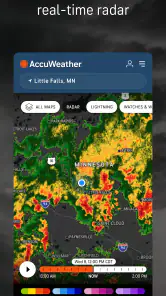
The app doesn’t stop there. It also provides hourly and daily forecasts, so you can plan your week with confidence. And for those of us who love to geek out over weather stats, there are detailed radar maps available, showcasing temperature, wind, and pressure variations. Staying informed has never been this visually appealing!
User Experience
Let’s dive into what it’s like to actually use AccuWeather. The interface is sleek and user-friendly, which means you won’t be fumbling around trying to find what you need. Everything is laid out logically and intuitively, with quick access to key information. I especially appreciate how the app balances detailed data with simplicity, ensuring that users of all tech levels can navigate it with ease.
Settings that earn their place
I would tune notifications before trusting any weather app to interrupt the day. Keep alerts focused on conditions that would genuinely change your plans, such as a severe-weather warning, and avoid enabling every possible prompt if constant updates become noise. The useful test is simple: after a few days, ask whether each alert helped you make a decision. If not, narrow the settings until the app is informative rather than distracting.
More From Our News Desk

X Under Pressure: Can It Recover When Posting Goes Wrong?

Clash of Clans Is Won Between the Battles

Android Auto Makes the Case for Quieter Car Software

MobiOffice: Transforming Mobile Productivity with Seamless Integration

EA SPORTS FC™ Mobile Soccer: Redefining Mobile Sports Gaming

How Microsoft OneDrive Became a Mobile Productivity Giant
Location also deserves a deliberate choice. For a commute or errands around town, a local forecast is usually enough; when travelling, checking the destination separately is more useful than assuming the home view will answer everything. If you prefer not to rely on a live location, selecting a place manually can make the routine more predictable. Either way, I’d open the relevant city before a trip rather than waiting until I’m already on the move.
Faster checks without overchecking
A habit that works well is to use the daily view for the broad decision, then switch to hourly details only for the part of the day that matters. I might check the evening hours before arranging an outdoor dinner, then glance at radar shortly before leaving. This avoids treating every fluctuation as a reason to change plans. Radar is most helpful as context for a developing situation, not as a promise that a particular street will stay dry.
For a family outing, I’d check the forecast once while planning and again just before packing. That second look can turn a vague “maybe rain” into a practical choice about an extra layer or an indoor backup. If conditions look unsettled, I’d build flexibility into the plan rather than relying on a precise minute-by-minute prediction. This is a small workflow, but it makes the app’s different forecast views work together instead of competing for attention.
Making radar useful, not hypnotic
One useful habit is to compare the radar with the actual conditions outside before changing plans. A colored patch on a map can look dramatic, but the practical question is whether its timing and direction matter for your route or activity. I use the map to decide whether I should leave earlier, take a covered route, or keep an indoor alternative in mind—not to keep refreshing until the forecast looks certain. That distinction helps prevent a detailed screen from creating more confidence than the situation warrants.
When I’m planning a day across several stops, I check the places in the order I’ll visit them rather than treating my home location as a stand-in for the whole area. A forecast that is useful for the morning commute may not answer whether an afternoon errand elsewhere will be wet. This is especially helpful for a day trip: I can make a broad plan from the destination forecast, then use the local view nearer the time. It is a simple routine, but it avoids the common mistake of applying one neighborhood’s conditions to every stop.
Where the detail has limits
AccuWeather is a better fit for people who want several ways to inspect conditions than for someone who wants a minimal screen with only temperature and a simple icon. More layers and alerts can mean more to sift through, and a visually detailed map still needs interpretation. If your main need is a fast glance, your phone’s built-in weather display may be easier; if you enjoy checking radar and planning around changing conditions, this app offers more to explore.
I also wouldn’t use a consumer forecast as the sole basis for a high-stakes decision. For dangerous weather, I’d read official local guidance and act on warnings rather than waiting for a map to settle my doubts. Short-range precipitation estimates can be handy for choosing when to walk the dog, but they cannot remove the uncertainty of scattered showers. That distinction is important: the app supports everyday judgement, it does not replace it.
User Experience
Let’s dive into what it’s like to actually use AccuWeather. The interface is sleek and user-friendly, which means you won’t be fumbling around trying to find what you need. Everything is laid out logically and intuitively, with quick access to key information. I especially appreciate how the app balances detailed data with simplicity, ensuring that users of all tech levels can navigate it with ease.
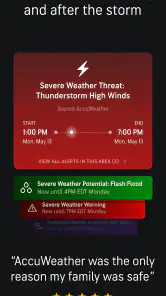
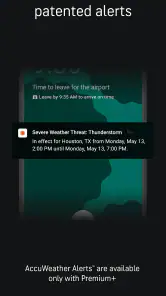
Another cool feature is the ability to customize alerts. Whether it’s a severe weather warning or simply a heads-up about tomorrow’s temperature drop, you can set the app to notify you about what matters most to you. Because, let’s face it, we all have those days when the weather is the last thing on our minds, but it’s always good to be prepared.
How it fits beside other weather apps
Compared with the built-in weather app on a phone, AccuWeather makes more sense when I want to move beyond a quick temperature check and look at hourly changes, precipitation timing, or radar. The trade-off is that extra information asks me to spend more time interpreting the screen. If I’m already outside and only need to know whether to bring a layer, the default app may be quicker. If I’m choosing when to set out or whether to rearrange an outdoor plan, the additional views are more useful.
Other weather apps can also be a better match if their layout feels clearer to you or if you primarily want a simple forecast. I wouldn’t switch just because one service presents more information; I’d compare how easily each one answers the question I ask most often. For me, the deciding test is whether radar and the short-range rain view help with real plans often enough to justify opening a fuller app. People who rarely use those tools may be happier with a lighter alternative.
Who will get the most from it?
I’d recommend it to commuters, dog walkers, gardeners, and anyone whose plans depend on whether rain is arriving soon or later. People who travel between places may also appreciate being able to check forecasts beyond their immediate neighborhood. By contrast, if you rarely look beyond the temperature or dislike notifications and extra detail, a simpler default weather app may be a better everyday fit. The free starting point makes it easy to try, while in-app purchases range from $0.99 to $29.99 per item, so I’d check what is included before paying for anything.
A realistic example is a morning when I have a walk planned, errands later, and no desire to watch the forecast all day. I’d look at the hourly view while getting ready, use the short-range precipitation estimate if rain seems close, and check radar once before leaving. If the outlook is uncertain, I’d carry a light layer or adjust the route rather than repeatedly reopening the app. That keeps the tool in its proper role: helping me make a sensible choice, not dictating the whole day.
It is rated for Everyone and requires Android 8.0 or later. That makes the age guidance straightforward, but the practical choice still depends on your device and whether you want a map-focused toolkit or just a quick forecast. I would not choose it solely because it is popular; I’d try the ordinary forecast and one radar check, then decide whether those extra views genuinely improve my planning.
Is It Worth It?
So, is AccuWeather worth downloading? In my humble opinion, absolutely! It’s one of those apps that once you start using, you wonder how you ever lived without it. The precision of the forecasts, combined with the wealth of additional features, makes it a standout in the crowded world of weather apps.
In conclusion, if you’re tired of being caught off guard by the weather, give AccuWeather a try. With its detailed forecasts, customizable alerts, and user-friendly interface, it’s a must-have for anyone who likes to stay one step ahead of Mother Nature. So go ahead, download it, and let it help you plan your days with confidence!
My verdict after making it a habit
My strongest recommendation is to keep the workflow modest: check the hours that affect your plans, use radar when timing matters, and keep only alerts that are worth an interruption. That makes the app useful without turning weather-checking into a constant task. Its large set of views is an advantage for curious planners, but not a reason everyone needs to switch from a simpler alternative.
Overall, I see it as a capable everyday companion rather than an authority to follow blindly. If you want local forecasts, short-range rain guidance, and maps in one place, it is worth trying. If you prefer the quietest possible interface or need certainty for a consequential decision, keep expectations realistic and consult the appropriate local source when conditions are serious.
AccuWeather: Weather Radar Frequently Asked Questions
How much storage space does AccuWeather need, and will it affect my phone’s performance?
AccuWeather is a weather app designed to bring forecasts, radar maps, storm tracking, and weather news together on your device. If you are deciding whether to install it, consider the space available on your phone and how often you expect to use its live information and notifications. Keeping your device’s operating system current can also help with general app compatibility.
Does AccuWeather require an internet connection to show current weather information?
AccuWeather focuses on local forecasts, storm tracking, radar maps, and live weather news, which are most useful when the app can refresh its information. If you are heading somewhere with unreliable connectivity, check the forecast before you leave and keep in mind that new conditions may not appear until the app can update. For urgent weather decisions, consult official local guidance as well.
Can I use AccuWeather while traveling to check weather outside my home area?
Yes. AccuWeather supports tracking multiple locations, so you can add cities or regions you care about and check their weather alongside conditions near home. This can be handy when planning a trip or keeping an eye on the forecast for family elsewhere. Review your saved locations and notifications so the updates you receive are relevant to where you are going.
What should I know about compatibility and age suitability before downloading AccuWeather?
AccuWeather is a weather app from AccuWeather, and it is rated Everyone, so it is intended for a broad audience. On Android, it requires version 8.0 or later. Check your device’s operating system before downloading, and make sure you are getting the app from the official app store for your platform. These basic checks can help you decide whether it suits your device and household.
Can I use AccuWeather to follow severe storms and changing conditions?
Yes. AccuWeather’s focus includes local forecasts, storm tracking, radar maps, and live weather news, so it can help you keep an eye on changing conditions in your area. Radar and alerts are useful for staying informed, but they should complement official emergency guidance during dangerous weather. Consider enabling relevant notifications if you want timely updates rather than opening the app to check manually.
Pros
- Highly accurate weather forecasts
- Real-time weather radar updates
- Customizable weather alerts
- Detailed temperature and wind analysis
- User-friendly interface
Cons
- Ads can be intrusive
- Some features require premium subscription
- Occasional app crashes
- Data usage can be high
- Limited offline functionality
- Category
- Weather
- Version
- Varies with device