Weather - By Xiaomi
- 2.91K
- 4.1
- Installs
- 1.00B
- Price
- Free

Screenshots

Analysis by Reviewed
For me, the most useful thing a weather app can do is turn a forecast into a quick decision: take a jacket, change a route, or move an outdoor plan. That is the lens I use for Weather - By Xiaomi. It puts everyday conditions and air quality in one place, so I can check more than just whether the sky looks clear before heading out.
A quick check that supports real decisions
The app’s appeal is its straightforward focus on the weather in your city. Temperature and forecast information answer the immediate question of what to expect, while the air quality index adds useful context for time outdoors. I like that combination because a pleasant temperature alone does not tell me whether a long walk or run will feel comfortable.
It is most helpful as a planning aid, not a promise about exactly what will happen. Forecasts can change, and local conditions may differ from what a city-level view suggests. I treat the outlook as a starting point, then check again before a plan that depends on staying outside for hours.
The Latest on Weather - By Xiaomi
How I would use it through the day
On a normal morning, I would check the forecast before getting dressed, then use the temperature and expected conditions to decide whether to bring a layer or umbrella. If I am considering exercise outside, the air-quality reading gives me another reason to proceed or choose an indoor alternative. That small routine is where the app makes most sense: it can help avoid needless guesswork without turning weather checking into a project.
Sunrise and sunset times also suit a specific kind of planning. If I want to take photos in softer evening light, or finish a walk before it gets dark, those times help me choose when to leave. They are useful details rather than the main reason to install the app, and I would still allow some flexibility instead of planning a tight schedule around them.
Where it fits among weather apps
Compared with a typical weather app that emphasizes maps, alerts, or extensive forecast controls, Xiaomi’s option feels better suited to quick, glanceable checks. That simplicity is a benefit if I mainly want conditions for my city and a practical sense of the day ahead. It is less compelling for someone who likes to inspect detailed radar or compare several locations before making a call; a specialist forecast app may serve that habit better.
A useful habit is to check the forecast at the moment it matters, rather than assume an earlier glance will remain current. For a commute, I would look before leaving; for an evening outdoor plan, I would check again later. This is especially sensible when rain or air quality could change whether the plan is comfortable. The app can inform the choice, but it cannot remove the uncertainty that comes with changing weather.
More From Our News Desk

X Under Pressure: Can It Recover When Posting Goes Wrong?

Clash of Clans Is Won Between the Battles

MobiOffice: Transforming Mobile Productivity with Seamless Integration

EA SPORTS FC™ Mobile Soccer: Redefining Mobile Sports Gaming

How Microsoft OneDrive Became a Mobile Productivity Giant

How Google Translate Breaks Language Barriers Effortlessly
Design and Usability
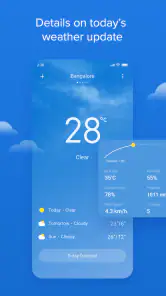
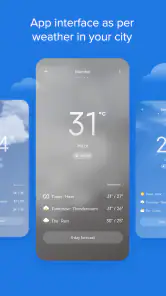
First things first, the design. Weather - By Xiaomi has a sleek and minimalistic interface that makes it super easy to use. I mean, who wants to fiddle around with complicated menus when you're just trying to figure out if you need an umbrella? The app is intuitive, with all the essential information right at your fingertips. The colors are easy on the eyes, which is a nice bonus when you're checking the forecast first thing in the morning.
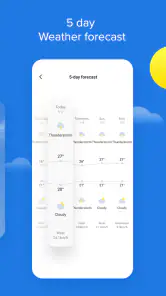
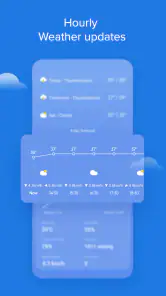
The usability is top-notch. The icons are clear, and everything is laid out in a way that makes sense. It’s like the app is reading your mind, knowing exactly what you need to see next. Whether it’s the current temperature, hourly forecasts, or a week-long outlook, it’s all there without any fuss.
Features That Stand Out
Now, let's talk about features. This app is not just about telling you if it's sunny or rainy; it goes above and beyond. One of my favorite features is the real-time weather updates. It keeps you updated with the latest weather conditions without you having to lift a finger. It’s perfect for those spontaneous plans where you need to know the weather ASAP.
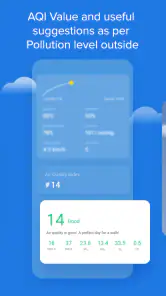
Another cool feature is the air quality index. In today's world where pollution is a big concern, having this information is crucial. It lets you know if it’s a good day for a run outside or if you should stick to the treadmill indoors. Plus, the sunrise and sunset times are a nice touch for those who like to capture that perfect golden hour photo.
Performance and Reliability
When it comes to performance, this app doesn’t disappoint. It loads quickly and doesn’t lag, which is a blessing when you’re in a rush. The accuracy of the forecasts is pretty impressive too. I’ve found it to be spot-on most of the time, which is a lot more than I can say for some other apps out there.
Reliability is key with any app, and Weather - By Xiaomi ticks this box with ease. It’s consistently updated, ensuring you have the latest weather information at all times. No more getting caught in the rain because of an outdated forecast!
Making its city-focused outlook useful
A city forecast is a useful starting point, but I get more value from it when I connect the reading to a specific decision instead of treating it as a general verdict on the whole day. If rain is possible, for example, I think about whether I will be walking between buildings, waiting outside, or travelling by car. The same forecast can matter very differently depending on how exposed I expect to be.
For a busy day with several stops, I would check once before leaving and again before the part of the schedule that involves being outdoors. That is a practical way to use the app without repeatedly refreshing it or assuming a morning glance covers every later plan. It is especially helpful when I have a flexible option, such as taking a different route or moving a walk to another time.
A realistic day-to-day example
Imagine I have a commute, errands to run on foot, and a casual walk planned after work. I can use the morning forecast to choose clothes and decide whether carrying an umbrella is worth the space in my bag. Before the walk, I can look again at expected conditions and the air-quality reading, then choose a shorter outing or an indoor alternative if the combination seems uncomfortable.
This is where having temperature, forecast information, and air quality together feels more useful than checking only a temperature number. It does not make the choice for me, and it cannot promise what a particular street will feel like. It does give me a compact set of cues to weigh against the plan I actually have, which is more useful than opening a weather app just to satisfy curiosity.
Using air quality as context, not a verdict
I would treat the air-quality index as a prompt to think about the kind and length of activity, rather than a simple pass-or-fail signal. A short trip to a nearby shop is not the same as a long run, and personal comfort can vary. If the reading gives me pause, I can shorten the outing, change its timing, or choose an indoor option instead of assuming that a comfortable temperature means the outdoors will suit every activity.
There is a useful trade-off here: the index adds context that many quick checks overlook, but a city-level figure cannot describe every block or individual experience. For someone who manages a health condition or needs highly localized guidance, I would not make a consequential decision from one broad reading alone. I would use it as one input and seek more tailored advice when the stakes are higher.
Who will get the most from it
I see this as a practical fit for people who want a fast daily check rather than a forecasting hobby: commuters deciding what to wear, casual walkers weighing an outdoor plan, or anyone who wants temperature and air quality together. Xiaomi Inc. makes this free weather app, rated for Everyone, and its broad reach—over a billion installs—suggests it is familiar to many Android users. Its average rating is 4.1 from around 1.3 million ratings, with roughly 2,900 written reviews. Those figures are useful context, but they do not tell me whether a particular forecast will match a particular street.
The app was released on April 29, 2020, and the current version is G-13.0.2.1, with Android 7.0 as the minimum operating-system requirement. I would check compatibility before installing it on an older device. If you want a free, simple weather view, it is easy to consider; if you need detailed storm tracking, many saved locations, or specialist forecasting tools, I would look for an app built around those needs instead.
When another kind of weather app is better
The usual alternatives tend to split into two broad habits: a quick forecast for everyday decisions, or a more involved tool for people who want maps, detailed local conditions, and greater control over what they inspect. Xiaomi’s app belongs more naturally in the first group. I would choose a radar-focused option when watching a storm’s movement matters to my route, or a specialist service when I need to compare locations closely before committing to travel.
That does not make a simpler view less useful; it means the best choice depends on the question I need answered. If I only need to know whether to take a layer and whether outdoor exercise sounds sensible, a compact city forecast is easier to live with. If the decision depends on a narrow window of changing conditions, I would rather use a tool built for close tracking and keep this app as the quick overview.
Small limits worth keeping in mind
City forecasts are convenient, but they are not a substitute for observing conditions where you are. A brief shower can affect one part of a city while another stays dry, and air quality can also vary by area. I would avoid treating one reading as a guarantee, especially before a long outdoor workout or travel plan. Checking close to departure is a sensible safeguard, not a criticism unique to this app.
There is also a trade-off in keeping the experience simple. People who want layers of radar, technical charts, or fine control over alerts may find a more advanced weather service easier to work with, even if it takes longer to navigate. Xiaomi’s app makes more sense when a quick answer matters more than exploring every possible weather detail.
What to expect before installing
If you are deciding whether it suits your routine, ask yourself how often you need more than a city-level forecast. For a quick morning check, a work commute, or deciding whether to take a walk, its compact focus is a strength. If you routinely plan outdoor events far ahead, follow rapidly changing conditions, or need to compare several places, you may prefer a dedicated forecasting tool as your main app.
It is free, so trying it is a low-commitment way to see whether its style of information works for you. The important question is not whether it can replace every weather service, but whether it answers your everyday questions with less effort. On an older Android device, I would first make sure the operating-system requirement is met; once installed, I would judge it by how well its city outlook fits the places and plans I actually check.
Final Thoughts
In conclusion, Weather - By Xiaomi is a fantastic choice for anyone looking to keep tabs on the weather in a simple yet detailed way. It’s user-friendly, packed with useful features, and reliable. Whether you’re planning a weekend getaway or just trying to decide if you need a jacket, this app has got you covered. So, next time you’re in the app store, give this one a download – it’s worth it!
Weather - By Xiaomi Frequently Asked Questions
Is Weather by Xiaomi available on iOS, or is it an Android app?
Weather by Xiaomi is an Android app, so it is intended for compatible Android phones rather than iOS devices. If you use an iPhone, you will need to look for a weather app made for iOS. Android users can check their operating-system version before downloading to make sure the app will run on their device.
What information can I check in Weather by Xiaomi at a glance?
The app is focused on everyday weather information for your city. Its main purpose is to show temperature, forecasts, and air-quality information, which can help you get a quick sense of local conditions before heading out. The concise weather focus may suit people who want practical updates without using a separate service built around a wider range of topics.
What devices and operating systems can run Weather by Xiaomi?
Weather by Xiaomi is a weather app developed by Xiaomi Inc. It supports devices running Android 7.0 or later, so checking your phone’s operating-system version before downloading can help you avoid compatibility surprises. The app is intended for everyday weather checks, with temperature, forecasts, and air-quality information for your city.
Who is Weather by Xiaomi intended for, and what is its age rating?
Weather by Xiaomi is designed for people who want a straightforward way to check local conditions and forecasts. Its content rating is Everyone, making it suitable for a broad audience. The app is free to download, and its simple weather focus may appeal to users who prefer quick information rather than a separate, feature-heavy service.
What features does the Weather app by Xiaomi offer?
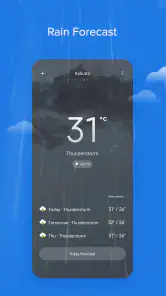
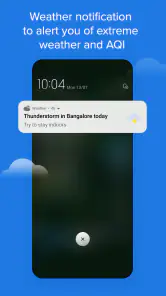
The Weather app by Xiaomi provides real-time weather updates with detailed forecasts for temperature, humidity, and wind speed. It also offers hourly and weekly forecasts, weather alerts, and a radar map for tracking weather conditions. Users can personalize their experience with customizable widgets and themes to suit their preferences.
Pros
- Accurate weather forecasts
- Simple and clean interface
- Real-time weather updates
- Customizable notifications
- Supports multiple locations
Cons
- Contains ads
- Limited advanced features
- May drain battery quickly
- Requires internet connection
- Occasional loading delays
- Category
- Weather
- Version
- G-13.0.2.1