Weather & Radar - Storm radar
- 13.97K
- 4.6
- Installs
- 100.00M
- Price
- Free

Screenshots
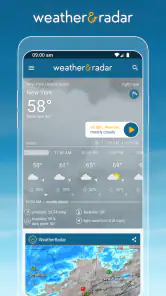
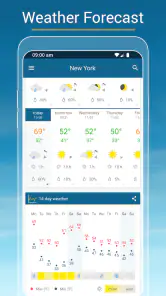
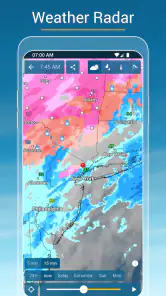
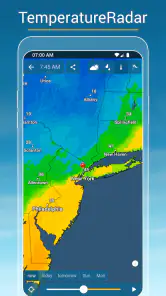
Analysis by Reviewed
When I’m deciding whether a weather app is worth keeping, I want two things: a quick answer for today and enough detail to make a sensible plan when the forecast looks uncertain. Weather & Radar - Storm radar aims to cover both, pairing everyday forecasts with a map-led view of changing conditions. I find that combination more useful than opening an app, reading one temperature, and still wondering whether rain is on its way.
What you get without paying
The app is free to download, and WetterOnline GmbH makes it for people who want local forecasts alongside radar, weather alerts, air-quality information, and a widget. Optional in-app purchases are listed from $0.99 to $8.99 per item. That gives you a clear starting point: you can try the core experience without paying upfront, while any purchase should be judged by the specific extra value it offers you rather than assumed to be necessary.
I would not treat the free price as a promise that every preference or feature is included at no cost. If you are considering a purchase, check what that item changes in the app before committing. For someone who only needs to check the day’s outlook and glance at the radar now and then, paying may not be important; a frequent user who wants more from the experience may weigh the available extras differently.
The Latest on Weather & Radar - Storm radar
The Ultimate Weather Companion
Once you dive into Weather & Radar, you quickly realize this app means business. It's like having a meteorologist in your pocket, ready to give you a heads-up on whether you need an umbrella or if you can finally wear those sunglasses you bought last summer. The app covers everything from current conditions to extended forecasts, and it does so with flair.
Sleek Design Meets Functionality
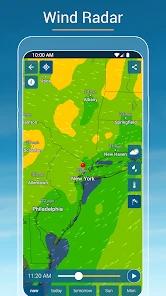
The first thing that caught my eye was the sleek design. It’s intuitive and easy to navigate, which is great because, let’s face it, nobody has time to figure out a complicated interface when they just want to know if it’s going to rain. The app showcases a radar map that is not only detailed but also beautifully animated. Watching the weather fronts move across the map is oddly mesmerizing, and it's a feature that keeps me coming back.
Another neat feature is the app's ability to provide hyper-local weather updates. Thanks to its precise GPS tracking, you can get updates specifically tailored to your location. Whether you're in a bustling city or out exploring the countryside, you won't miss a beat.
More Than Just Forecasts
What sets Weather & Radar apart is its additional features. For those of us who like to keep an eye on more than just the temperature, the app offers insights into air quality, pollen count, and UV index. It's like having an all-in-one environmental monitor. This is particularly handy for people with allergies or sensitive skin, as it helps them plan their day accordingly.
More From Our News Desk

Weather by Xiaomi Review: Clear at a Glance, Less Clear Up Close

X Under Pressure: Can It Recover When Posting Goes Wrong?

Clash of Clans Is Won Between the Battles

Android Auto Makes the Case for Quieter Car Software

MobiOffice: Transforming Mobile Productivity with Seamless Integration

EA SPORTS FC™ Mobile Soccer: Redefining Mobile Sports Gaming
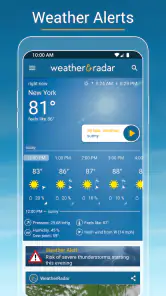
The app also sends out severe weather alerts, which can be a lifesaver. Whether it's a hurricane or just a particularly nasty thunderstorm, you'll be in the know and can take necessary precautions. The peace of mind this brings is invaluable, especially if you live in an area prone to extreme weather.
Getting more from the radar and alerts
I get the most out of the animated map when I have a decision to make, not when I’m idly watching it. Before leaving for a walk or drive, I check whether a rain band appears to be moving toward my area, then compare that picture with the local forecast. Radar is useful for judging what may be approaching, but it is not a guarantee that a shower will hit every street exactly as shown. I treat it as context for a plan, not a promise.
Alerts work best as a backup rather than a substitute for checking conditions. If you rely on them, make sure notifications are enabled in the app and on your device, and think about whether you want weather interruptions throughout the day. Someone who finds frequent alerts distracting may prefer to check the app at chosen times; someone who spends time outdoors or lives with changeable weather may value the heads-up more.
A practical day-to-day routine
Imagine I’m leaving for work and have a walk between the car and the office. I can check the local outlook first, use the radar to see whether rain looks close, and then decide whether to carry a compact umbrella. If I’m planning an outdoor lunch, I can revisit the map nearer the time instead of relying on a forecast I saw hours earlier. That small habit is where the combination of local information and radar earns its place: it helps turn a forecast into a choice.
The widget can make routine checks quicker by putting weather information where I can see it without opening the full app. I’d use it for a glance at the day, then open the app when I need the radar or more detail. A widget is most helpful when it shows the information I actually check; if it becomes visual clutter, removing it does not take away the app’s main value.
How it fits beside other weather apps
Compared with a basic phone weather app, Weather & Radar puts more emphasis on the moving map and on bringing several kinds of weather information together. That is a practical advantage when I want to inspect incoming rain or check air quality alongside the forecast. A simpler alternative may be better if I only want a minimal temperature display, while a dedicated specialist service could suit someone who needs highly technical weather analysis. For everyday planning, this app occupies a useful middle ground rather than asking me to become a forecaster.
Its broader set of information also means there is more to look at than in a stripped-down forecast tool. I would not open every panel every day; the point is to have relevant details available when a particular need comes up. People with allergies may care about pollen, while someone planning time outdoors may pay more attention to UV conditions or air quality. The app is most worthwhile when those details affect decisions, not simply because more information is present.
Making the information work for you
One useful habit is to separate the question “What is expected today?” from “What is happening near me right now?” I use the forecast for the broad shape of the day and the radar for the timing of a possible shower. If those views seem to disagree, I avoid treating either one as an exact promise and make the flexible choice: take a light layer, move an outdoor plan indoors, or check again closer to leaving.
For a trip across town, I would also compare the place shown on the screen with the destination rather than assuming conditions at home apply everywhere. That matters especially when a route crosses areas with different local weather. Saving a few seconds by checking only the starting point can lead to a poor call; looking at the destination before setting out is a small workflow improvement that makes the map more useful.
Where I’d draw the line
No forecast or radar view can remove uncertainty from the weather, so I would not use this app as my sole basis for a safety-critical decision. For dangerous conditions, follow local official guidance and treat an in-app alert as a prompt to pay attention, not as an all-clear system. The detailed map can also be more than a casual user needs; if all you want is a quick temperature check, a built-in weather app may be simpler and less distracting.
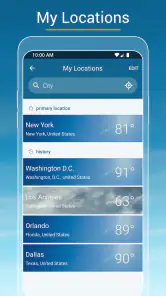
There is also a difference between having location-specific information and wanting location access all the time. If you prefer not to use GPS, you can decide whether entering or selecting a place manually suits your routine; the trade-off is convenience versus control. Either way, it is worth checking that the location shown is the one you intend to plan around, especially before travelling.
Another trade-off is attention. A radar animation invites you to keep watching, but repeated checks do not necessarily improve a decision when the weather is settled. I find it more sensible to open the map when the forecast raises a real question, then close it once I have a workable plan. This keeps the app from becoming another stream of information to monitor without a clear benefit.
Who is likely to get good value?
I’d recommend giving it a try if you regularly plan walks, commutes, errands, or outdoor time around changing rain, and if you appreciate seeing conditions on a map rather than reading a short summary. It can also be a sensible choice for people who want weather alerts and environmental details in the same place. The app is rated for Everyone, so its general audience is broad, but the best fit is someone who will actually use those extra views.
It is particularly useful for someone whose plans are adjustable rather than fixed: a dog walker choosing a route, a parent deciding whether to bring outdoor gear, or a person who cycles and wants to check rain before heading out. The practical value is not that the app can make weather certain; it is that the radar and local outlook give you another way to choose when to leave, what to carry, or whether to change the plan.
By contrast, I would steer away from it if you rarely look beyond the current temperature, dislike map-heavy interfaces, or want specialist meteorological tools. People who need dependable information for hazardous conditions should use the relevant official sources rather than relying on a consumer app alone. And if you already have a weather app whose forecasts and alerts suit your habits, installing another one only makes sense if this map view fills a gap.
Weather & Radar has been available since July 17, 2012, and it has grown to over 100 million installs, with an average rating of 4.6 from around 2.4 million ratings. Those figures suggest it has reached a large audience, but I would still decide based on whether its layout and radar suit the way I check the weather. A high average cannot tell me whether I personally want a detailed map or a quieter, simpler forecast.
Final Thoughts
In a world where information is at our fingertips, Weather & Radar does an exceptional job of keeping you informed and prepared. Its combination of beautiful design and comprehensive data makes it a must-have for anyone who wants to stay ahead of the weather. So, whether you're planning a picnic or just trying to make it to work without getting soaked, this app has got your back.
It’s not just about checking the weather anymore; it’s about experiencing it. And with Weather & Radar, you’re not just getting a forecast, you’re getting a glimpse into the ever-changing atmosphere around us. So go ahead, give it a try, and see the weather in a whole new light.
My buy-or-skip verdict is straightforward: start with the free version if you want to see whether its radar, local outlook, and alerts fit your routine. Consider an optional purchase only after checking the particular item and deciding that it adds something you will use. Skip it if a bare-bones forecast already answers your daily question, or if you need specialist analysis rather than an accessible everyday weather companion.
Weather & Radar - Storm radar Frequently Asked Questions
Can Weather & Radar help me keep up with changing conditions throughout the day?
Yes. Weather & Radar is intended for checking local forecasts and viewing radar information, so it can help you follow conditions as they develop. Its features include rain, snow, and wind radar, along with weather alerts and a widget. For current conditions and updated forecasts, the app needs an internet connection; radar is most useful when you can refresh the information.
Does Weather & Radar include air quality information and a home-screen widget?
Yes. The app’s features include air quality information and a weather widget, alongside local forecasts and radar views. The widget can offer a quick way to check weather without opening the app, while air quality details add another type of local information to consider when planning your day. The availability of these tools can make the app useful for both quick checks and closer forecast review.
Can I use Weather & Radar to follow rain, snow, and wind?
Yes. Weather & Radar includes radar for rain, snow, and wind, as well as storm radar and local forecast information. These views can help you see weather patterns and make practical plans, whether you are heading out or keeping track of changing conditions nearby. Radar is not a guarantee of what will happen at a specific spot, so it is sensible to treat it as guidance alongside the forecast.
Is Weather & Radar free to download, and are there optional purchases?
Weather & Radar is free to download, so you can try its weather tools without paying upfront. The app also offers optional in-app purchases, with items ranging from $0.99 to $8.99. These purchases are separate from the free download, so check the purchase details shown in your app store before choosing one.
Who develops Weather & Radar, and what age group is it suitable for?
Weather & Radar is developed by WetterOnline GmbH and is rated Everyone, making it suitable for a general audience. It is a weather app designed for checking local conditions, forecasts, and radar information. Its straightforward purpose can make it useful for anyone who wants to plan around changing weather, from everyday errands to outdoor activities.
Pros
- Accurate weather forecasts
- Detailed radar maps
- Customizable alerts
- User-friendly interface
- Global weather coverage
Cons
- Ads in free version
- Occasional loading issues
- Limited free features
- Battery consumption
- Infrequent app updates
- Category
- Weather
- Version
- Varies with device