Email - Fast and Smart Mail
- 2.06K
- 4.0
- Installs
- 10.00M
- Price
- Free

Screenshots
Analysis by Reviewed
I judge an email app by whether it makes a busy inbox easier to handle without adding another routine to my day. Email - Fast and Smart Mail is aimed at people who want to bring their mail into one mobile workspace, and its appeal is straightforward: spend less time switching between accounts and more time dealing with the messages that need attention. It is a free communication app from AMOBEAR TECHNOLOGY GROUP, with an average rating of 4.1 from around 95,000 ratings. That gives it a substantial audience, though it is still worth deciding whether its style suits the way you work.
Where a shared inbox can help
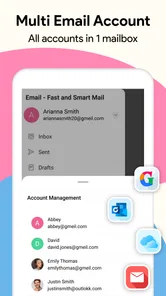
The strongest reason to try this app is convenience across accounts. If you have one address for family, another for work, and a third for receipts or sign-ups, checking them in one place can make quick scans less disruptive. The benefit is not that every email task becomes effortless; it is that you can move between different parts of your day without repeatedly reopening separate apps.
That arrangement is particularly useful for people who are often away from a desk. I can picture checking a client’s reply while waiting for a bus, then switching to a personal account to find a booking confirmation without losing track of which inbox I am viewing. If you mostly read and answer routine messages on your phone, this kind of consolidation may be more valuable than a long menu of advanced tools.
A small workflow that prevents avoidable mistakes
Multiple accounts bring a practical risk along with their convenience: it is easier to send a reply from the wrong address. I would make checking the selected account part of the send routine, especially before replying to a client, landlord, school, or anyone who expects a particular address. The extra glance is faster than correcting a confusing message later.
I would also use the prioritized inbox as a starting point, not as the only view I trust. For example, if I am waiting for a time-sensitive travel update or an important work response, I would check the full inbox as well. Automatic organization can make everyday scanning easier, but a missed message matters more than a slightly longer review, so the best approach is to match the shortcut to the importance of the task.
Choosing notifications without letting email take over
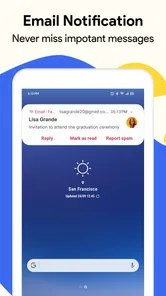
Customizable alerts are most useful when they support a clear boundary. I would enable notifications for the account where a prompt response genuinely matters and keep less urgent mail quiet enough to review when convenient. That can make the phone feel less like a running stream of interruptions while still leaving an important channel visible.
There is a trade-off: fewer alerts mean fewer interruptions, but they also make it more important to check the inbox deliberately. Someone who expects urgent messages throughout the day may prefer broader notifications; someone who gets a high volume of low-priority mail may benefit from a narrower setup. I would experiment with the balance during an ordinary week rather than switching everything on and hoping the defaults suit my routine.
More From Our News Desk

Weather by Xiaomi Review: Clear at a Glance, Less Clear Up Close

X Under Pressure: Can It Recover When Posting Goes Wrong?

Clash of Clans Is Won Between the Battles

Android Auto Makes the Case for Quieter Car Software

MobiOffice: Transforming Mobile Productivity with Seamless Integration

EA SPORTS FC™ Mobile Soccer: Redefining Mobile Sports Gaming
The experience of managing several inboxes
Email - Fast and Smart Mail promises a comprehensive email management solution, and it delivers on this promise quite spectacularly. From the get-go, the app supports a multitude of email providers including Gmail, Yahoo, Outlook, and many more. The setup process is as simple as pie, even for those of us who aren't exactly tech-savvy. Just enter your email credentials, and boom, you’re ready to rock and roll.
Speed and performance in daily use
One of the first things I noticed was how fast the app is. Emails load in a flash, which is a huge plus when you’re in a hurry. Whether you’re opening a lengthy thread or downloading attachments, the app handles it with impressive speed. There’s no lag, no frustrating delays, just smooth sailing all the way.
That quick access matters most in small moments: checking a confirmation before leaving home, finding a delivery update while out, or catching a work message between tasks. I would still treat performance as something that depends on connection quality and the mail service itself. An email client can make navigation feel lighter, but it cannot make a slow network or a delayed incoming message disappear.
A clear layout, with a practical trade-off
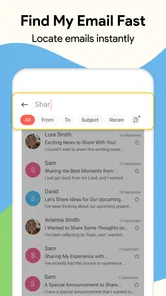
The design of the app is a breath of fresh air. It’s clean, intuitive, and downright user-friendly. Navigating through different accounts, composing emails, or searching for that one elusive email from months ago is a breeze. The search function is particularly noteworthy; it’s precise and quick, saving you the hassle of endless scrolling.
For a useful habit, I’d search for a sender or a distinctive subject phrase rather than scroll through an entire mailbox. That is especially helpful when a message is buried among newsletters or old project threads. At the same time, people who rely on a particular provider’s specialized tools may prefer that provider’s own app: a general-purpose inbox can be convenient, while a dedicated client may fit more closely with one service’s workflow.
Priorities, notifications, and account switching
What sets this app apart from its competitors are its smart features. The app comes with a smart inbox that prioritizes your emails, ensuring that the most important ones are right at the top. Plus, the app’s ability to categorize emails automatically is a neat trick that I didn’t know I needed until now. It even allows for customizable notifications, so you’re only alerted to the emails that matter most.
The practical value of those tools depends on how you use them. I would check the prioritized view against the full inbox when expecting something time-sensitive, rather than assuming every important message will automatically land at the top. For notifications, a sensible approach is to keep alerts focused on the account or messages that need a quick response. That reduces interruptions without requiring you to ignore email altogether.
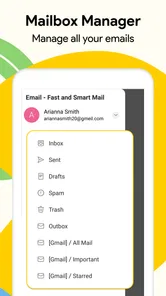
Another remarkable feature is the app’s ability to handle multiple accounts with ease. Switching between accounts is seamless, and managing them doesn’t feel like a chore. This is especially useful for those of us who have separate email accounts for work, personal use, and other projects.
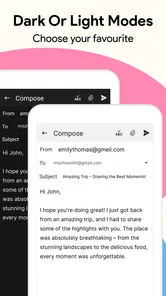
A realistic example is a freelancer keeping client correspondence separate from personal mail while still checking both during a commute. One app can make that routine less fragmented; the trade-off is that a shared interface may make it easier to act from the wrong account. Before sending a sensitive reply, I’d make a quick habit of checking the sender account shown in the compose screen. That small pause is worthwhile whenever work and personal addresses sit side by side.
"The app’s ability to streamline my email experience has been nothing short of a revelation."
Privacy, compatibility, and the limits of a general client
In this digital age, security is paramount, and Email - Fast and Smart Mail doesn’t skimp on this. The app boasts robust security features, ensuring your emails are safe from prying eyes. With support for encryption and a strong privacy policy, you can rest easy knowing your data is protected.
Email is personal, so I would still review the account permissions and security options available through the mail provider itself, especially before connecting a work inbox. The app is rated for Everyone and is free to install, with optional in-app purchases ranging from $1.49 to $299.99 per item. I’d check the purchase screen carefully before buying anything; the free starting point may be enough for basic email habits, while paid extras only make sense if they solve a need you actually have.
The app has been available since June 4, 2019, and its current version is 5.1.9_219_28102025, with Android 8.0 as the minimum operating system requirement. It has passed 10 million installs and has around 2,000 written reviews. Those figures suggest broad use, but they don’t guarantee that every provider-specific setting or advanced workflow will behave exactly as you expect. If you depend on sophisticated rules, deep calendar integration, or a tightly managed corporate setup, I’d test your core routine before making it your only mail app.
How it compares with familiar alternatives
Compared with using each provider’s own app, the central advantage here is having multiple accounts together with a common way to scan, search, and switch between them. That can be a better fit for someone whose mail comes from different services and who wants one mobile habit. The cost of that simplicity is that a single general client may not offer the same provider-specific controls or integrations that a dedicated app does.
Compared with a basic, chronological inbox, the smart sorting and automatic categorization can reduce the effort of deciding what to open first. But if you prefer to inspect every message in arrival order, or you find automatic prioritization distracting, a simpler client may feel more predictable. I would not choose a mail app just because it labels itself smart; I would choose it if its shortcuts match the way I actually review and respond.
Who will get the most from it
I’d recommend this app to someone who checks several ordinary email accounts and wants a simpler way to move among them on a phone. It is also a reasonable fit for people who value a prioritized inbox and adjustable alerts more than a long list of specialist tools. Its strengths are most relevant when the daily task is reading, finding, and replying to messages across accounts.
I’d be more cautious if you only use one provider and already like its official app, or if your work depends on provider-specific controls. A dedicated client can be the better choice when its particular integrations or account policies matter more than having multiple inboxes together. Likewise, someone who dislikes automated sorting may prefer to rely on a plain chronological inbox and review everything manually.
Before relying on it for an important account, I’d connect the account you use most and try the routine that matters: locate an older message, open a thread, reply, and check which address is selected. Then add another account if the first one behaves as expected. This is a practical way to see whether the combined inbox feels genuinely simpler, and whether its sorting and alerts work for your own message habits.
The free installation makes that initial trial easy, but the range of optional purchases is broad enough that I would avoid buying anything until I understand what it changes. A person who only needs to read and send everyday mail may have no reason to pay; someone considering an upgrade should first decide which specific annoyance it would fix. That keeps the decision grounded in actual use rather than the assumption that a paid option is automatically necessary.
It is also worth thinking about the kind of mail you manage. For personal messages, shopping updates, and ordinary project conversations, a shared mobile inbox is a sensible convenience. For a workplace with strict account requirements, complex routing, or a need to use specialized provider features, I would keep the official or organization-approved option available until the combined client has proved it can handle the essential workflow.
In conclusion, if you’re on the hunt for an email app that combines speed, functionality, and smart features, Email - Fast and Smart Mail is definitely worth a shot. It has significantly simplified my email management, and I’m confident it will do the same for you. So why not give it a try and see how it transforms your email experience?
Email - Fast and Smart Mail Frequently Asked Questions
Can I use Email - Fast and Smart Mail to bring several inboxes together?
Yes. Email - Fast and Smart Mail supports multiple email accounts, so you can manage personal, work, or school addresses from one interface instead of switching between separate mail apps. That can make everyday checking more convenient, especially if messages arrive across different providers. You can add the accounts you want to use and keep their mail accessible in one place.
Is Email - Fast and Smart Mail suitable for children and families?
The app has an Everyone content rating, so it is intended for a broad audience. Families should still consider how email accounts are set up and who can access them, particularly on a shared device. Optional in-app purchases are also available, so parents may want to use device purchase controls and review prompts with younger users before they download or use the app.
What should I check before installing Email - Fast and Smart Mail?
Check that your Android device runs version 8.0 or later and that you are comfortable adding another app for email management. Email - Fast and Smart Mail is free to download and is designed for handling different types of mail. If you use more than one address, its support for multiple accounts may help bring your inboxes together in one interface.
Is Email - Fast and Smart Mail free to download?
Email - Fast and Smart Mail is free to download, so you can try its email-management features without paying upfront. The app also offers in-app purchases, with prices ranging from $1.49 to $299.99 per item. If you prefer to avoid optional spending, check the purchase prompts carefully and use your device’s purchase controls before handing the app to a child.
Which devices can run Email - Fast and Smart Mail?
The app is available for Android devices running version 8.0 or later. Before downloading, check your device’s operating-system version and make sure you have enough room for another app. Email - Fast and Smart Mail is rated for Everyone, making it suitable for a broad audience, though parents may still want to supervise account setup and any optional purchases.
Pros
- User-friendly interface for quick navigation.
- Supports multiple email accounts efficiently.
- Fast email syncing across devices.
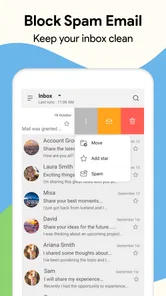
- Advanced spam filtering capabilities.
- Customizable notifications and alerts.
Cons
- Occasional ads in free version.
- Limited cloud storage integration.
- Some features require premium upgrade.
- May drain battery faster on older devices.
- No offline mode for email access.













