Weather Radar - Meteored News
- 9.11K
- 4.8
- Installs
- 50.00M
- Price
- Free

Screenshots
Analysis by Reviewed
Have you ever found yourself caught in an unexpected downpour without an umbrella, or wished you could plan your weekend activities around the weather? Well, say hello to Weather Radar - Meteored News, your new best friend when it comes to weather updates. This app has been my go-to for a while now, and let me tell you, it's like having a personal meteorologist in your pocket.
For a first-time user, I’d treat it as a place to check the day’s conditions, look at the radar when timing matters, and keep an eye on weather alerts. Meteored makes this free weather app, which has been available since 2012. Its 4.8 average from around 2.6 million ratings and over 50 million installs suggest it has found a broad audience, though popularity alone can’t tell you whether its style suits your routine.
What to expect from a weather app with radar
The main appeal here is having a straightforward forecast and a more visual way to think about changing conditions in the same app. A basic phone weather panel is often enough to answer “Is it cold?” This app is more useful when your question is “Could rain affect the time I leave?” or “Should I move this outdoor plan earlier?” That difference is worth keeping in mind: radar is there to help you make a decision, not to turn every weather check into a deep investigation.
The Latest on Weather Radar - Meteored News
Weather information can feel precise because it is presented with maps, readings, and alerts, but the actual decision still depends on where you are and what you plan to do. I’d use the app as a practical guide for ordinary choices—clothing, errands, a walk, or an outdoor meal—rather than expect any forecast to settle every uncertainty. That mindset makes the extra detail useful without asking it to promise more than weather can promise.
First Impressions Matter
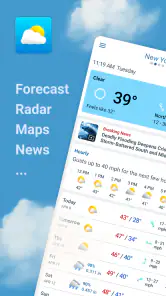
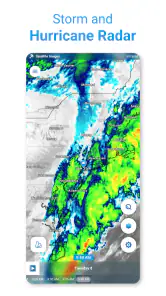
From the moment you open Weather Radar - Meteored News, you're greeted with a sleek, user-friendly interface. It's designed in a way that even if you're not tech-savvy, you'll find your way around without a hitch. The homepage gives you a quick overview of the current weather, and the radar feature is just a tap away. It's like having a window to the sky, showing you real-time updates on what's happening above.
Getting started and finding your first useful check
I’d begin by looking up the place you actually need to plan for, then checking the current conditions before exploring the other sections. If location access is offered, choose the option that feels comfortable; a manually selected place can be enough when you mainly care about home, work, or a planned destination. The first useful win is simple: check the forecast before leaving, then open the radar if rain could change your timing.
That order matters because a radar view is most helpful when you have a decision to make, not when you’re trying to interpret every moving patch on screen. For a commute, check again before setting out and compare the approaching weather with the route and time you have in mind. For a weekend plan, use the forecast to decide whether an outdoor activity is sensible, then return to the radar closer to the start rather than treating one early glance as a guarantee.
More From Our News Desk

X Under Pressure: Can It Recover When Posting Goes Wrong?

Clash of Clans Is Won Between the Battles

Android Auto Makes the Case for Quieter Car Software

MobiOffice: Transforming Mobile Productivity with Seamless Integration

EA SPORTS FC™ Mobile Soccer: Redefining Mobile Sports Gaming

How Microsoft OneDrive Became a Mobile Productivity Giant
A first-day routine that keeps the app useful
After the initial location check, I’d resist the urge to explore every screen at once. Start with one repeatable question, such as whether you need a coat for the trip to work. Look at the day’s conditions, note the part of the forecast that affects that choice, and close the app. When timing is the issue, reopen the radar shortly before leaving. That small routine is more useful than repeatedly checking out of habit, especially when the weather is stable.
If you regularly travel between places, make the destination—not just your current position—the focus of the check. A forecast for home may not help when you are planning an afternoon elsewhere. This is an easy detail to overlook in any weather app, and it can lead to a poor decision even when the displayed information is working as intended. Before a trip, make sure you are looking at the place where the activity will happen.
Features That Stand Out
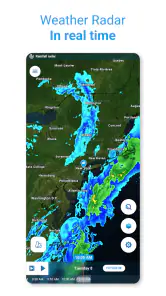
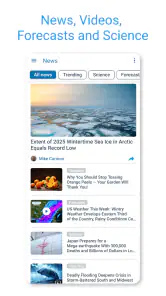
The radar feature is, without a doubt, the star of the show. It provides live updates on weather conditions, so you can see what's coming your way. Whether you're planning a picnic or a road trip, this feature helps you decide if you should pack sunscreen or a raincoat. Another great feature is the weather news section. It's not just about numbers and forecasts; it gives you context, explaining weather patterns and helping you understand the why behind the weather.
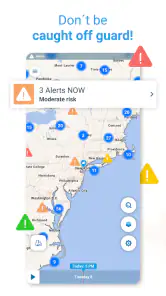
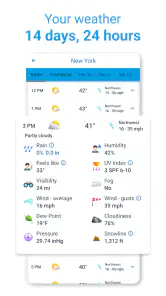
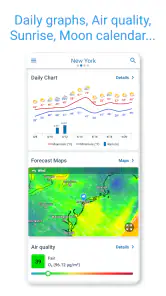
Moreover, the app offers customizable alerts. You can set it up to notify you about severe weather conditions, so you're never caught off guard. And for those of us who love to geek out over weather details, the app provides comprehensive stats, from humidity levels to wind speed. It's like having a weather station in your hand!
Making the details work in everyday life
A practical way to use the extra readings is to connect them to a specific choice. Humidity can help explain why a mild temperature still feels uncomfortable, while wind speed can affect a bike ride or time spent outdoors. I wouldn’t check every measurement just because it is available; I’d focus on the detail that could change what I wear or when I leave.
Alerts are most useful when they support, rather than replace, a quick check. I’d enable the kinds of notifications that matter to my plans and avoid turning on every alert if frequent interruptions would make me ignore them. If a warning arrives, open the app and review the conditions directly before deciding what to do. That small habit keeps a notification in perspective instead of treating it as a complete plan.
Using radar without overreading it
One helpful habit is to use the map to answer a narrow question: does the weather appear to be moving toward the area I care about, and does that affect my next hour or so? A broad swath of color can look alarming when viewed without context, while a quiet-looking moment does not guarantee that conditions will stay quiet. I find radar easiest to use as a second look after checking the forecast, rather than as a standalone prediction.
For a drive, for example, I’d check the destination and timing as well as the starting point. If I’m deciding whether to take a short walk, I’d focus on whether the conditions could change during the outing instead of trying to decode the entire map. This is a useful trade-off of a visual feature: it can make changing weather easier to grasp, but it still rewards a little restraint and common sense.
How it fits beside other weather apps
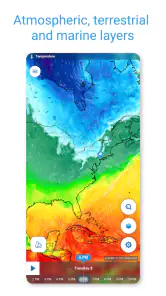
Compared with a basic phone weather screen, this app gives more room to explore radar, weather news, and detailed conditions in one place. That makes it a better fit for someone who likes to understand what may be changing, not just glance at a temperature. On the other hand, if you want only a minimal forecast with no extra sections to browse, the built-in weather option on your phone may be quicker and less distracting.
It also won’t replace careful local judgement for a high-stakes outdoor decision. Radar is a useful visual aid, but it takes interpretation, and forecasts can’t remove uncertainty. For a routine walk or deciding whether to carry a jacket, the extra context is handy; for a decision where conditions could put someone at risk, use appropriate official guidance as well.
Who will get the most from it
I think the app makes the most sense for people who check the weather because it affects their schedule, not just because they enjoy looking at forecasts. Someone who walks or cycles, has outdoor plans, or needs to decide when to run errands can benefit from having radar, alerts, and weather context close together. The app is also a sensible choice for a curious user who likes to connect conditions such as wind and humidity with how the day actually feels.
It may be less appealing if your ideal weather app is a single number and a simple icon with nothing else to explore. The additional sections are valuable when you want them, but they can be unnecessary if you rarely need more than a quick glance. In that case, the weather view already built into your phone may be the better fit simply because it is immediate and familiar. I’d choose based on how often you use radar and alerts, not on how many options an app can show.
A realistic day with the app
Imagine you have a morning commute and an outdoor lunch planned. I’d first check the forecast while getting ready, using the conditions to decide what to wear and whether to bring a light layer. Before leaving, I’d open the radar if rain could change the route or departure time. Later, I’d check the lunch location rather than assuming it shares the weather at home. If an alert appears, I’d use it as a prompt to review the conditions, not as a substitute for thinking through the plan.
This workflow is deliberately modest. It avoids checking the app every few minutes, but still gives the information a chance to change a practical choice. It also shows why the combination of a quick forecast and a map can be more helpful than either one alone: the forecast supports planning, while radar gives a visual check when timing becomes important.
Why You'll Love It
What I love most about this app is its accuracy. There's nothing worse than being told it's going to be sunny all day, only to be drenched in a surprise shower. With Weather Radar - Meteored News, the forecasts are reliable. It's like having a trusty friend who actually knows what they're talking about when it comes to weather.
Plus, the app is available for both Android and iOS, so no matter what device you're using, you're covered. And let's not forget the simple joy of planning your outfits based on accurate weather predictions. No more freezing in a summer dress or sweating in a winter coat!
On Android, the current version is 8.9.2_free and the minimum operating system is Android 8.0. The app is rated for Everyone, while optional in-app purchases range from $0.99 to $7.99 per item. I’d start with the free experience and see whether the everyday forecast, radar, and alerts meet your needs before considering any purchase.
Questions worth settling before you rely on it
Do you need to buy anything to try it? No: the app is free to start with, so I’d first see whether its ordinary forecast and radar fit your routine. Optional purchases are available, but I wouldn’t treat them as necessary before you know what you actually use. If your needs are simple, the free experience may be all you want.
Is it suitable for someone who has never used radar? Yes, as long as you begin with the forecast and use the map only when it helps answer a concrete timing question. The map is easier to approach when you are checking one location and one plan rather than trying to interpret every detail. And if you only want a quick temperature check, you can keep your use just as simple.
Should you rely on alerts alone? I wouldn’t. They can draw attention to conditions worth checking, but your plans, location, and the latest information still matter. For ordinary choices, the app can help you prepare; for serious weather risks, follow appropriate official advice. That is a sensible boundary for any consumer weather app, including this one.
The Final Verdict
In conclusion, if you're someone who likes to be prepared (and who doesn't?), this app is a must-have. Its combination of a user-friendly interface, accurate forecasts, and insightful weather news makes it a standout in the crowded world of weather apps. So go ahead, give it a try, and step out with confidence, no matter what the skies have in store!
My more measured recommendation is to give it a place in your routine if you’ll use its extra context: check the forecast for the broad plan, turn to radar when timing matters, and keep alerts focused on what you care about. If all you need is a quick temperature glance, a simpler built-in option is likely enough. For everyone in between, Meteored’s app offers a comfortable way to make everyday weather decisions with a little more context, without needing to become a weather expert.
Weather Radar - Meteored News Frequently Asked Questions
Can Weather Radar - Meteored News notify me about severe weather?
Yes. Weather Radar - Meteored News includes alerts as part of its weather information, and its store summary highlights hurricane and storm tracking alongside live radar. Notifications can be useful when conditions change, but it is worth reviewing the app’s alert settings so they fit your routine. For urgent decisions, use the alerts as one source of information rather than a substitute for local safety guidance.
Can I see radar and forecasts without opening the app every time?
The app offers a home-screen widget for quick weather updates, so you can check conditions without launching it each time. It also provides forecasts and animated weather maps for a closer look when you open the app. Widgets and radar views can make routine checks more convenient, although the latest information and map updates are best accessed while your device has an internet connection.
Who develops Weather Radar - Meteored News, and what is it designed for?
Weather Radar - Meteored News is a weather app developed by Meteored. Its focus combines forecasts, trending news, storm tracking, alerts, and live radar, which makes it relevant for everyday planning as well as keeping an eye on changing conditions. If you mainly want a straightforward way to follow weather information, its mix of forecast and radar tools is the central reason to consider it.
Can I set up Weather Radar - Meteored News for the places I care about?
Weather Radar - Meteored News is designed to help you follow weather conditions and forecasts, making it useful when you want updates relevant to your plans. Its weather information is most helpful when you check the location you have in mind, whether you are looking ahead to the day or keeping an eye on changing conditions. The app is free to download, with optional in-app purchases.
Is Weather Radar - Meteored News suitable for families and younger users?
The app has an Everyone content rating, so it is categorized for a broad audience. Its focus is weather forecasts, radar, alerts, and news rather than age-specific entertainment. As with any app, families can decide whether its notifications and information suit their needs. Weather Radar - Meteored News is developed by Meteored and is available as a weather app for everyday use.
Pros
- Real-time weather updates
- Customizable weather alerts
- Detailed radar maps
- User-friendly interface
- Accurate weather predictions
Cons
- Ads can be intrusive
- Some features require subscription
- Occasional slow loading times
- Limited offline functionality
- High battery usage
- Category
- Weather
- Version
- 8.9.2_free