The Weather Channel - Radar
- 543.94K
- 4.6
- Installs
- 100.00M
- Price
- Free

Screenshots
Analysis by Reviewed
My useful-weather-app test usually starts with a practical question: can I tell whether rain will disrupt the next part of my day, and can I get a warning before severe weather becomes an urgent problem? The Weather Channel - Radar is built for that kind of check. I find it most valuable when I use the radar and alerts to make a decision, rather than treating the app as something to refresh repeatedly without a plan.
Start with the day you actually have
For a morning commute, a walk with the dog, or an outdoor appointment, I start with the forecast for my location and then look at the radar if the sky seems unsettled. That order matters: a broad forecast gives me the day’s shape, while the map helps me judge what may be moving nearby. If I am deciding whether to leave early or carry a rain jacket, the two views answer different parts of the same question.
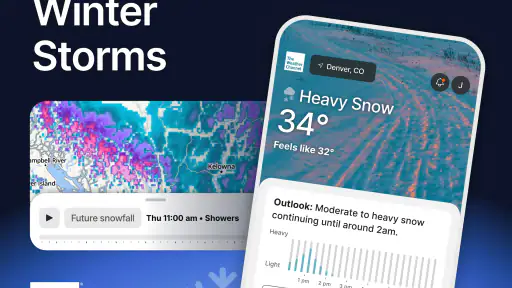
A useful habit is to check once before making plans and again when the weather could change those plans. The app’s future radar is especially relevant here: instead of looking only at what is overhead now, I can use it to think ahead. I still treat a forecast as guidance rather than a promise, particularly when a short shower could affect one neighborhood but miss another.
The Latest on The Weather Channel - Radar
Turn alerts into a sensible handoff
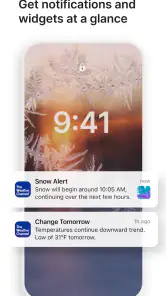
Notifications are most helpful when they lead to a clear next step. I would set the severe-weather alerts I care about, then decide in advance what I will do if one arrives: bring outdoor items inside, check on someone who may need help, or postpone a trip. That small bit of preparation makes an alert more useful than simply receiving another message on a busy phone.
There is a trade-off, though. Weather notifications can interrupt work or travel, and too many alerts make it easier to ignore the one that matters. I recommend starting with the warnings that would genuinely change your plans and adjusting from there. If you are comparing conditions with another person, share the practical takeaway—such as whether to leave now—rather than assuming they have seen the same screen or received the same notification.
Features That Shine
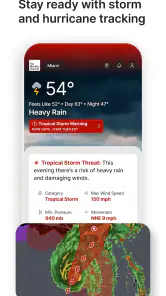
First things first, the The Weather Channel - Radar app is packed with some seriously cool features. The app offers real-time radar maps that are so detailed, you might find yourself staring at them just for fun. You can easily zoom in and out to see what's happening both locally and globally. It's like having a live weather station right in your pocket.
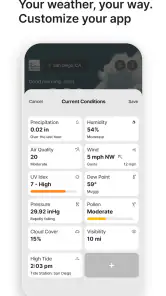
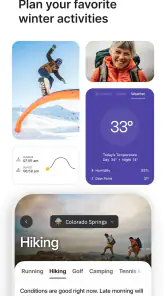
Another thing I love is the hourly and 10-day forecasts. It’s incredibly detailed, offering insights into temperature, humidity, wind speed, and even UV index. This is perfect for planning your day-to-day activities or long-term travel plans. Plus, the app provides severe weather alerts, which is a lifesaver, literally! You'll get notified about any upcoming storms or extreme weather conditions, keeping you and your loved ones safe.
More From Our News Desk

X Under Pressure: Can It Recover When Posting Goes Wrong?

Clash of Clans Is Won Between the Battles

Android Auto Makes the Case for Quieter Car Software

MobiOffice: Transforming Mobile Productivity with Seamless Integration

EA SPORTS FC™ Mobile Soccer: Redefining Mobile Sports Gaming

How Microsoft OneDrive Became a Mobile Productivity Giant
User Experience
Let’s talk about the user experience, which is top-notch. The interface is super intuitive, making navigation a breeze. Whether you’re a tech-savvy user or someone who’s not too keen on digital stuff, you’ll find this app straightforward. The clean design with easy-to-read icons and fonts means you'll spend less time figuring things out and more time enjoying the app.
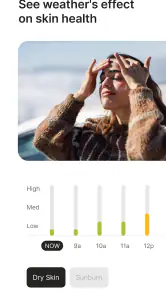
For a weekend plan, I would use the hourly outlook to choose a start time, then revisit the radar shortly before heading out. That is more practical than relying on a single glance at a long-range forecast, especially when a plan depends on a narrow window of dry weather. The UV information also gives the forecast a different use: it can help me think about sun exposure, not just whether I need a coat.
Another fantastic aspect is the personalized notifications. You can customize what kind of alerts you want to receive, so you're not bombarded with unnecessary information. It’s like having a personal weather assistant who's got your back 24/7.
Making the forecast useful beyond a glance
I get the most from the app when I connect the forecast to a decision that has a time and a place attached to it. For example, if I have errands across town, I can check the hourly outlook before leaving and use the radar closer to departure to decide whether to group the stops together or wait. The forecast helps with the broad schedule; the map gives me a reason to reconsider the immediate route or timing. Neither view needs to dictate the whole day.
A less obvious benefit is that I can use the same check to prepare for someone else. If a family member is driving later or a friend is meeting me outdoors, I can pass along a specific plan—bring a layer, leave earlier, or have an indoor backup—instead of sending a screenshot without context. That handoff is more useful because the other person does not have to interpret the same map from scratch.
I also avoid treating the future radar as a minute-by-minute guarantee. It is most helpful as a planning aid: if weather appears to be moving toward my area, I can allow extra time or keep a backup option open. When a decision is sensitive to a small change in location, I check again nearer the event and compare the app’s picture with what I see outside. That habit prevents a confident-looking map from becoming a false promise.
Where it may not fit
If all you want is a quick temperature check, a simple built-in weather app may be faster and less busy. The Weather Channel’s mix of maps, forecasts, and alerts suits people who like to investigate conditions and plan around them; it is less compelling if you rarely change plans based on weather. Radar also takes a little interpretation: a colorful map can look dramatic, but the useful question is whether the conditions affect your location and timing.
Compared with a basic forecast screen, this app gives me more ways to move from a general outlook to a map-based check and a warning. That breadth is a strength, but it can also mean more information to scan. I would not use any single app as the sole basis for a safety-critical decision during dangerous conditions; follow local emergency guidance when it applies.
It is also not necessarily the best choice for someone who wants the quietest possible phone experience. Alerts are valuable only when they remain noticeable, so I would be selective rather than enabling every notification available. If I am already comfortable with a simple app and only check the temperature before getting dressed, the additional radar and planning views may not justify changing habits. On the other hand, a person who regularly coordinates outdoor work, exercise, or school pickups may find that extra context worth the occasional bit of setup.
Who will get the most from it
I’d recommend it to commuters, people who spend time outdoors, and anyone who needs to keep an eye on changing conditions around family plans. A realistic example: before taking children to a park, I can check the hourly forecast, inspect the radar for approaching rain, and decide whether to go earlier or choose an indoor alternative. The result is a concrete plan, not just a forecast screen left open.
For a commuter, the useful workflow is slightly different. I would check before leaving home, note whether the forecast suggests a wet part of the journey, and look at the radar again if conditions seem to be changing. That second glance is especially handy when deciding whether to walk to a stop, bring rain gear, or build a little flexibility into the trip. I would not assume a map can tell me which individual street will stay dry, but it can help me avoid being caught unprepared.
People planning a trip can use the longer outlook to spot days that may need a backup plan, then rely more on the nearer-term forecast as the outing approaches. I find this more sensible than making a firm outdoor schedule around a forecast far ahead. It is also a good fit for anyone who wants forecast details such as wind or UV information alongside temperature, rather than a single number. If those details do not affect your choices, a simpler option may feel more direct.
The app is from The Weather Channel and sits in the weather category. It is free to download, rated for Everyone, and version 15.6.1 requires Android 9 or later. Optional in-app purchases range from $0.99 to $29.99 per item, so I would check the purchase details before paying for anything. Its 4.6 average across around 3.4 million ratings and more than 100 million installs suggest it has reached a very large audience, though popularity alone does not tell me whether its style suits every user.
One practical question is whether I need to buy anything to get value from it: the app is free, and the core appeal is the everyday combination of forecast, radar, and alerts. Another is whether it replaces checking outside; it does not. I use the map to inform a choice, then adapt if local conditions differ from what the forecast suggested.
What to expect from the day-to-day routine
There is no need to keep the app open all day to make it useful. I would make a quick check when I am planning, leave the alerts that matter enabled, and return to the forecast when a weather-dependent decision gets closer. That keeps the tool in a supporting role instead of turning every change in the sky into a reason to refresh the screen.
For someone deciding whether the app is worth trying, the main question is how often weather changes a real plan. If it affects a commute, outdoor appointment, or family outing, having forecasts, radar, and warnings together can reduce the number of separate checks I need to make. If I only want a glance at today’s temperature, the built-in option on a phone may already do enough. The difference is not simply how many screens an app has; it is whether those screens help you choose what to do next.
I would also keep a backup plan for activities that cannot easily be moved. A forecast can help me choose when to go, but it cannot guarantee the conditions at a precise spot. For a picnic, that might mean knowing an indoor alternative before setting out. For a longer drive, it could mean allowing time to pause if conditions worsen. Those small decisions are where the app is most useful: it helps me prepare, while leaving room for judgment.
Why You Should Download It
In a world where weather can be as unpredictable as ever, having a reliable app like this is essential. Not only does it keep you informed, but it also helps you make better decisions, be it dressing appropriately or planning outdoor events. The app’s accuracy is something to write home about, and the user-friendly design is just the cherry on top.
Wrapping it up, if you’re looking for a weather app that’s both comprehensive and easy to use, The Weather Channel - Radar is a no-brainer. Trust me, once you start using it, you’ll wonder how you ever lived without it. So go ahead, give it a try, and let me know what you think!
The Weather Channel - Radar Frequently Asked Questions
Is The Weather Channel - Radar suitable for someone who just wants quick local weather updates?
The Weather Channel is a weather app built around forecasts, radar, and alerts, so it can serve both quick check-ins and closer monitoring of changing conditions. Its notifications and live alerts are useful when you want updates without repeatedly opening the app, while radar and future radar offer a visual way to follow weather activity. The range of tools may be more than you need if you only want a brief temperature check.
What does the radar show, and can it help me prepare for severe weather?
The Weather Channel is a weather app with radar and forecasting tools designed to help you follow changing conditions. Its store summary highlights future radar and live alerts for severe weather, alongside notifications. These features can help you keep an eye on developing weather and plan ahead, while the app’s forecasts and alerts provide additional context for the conditions affecting your area.
Which devices and operating systems can run The Weather Channel app?
The Weather Channel app is available for Android and iOS devices, with a minimum operating system requirement of version 9. Before downloading, check that your device meets that requirement and has room for an app. The app is rated for Everyone, so its stated age suitability is broad. Keeping your device’s software compatible can help you install and use the app smoothly.
What features does The Weather Channel app offer?
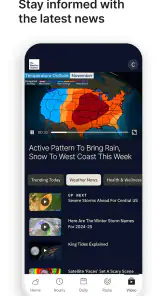
The Weather Channel app provides a comprehensive suite of features including live radar updates, weather forecasts, severe weather alerts, and real-time temperature notifications. Users can also access detailed hourly, daily, and weekly forecasts, as well as news related to weather events. The app offers customizable notifications to keep you informed about weather changes in your area.
Can I choose which weather notifications I receive?
The Weather Channel app offers customizable notifications, so you can tailor weather updates to the conditions and changes that matter to you. Severe weather alerts are a central part of its preparation features, and notification settings can help keep those updates relevant rather than overwhelming. It is worth reviewing the alert options after installation and choosing the notices that make sense for your location and routine.
Pros
- Accurate weather forecasts
- Detailed radar maps
- User-friendly interface
- Customizable notifications
- Comprehensive weather alerts
Cons
- Ads can be intrusive
- Some features require subscription
- Occasional lag in updates
- Heavy on battery usage
- Limited offline functionality
- Category
- Weather
- Version
- 15.6.1