Live Weather: Daily Forecast
- 745.00
- 4.3
- Installs
- 5.00M
- Price
- Free
Screenshots
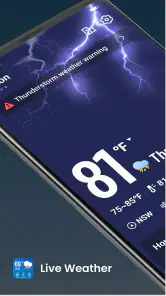
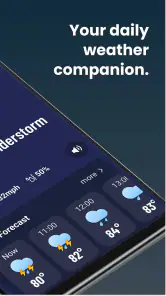
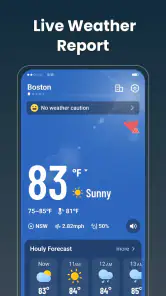
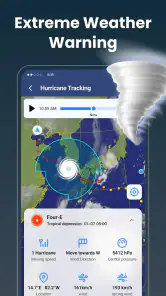
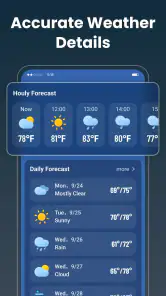
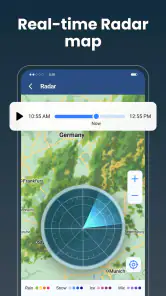
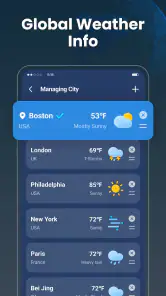
Analysis by Reviewed
When I check the weather, the useful question is rarely just “What’s the temperature?” I want to know whether a change outside should alter my plans. Live Weather: Daily Forecast is a weather app from WINDWAVE LIMITED built around quick, current conditions and forecasts. Its appeal is straightforward: it gives weather a place in a daily decision rather than asking me to treat it as a hobby. I’d consider it for checking the day before heading out, while keeping in mind that a forecast is guidance, not a guarantee.
Why current conditions are the useful starting point
The main capability suggested by the app’s focus is access to live weather information. In practice, that matters most when I need a quick read before leaving home: should I take a jacket, change the timing of a walk, or expect the conditions to feel different later? A fast glance is more useful in those moments than a deep collection of charts I have to interpret.
That emphasis also sets expectations. This is a weather app, not a specialist forecasting workstation. I’d use it to get oriented and make ordinary plans, then seek a more detailed source when the decision is unusually sensitive to weather. If a long drive, outdoor event, or work task depends on narrow timing, relying on a single general-purpose forecast would be unwise.
The name, Live Weather: Daily Forecast, puts the everyday use case front and center. I find that framing sensible: most people open a weather app for a near-term decision, not to study meteorology. The challenge is whether the information is clear enough to act on without turning a quick check into a distracting routine.
A practical check, not a promise
I’d treat “live” as a cue to check conditions close to the time I need them, rather than assuming that one morning glance settles the day. Weather can change, and forecasts can be less dependable when conditions are shifting quickly. A useful habit is to check once while planning and again before committing to an outdoor plan if the weather matters.
That small distinction prevents a common mistake: confusing a current snapshot with certainty about what will happen hours from now. The app can help me make a better-informed choice, but it cannot remove the need to use judgment. If the sky looks different from what I expected, I would trust what is happening around me over an earlier screen reading.
How I’d use it during a normal day
For a commute, I’d check before getting dressed and again before leaving if rain or changing conditions could affect the route. For errands, the forecast can help me decide whether to combine outdoor stops or postpone one. The value is not that the app makes the decision for me; it is that it gives me a quick reason to reconsider a plan before I’m already on my way.
Here’s a realistic example: I’m planning a walk after work and need to decide whether to bring a light layer. I’d look at the current conditions, consider the forecast for the time I expect to be outside, and make a practical choice. If the plan is flexible, I can check again closer to departure. That second check is a simple but useful workflow, especially when the weather has been unsettled.
For household planning, I’d use it to choose between doing a short outdoor task now or waiting until later, rather than treating the forecast as a detailed schedule. People with children, pets, or outdoor hobbies may find this quick planning role especially handy: the app can prompt a check before a trip to the park or a dog walk. It is still worth leaving room for conditions to differ from expectations.
One non-obvious benefit of a simple weather routine is that it can reduce unnecessary checking. I’d decide what question I need answered before opening the app—current conditions, or whether the forecast supports a particular plan—then close it once I have enough information. That keeps weather checks useful instead of turning into repeated scrolling for reassurance.
Making a forecast actionable
I recommend pairing the forecast with the actual decision you face. “Is it going to rain?” is often too broad to guide a day. “Will I be outside long enough to need a coat?” is more practical. This approach works well with a daily weather app because it focuses attention on what matters to you, rather than encouraging a hunt for certainty that no forecast can provide.
If you are planning something where a delay has real consequences, build in a fallback. For example, choose a route with shelter or keep an indoor alternative available. That isn’t a workaround unique to this app; it’s the sensible way to use weather information. The app helps inform the plan, while the backup protects you from a forecast that turns out differently.
Where it fits among other weather apps
Compared with the default weather app already on a phone, Live Weather: Daily Forecast has to earn a place by making its quick check feel more useful or comfortable. Many people will find that their built-in option is enough for a temperature glance and a basic plan. If you already like your phone’s weather display and rarely need more, installing another app may add little.
On the other hand, some weather services are designed for people who want detailed maps, radar, alerts, or specialist information. Those can be better choices when you need to track a storm closely or make a decision based on precise local developments. I wouldn’t choose a general daily forecast as a substitute for a dedicated severe-weather source when safety is involved.
The middle ground is where this app makes the most sense: someone who wants a dedicated place to check everyday conditions, but does not need to interpret a wall of technical data. The trade-off is that simplicity can leave experienced weather watchers wanting more depth. I’d judge it by whether its current information and forecast answer your routine questions, not by whether it replaces every tool you might use in unusual conditions.
Useful limits to keep in mind
Any forecast has uncertainty, and local conditions can vary even over short distances. That matters if you are near hills, a coastline, or an area where weather changes quickly. A general view can help you plan, but I’d be cautious about treating it as a precise account of what will happen at one particular street or outdoor venue.
There is also a practical trade-off in using a dedicated app: you have to decide whether it deserves space in your routine. If you only check the weather once in a while, the phone’s built-in service may be simpler. If you check before commuting, walking, exercising, or arranging outdoor errands, a separate app may be worth trying—provided its layout makes those checks easy for you.
The app is free to download, with in-app purchases priced from $2.99 to $49.99 per item. I’d start with the free experience and decide whether anything beyond it is genuinely useful before spending money. That is particularly important for a category where a basic forecast may already cover what many people need.
Who is most likely to benefit
I’d recommend giving it a try if you regularly make small, weather-dependent decisions and want a dedicated forecast app for those moments. It could suit commuters, walkers, people planning errands, and anyone who likes to check conditions before stepping outside. The app is rated for Everyone, and its broad everyday purpose makes it approachable for a general audience.
There is a substantial audience for it: Live Weather: Daily Forecast has an average rating of 4.3 from around 19,000 ratings, with more than 5 million installs. Those figures suggest that plenty of people have tried it, but they cannot tell me whether its presentation will suit your habits. I’d still test it against the questions you actually ask each day.
It may be the wrong fit if you need professional-grade weather analysis, depend on specialized warnings, or are already satisfied with the default forecast on your device. People who dislike checking apps repeatedly should also remember that live information is only useful when they consult it; it does not automatically make plans safer or more accurate.
The app was released on December 27, 2024, and its current version is 1.3.25. It supports devices running Android 7.0 or later. WINDWAVE LIMITED is the developer, and the app’s focus remains firmly on everyday weather rather than a niche forecasting task.
My recommendation
What I like about the idea of Live Weather: Daily Forecast is its practical role: check conditions, connect them to a real plan, and move on. Its strongest use is not predicting every detail of the day, but helping me make a more thoughtful choice before a commute, walk, or outdoor errand. The best results come from checking at the moment it matters and keeping a backup when the weather could disrupt something important.
My honest recommendation is to try it if a dedicated daily forecast would improve your routine, but not to expect it to replace specialist weather tools or your own judgment. Since it is free to start, it is easy to see whether it fits the way you plan your day. If your built-in app already answers your questions, there may be no reason to switch; if you want a focused weather check before heading out, this is a reasonable option to consider.
Live Weather: Daily Forecast Frequently Asked Questions
What can I check with Live Weather: Daily Forecast?
Live Weather: Daily Forecast is intended to help you check current weather conditions and look ahead at the forecast for a selected location. Depending on the version and available data, it may show details such as temperature, precipitation, wind, and humidity. Forecasts can change, so use them as a helpful guide rather than a guarantee, especially when planning travel or outdoor activities.
Does Live Weather: Daily Forecast show weather for my current location?
The app may use your device’s location to provide local weather information, but this generally requires you to grant location permission. If you prefer not to share your location, you can usually search for or select a city manually, if that option is available in your version. Check the permission prompt carefully and review your device settings if you want to change access later.
Is Live Weather: Daily Forecast free to download and use?
The app may be available to download without an upfront charge, but that does not necessarily mean every feature is free. Some versions of weather apps include advertising, optional subscriptions, or in-app purchases for extra features. Review the app’s store listing and purchase details before installing, and check the terms shown inside the app so you understand any charges that may apply.
How accurate are the forecasts in Live Weather: Daily Forecast?
Weather forecasts are estimates based on available meteorological data, and their accuracy depends on factors such as your location, the forecast timeframe, and changing conditions. Near-term forecasts are generally more useful for immediate planning, while longer-range predictions are less certain. For severe weather or safety-critical decisions, compare the app’s information with official alerts and local weather services.
What permissions or internet access does Live Weather: Daily Forecast need?
Weather information typically needs an internet connection so the app can retrieve current conditions and updated forecasts. Location access may be requested to display local weather automatically, though manual location selection may be possible. Permission requirements can vary by device and app version. Before installing, review the store listing and privacy information, and grant only the access you are comfortable with.
Pros
- Quickly check current conditions and upcoming weather in one place.
- Hourly forecasts help with planning outings and commutes.
- Multiple locations make it useful for travel and checking on family.
- Weather alerts can provide advance notice of changing conditions.
- A straightforward layout makes key forecast details easy to find.
Cons
- Forecast accuracy may vary by location and weather conditions.
- Some features or details may require an internet connection.
- Frequent notifications can become distracting if not customized.
- Ads may interrupt browsing in the free version.
- Weather data and forecast availability may differ between regions.
- Category
- Weather
- Version
- 1.3.25