1Weather Forecasts & Radar
- 273.21K
- 4.3
- Installs
- 100.00M
- Price
- Free

Screenshots
Analysis by Reviewed
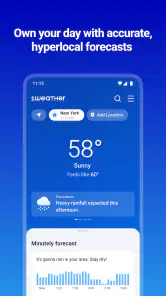
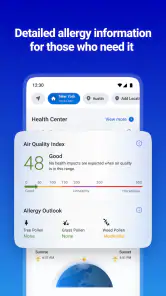
I tend to judge a weather app less by how many screens it offers and more by whether it helps me make a decision quickly. 1Weather Forecasts & Radar is at its best when I use it as a simple daily routine: check the forecast before leaving, glance at radar if the sky looks questionable, and pay attention to alerts when conditions could disrupt plans. It is a free weather app from OneLouder Apps, and its mix of quick checks and deeper weather views suits people who want more than a bare temperature readout.
A repeatable routine works better than constant checking
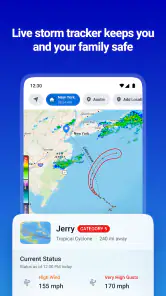
For an ordinary morning, I would start with the local forecast and use the radar only when timing matters. If I have a walk, school pickup, or commute planned, seeing how weather is moving can be more useful than repeatedly refreshing a general summary. The practical habit is to check once when planning, then revisit the radar if clouds build or an alert comes through. That keeps the app useful without turning every change in the sky into a reason to monitor my phone.
It is also worth treating a long-range outlook as a planning aid, not a promise. A forecast weeks ahead can help me think about a flexible weekend or a trip, but I would make final decisions closer to the day and check again as conditions change. That distinction matters: the app can help me prepare, while weather farther out remains uncertain.
The Latest on 1Weather Forecasts & Radar
Small habits for a more useful forecast
I get more out of a weather app when I decide what I need to know before opening it. For a commute, that may be whether rain could affect the trip; for a day at home, it may simply be whether outdoor chores can wait. This keeps the forecast in its proper role: a source of context for a decision, rather than a stream of updates that I feel obliged to follow.
A useful habit is to compare the forecast with the actual conditions before leaving, especially when the weather has been changeable. If the app and the sky seem out of step, I would treat that as a reason to check radar or revisit the forecast later, not as proof that one screen can answer every question. The point is to use the different views together only when the decision calls for them.
Features That Shine
First off, let's talk about the features that make 1Weather Forecasts & Radar stand out. The app offers a comprehensive suite of weather tracking tools, including live radar, severe weather alerts, and even a 12-week forecast! Yes, you heard that right—a whole three months of weather predictions. It’s like having a crystal ball, but for weather.
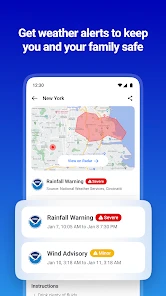
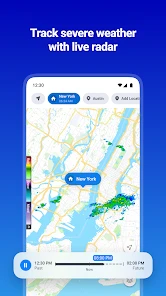
One of my favorite features is the detailed radar system. It's incredibly interactive and allows you to track weather patterns in real-time. Whether you’re planning a picnic or a road trip, having this level of detail at your fingertips is invaluable. Plus, the severe weather alerts ensure that you never get caught off guard by a sudden storm.
More From Our News Desk

Weather by Xiaomi Review: Clear at a Glance, Less Clear Up Close

X Under Pressure: Can It Recover When Posting Goes Wrong?

Clash of Clans Is Won Between the Battles

Android Auto Makes the Case for Quieter Car Software

MobiOffice: Transforming Mobile Productivity with Seamless Integration

EA SPORTS FC™ Mobile Soccer: Redefining Mobile Sports Gaming
User Experience
Now, onto the user experience. The layout is intuitive, with a sleek design that doesn't overwhelm you with data. Everything is neatly organized, making navigation a breeze. I particularly appreciate the "Follow Me" feature, which updates the weather based on your location. It's perfect for those who travel frequently and need to stay updated.
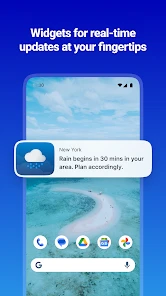
The app also offers customizable widgets, which you can place on your home screen. This means you can check the weather at a glance without even opening the app. How convenient is that? It’s like having a personal weather station right on your phone.
Settings that make checks more useful
I would spend a moment choosing which locations deserve a place in my regular routine. Keep home easy to reach, then add only places that affect an actual plan, such as a workplace or a destination for the weekend. A short list is quicker to scan and makes it less likely that I confuse a forecast for one place with the weather where I am now.
Location-based updating is convenient, but it is not always the right choice for every situation. When I am planning for a fixed address, selecting that place directly is clearer than relying on a changing current location. For travel days, the reverse can be more helpful. This small choice makes the app feel less noisy and keeps the displayed forecast aligned with what I need to decide.
Faster ways to use radar and widgets
The widget is most valuable when it answers one quick question without opening the app: do I need to bring a layer, or should I allow extra time for weather? I would choose a layout that remains readable on my home screen rather than trying to fit every detail into a tiny space. A widget is a shortcut, not a replacement for radar or an alert when the conditions deserve a closer look.
For a realistic example, imagine leaving work with an outdoor errand planned. I would glance at the widget, open radar if rain looks possible, and decide whether to go straight there or shift the errand. If severe weather alerts are relevant, they add another reason to reconsider timing. This sequence is more practical than repeatedly checking the temperature, because each step answers a different question.
Who benefits most from the extra detail
I think this app makes the most sense for someone whose day includes choices that weather can change: walking or cycling to work, arranging outdoor plans, or keeping track of conditions at more than one place. Its combination of a home-screen glance, radar, and alerts gives those users a way to move from a quick check to a more informed decision without treating every forecast as equally important.
It is less compelling for someone who only checks the temperature once in a while. A built-in weather app can be the better choice when speed and simplicity matter more than an interactive radar or several locations. I would also steer a user who needs specialist forecasting toward a dedicated tool for that purpose. 1Weather is designed for everyday weather decisions, not as a substitute for professional analysis.
Where it fits among weather apps
Compared with a basic built-in weather app, 1Weather gives me a more deliberate route from a quick glance to radar and alerts. That extra depth is useful if I plan outdoor activities or want weather information in a widget. On the other hand, if I only want a simple current temperature and a short forecast, the app already on my phone may be faster and less demanding. People who need specialist meteorological analysis may also prefer a dedicated tool rather than a general-purpose app.
There is a trade-off in having several ways to look at the weather: more detail helps when conditions are changing, but it can invite overchecking or make routine decisions feel complicated. I would use alerts for meaningful disruption and radar when timing matters, not treat every screen as something that needs daily study. If you prefer an uncluttered glance and rarely make plans around weather, the broader toolkit may be more than you need.
Why You Should Try It
If you’re still on the fence about trying out this app, let me give you a nudge. The level of detail and accuracy provided by 1Weather Forecasts & Radar is impressive. Whether you're a weather fanatic or just someone who likes to stay informed, this app has got you covered.
The best part? It’s free! Of course, there are premium features available, but the free version is more than sufficient for everyday use. So why not give it a go? You might just find it becomes one of your must-have apps.
A sensible way to decide
One practical question is whether I need to pay to get value from it. The app is free to download, while optional in-app purchases range from about fifty cents to twenty dollars per item. I would begin with the free experience and consider a purchase only if a specific extra solves a problem I actually have; there is little point paying just because an upgrade is offered.
It is rated for everyone, has an average rating of 4.3 from around 1.1 million ratings, and has passed 100 million installs. Those figures suggest a well-established audience, but they do not tell me whether its presentation suits my habits. I would judge that by trying the widget, checking a location I use often, and seeing whether radar is clear enough for decisions I make outdoors.
On the practical side, the current version is 11.7.1 and it requires Android 7.0 or later. The app first appeared on January 11, 2012, and its long history means it has had time to develop beyond a bare forecast screen. Still, compatibility and day-to-day usefulness are different questions: I would make sure my device supports it, then decide whether its extra weather tools earn a regular place on my home screen.
What to expect from alerts and long-range planning
Alerts are most useful when I treat them as prompts to reassess a plan, rather than as a guarantee that I can safely ignore the weather until one arrives. If an alert affects my area, I would check what it means for the activity I have planned and follow relevant local guidance. For routine showers, radar and the forecast are more appropriate tools; alerts are there for conditions serious enough to warrant attention.
The long-range outlook is a different kind of help. It can make an early conversation about a trip or outdoor gathering more informed, but I would not use it to lock in a decision that depends on the exact weather. I would keep plans flexible, then check again as the date approaches. That distinction answers a common practical question: the farther away the plan, the more useful the forecast is for broad preparation than for precise scheduling.
Mastering the everyday trade-offs
My best advice is to build a small, repeatable pattern rather than trying to explore every view at once: keep a few useful locations, use the widget for routine checks, and open radar when the timing or direction of weather could change a plan. For a commute, that might mean checking before leaving; for a weekend outing, it means using the distant outlook to stay flexible and revisiting the forecast nearer the date.
That approach also sets a sensible boundary. Radar and alerts can help me respond to changing conditions, but they do not remove the need to use judgment, especially when travel or outdoor safety is involved. If I need highly specialized forecasting, I would look for a tool built for that purpose; if I want a convenient everyday companion with more depth than a quick temperature card, this one makes a stronger case.
My verdict after weighing the routine
For me, the strongest reason to choose this app is the way its pieces can support one repeatable routine: a widget for a quick read, a chosen location for a fixed plan, and radar when timing matters. That combination is more useful than collecting weather screens I rarely open. I would set up only the places I check regularly, learn which view answers each question, and avoid turning every forecast change into a new decision.
1Weather Forecasts & Radar is a sensible pick if you want a free everyday weather app with more depth than a basic temperature display, and you are willing to use that depth selectively. If you value minimalism above all, or need specialist forecasting, another option may suit you better. For ordinary planning around changing weather, I would give it a try and keep it only if its widget, locations, and radar genuinely make my day easier.
1Weather Forecasts & Radar Frequently Asked Questions
What does 1Weather cost, and are purchases required to use it?
1Weather is free to download, so you can try its weather features without paying upfront. Optional in-app purchases are available, with prices ranging from around 49 cents to around 20 dollars per item. You can decide whether those extras are worthwhile for you; the app’s free option provides access to essential weather information.
Can 1Weather help me keep track of severe weather?
Yes. Severe weather alerts are among 1Weather’s highlighted features, alongside forecasts and live radar. These tools can help you keep an eye on changing conditions and get relevant warnings through the app. If timely updates matter to you, you can also adjust notification preferences to suit the locations and information you want to follow.
What does 1Weather show when I open it for the first time?
1Weather is a weather app built around local conditions, forecasts, radar, severe weather alerts, and homescreen widgets. Its store summary highlights hyperlocal forecasts and live radar, so it is designed to make current and upcoming weather easy to check. You can also use it to follow more than one location, which is useful when keeping an eye on weather elsewhere.
What features does 1Weather offer for tracking weather conditions?
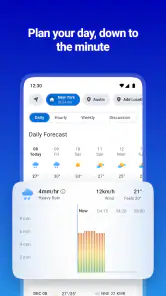
1Weather provides a comprehensive suite of features for weather tracking, including real-time local weather forecasts, hourly forecasts, and extended 10-day forecasts. It also offers radar maps, severe weather alerts, and precipitation predictions. Additionally, users can customize their experience with widgets and access weather information for multiple locations.
Is 1Weather free to use, or does it require a subscription?
1Weather is available for free, offering essential features like forecasts and radar. However, it also offers optional in-app purchases, with items priced from around 49 cents to around 20 dollars. The free option lets users try its core weather features without paying, while purchases may provide additional options.
Pros
- Accurate weather predictions
- User-friendly interface
- Customizable alerts
- Detailed radar maps
- Multi-location tracking
Cons
- Contains ads
- Limited free features
- Occasional lag issues
- Requires internet connection
- Subscription for premium features
- Category
- Weather
- Version
- 11.7.1