Windy.com - Weather Forecast
- 10.13K
- 4.7
- Installs
- 50.00M
- Price
- Free

Screenshots
Analysis by Reviewed
I tend to open a weather app with one practical question: should I change my plans, or just bring a jacket? Windy.com is useful when that quick check turns into a closer look at what is moving across the sky. It is a free weather app from Windyty SE, and its map-led approach makes more sense to me when I want to understand conditions around a route or destination, not only see a single forecast number.
Start with the decision, not the map
Before exploring layers, I find it helps to decide what I actually need to know. Am I trying to avoid a shower during a school run, choose a better time for a bike ride, or work out whether wind might make a coastal plan uncomfortable? Those questions point me toward different parts of the map. Without a clear purpose, the amount of detail can turn a simple check into aimless browsing.
For an everyday outing, I would first look at the destination and the time I expect to be there. Then I would compare that spot with the surrounding area, rather than assuming the nearest forecast tells the whole story. A short drive can take me into a different patch of rain or stronger wind, and the map is valuable precisely because it encourages that broader view.
The Latest on Windy.com - Weather Forecast
From a quick check to a plan
My usual workflow starts by finding the place I care about, then looking at the map rather than stopping at the first forecast screen. Wind and rain layers can help explain why two nearby areas may feel different, while radar and satellite views give useful context when clouds or showers are already developing. I find this especially helpful before a walk, a drive, or a day outdoors: I can check the destination and the approach, then decide whether to leave earlier, choose a different route, or pack for changing conditions.
A practical tip is to treat the map as a comparison tool, not as a promise. If a front is moving toward the area, I look at its direction and surrounding conditions instead of relying on one snapshot. For a coastal outing, the wind and wave information can be more relevant than a general temperature reading; for a hike, a rain layer and the timing of the trip may matter more. The app’s range of views rewards a specific question, so I get more from it when I know what decision I am trying to make.
Turning weather context into a real-world handoff
One useful way to use the app is as a shared planning aid rather than a private forecast screen. If I am meeting friends for a walk, I can check both the meeting point and the route, then describe the practical takeaway: rain may reach the western side first, so we could start earlier or choose a shorter loop. The map helps me explain why I am suggesting a change instead of sending someone a single temperature or rain symbol with no context.
For a road trip, I would check the route in sections rather than letting the forecast for the starting town stand in for the whole journey. If conditions appear unsettled, I can use the information to decide when to leave, where to pause, or whether to keep a backup plan. That is a planning workflow, not a guarantee about what will happen on every stretch of road, so I would still follow local advice and pay attention while travelling.
More From Our News Desk

Android Auto Makes the Case for Quieter Car Software

MobiOffice: Transforming Mobile Productivity with Seamless Integration

EA SPORTS FC™ Mobile Soccer: Redefining Mobile Sports Gaming

How Microsoft OneDrive Became a Mobile Productivity Giant

How Google Translate Breaks Language Barriers Effortlessly

Why Google Sheets Is the Ultimate Mobile Productivity Tool
The same distinction matters for more exposed activities. A sailor, cyclist, or hiker may care about wind or precipitation in a very specific place and time, while a friend joining casually may only need to know whether to bring a waterproof layer. I like that the app can support both conversations, but I would not expect everyone in a group to want to interpret the same dense map. I translate the detail into a simple decision before passing it along.
Where extra detail earns its space
Windy.com is a strong fit for people who make plans around outdoor conditions, including hikers, sailors, cyclists, and anyone following storms. It can also suit a curious everyday user who likes seeing how weather changes across a region. Compared with the simpler weather apps many people use, it offers more visual context and more layers to explore. That extra detail is the point, but it also creates friction: a busy map can feel like too much when all I want is a quick answer about whether to take an umbrella.
It is particularly useful when a decision depends on movement or exposure. A person cycling across town may want to compare wind conditions along the route, while someone planning a beach visit may care about the relationship between wind and waves more than a broad daily summary. Those are cases where a map can answer a better question than a compact forecast card. For someone who rarely makes plans beyond the local commute, though, that added perspective may not justify learning another interface.
When I am in a hurry, I would rather use a straightforward forecast app or a phone’s built-in weather view for a glanceable summary. Windy.com is better when I want to investigate, compare locations, or follow a system as it approaches. The choice is not really about which app is universally better; it is about whether I need a quick daily prompt or a map I can interrogate. New users may need a little time to learn which layers answer which questions, and it is easy to spend longer browsing than the decision deserves.
That trade-off is worth keeping in mind when choosing a weather app. A simple forecast is often the better tool for checking tomorrow morning before bed; this app is more rewarding when I have a place, route, or weather pattern to examine. I would recommend it to someone who enjoys visual context and is willing to spend a moment interpreting it. I would not push it on a person who wants a single uncomplicated answer and has no interest in exploring beyond that.
Everyday use, without over-reading the forecast
Imagine I am deciding whether to take a longer walk after work. I check the area I plan to visit, inspect the rain and wind views, and compare the route with the nearby streets or open spaces. If showers look likely to approach during the walk, I might leave earlier, choose a shorter loop, or pack a light layer. The point is not to turn a casual outing into a weather research project; it is to make one sensible adjustment before heading out.
For a more involved day, I would use the same process in stages: check the general picture first, narrow in on the places that matter, and then return to the map near departure if conditions are changing. Radar and satellite views are most useful to me as context for what is developing, while a forecast layer helps with planning ahead. Keeping those roles separate makes it easier not to mistake a current view of the sky for a dependable answer about conditions later.
People sometimes ask whether they need to be weather experts to benefit from a map-heavy app. I do not think so, but a little patience helps. Start with one layer tied to one decision—rain for an outdoor appointment, wind for a ride, or waves for a coastal plan—and leave the rest alone until you have a reason to use it. This keeps the interface manageable and helps build familiarity through practical questions rather than trying to learn every option at once.
Its details, costs, and learning curve
The app is rated for Everyone 10+ and is available on Android and iOS. It has a 4.7 average from around 789,000 ratings, and more than 50 million installs. The core app is free, with in-app purchases ranging from $1.49 to $114.99 per item. I would start with the free experience and see whether its level of detail fits my routine before considering any purchase; the right choice depends on what you need from the app rather than on how many options it displays.
It has been available since February 14, 2016, and works on Android 8.0 or later. That makes the minimum software requirement worth checking if you are using an older phone. I would also think about how I expect to use it: a map that is useful while planning at home may be less convenient to interpret in a rush on a small screen. I prefer to do the comparison before leaving, then use the result as a practical guide rather than repeatedly reopening the app during an activity.
The purchase options are another reason I would not treat every paid choice as necessary. The free version is a sensible place to find out whether the map, layers, and forecast style fit your habits. If you only need an occasional rain check, paying for extra capabilities may not improve your routine. If you regularly plan around detailed conditions, you can consider whether a purchase addresses a real need after you have used the app long enough to identify one.
What Sets Windy.com Apart?
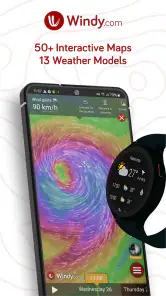
Let's dive right into what makes Windy.com stand out in the crowded world of weather apps. First off, the app's interface is nothing short of stunning. The visualizations are not just eye-catching; they're incredibly detailed and provide a wealth of information at a glance. You can easily see wind patterns, temperature changes, and precipitation levels all in one view. It's like having a meteorologist in your pocket!
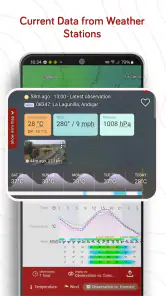
One of my favorite features has to be the app's ability to show real-time weather updates. Whether you're planning a hike, a road trip, or just deciding whether to carry an umbrella, having up-to-the-minute information is invaluable. Plus, the app is incredibly user-friendly. Even if you're not a weather geek, navigating through its features is a breeze.
Features That Make a Difference
Windy.com isn't just about pretty visuals; it's packed with features that are genuinely useful. For instance, the app provides weather forecasts from multiple sources, so you can compare and choose the one you trust most. It also offers detailed layers that let you see various data points like wind speed, temperature, and even air quality.
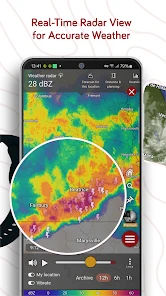
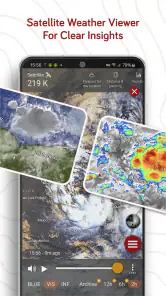
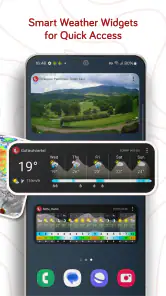
Another standout feature is the app's radar and satellite overlays. These are perfect for those moments when you need a more in-depth look at what's happening in the skies. And if you're someone who loves customizing your apps, you're in luck. Windy.com allows you to tailor the app to your specific needs, whether it's setting up alerts for weather changes or customizing the display settings to highlight the information you find most relevant.
Is It Worth It?
Now, you might be wondering if Windy.com is worth the download. In my opinion, it's a resounding yes! Whether you're a casual user who just wants to know if it's going to rain tomorrow or a weather enthusiast who loves diving into the nitty-gritty details, this app caters to all levels of interest.
What's more, the app is available for both Android and iOS, and it offers a seamless experience across devices. I've found that the app's performance is consistently smooth, with very few hiccups or crashes. And let's be honest, there's nothing more frustrating than an app that doesn't work when you need it the most!
In conclusion, Windy.com is a fantastic tool for anyone looking to stay informed about the weather. With its detailed forecasts, real-time updates, and user-friendly interface, it's hard not to be impressed. So, go ahead and give it a try! You might just find that checking the weather becomes one of your favorite daily rituals.
Windy.com - Weather Forecast Frequently Asked Questions
Can I use Windy.com to check weather conditions for a trip or outdoor activity?
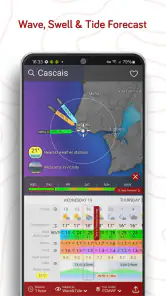
Windy.com can help you explore weather conditions before heading out, with map views for wind, waves, ocean conditions, satellite imagery, and hurricane forecasts. You can inspect the weather information relevant to your plans and use the visual maps to get a broader picture. Conditions and forecasts can change, so use the app as a planning aid rather than a substitute for sound judgment.
Does Windy.com show radar and satellite imagery as well as forecasts?
Yes. Windy.com combines forecast information with weather radar and satellite imagery, alongside maps for wind, waves, and ocean conditions. These different views can help you follow weather patterns from more than one perspective, rather than relying on a single forecast display. The app is particularly suited to people who like seeing weather conditions represented visually on a map.
Is Windy.com free to download, and what should I know about paid options?
Windy.com is free to download, and its core weather tools are available without paying. The app also offers in-app purchases, including a premium option for people who want additional features. Before downloading, it is worth knowing that paid extras are optional; you can start with the free version and decide whether you need more after exploring the app.
What devices can run Windy.com, and is it suitable for all ages?
Windy.com is a weather app for Android and iOS, and the Android version requires OS 8.0 or later. Its content rating is Everyone 10+, so it may be worth checking that rating if you are choosing an app for a younger user. The app is published by Windyty SE and is focused on weather information rather than games or social features.
What features does Windy.com offer for weather forecasting?
Windy.com provides a comprehensive suite of features for weather forecasting. Users can access animated weather maps, satellite imagery, and various forecast models. The app also offers data on wind speed, temperature, precipitation, and more. Additionally, it includes features like hurricane tracking, rain radar, and views of waves and ocean conditions.
Pros
- Accurate weather updates globally.
- Detailed wind patterns and forecasts.
- User-friendly and intuitive interface.
- Real-time storm tracking features.
- Customizable weather alerts.
Cons
- Requires a strong internet connection.
- Ads in free version can be intrusive.
- Limited offline access to data.
- Premium features require subscription.
- Complex data may overwhelm casual users.
- Category
- Weather
- Version
- Varies with device