Weather app - Radar & Widget
- 3.36K
- 4.5
- Installs
- 10.00M
- Price
- Free
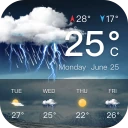
Screenshots
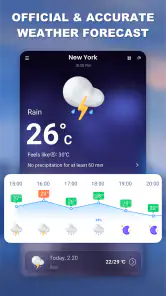
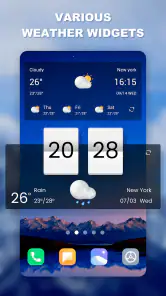
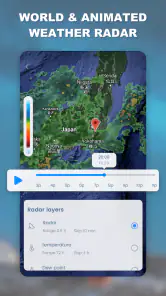
Analysis by Reviewed
I tend to check the weather when I have a decision to make, not just out of curiosity: whether to walk, carry a jacket, or change the time I leave. Weather app - Radar & Widget is built for those quick checks, pairing local forecasts with a radar view and a home-screen widget. It is a free weather app from Fillog Studio, and its broad appeal is reflected in a 4.5 average from around 138,000 ratings, with over 10 million installs.
Start with the question you need answered
My most useful routine is to open the forecast before a day with several stops, then check the radar if the sky looks uncertain. A forecast helps with the general plan; radar is more useful when I want to judge whether a storm is moving toward the area. I would treat that view as a planning aid rather than a guarantee about the exact conditions on my street, especially when weather is changing quickly.
The widget can make this workflow quicker once it is set up. I’d choose only the details I actually use, rather than trying to display every available reading: a glance at temperature and conditions is often enough to decide what to wear, while wind or humidity matters more for a run, a bike ride, or time outdoors. Keeping the home screen focused makes the widget useful instead of turning it into another block of information to scan.
From forecast to a practical plan
Imagine I’m getting ready to leave for work and rain is possible later. I can check the forecast first, then use the radar to see whether a storm appears to be approaching before deciding to pack an umbrella or adjust my departure. If I’m planning a picnic, I’d look beyond the current conditions and consider the wider forecast before settling on a time. That small distinction matters: the current sky tells me what is happening now, while the forecast helps me prepare for what may happen next.
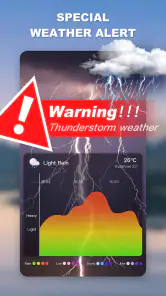
Alerts can add another handoff between checking the app and acting on the information. I find them most useful when I have a reason to be outdoors or need to make plans in advance. If notifications are not relevant to my day, I would rather rely on a manual check than let weather updates interrupt me unnecessarily. The practical benefit is not simply seeing more information; it is having a prompt to reconsider a plan when conditions could affect it.
How it fits into everyday weather checks
I use this kind of weather check to move from a quick glance to a decision: whether to leave as planned, pack an umbrella, or rethink an outdoor stop. The useful part is choosing what information deserves attention before I open the app, rather than letting every reading become another reason to hesitate. That distinction helps me make the next step—checking the forecast or radar—feel deliberate instead of repetitive.
Where it helps, and where I’d be cautious
Compared with relying only on a basic phone weather panel, this app gives radar and a configurable widget a more central role. That is helpful if I like to compare a broad forecast with a visual look at nearby weather. Someone who only wants the day’s high and low may find a simpler built-in weather view faster, while a person who needs specialized forecasting for work or outdoor activities may prefer a service designed around those particular needs. I see this app as a convenient everyday option, not a substitute for specialist planning.
More From Our News Desk

Weather by Xiaomi Review: Clear at a Glance, Less Clear Up Close

X Under Pressure: Can It Recover When Posting Goes Wrong?

Clash of Clans Is Won Between the Battles

Android Auto Makes the Case for Quieter Car Software

MobiOffice: Transforming Mobile Productivity with Seamless Integration

EA SPORTS FC™ Mobile Soccer: Redefining Mobile Sports Gaming
There is also a useful trade-off in how much I check. Radar can help me decide whether to wait before leaving, but repeatedly watching it does not make a forecast certain. For a longer outing, I’d check again closer to departure instead of treating an earlier glance as settled. Likewise, a widget is convenient but only valuable if its selected information answers a real question; if I keep opening the full app anyway, I would simplify the widget rather than add more items.
Before installing, it is worth knowing the basics: the app is free, rated for Everyone, and its current version is 1.6.0, with Android 6.0 or later required. Optional in-app purchases range from $4.99 to $16.99 per item, so I’d check what is included before buying anything. The app first appeared on March 10, 2021, and has around 3,400 written reviews. Those details make it easy to judge whether it fits a household device or an older Android phone, though the core decision is whether radar, alerts, and a widget suit the way you check the weather.
First Impressions
When I first opened the Weather app - Radar & Widget, I was greeted with a sleek and intuitive interface. The layout is clean, with vibrant colors that make the information pop. It's like the app is saying, "Hey, I'm here to make your weather-checking experience as smooth as a sunny day." The navigation is straightforward, so you won't find yourself lost in a sea of menus.
Features That Shine
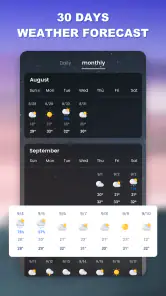
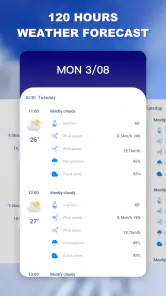
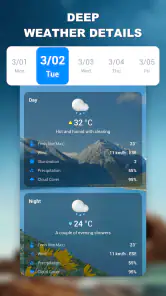
This app is packed with features that make it stand out from the crowd. First off, the radar function is a game-changer. With just a tap, you can view real-time weather patterns and track storms like a pro. It's like having a front-row seat to Mother Nature's show. Plus, the app offers detailed forecasts, so you can plan your week with confidence.
Another feature I love is the customizable widget. You can tailor it to show the information that's most important to you, whether it's the current temperature, humidity levels, or wind speed. It's like having a personalized weather report right on your home screen. And let's not forget about the alerts. The app sends notifications for severe weather conditions, so you can stay safe and prepared.
Performance and Usability
In terms of performance, the app runs smoothly without any hitches. It's fast, responsive, and doesn’t drain your battery, which is a big win in my book. I appreciate how it doesn’t bombard you with ads, allowing for an uninterrupted user experience. The developers clearly put a lot of thought into creating an app that's both functional and user-friendly.
Now, I know what you're thinking – "All these features must cost a pretty penny." But here's the kicker: the app is free to download. There are in-app purchases available, but they're not necessary to enjoy the core features. So, you can keep your wallet happy while staying informed about the weather.
Making the information useful beyond the screen
A weather check is most valuable when it changes a decision, so I would use the app differently depending on the day. For a short walk, the widget may be all I need; for a commute involving a bus stop or a long stretch on foot, I’d open the forecast and radar before leaving. That two-step habit is more practical than repeatedly refreshing the app: the first glance sets expectations, and the second is reserved for conditions that could alter the route or timing.
For a family outing, the useful handoff is from one person checking the forecast to everyone deciding what to bring. I’d share the takeaway in plain terms—whether rain looks plausible during the outing, for example—rather than expecting everyone to interpret a radar image. A visual map can be helpful to the person checking it, but it is not automatically a clear instruction for the rest of the group. Pairing it with the wider forecast keeps a single snapshot from dominating the plan.
The same approach works for outdoor exercise, with a different threshold for changing plans. Someone heading out for a brief jog may accept a passing shower, while a person planning a longer ride may want to delay or shorten the trip. I would use the app to compare the general outlook with what radar suggests nearby, then make the call based on the activity. It is a useful distinction because the same conditions do not carry the same cost for every plan.
Who will get the most from it
I think this app suits people who want more than a temperature tile but do not need a professional meteorology tool. The combination of forecast, radar, alerts, and a widget gives everyday users several ways to check conditions without making every check a deep dive. It is particularly handy for someone whose plans change with rain—walking to work, taking children outside, tending a garden, or deciding whether to bring outdoor laundry in.
It is less compelling if all you ever want is a quick high and low. In that case, the phone’s built-in weather panel may be enough, with fewer steps between unlocking the device and seeing the answer. I would also look elsewhere if weather is central to a safety-critical job, a remote trip, or a specialized outdoor pursuit. A general-purpose app can support ordinary planning, but it should not be the only source guiding decisions where conditions have serious consequences.
One practical tip is to treat the widget as a shortcut, not a miniature dashboard. Select the readings that affect your normal decisions and leave the rest for the full app. If the widget is crowded, it takes longer to interpret and loses its main advantage: seeing a useful prompt without opening anything. The best setup is personal, but a focused display is easier to scan while getting ready or heading out the door.
Reading radar with the right expectations
Radar is the feature I would use when timing matters, but I would not interpret a colored map as a promise that rain will—or will not—hit a particular doorstep. Local weather can shift, and a map is a view of a changing situation rather than a certainty about the next hour. If a plan matters, check close to the time you leave and use the forecast as context instead of treating one image as the final answer.
That caution also helps avoid a common trap: checking so often that every small change feels decisive. For a flexible errand, one forecast check and a quick radar look may be plenty. If I have a long outdoor commitment, I’d revisit the information nearer departure and keep a backup plan in mind. The app can make it easier to notice a developing weather issue, but the sensible response still depends on where I’m going and how much flexibility I have.
Alerts are another choice to tailor rather than accept as useful by default. A person who spends much of the day outdoors may welcome a prompt about severe conditions; someone with a predictable indoor routine may find frequent notifications more distracting than helpful. I would enable alerts only if they are likely to change what I do, and I’d still check manually before an important outing. This keeps the app in the role of assistant rather than letting every notification interrupt the day.
Everyday convenience versus specialist tools
Compared with a simple built-in forecast, this app’s strongest distinction is the closer connection between a glanceable widget and a radar-based check. A basic panel wins when speed and minimal setup matter most. This app makes more sense when I want to move from “What is the weather like?” to “Does the nearby pattern change my plan?” without switching to a separate radar product.
Dedicated forecasting services can be a better fit for people who need specialized detail or make decisions in a particular outdoor field. I would not choose a general weather app as a substitute for a tool tailored to aviation, marine travel, or other high-stakes use. For ordinary local routines, though, the broader mix here is convenient: it covers quick checks and gives me another way to assess unsettled conditions without asking me to become a weather expert.
There is a small setup cost to that convenience. A widget only helps after I decide what to show, and alerts only help after I decide which interruptions are worthwhile. Those choices are not difficult, but they mean the app is not necessarily more useful the moment it is installed. I’d spend a minute shaping it around my routine, then judge whether it actually reduces the number of steps in a typical weather check.
Final Thoughts
All in all, the Weather app - Radar & Widget is a must-have for anyone who wants to stay ahead of the weather. Whether you're a weather enthusiast or just someone who wants to avoid getting caught in the rain, this app has got your back. It's like having a trusty weather companion, always ready to give you the latest forecast with a smile. So go ahead, give it a try – your future self (and possibly your hair) will thank you!
Weather app - Radar & Widget Frequently Asked Questions
Does Weather app - Radar & Widget need an internet connection to show weather information?
Weather app - Radar & Widget is designed to provide forecasts, radar information, and weather updates, so an internet connection is useful for retrieving current information. If you are planning to rely on it while traveling or in an area with limited connectivity, consider checking the app before you lose access and keeping another way to consult important forecasts available.
Can I use Weather app - Radar & Widget to check weather for more than one location?
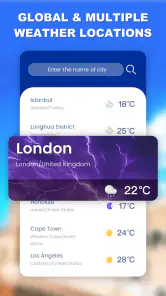
The app’s feature set includes forecasts for multiple locations, which can be helpful if you regularly check conditions for home, work, or a destination you plan to visit. You can consult the available location controls after installing it and decide whether its presentation suits the way you compare weather. The app is a weather companion, not a replacement for emergency guidance.
Is Weather app - Radar & Widget free to download, and are there optional purchases?
Weather app - Radar & Widget is free to download, so you can try its weather tools without paying upfront. It also offers in-app purchases priced from $4.99 to $16.99 per item. If you prefer not to make purchases, check the options shown in the app and your device’s purchase settings before proceeding.
Which devices can install Weather app - Radar & Widget?
The app is available for Android devices running Android 6.0 or later. Before downloading, check your device’s operating system version to make sure it meets that requirement. Weather app - Radar & Widget is rated for Everyone, making it suitable for a broad audience, though parents may still want to review how children use weather alerts and location-related features.
Who makes the app, and is it widely used?
Weather app - Radar & Widget is developed by Fillog Studio and is listed in the Weather category. It has over 10 million installs and an average rating of 4.5 from around 138,000 ratings, giving prospective users a useful sense of its reach and reception. It was released on March 10, 2021, and its current version is 1.6.0.
Pros
- Accurate weather forecasts
- Interactive radar maps
- Customizable widgets
- Real-time alerts
- User-friendly interface
Cons
- Ads in free version
- Limited features offline
- Battery consumption
- Occasional loading lag
- Requires data connection
- Category
- Weather
- Version
- 1.6.0













