Dressup: AI photo Editor & Art
- 325.00
- 4.0
- Installs
- 5.00M
- Price
- Free

Screenshots
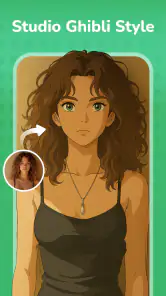
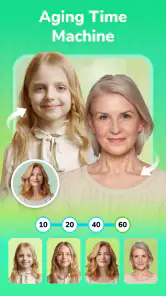
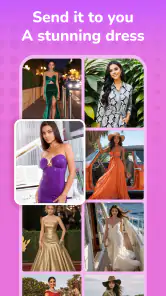

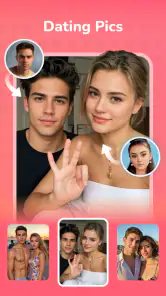
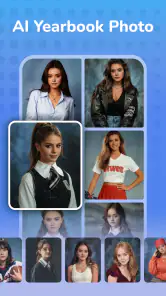

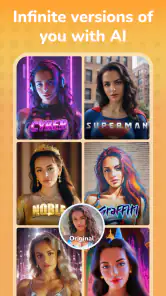
Analysis by Reviewed
I see Dressup: AI Photo Editor & Art as a playful shortcut for trying a new look, not a replacement for a careful photo-editing workflow. Its appeal is the way it brings several AI-led experiments into one photography app: I can touch up an image, try a more imaginative treatment, or explore a face swap without moving between specialist tools. That range is convenient, but it also means I judge each result on its own rather than assuming every effect will suit every photo.
A useful first test is a simple portrait
If I were opening the app for the first time, I would pick a well-lit portrait with the face clearly visible and try one effect before exploring the rest. That gives me a baseline: I can see what the app changes, whether the result still looks like the person, and whether the style suits the image. Starting with a busy group photo or a dim picture makes it harder to tell whether an imperfect result comes from the effect or from the source image.
I would also keep an untouched copy nearby. AI edits can alter small details as well as the obvious feature I asked them to change, and a side-by-side comparison helps me decide whether those changes are welcome. This is especially useful when I like the general mood of an effect but want to avoid losing something distinctive, such as a familiar expression or the texture of clothing.
Where a playful transformation helps
Dress-up effects are most useful when the aim is entertainment or visual experimentation, rather than a faithful record of what someone wore. I can imagine using one to make a lighthearted birthday image, test a costume-like look, or create a different portrait for a casual social post. The same feature is less suitable for a profile photo where I want friends or colleagues to recognize me immediately, or for an image that needs to represent real clothing accurately.
Face swapping and AI-generated video call for a little more care. A clear, unobstructed face gives the tool an easier starting point, while unusual angles and crowded scenes may make the result feel less convincing. I would treat the output as a joke or creative sketch, not as evidence of what someone actually did. Before sharing an edit that includes another person, I would consider whether they are comfortable with the transformation and the context in which it will appear.
Repair works best with realistic expectations
AI repair can be appealing when I come across an old or damaged picture and want to see whether it can be made more usable. I would approach it as an experiment, then zoom in on faces and other important details before deciding that the image has been restored successfully. A repair can produce a cleaner-looking picture without necessarily recovering the exact information that was lost, so I would keep the original and avoid treating a generated reconstruction as a historically accurate record.
That distinction matters most for family photos, documents, or images that carry personal value. For a casual keepsake, a visually pleasing result may be enough. If precision matters, I would compare the repaired version with the source and consider a more controlled restoration workflow instead. Keeping both versions also lets me share the improved one without giving up the original.
More From Our News Desk

Weather by Xiaomi Review: Clear at a Glance, Less Clear Up Close

X Under Pressure: Can It Recover When Posting Goes Wrong?

Clash of Clans Is Won Between the Battles

Android Auto Makes the Case for Quieter Car Software

MobiOffice: Transforming Mobile Productivity with Seamless Integration

EA SPORTS FC™ Mobile Soccer: Redefining Mobile Sports Gaming
Think about the whole image, not just the effect
One practical tip is to choose a source photo that already has the framing and expression I want. An AI effect may change the look of a portrait, but it is not a dependable substitute for taking a better-composed photo in the first place. If the face is tiny in the frame, partly hidden, or competing with a cluttered background, I would crop or choose another image before testing a transformation.
I would also avoid applying several strong treatments in sequence just because the app makes experimentation easy. Each additional change can make it harder to tell which one improved the picture and which one made it feel less natural. Trying one effect, saving or comparing the result, and then deciding whether to continue gives me a clearer sense of what I actually like.
What the app is good for—and what it asks of you
Dressup, made by Fillog Studio, moves beyond conventional filters by bringing together AI dress-up, video generation, image repair, and face swapping for both photos and videos. That combination is handy when I want a casual portrait to feel more entertaining, want to test a new visual direction, or want to see whether an older image can be improved. The app is free to start, with in-app purchases available, so I would explore the specific tools I care about before paying for anything.
A practical workflow is to begin with a clear, well-lit photo and make one change at a time. For instance, I might try a dress-up effect first, compare it with the untouched image, then decide whether any additional editing helps. Keeping the original nearby makes it easier to spot when an AI treatment has altered details I wanted to preserve. For a quick social post, that comparison is more useful than stacking effects simply because they are available.
Face swaps and generated video are better approached as playful experiments than dependable editing tools. The source image matters: a face that is unobstructed and easy to see gives the app a clearer starting point, while unusual angles or busy scenes can make the result feel less convincing. I would also think about the people pictured before sharing an edited image; a funny transformation is most enjoyable when everyone involved is comfortable with it.
Trying creative edits without a complicated workflow
When I first downloaded Dressup: AI Photo Editor & Art, I was immediately struck by its sleek and user-friendly interface. Navigating through the app is a breeze, even if you're not a tech whiz. The app uses cutting-edge AI technology to transform your photos, making them look like they were edited by a professional designer.
Features That Stand Out
One of the standout features is the variety of art styles you can choose from. Whether you're into classic paintings, modern art, or something a bit more abstract, there's a style for everyone. The AI does a remarkable job of applying these styles to your photos without losing the original charm.
Another feature I found particularly useful is the auto-enhance tool. With just a tap, the app adjusts the lighting, contrast, and color to make your photo pop. It's perfect for those days when you need a quick touch-up before posting on social media.
Where it fits—and where it doesn’t
For a realistic everyday use, imagine taking a quick portrait before meeting friends and wanting it to look a little brighter for a group chat. I would try auto-enhance first, then stop if the lighting already feels natural. If I wanted a more playful version for a post, I could test an art style on a copy rather than replace the original. That small habit gives me room to experiment without losing the straightforward photo I may want later.
Compared with a standard editor focused on precise exposure, cropping, and color controls, Dressup is more about quick AI transformations and novelty. That makes it a better fit when I want a distinctive result with little manual work; a conventional editor is the stronger choice when I need exact adjustments or consistent edits across a set of photos. AI repair may also be worth trying on a damaged image, but I would inspect the output closely before treating it as a faithful restoration.
The main trade-off is control. A one-tap result can save time, but it may change facial details, clothing, or textures in ways I did not intend. I would not rely on it for professional retouching, documentary images, or edits where accuracy matters. It is also sensible to check the available purchase options before settling into a workflow that depends on a particular paid feature; the app includes in-app purchases, while the initial download is free.
Who I’d recommend it to
I’d recommend it to casual creators who enjoy trying different looks, want a quick portrait makeover, or like having photo and video experiments together in one place. Its Everyone age rating makes it broadly accessible, though younger users should still have a parent or guardian help them make purchase decisions. If you mainly need precise image correction, batch editing, or a natural-looking result every time, I’d choose a traditional photo editor instead.
Dressup has an average rating of 4.0 from around 17,000 ratings and has been installed over 5 million times, which suggests it has found a sizable audience without making it the right choice for every editing style. It was released in August 2022, and version 1.6.3 requires Android 7.0 or later. Those details are useful when checking whether it suits your device, but the best test is still to try a few different kinds of image and see whether its AI choices match your taste.
What I love most about this app is its ability to make everyday photos look extraordinary. It's not just about adding filters; it's about transforming your photos into something truly unique. Plus, it's fun to experiment with different styles and effects to see what suits your mood or the occasion.
Moreover, the app is constantly updated with new features and styles, ensuring that you never run out of options to explore. Whether you're a casual user or someone who takes their photo editing seriously, Dressup has something for you.
In conclusion, Dressup: AI Photo Editor & Art is a fantastic tool for anyone looking to add a creative twist to their photos. It's easy to use, packed with features, and most importantly, it makes photo editing fun and accessible to everyone. So why not give it a try and see how it can transform your photo game?
Dressup: AI photo Editor & Art Frequently Asked Questions
Does Dressup: AI Photo Editor & Art need an internet connection to use its AI tools?
AI-based editing can involve processing that differs from ordinary changes such as adjusting a photo’s appearance. If you plan to use Dressup for its dress-up, video, repair, or face-swap options, consider whether you will have a reliable connection while working. Your experience may depend on the feature you choose and the conditions on your device, so it is sensible to try the app in the setting where you expect to use it.
What kinds of photos or videos should I prepare before trying the app?
Dressup is intended for creative work with images and videos, including AI dress-up, AI video generation, image repair, and face swaps. For a smoother first try, choose a clear photo or a clip that shows the subject you want to edit, and make sure you have permission to use any images involving other people. Starting with material you are comfortable experimenting on makes it easier to judge whether the results suit your needs.
What devices and operating systems can run Dressup: AI Photo Editor & Art?
Dressup: AI Photo Editor & Art is an Android app for photo editing and AI-powered creative tools. Its minimum operating system requirement is Android 7.0, so check your device’s software version before downloading. The app is listed as suitable for everyone, and it may appeal to people who want to experiment with photo and video effects on a phone.
Who develops Dressup: AI Photo Editor & Art, and how popular is it?
The app is developed by Fillog Studio. It has an average rating of 4.0 from around 17,000 ratings, with roughly 325 written reviews, and it has been installed over 5 million times. Those figures suggest that it has reached a broad audience, though individual experiences with its editing tools and results can differ.
What is Dressup: AI Photo Editor & Art?
Dressup: AI Photo Editor & Art is an innovative application designed to enhance your photos using artificial intelligence. It offers a range of tools and features that enable users to edit photos professionally, add artistic effects, and create stunning visuals effortlessly. The app is tailored for both amateur photographers and professionals looking to add a creative touch to their images.
Pros
- Intuitive user interface making editing easy.
- Wide variety of filters to choose from.
- Quick processing time for edits.
- Regular updates with new features.
- No ads in the paid version.
Cons
- Limited features in the free version.
- Requires internet for full functionality.
- Occasional app crashes reported.
- Some filters are premium only.
- In-app purchases can be costly.
- Category
- Photography
- Version
- 1.6.3












