Weather - Accurate Weather App
- 517.00
- 4.5
- Installs
- 5.00M
- Price
- Free
Screenshots
Analysis by Reviewed
Hey there! Today, I want to chat with you about a nifty little app that I've been using to keep tabs on the weather: the Weather - Accurate Weather App. If you're anything like me, checking the weather is part of your daily routine, and having a reliable app makes it so much easier. So, let's dive into what makes this app a standout choice for weather enthusiasts like us.
What to expect before you install
This is a free weather app from Coocent, aimed at people who want more than a single temperature readout but don't want to dig through a complicated forecasting tool. Its hourly and daily outlooks, severe-weather alerts, and extra conditions make it useful for ordinary decisions: what to wear, when to head out, or whether to move an outdoor plan indoors. It is rated for Everyone, has a 4.5 average from around 51,000 ratings, and has been installed over five million times.
That popularity is reassuring, but it is not proof that every forecast will match what happens on your street. Weather predictions vary with location and conditions, so I treat any app as a guide rather than a guarantee. If you need highly specialized meteorological analysis, or depend on a particular local agency's warnings, a dedicated official source may be a better companion.
Starting with the right location
Before relying on a forecast, I’d make sure the place shown is the one I actually care about. A nearby city can have different conditions from a home on the edge of town, and a saved destination is more helpful than repeatedly checking the wrong default. When travelling, I’d compare the destination with home rather than assuming one forecast applies to both.
A useful first routine is deliberately small: check today’s conditions, look at the hours that overlap with your plans, and decide what you might change. That gives the app a clear job. If the question is whether to cycle to work, for instance, the weather at departure and return matters more than a general impression of the whole day.
Features That Shine
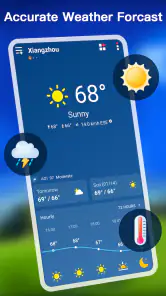
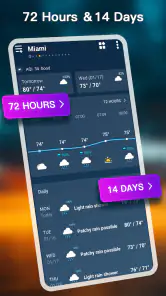
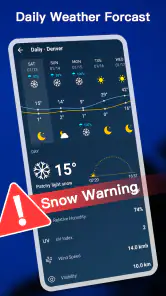
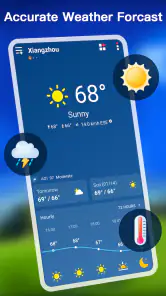
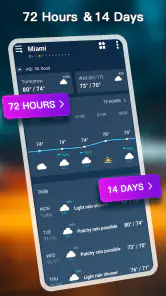
First off, the app gives me a practical overview rather than just one temperature. It provides hourly updates, which is helpful when I’m planning outdoor activities and need to choose a better time to head out. The interface is user-friendly, with a clean design that makes navigation a breeze. I appreciate how the main screen gives you a clear overview of the current weather, complete with temperature, wind speed, and humidity levels.
For a first-time user, the practical starting point is to look at the current conditions, then scan the hours ahead rather than relying only on the day’s high and low. On a commute, for example, I’d check the time I expect to leave and again around the time I’ll be coming home. That small habit makes an hourly forecast more useful than repeatedly reopening the app without a specific question in mind.
More From Our News Desk

Weather by Xiaomi Review: Clear at a Glance, Less Clear Up Close

X Under Pressure: Can It Recover When Posting Goes Wrong?

Clash of Clans Is Won Between the Battles

Android Auto Makes the Case for Quieter Car Software

MobiOffice: Transforming Mobile Productivity with Seamless Integration

EA SPORTS FC™ Mobile Soccer: Redefining Mobile Sports Gaming
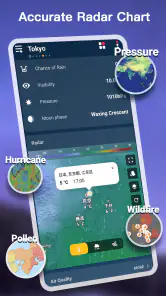
Not only does it offer the basics, but it also includes weather alerts and radar maps. If you're curious about atmospheric details, you'll find the app's UV index, visibility, and air quality data useful. Those extra readings can help explain why a day that looks pleasant by temperature alone may call for a different choice of clothing or a shorter outdoor workout.
Getting the first useful result
When you first open a weather app, the key choice is usually whether to use your current location or look up a place yourself. I’d start with the location you care about most, then check that the displayed place is the one you intended; this matters if you live near a city boundary or travel between nearby towns. For a trip, searching the destination ahead of time gives you a useful comparison without replacing your home forecast.
A realistic routine is to check the hourly view before a walk or school pickup, then use the radar map when rain looks possible. The forecast helps with timing; the map can help you judge whether weather is approaching your area. Neither should be treated as a promise, so I’d keep a backup plan for a long outdoor event. The most useful result is not simply knowing that rain is possible, but deciding whether to leave earlier, bring a layer, or change the plan.
Making alerts and widgets work for you
One of the things I love most about this app is the ability to customize notifications. You can set alerts for significant weather changes, like sudden temperature drops or severe weather warnings. This feature has saved me more than once from being caught off guard by a sudden storm.
I’d keep alerts focused on changes that could affect a real decision, rather than turning on every notification and learning to ignore them. A severe-weather warning is worth noticing; a stream of routine updates may become background noise. If an alert feels excessive, adjusting the notification choices is a better first move than assuming the forecast itself is wrong.
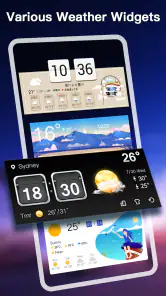
The app also offers different themes and widgets, allowing you to personalize your experience. Whether you prefer a minimalist look or something more vibrant, there's an option for everyone. Plus, the widgets mean you can glance at the weather straight from your home screen without even opening the app.
A widget is especially handy when you check conditions several times a day, but it works best as a quick prompt rather than a full forecast. I’d use it to spot a change, then open the app before making a decision that depends on timing or severe conditions. That two-step approach keeps the home screen convenient without asking a small glance to answer every weather question.
Reliability and everyday trade-offs
In terms of performance, the app is quick and responsive, with minimal lag when loading data. I've found its forecasts to be consistently accurate, and it doesn't drain my phone's battery—a huge plus in my book. Coocent’s current version is 1.6.3, and the app requires Android 7.0 or later. It was released on May 17, 2019, and has received 517 reviews.
It suits someone who wants a compact daily check-in, a glanceable widget, and a few ways to explore conditions without switching between several tools. The trade-off is that a screen with many weather details can be more than a casual user needs. If all you want is a simple answer about whether to carry an umbrella, your phone’s built-in weather option may be enough; if you enjoy comparing conditions and checking the hours ahead, this app gives you more to work with.
In that sense, it sits between a basic phone forecast and a specialist weather service. The built-in option is often quicker for a one-second check, while this app makes more sense when I want to inspect the coming hours, look at a radar map, or consider conditions beyond temperature. A local authority’s warning service is the better choice when official instructions are what matter most. I would use the tools together when the stakes are high rather than expecting one general-purpose app to cover every need.
The app is free, and its Everyone age rating makes it suitable for a broad audience. Its 4.5 average comes from around 51,000 ratings, and it has passed five million installs. Those figures suggest a well-used option, but my recommendation still depends on whether its mix of detail and quick access matches your habits.
One useful way to avoid confusion is to separate a forecast from an alert. The hourly and daily outlooks help with planning, while severe-weather notifications are there to draw attention to potentially dangerous conditions. I would not use a general forecast as a substitute for local emergency instructions. Likewise, an air-quality reading or UV index adds context for a particular outing, but it does not replace personal medical advice or official health guidance.
Another practical trade-off is how much detail you want at a glance. Wind, humidity, visibility, UV, and air quality can explain why a day feels different from the temperature alone, but they are not all equally relevant every day. For a short errand, temperature and rain timing may be enough; for a long walk, heat, UV, and air quality may deserve a closer look. I find the app most useful when I choose the detail that answers the decision I’m making instead of trying to interpret every value each time.
Planning a day out or a journey
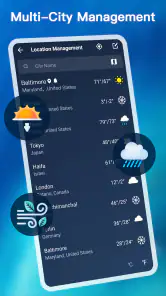
Another aspect worth mentioning is the app's global reach. Whether you're checking the weather in your hometown or planning a trip abroad, the app provides information for locations worldwide. That makes it convenient to check a destination before setting off, especially when you want to compare its outlook with the conditions you’re leaving behind.
For travel, I’d check the destination before packing and again on the morning of departure, rather than treating one early forecast as fixed. Conditions can shift, and the hourly view is more relevant to a specific arrival or outdoor activity than a broad daily summary. If precise warnings matter for a route or remote area, I’d also consult the local authority or another trusted source; this app is convenient for planning, not a replacement for official alerts.
For a normal weekday, the value is less dramatic but more frequent. I might check conditions before leaving home, notice that the return trip could be wetter, and put a light layer in my bag rather than changing the whole day’s plan. A parent planning a pickup or someone walking a dog can use the same approach: check the relevant hours, make one practical adjustment, then stop monitoring unless the weather changes.
Who should choose it
I’d recommend trying it if you routinely plan around changing weather and want hourly timing, alerts, and extra conditions in one place. It is less compelling if you prefer a bare-bones screen or already rely on a local service whose forecasts and warnings you trust more. After installing, the easiest first success is simple: choose a location, check the next few hours, and set only the alerts you genuinely want to act on. Coocent’s app is at its best when it supports that everyday decision, not when it becomes another feed to monitor.
It is also a good fit for someone who likes a little context alongside a forecast, such as checking visibility before a drive or UV before spending a long time outside. The extra detail is there to inform a choice, not to turn every ordinary day into a weather analysis. If you prefer a single, uncluttered answer and never use alerts or widgets, there is little reason to switch from the simplest option already on your phone.
My main advice for a new user is to keep the setup modest. Pick the places you genuinely need, make a quick check of the displayed location, and choose alerts that would change your plans. Then use the hourly outlook for one real decision, such as timing a walk or deciding when to leave. That is a calmer and more useful way to learn the app than exploring every reading at once.
In the end, the Weather - Accurate Weather App is a solid choice for anyone looking to stay informed about the weather with ease. Its combination of forecasts, radar, alerts, widgets, and additional conditions gives everyday planning more depth than a simple temperature tile, while remaining approachable for a first-time user. I’d give it a try if those tools match the way you make plans, and keep an official local source close at hand when safety decisions require authoritative guidance.
Weather - Accurate Weather App Frequently Asked Questions
Is Weather - Accurate Weather App free to download?
Weather - Accurate Weather App is free to download, making it an easy option to try if you want a dedicated place for forecasts and weather updates. It focuses on hourly and daily forecasts and severe weather alerts. Before downloading, consider whether those core weather tools suit the way you check conditions and plan your day.
Who develops Weather - Accurate Weather App, and what kind of app is it?
Weather - Accurate Weather App is a weather app developed by Coocent. It is designed for people who want forecasts and weather updates in one place, with hourly and daily outlooks as well as severe weather alerts. If you are looking for a general-purpose tool to check conditions and plan around changing weather, its focus is straightforward and easy to understand.
What features does the Weather - Accurate Weather App offer?
The Weather - Accurate Weather App provides a variety of features to keep you informed about weather conditions. It offers real-time weather updates, detailed forecasts, severe weather alerts, and interactive radar maps. Users can also customize the app to receive daily weather summaries and set notifications for specific weather conditions. Its intuitive interface makes it easy to navigate and find the information you need quickly.
How accurate are the weather forecasts provided by this app?
The Weather - Accurate Weather App prides itself on delivering highly accurate weather forecasts. It utilizes advanced meteorological technology and sources data from reliable weather stations and satellites globally. The app continuously updates its forecasts to reflect the most recent weather changes, ensuring users receive precise and timely information. While no forecast can be perfect, this app is among the most reliable in predicting weather patterns.
Is the Weather - Accurate Weather App free to use, or are there any in-app purchases?
The Weather - Accurate Weather App is available for free download, offering a wide range of features at no cost. However, it also offers optional in-app purchases for users who wish to access premium features such as ad-free experience, advanced radar capabilities, and extended forecast details. These purchases are optional and the free version still provides comprehensive weather information.
Pros
- Highly accurate weather predictions
- User-friendly interface design
- Real-time weather updates
- Customizable weather alerts
- Detailed weather maps available
Cons
- Contains in-app ads
- Requires internet connection
- Limited offline features
- Battery consumption can be high
- Occasional location detection issues
- Category
- Weather
- Version
- 1.6.3













